2.3.2. Common Cable Types and Connectors
💡 First Principle: To establish reliable communication between computer components and peripherals, you must correctly identify and utilize the right cable and connector for a given task.
Scenario: You are setting up a new office workstation. You need to connect the PC to the wired network, attach a keyboard and mouse, and connect it to a SATA hard drive inside the case. You must select an RJ-45, USB-A, and SATA data cable respectively.
A technician must be a master of cables.
- Network Cables:
- Twisted Pair (Ethernet): Uses an RJ-45 connector. Comes in different Categories (Cat 5e, Cat 6, etc.) that support different speeds. Can be UTP (Unshielded) or STP (Shielded).

Visual: RJ-45 Ethernet connector — 8 pins, larger than the telephone RJ-11. Used with Cat 5e/6/6a twisted pair cable.
- Peripheral Cables:
- USB: The universal standard. USB-A (the classic rectangle), USB-B (often for printers), USB-C (modern oval), microUSB, and miniUSB.
- Thunderbolt: Uses a USB-C connector but offers much higher speeds.
- Serial (DB-9): An old standard used for some networking equipment and industrial devices.
- Internal Cables:
- SATA: Connects hard drives and SSDs to the motherboard for data. A separate SATA power cable comes from the PSU.
- Molex: An older power connector used for some drives and case fans.
- Telephony:
- RJ-11: Used for traditional telephone lines. Smaller than RJ-45.

Visual: USB connector types — Note USB 3.0 ports and plugs are typically blue inside to distinguish them from USB 2.0.
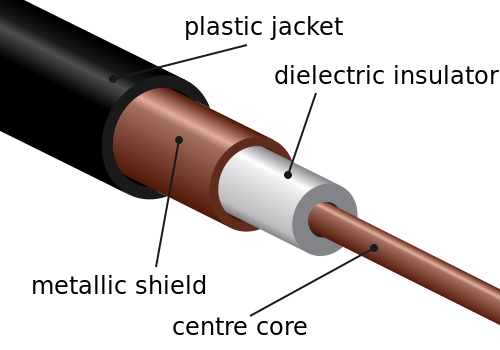
Visual: Coaxial cable cross-section showing its layered construction — a central copper conductor surrounded by insulation, a braided metal shield, and an outer jacket. Used for cable internet and TV connections.
⚠️ Common Pitfall: Confusing an RJ-11 (telephone) connector with an RJ-45 (Ethernet) connector. While they look similar, an RJ-11 is smaller and will not work in an Ethernet port.
Key Trade-Offs:
- Cable Category vs. Network Speed: Using an older Cat 5 cable on a Gigabit network will limit the connection speed to 100 Mbps. The cable must match or exceed the network's capabilities.
Reflection Question: You find a cable with a USB-C connector on both ends. What are the different types of signals (e.g., data, video, power) that this single cable could potentially be carrying, and how would you determine its capabilities?
