AWS Certified Solutions Architect Study Path Explained
AWS Certified Solutions Architect Study Path Explained
If you're aiming for AWS Certified Solutions Architect - Associate, your study path should follow a clear order: understand the exam domains, learn the core AWS services, build small architectures, drill scenario questions, then use readiness data to decide when to schedule. Don't start with random videos or memorize service names in isolation. This exam rewards architectural judgment.
This guide focuses on the Associate-level exam, known as SAA-C03. If you're brand new to AWS, plan for a longer study period. If you've already built workloads in AWS, your main job is usually to fill service gaps and practice exam-style tradeoffs.
What the AWS Certified Solutions Architect Exam Measures
The AWS Certified Solutions Architect - Associate exam tests your ability to design secure, resilient, high-performing, and cost-optimized workloads on AWS. AWS describes the target candidate as someone with experience designing distributed systems on AWS. Always check the official exam page to confirm the current format before you book.
The key word here is design. You're not just asked what Amazon S3 does. You're asked which storage, networking, database, security, and reliability choices best fit a business requirement, considering specific constraints.
According to the official AWS Certified Solutions Architect - Associate exam guide, the SAA-C03 domains are weighted as follows:
| Exam domain | Weight | What it really tests |
|---|---|---|
| Design Secure Architectures | 30% | IAM, encryption, network boundaries, least privilege, secure access patterns |
| Design Resilient Architectures | 26% | Multi-AZ design, backups, decoupling, fault tolerance, recovery objectives |
| Design High-Performing Architectures | 24% | Compute, storage, databases, caching, scaling, low-latency choices |
| Design Cost-Optimized Architectures | 20% | Right-sizing, pricing models, managed services, lifecycle rules, cost tradeoffs |
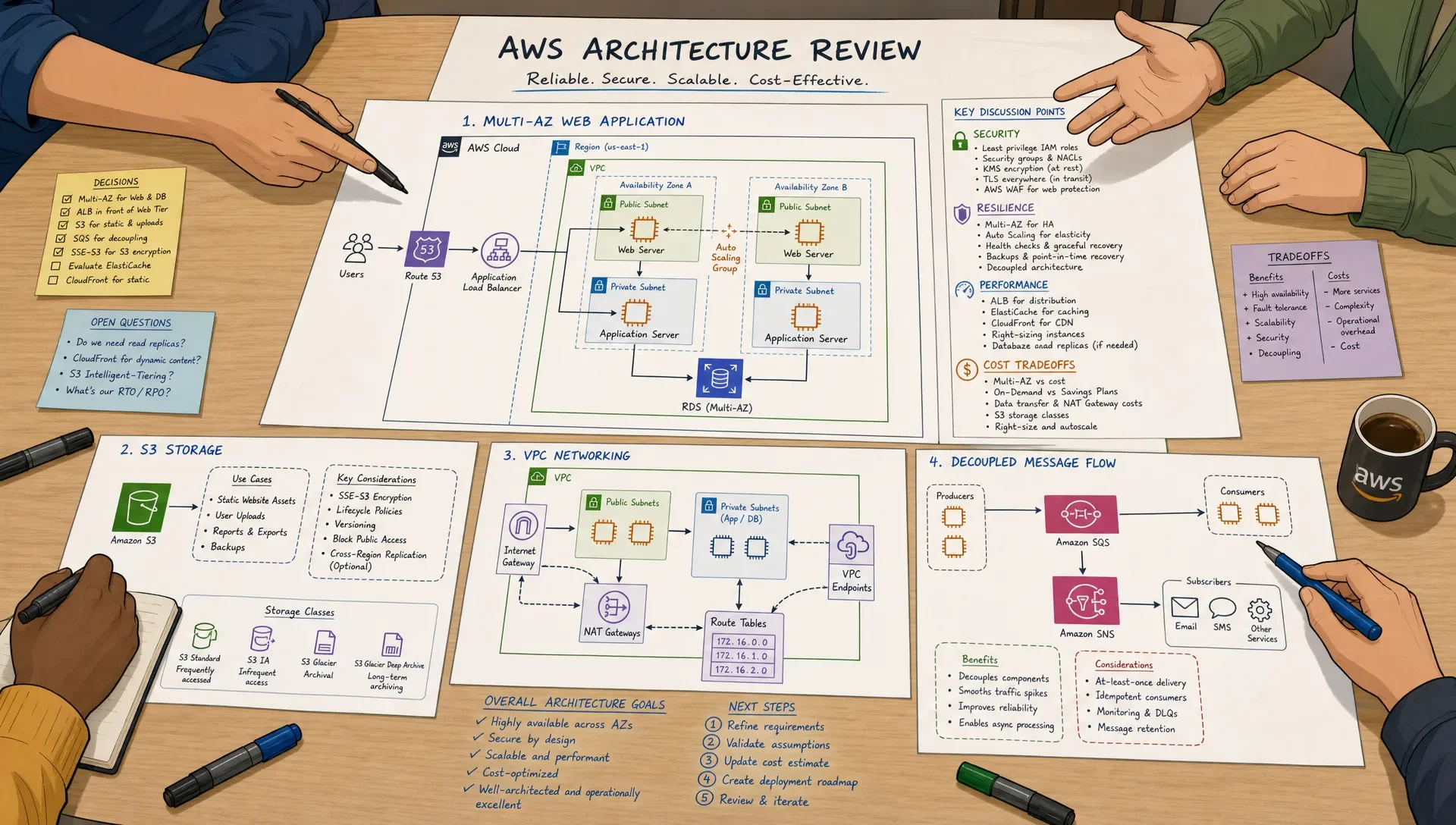
A good study path should align with these weights. Security and resilience deserve more time than niche services. Cost optimization matters, but it's often tied to the same core services you're already learning, such as EC2, S3, RDS, DynamoDB, Lambda, CloudFront, and load balancing.
Recommended Study Path Based on Your Starting Point
There isn't one perfect timeline for everyone. The right path depends on your existing AWS knowledge and how much time you can study each week. Most learners benefit more from steady weekly work than from cramming over a weekend, because the exam asks you to compare similar choices under pressure.
| Your background | Recommended timeline | Weekly study target | Main priority |
|---|---|---|---|
| New to cloud and networking | 10 to 12 weeks | 7 to 10 hours | Build fundamentals before heavy practice exams |
| IT experience but little AWS | 8 to 10 weeks | 6 to 8 hours | Map existing infrastructure knowledge to AWS services |
| AWS user with limited architecture exposure | 6 to 8 weeks | 5 to 7 hours | Practice scenario-based design decisions |
| Cloud engineer using AWS regularly | 3 to 5 weeks | 4 to 6 hours | Close domain gaps and build exam stamina |
If you can explain why one architecture is better than another, you're on the right track. If you can only define services, keep studying before you rely on full-length practice exams.
Step 1: Build the Core AWS Foundation
Start with the services that appear in many architecture questions. You don't need expert-level depth in every AWS product, but you do need strong judgment around the services that show up in common workloads.
Focus first on IAM, VPC, EC2, S3, Elastic Load Balancing, Auto Scaling, RDS, DynamoDB, Lambda, CloudWatch, CloudTrail, KMS, Route 53, CloudFront, SQS, SNS, and EventBridge. These services form the backbone of most Associate-level architecture scenarios.
Use the AWS Certified Solutions Architect - Associate study guide to keep your preparation aligned with exam objectives. A structured guide helps you see which topics belong together, such as VPC routing with security groups, or S3 encryption with IAM policies and KMS keys.
A simple foundation sequence works well:
- Identity and access: IAM users, roles, policies, permission boundaries, resource policies, and least privilege.
- Networking: VPCs, subnets, route tables, NAT gateways, internet gateways, security groups, NACLs, VPC endpoints, and hybrid connectivity basics.
- Compute and scaling: EC2 instance types, Auto Scaling groups, load balancers, Lambda, containers at a high level, and placement tradeoffs.
- Storage and databases: S3 classes, EBS, EFS, FSx awareness, RDS, Aurora, DynamoDB, ElastiCache, and backup patterns.
- Monitoring and operations: CloudWatch metrics and logs, CloudTrail auditing, AWS Config awareness, Systems Manager basics, and health checks.
Don't try to learn these as isolated flashcards only. For every service, ask three questions: when would I choose it, when would I avoid it, and what does it integrate with?
Step 2: Learn Architecture Patterns Instead of Isolated Services
The fastest way to improve is to study common patterns. AWS certification questions often describe a workload and ask for the best combination of services. The wrong answers are usually plausible, but they miss a key requirement like low operational overhead, cross-Region resilience, private access, or cost efficiency.
The AWS Well-Architected Framework is worth reading because it gives you the language AWS uses for secure, reliable, efficient, and cost-aware design. You don't need to memorize every page, but you should understand the pillars and how they shape service selection.
| Scenario clue | Think about these services or patterns | Common trap |
|---|---|---|
| Highly available web app | Multi-AZ subnets, Application Load Balancer, Auto Scaling, RDS Multi-AZ | Confusing Multi-AZ with read scaling |
| Static global website | S3, CloudFront, Route 53, ACM | Using EC2 when managed hosting is simpler |
| Private access to AWS services | VPC endpoints, endpoint policies, private subnets | Sending traffic through the public internet unnecessarily |
| Decoupled application | SQS, SNS, EventBridge, Lambda, DLQs | Tight coupling services that should retry independently |
| Read-heavy database workload | Read replicas, ElastiCache, DynamoDB DAX where appropriate | Scaling writes when the issue is reads |
| Long-term archival data | S3 lifecycle policies, Glacier storage classes | Keeping cold data in expensive frequent-access storage |
This is also where a concise reference can help. Use an AWS cheat sheet for quick review, but don't let it replace architecture practice. Cheat sheets are most useful after you've already built the mental model.
Step 3: Get Hands-On With Small Architecture Labs
Hands-on work doesn't have to mean building a production platform. You need enough experience to recognize how services behave together. Even small labs make exam questions easier because you've seen the moving parts firsthand.
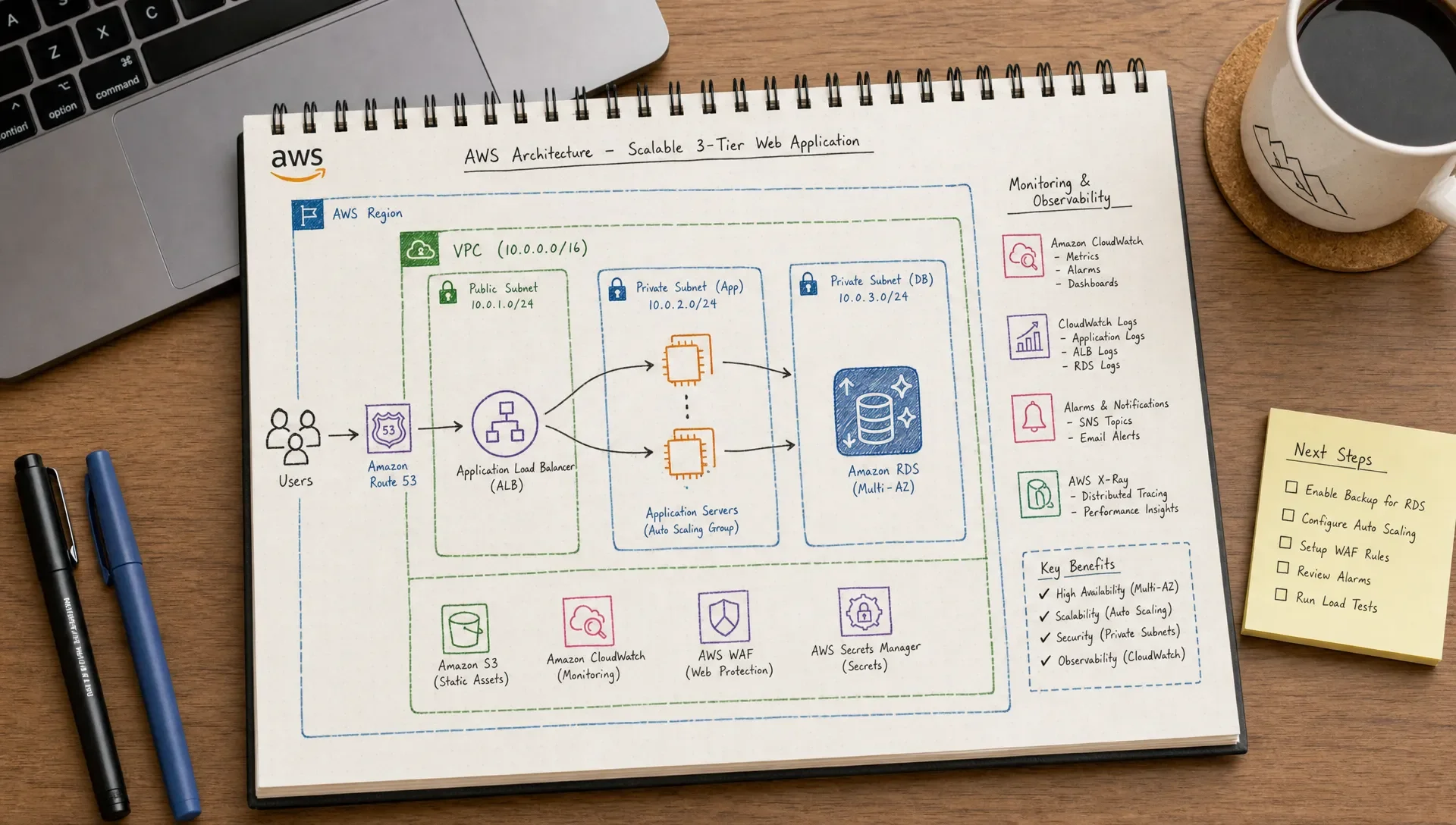
Build labs that match the exam domains. Create a VPC with public and private subnets. Launch an EC2 instance behind an Application Load Balancer. Store static files in S3 and distribute them with CloudFront. Configure an IAM role for an application instead of using access keys. Create an RDS database with backups and a Multi-AZ option. Send application messages through SQS and test how retries work.
Keep each lab small, document what you learned, then delete resources you don't need. Set a budget alert in your AWS account before you experiment. The goal isn't to build something impressive. The goal is to understand why an answer choice says one architecture is more secure, resilient, or cost-effective than another.
After each lab, write a short architecture note:
- What requirement did this architecture solve?
- Which services were managed by AWS, and which parts would I still operate?
- What would break if one Availability Zone failed?
- How would I make the design cheaper?
- What security control did I add, and what risk remains?
Those notes become high-value review material because they're written in your own words.
Step 4: Turn Notes Into Active Recall
Reading documentation feels productive, but recall is what truly helps during the exam. You need to answer questions when the prompt is long, the options are similar, and the clock is moving.
A well-known review in Psychological Science in the Public Interest found practice testing and distributed practice to be effective learning techniques. For certification preparation, that means you should repeatedly retrieve information over time instead of rereading the same notes the night before.
Use flashcards for definitions, conceptually important service limits, and decision rules. For example, one flashcard might ask when to use an S3 gateway endpoint instead of sending traffic through a NAT gateway. Another might ask how an RDS Multi-AZ deployment differs from a read replica.
MindMesh Academy's flashcards use spaced repetition, and its connected study workflow helps tie study guides, practice questions, explanations, and progress tracking together. That matters because the exam doesn't reward isolated memorization. It rewards your ability to connect services under constraints.
If you use generative AI to summarize notes, be careful not to outsource the thinking. Rewrite summaries in your own words and check whether you can explain the design without help. If your school or employer has policies around AI-written submissions, it's also worth understanding AI-writing detection resources so your study process stays transparent and compliant.
Step 5: Use Practice Questions the Right Way
Practice questions should do more than tell you whether you're right. They should reveal why you made a decision. Many learners plateau because they take practice tests, read the score, and move on. That's not enough for this exam.
Use the AWS Certified Solutions Architect - Associate practice exam after you've built a foundation in the major services. Before that point, full exams can feel discouraging and may train you to guess. Once you're ready, review every explanation, including the questions you got right.
For deeper strategy on simulated testing, MindMesh Academy's guide to using an AWS practice exam explains how to treat practice results as a diagnostic tool, not just a score.
Track your misses in a simple format:
| What to record | Example |
|---|---|
| Missed requirement | The prompt asked for lowest operational overhead, but I chose a self-managed option |
| Confused services | NAT gateway vs VPC endpoint, RDS Multi-AZ vs read replica |
| Domain affected | Secure architectures or cost-optimized architectures |
| Correct rule | Use VPC endpoints for private access to supported AWS services without public internet routing |
| Next action | Review VPC endpoint policies and complete one private subnet lab |
A strong review session takes time. If a 65-question practice exam takes you two hours, reviewing it may take another two or three. That's normal. The learning happens in the review.
Step 6: Measure Readiness Before You Schedule
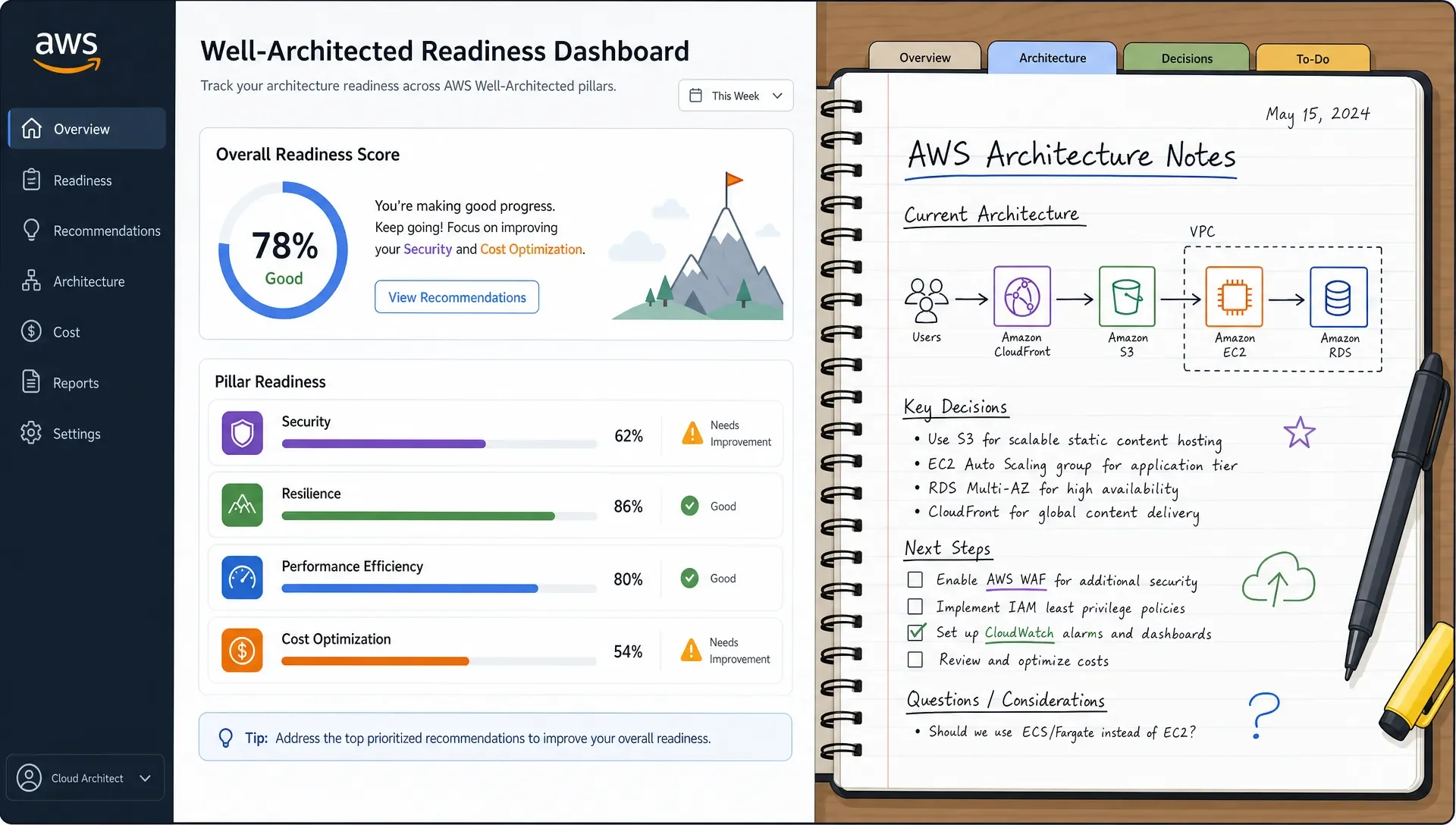
Don't schedule based on vibes. Schedule when your data says you're close. AWS reports the Associate exam on a scaled score, and the official guide lists the passing score as 720 on a scale from 100 to 1000. Practice exam percentages don't map perfectly to that scale, but they still help you judge consistency.
Use readiness signals across domains, not just one overall score.
| Readiness signal | Strong sign | Not ready yet |
|---|---|---|
| Domain consistency | You perform reasonably well across all four domains | One domain is repeatedly weak, especially security or resilience |
| Explanation quality | You can explain why wrong options are wrong | You only recognize the right service name |
| Time management | You finish timed sets with review time left | You rush the final third of the exam |
| Scenario judgment | You identify requirement keywords quickly | You miss phrases like least operational overhead or most cost-effective |
| Retention | You remember concepts after several days | You forget topics unless you studied them that day |
An instructor-style benchmark is to aim for consistent passing-range results on fresh, timed practice sets, plus the ability to explain your mistakes without looking at the answer. If you keep seeing the same weak topic, don't take another full exam immediately. Study that topic, do a few targeted questions, then retest.
Common AWS Certified Solutions Architect Study Path Mistakes
- Starting with full practice exams too early. If you don't know the core services yet, full exams become guessing drills. Start with objective-based study, then move into timed practice.
- Memorizing service definitions without decision rules. Knowing that DynamoDB is a NoSQL database is not enough. You need to know when it fits better than RDS, when DAX might help, and how partition key design affects performance at a high level.
- Ignoring networking. VPC questions can feel intimidating, but they're central to secure architecture. You should understand subnet routing, security groups, NACLs, NAT gateways, internet gateways, and VPC endpoints well enough to read a diagram mentally.
- Treating cost as a separate topic. Cost optimization appears across compute, storage, database, and networking questions. A lifecycle policy, reserved capacity, managed service, or serverless design may be the cost-aware answer depending on the requirement.
- Skipping explanation review. If you got a question right for the wrong reason, that's still a gap. Review correct answers too, especially when you guessed between two options.
A Practical 8-Week AWS Certified Solutions Architect Study Plan
This plan works for many learners who already have some IT or cloud background. If you're new to AWS, extend the same plan to 10 or 12 weeks by adding more hands-on practice and review time.
| Week | Main focus | What to produce by the end of the week |
|---|---|---|
| 1 | Exam objectives, IAM, shared responsibility, core AWS account concepts | A security notes page with IAM roles, policies, and encryption basics |
| 2 | VPC, subnets, routing, security groups, NACLs, NAT, endpoints | A simple VPC lab and a diagram you can explain |
| 3 | EC2, load balancing, Auto Scaling, Lambda, basic containers | A highly available web tier design with scaling notes |
| 4 | S3, EBS, EFS, lifecycle policies, backup patterns | A storage decision table for common workload types |
| 5 | RDS, Aurora, DynamoDB, ElastiCache, database scaling and recovery | A database comparison sheet tied to scenario clues |
| 6 | SQS, SNS, EventBridge, CloudWatch, CloudTrail, Route 53, CloudFront | A decoupled architecture sketch with monitoring notes |
| 7 | Mixed domain review and targeted practice questions | A weakness list ranked by domain and severity |
| 8 | Timed practice exams, final review, exam-day strategy | Consistent readiness data and a short final-week plan |
Don't treat this table as a checklist you rush through. If Week 2 networking is weak, slow down. Networking gaps can affect security, resilience, and performance questions later.
What to Do in the Final Week Before the Exam
The final week is for consolidation, not learning every obscure service. Review the official exam domains, revisit your mistake log, and do timed question sets. Keep your study sessions shorter and more focused so you don't burn out.
Spend extra time on high-yield comparisons: NAT gateway vs VPC endpoint, security group vs NACL, RDS Multi-AZ vs read replica, S3 storage classes, SQS vs SNS vs EventBridge, ALB vs NLB, CloudFront vs Global Accelerator, and IAM role vs access key.
Two days before the exam, stop adding new resources unless a gap is truly critical. The day before, review your notes, get good sleep, and ensure your exam logistics are ready. On exam day, read for constraints first: security, availability, performance, cost, operational overhead, and migration requirements.
Frequently Asked Questions
Is AWS Certified Solutions Architect hard for beginners? It can be challenging if you're new to cloud, networking, and distributed systems. Beginners can pass, but they usually need a longer study path, hands-on labs, and more time with scenario questions before taking full practice exams.
How long should I study for AWS Certified Solutions Architect - Associate? Many learners need 6 to 10 weeks, depending on their background and weekly study time. If you're brand new to AWS, plan closer to 10 to 12 weeks so you can build fundamentals instead of memorizing answers.
Do I need to take AWS Certified Cloud Practitioner first? No, it's not required. Cloud Practitioner can help if you're completely new to AWS, but learners with IT experience can often go straight to Solutions Architect - Associate with a structured study path.
How much hands-on AWS experience do I need? You should do enough hands-on work to understand IAM, VPCs, compute, storage, databases, monitoring, and decoupled architectures. You don't need production-level expertise, but you should be able to explain how services connect.
Are practice exams enough to pass? Practice exams are important, but they're not enough by themselves. Use them after you've studied the domains, then review every explanation and target your weak areas before taking another timed set.
What is the best way to know I'm ready? You're closer when your timed practice results are consistent, your domain scores are balanced, and you can explain why the wrong answers are wrong. Tracking your readiness by topic is more useful than relying on one high score.
Build a Study Workflow You Can Trust
A focused, active, and measurable study workflow helps you move from recognizing AWS services to thinking like an architect. Build a solid foundation by learning the objectives, practicing scenario decisions, and tracking your readiness by domain. MindMesh Academy provides tools like exam-objective study guides, practice questions with detailed explanations, and adaptive weakness-based practice to help you prepare effectively for any certification. Explore our full range of IT certification preparation resources to find the right path for your career goals.
The Solutions Architect route is one of several. For the wider picture, the AWS certification path covers the developer, operations, security, data and machine-learning tracks alongside it.

Written by
Alvin Varughese
Founder, MindMesh Academy
Alvin Varughese is the founder of MindMesh Academy and an enterprise architecture leader. An electrical engineer by training, he moved from factory automation in South Africa to cloud architecture at GE Appliances and Humana (Fortune 50), and holds 20 professional certifications including AWS Solutions Architect Professional, Azure DevOps Engineer Expert, and Microsoft Agentic AI Business Solutions Architect. He built MindMesh Academy after interviewing too many highly certified candidates who couldn't answer basic questions: the goal is prep that makes you better at the job, not just able to pass the exam.