The Ultimate AWS Cheat Sheet for Certification Success
The Ultimate AWS Cheat Sheet for Certification Success
Use this guide as your definitive AWS cheat sheet. We built this specifically for IT professionals preparing for exams. Use it for quick lookups and final revision. This resource solidifies core concepts and provides fast answers, allowing you to avoid searching through extensive documentation.
How This Guide Will Help You Prepare
Studying for AWS certification requires absorbing a massive volume of technical data. We designed this guide as a quick-reference companion for moments when you need to clarify a service detail, verify a command, or reinforce a concept. Use it to supplement your primary study materials rather than replacing them. Short reviews throughout your study week will help you retain technical definitions and architectural logic.
An AWS certification remains a smart investment. Amazon Web Services leads the global cloud infrastructure market, capturing roughly 29% of the global market share and generating more than $100 billion in annual revenue (verify current figures through industry reports). This market dominance makes these credentials highly valuable to employers. Earning a certification proves you have the skills to manage workloads on the most widely used cloud platform in the world.
What's Inside This Cheat Sheet
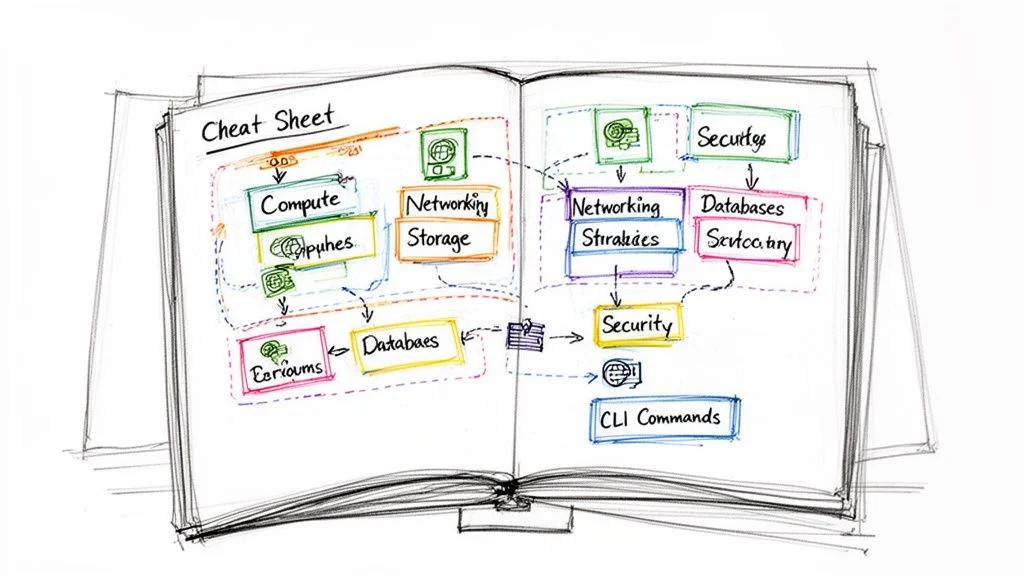
This guide focuses on the specific topics needed for exam success and daily work. Here is what this section covers:
- Core Services Breakdown: Clear explanations of basic services across compute, storage, networking, and databases. These are the building blocks for every cloud professional regardless of their specific job role.
- Essential CLI Commands: A list of AWS Command Line Interface (CLI) commands to help you manage resources and automate tasks. Learning these helps you move beyond the management console.
- Key Architecture Patterns: Insights and diagrams for designing highly available and scalable cloud solutions that follow AWS best practices. These patterns are central to the architect and developer exams.
- Exam-Focused Strategies: Advice and techniques for breaking down and answering the scenario-based questions found in certification exams. You will learn how to identify distractors in multiple-choice questions.
Use this resource to reinforce your knowledge, fix conceptual gaps, and prepare for your exam. Consistency is key when studying for these technical tests. For structured learning, explore our current AWS Certified Cloud Practitioner (CLF-C02) study guide at MindMesh Academy. This guide provides the context you need to pass with confidence.
Core AWS Compute And Storage Services
Compute and storage services sit at the center of almost every application hosted on AWS. These are the primary components and the base for nearly every cloud solution you build. Before examining specific tools, start by reviewing core cloud service models like Infrastructure as a Service (IaaS). Services such as Amazon EC2 and Amazon S3 are prime IaaS examples, providing the raw, scalable infrastructure needed to run and manage workloads.
This section provides a direct, high-impact breakdown of these services. We focus on the specific details required for certification exams and practical daily operations.
Essential Compute Services
Compute services provide the processing power for your applications. They execute code and handle the logic of your workloads. AWS offers various compute options, ranging from traditional virtual servers to event-driven functions that require no server management.
- Amazon EC2 (Elastic Compute Cloud): This service offers scalable virtual servers known as instances. You have full control over the configuration, including CPU, memory, and storage types. You also maintain administrative access to the operating system (Linux or Windows). EC2 is the standard choice for hosting web servers, backend applications, or any software that needs a persistent operating system. It uses different pricing models like On-Demand, Spot Instances for cost savings, and Reserved Instances for long-term commitments.
- Certification Scenario: When an exam question describes a custom application that needs OS-level access or specific software installations, EC2 is usually the correct choice.
- AWS Lambda: A serverless compute service that runs code in response to events. With Lambda, you do not provision or manage servers. You upload your code in supported languages like Python, Node.js, or Java, and the service executes it when triggered by API calls, S3 file uploads, or database updates. You pay only for the exact compute time used, measured in milliseconds. This makes it efficient for microservices and tasks that run for short periods (up to a 15-minute timeout).
- Reflection Prompt: Consider how you might use Lambda to automatically resize images when they are uploaded to an S3 bucket. How would the costs differ from keeping an EC2 instance running 24/7 to perform the same task?
While EC2 and Lambda are common, AWS has a catalog of more than 200 cloud services. Modern certification exams test your ability to combine these tools to build systems that are reliable, scale automatically, and remain cost-effective.
Foundational Storage Services
Storing and retrieving data is a vital part of cloud architecture. AWS uses a tiered storage model, offering different options based on how often you need to access data, how fast you need it, and how much you want to spend.
- Amazon S3 (Simple Storage Service): This is a durable object storage service designed to store and retrieve any amount of data. S3 is used for static website hosting, application backups, and large data sets for analytics. It provides 99.999999999% (11 9s) of durability. Data is stored in "buckets," and each object can be up to 5 TB in size. Note that bucket names must be globally unique across all AWS accounts.
- Amazon EBS (Elastic Block Store): This acts as a high-performance virtual hard drive for EC2 instances. It provides block-level storage, which is necessary for databases or file systems that require frequent updates and low latency. EBS volumes are replicated within an Availability Zone to prevent data loss from a single hardware failure. You can choose between different volume types, such as General Purpose SSD (gp3) or Provisioned IOPS SSD (io2), depending on your performance needs.
- Key Concept: EBS volumes are typically tied to one EC2 instance at a time. Unlike S3, which is accessible over the internet, EBS is local storage for your virtual servers.
- Amazon S3 Glacier: This service is for "cold" data storage. It is a very low-cost option for archiving data that you do not need to access immediately. It is useful for meeting regulatory requirements or keeping historical records. Retrieval times vary based on the tier: Expedited (1–5 minutes), Standard (3–5 hours), or Bulk (5–12 hours).
- Real-world Application: Users often set up S3 Lifecycle Policies. These policies automatically move data to S3 Glacier after a certain period (e.g., 90 days) to reduce storage costs while keeping the data available for emergencies.
AWS Storage Services At A Glance
Choosing the right storage service is a common task in architectural design and a frequent topic on AWS exams. This table compares the primary storage options to help you make quick decisions.
| Service | Primary Use Case | Durability | Access Model | Key Feature |
|---|---|---|---|---|
| S3 | Object storage; backups, static websites, and data lakes. | 99.999999999% (11 9s) | Object (HTTP/S API) | Infinite scalability, versioning, and lifecycle management. |
| EBS | Block storage for EC2; databases and boot volumes. | High (replicated in AZ) | Block (OS-level device) | Low-latency, high IOPS, and snapshot backups to S3. |
| S3 Glacier | Long-term archiving; compliance and disaster recovery. | 99.999999999% (11 9s) | Object (Asynchronous) | Lowest cost per GB and customizable retrieval speeds (minutes to hours). |
Every AWS storage service serves a specific type of workload. Using S3 to run a transactional database would result in poor performance and high costs. Similarly, using EBS for long-term archiving is expensive compared to Glacier. Understanding these differences is essential for passing your exams and building efficient cloud environments.
Getting Started with AWS Networking and Content Delivery
Building solutions on AWS means you are designing a virtual network. Controlling how traffic moves and ensuring users get data quickly are mandatory skills for any cloud professional. This section of the cheat sheet looks at the primary services used to isolate resources and connect them to the internet securely.
Knowing these networking services is required for any AWS certification exam. They are the technical base for almost every cloud architecture you will see. We will look at the specific tools and concepts you must understand to pass your upcoming exams.
Your Networking and DNS Foundation
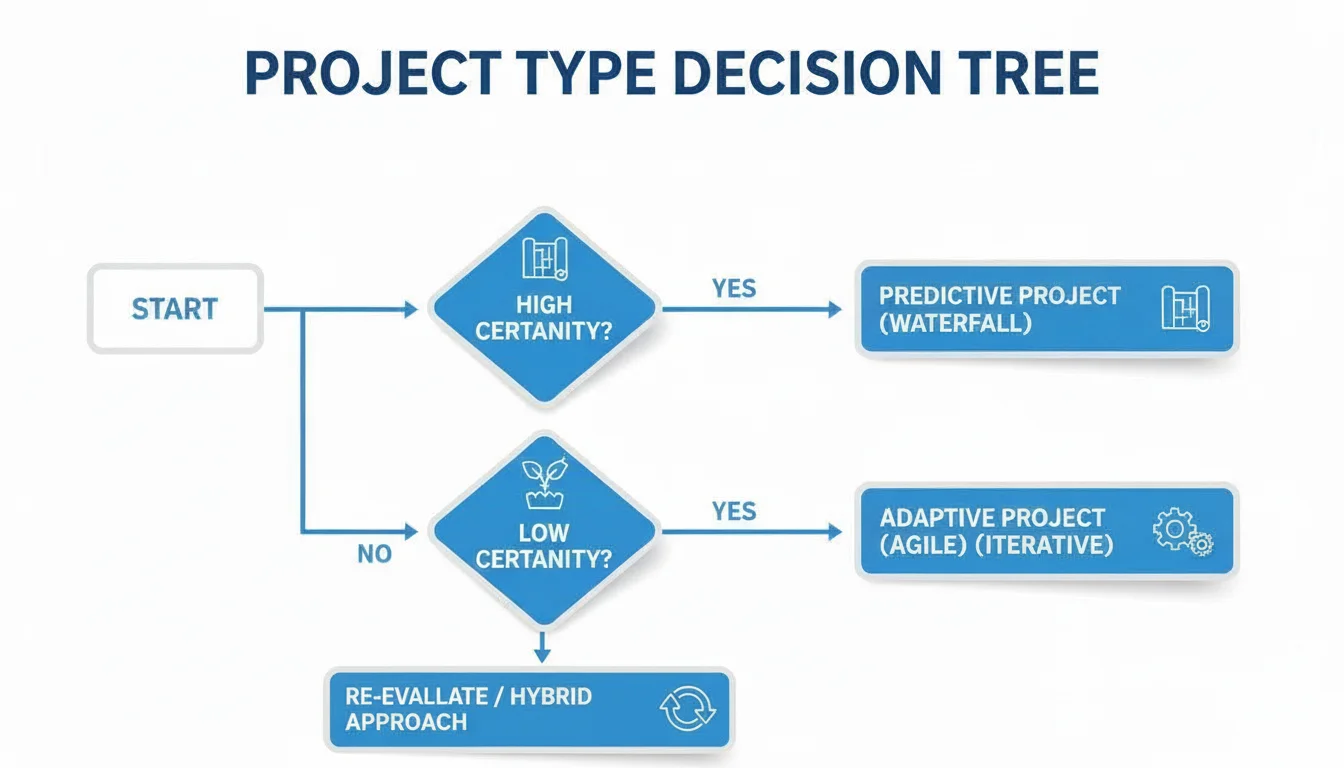
A setup begins with an isolated, private network segment in the AWS cloud. This Virtual Private Cloud (VPC) gives you authority over inbound and outbound traffic. You define the IP address ranges and manage the communication between your resources.
- Amazon VPC (Virtual Private Cloud): A VPC functions like a private data center inside AWS. It is a network space where you deploy EC2 instances and databases. You maintain authority over the network topology, IP addressing, and security rules. You have full control over the network configuration, including the selection of your own IP address range and the creation of subnets.
- Certification Insight: VPCs appear in almost every exam. Study CIDR blocks, Internet Gateways, NAT Gateways, and VPN connections. These are essential for the Solutions Architect and SysOps Administrator exams.
- Subnets: Subnets are ranges of IP addresses inside your VPC. Use public subnets for resources that need direct internet access, such as public web servers. Use private subnets for sensitive backend systems like databases that should not have a direct route to the internet. This separation is a key security practice for protecting data.
- Amazon Route 53: This is the AWS Domain Name System (DNS) web service. Route 53 translates domain names like
mindmeshacademy.cominto the IP addresses that computers use to talk to each other. It also provides management for global traffic. The service is designed to be highly available, ensuring that user requests for your domain are answered quickly and accurately.
Exam Tip: Mastering Route 53 Routing Policies: Expect questions testing your knowledge of Route 53 routing policies.
- Utilize Weighted routing to distribute a specific percentage of traffic among multiple resources, which is useful for A/B testing or testing the stability of new code deployments.
- Employ Latency-based routing to direct users to the AWS region that provides the lowest network latency. This ensures the fastest response times for your global user base.
- Consider Failover routing for disaster recovery scenarios, automatically moving traffic to a healthy backup resource if the primary system stops responding.
Delivering Content at Global Speed
After you deploy an application, the next goal is making sure it is fast for every user, regardless of where they live. A Content Delivery Network (CDN) makes this possible. Amazon CloudFront is the AWS CDN. It works with services like Amazon S3 and EC2 to cache static and dynamic content at edge locations worldwide.
This caching reduces latency by keeping data closer to the user. For example, if a user in London requests an image stored in a US-East (N. Virginia) bucket, CloudFront delivers it from an edge location in Europe. This results in faster load times, reduces the load on your origin server, and provides a better experience for users. Understanding how CloudFront interacts with S3 and Application Load Balancers is a common requirement for the Developer and Solutions Architect Associate exams.
Decoding AWS Databases And Analytics Services
Choosing the right database is a primary architectural decision. It affects how your application performs, how it scales, and what it costs to run. This is a high-priority topic on AWS certification exams. AWS does not use a "one size fits all" strategy. Instead, it provides a variety of specialized databases for different workloads. You must understand the specific traits of each to build efficient and resilient solutions.
This part of your AWS cheat sheet focuses on the database and analytics services you need for the current exam. We cover core functions, performance expectations, and use cases. This information helps you choose the right tool when faced with complex architectural scenarios.
Relational And NoSQL Databases
Most database choices start with the choice between relational (SQL) and non-relational (NoSQL) models. AWS offers managed services for both, which handles the difficult backend maintenance.
- Amazon RDS (Relational Database Service): RDS is the standard managed service for relational data. It simplifies setting up and scaling engines like MySQL, PostgreSQL, MariaDB, Oracle, and SQL Server. The service handles manual work like software patching, database backups, and point-in-time recovery. This automation allows developers to spend more time on code. RDS is the best fit for structured data requiring complex joins and ACID compliance. Use it for e-commerce platforms, ERP systems, or CRM tools where data integrity is the priority.
- Amazon DynamoDB: This is the primary AWS NoSQL database. It is a key-value and document store designed for high performance and massive scale. It offers single-digit millisecond latency regardless of how much data you store. DynamoDB works well for applications that need fast access and high throughput. Common uses include mobile app backends, gaming leaderboards, real-time bidding, and IoT data ingestion. Because it is serverless, you do not manage any underlying instances. You pay for the throughput and storage you use.
- Certification Tip: Contrast RDS (structured, SQL-heavy, ACID) with DynamoDB (flexible schema, high scale, low latency, key-value). Many exam questions test your ability to pick one based on latency or schema requirements.
High-Performance And Specialized Databases
AWS also provides databases for specific, high-intensity workloads. These include engines built for the cloud and large-scale data warehousing tools.
- Amazon Aurora: Aurora is a cloud-native relational database compatible with MySQL and PostgreSQL. AWS built it to take advantage of cloud storage and networking. It provides the performance and availability of commercial databases at one-tenth the price (verify current pricing on the vendor site). Aurora is the better choice when your application needs higher throughput or more resilience than a standard RDS instance can offer.
- Real-world Use Case: A global store migrating from local MySQL servers to AWS. They need to handle millions of transactions and scale automatically during busy holiday sales windows.
- Amazon Redshift: For heavy analytical tasks, Amazon Redshift is the standard. It is a fast, managed, petabyte-scale data warehouse. Redshift makes it easy to run complex queries against massive datasets. It connects directly to business intelligence tools for reporting and big data analysis.
Key Takeaway for Certification Exams: Use this guide for quick selection:
- Structured data, complex queries, ACID: Use Amazon RDS or Amazon Aurora for better performance with MySQL/PostgreSQL compatibility.
- Scalability, flexible schema, key-value store, low latency: This points to Amazon DynamoDB.
- Analytics, data warehousing, petabytes of data: Use Amazon Redshift.
Mastering AWS Security, Identity, And Compliance
AWS treats security as a central focus. Because of this, security is a significant and mandatory part of every certification exam. Use this section of your AWS cheat sheet as a quick reference for the services that manage access control—defining "who can do what"—and network traffic management—controlling "what gets in and out." Learning these principles is not just a requirement for passing your test. It is the foundation for building any safe architecture on the AWS platform.
We will focus on the tools for identity management, permissions, and network access. These tools help you follow the AWS Shared Responsibility Model. Under this model, AWS is responsible for security of the cloud. This includes the physical facilities, hardware, and the software that runs the cloud services. You are responsible for security in the cloud. This means you must manage your data, classify your assets, and use the tools provided to restrict access. These are the instruments you will use to maintain a strong security posture.
Identity And Access Management
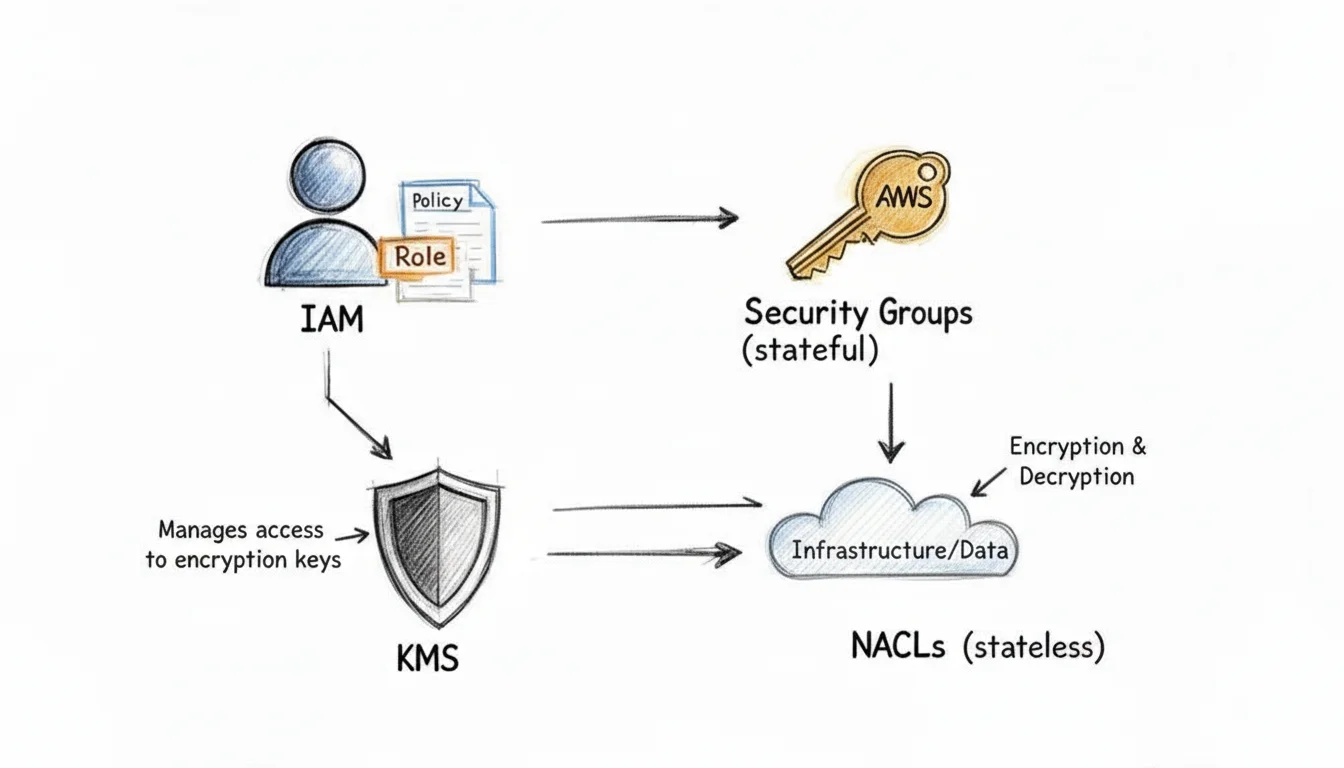
The foundation of AWS security is Identity and Access Management (IAM). IAM is a global service. You do not select a specific region when you use it; the users and groups you create are available across the entire world. It acts as the central control plane for managing access to all your resources. You will work with four main components:
- IAM Users: These represent a specific person or an application that needs long-term access to AWS. Each user can have their own login and security credentials.
- IAM Groups: This is a collection of IAM users. A common best practice is to assign permissions to groups rather than individuals. When a user joins a group, they inherit all the permissions assigned to that group, which makes management much simpler as your team grows.
- IAM Roles: These provide a way to grant temporary access with specific permissions. Roles are not tied to a single person. Instead, they are assumed by trusted entities. For example, an EC2 instance might need a role to write data to an S3 bucket, or a Lambda function might need a role to access a database. Users from different AWS accounts can also assume roles to perform tasks without needing permanent credentials.
- Certification Focus: You must understand the principle of least privilege. This means you should always grant only the minimum permissions required for a task. If you are taking the current SCS-C03 exam, expect many questions on how to limit access using roles.
- IAM Policies: These are JSON documents that define what is allowed or denied. They list the actions a user can take, the resources affected, and any conditions that must be met. You attach these policies to users, groups, or roles.
To keep your cloud environment under strict control, Mastering Governance in the Cloud provides a great resource for managing costs, improving security, and meeting compliance standards.
Network Security Controls
Another part of AWS security is carefully controlling the flow of network traffic to and from your resources. You have two primary tools for this: Security Groups and Network Access Control Lists (NACLs). These operate at different levels within your VPC. For any AWS certification, such as the CLF-C02, you must know the differences between them.
Students often get confused by the concept of statefulness, and exam writers often use this to create trick questions. Remember this specific distinction:
- Security Groups are stateful: If you create an inbound rule to allow traffic on a specific port, such as port 80 for web traffic, the return traffic is automatically allowed. You do not need to create a separate outbound rule for the response to get back to the user.
- NACLs are stateless: These require explicit rules for both directions. If you allow inbound traffic on a port, you must also create an outbound rule to allow the return traffic to leave the subnet. If you forget the outbound rule, the connection will fail.
The following table explains the technical differences you need to memorize.
Security Groups vs Network ACLs
| Feature | Security Group (SG) | Network Access Control List (NACL) |
|---|---|---|
| Scope | Applies to instances (e.g., EC2, RDS) | Applies to subnets (affects all resources within the subnet) |
| State | Stateful (Return traffic is automatically permitted once inbound traffic is allowed) | Stateless (Separate rules required for inbound AND outbound traffic; return traffic is NOT automatically allowed) |
| Rule Type | Allow rules only (Implicitly denies all other traffic by default) | Both Allow and Deny rules |
| Rule Evaluation | All rules are evaluated before a decision. The most permissive rule applies. | Rules are processed in numbered order (lowest number first). The first matching rule is applied. |
| Default State | Implicitly denies all inbound traffic. | Implicitly allows all inbound and outbound traffic upon creation, but often modified with explicit deny rules. |
| Association | An instance can have multiple SGs. An SG can be associated with multiple instances. | A subnet can only have one NACL. A NACL can be associated with multiple subnets. |
In real-world setups, Security Groups act as your first line of defense at the instance level. They allow you to set specific rules for applications and ports. Network ACLs are an optional second layer of defense. They sit at the subnet boundary and allow you to block wide ranges of IP addresses or traffic types before they ever reach your servers. Using both together creates a layered security model.
For a full look at how to build a safe environment, read our guide on AWS Security Best Practices.
Essential AWS CLI Commands For Daily Use
For IT professionals working with AWS, the AWS Command Line Interface (CLI) is a primary, functional tool. It allows you to manage services from your terminal, which increases speed and serves as a vital skill for certification exams and production environments.
These commands act as shortcuts for interacting with core services like Amazon S3, EC2, and IAM, often bypassing the AWS Management Console. They work well for building automation scripts, handling repetitive administrative tasks, or performing quick status checks on your cloud resources.
Managing S3 Buckets And Objects
Operations involving Amazon S3 are a daily reality for cloud engineers, and the CLI makes these tasks more efficient. Below are the essential commands you will use consistently:
-
List all S3 buckets:
aws s3 lsThis command generates a list of all S3 buckets in your account along with their creation dates. It is the quickest way to confirm a bucket name or check if a specific resource exists. -
Copy a local file to S3:
aws s3 cp local-file.txt s3://your-bucket-name/Use this for moving single files from your local disk to a specific bucket. If you need to move an entire folder, add the--recursiveflag, such asaws s3 cp mydir/ s3://your-bucket-name/mydir/ --recursive. -
Synchronize a directory with an S3 bucket:
aws s3 sync . s3://your-bucket-name/Thesynccommand is a smart way to manage data. It compares the source and destination, then only transfers files that are new or have been changed. It also removes files from the destination if they are no longer in the source. This tool is useful for updating static websites, managing offsite backups, or keeping data sets current.
Controlling EC2 Instances
Managing virtual servers requires precision. Being able to query and control EC2 instances from the command line is an essential operational capability for cloud administrators.
-
List EC2 instances:
aws ec2 describe-instancesRunning this command returns JSON data containing technical details about your EC2 instances. To find specific data, professionals often combine this with filters or the--queryflag to identify instance types, current states, or specific tags. -
Start or Stop an instance:
aws ec2 start-instances --instance-ids i-1234567890abcdef0aws ec2 stop-instances --instance-ids i-1234567890abcdef0Insert your specific instance ID to change the operational state of a server immediately. This facilitates rapid responses to operational needs or cost-saving strategies like shutting down idle resources.
Advanced CLI Technique: The
--queryFlag: Learn how to use the--queryflag to handle the JSON responses from AWS commands. This feature uses JMESPath syntax to filter and format data. For example,aws ec2 describe-instances --query "Reservations[*].Instances[*].{ID:InstanceId,State:State.Name,Type:InstanceType,KeyName:KeyName}"turns a large data block into a readable table showing only IDs, states, and types. Proficiency with this flag makes automation easier and helps you manage large infrastructure.
High-Yield AWS Exam Tips And Architecture Patterns
AWS exams test your architectural judgment. You must demonstrate that you can combine individual services to build reliable, scalable, and economical systems. This section focuses on the common patterns and technical concepts found in the more difficult scenario-based questions.
High availability (HA) is a core requirement for almost every production system. In most cases, achieving HA involves spreading resources across multiple Availability Zones (AZs) within one AWS Region. For example, a resilient web application uses an Application Load Balancer (ALB) to distribute traffic to EC2 instances running in at least two separate AZs. This setup ensures the application stays online even if one AZ suffers a complete power or networking failure.
The concept map below shows command structures for essential AWS services:
Visualizing command structures this way helps in remembering how to manage interconnected services like S3, EC2, and IAM from the command line. This knowledge is vital for operational efficiency and automation tasks frequently tested in the current exam.
Key Architecture Patterns For The Exam
Cost optimization is a major focus on professional and associate-level exams. You will often be asked to identify the cheapest way to solve a problem. Always look for the most economical service that still meets the specific technical requirements.
- For instance, Amazon EC2 Spot Instances are ideal for flexible tasks that can survive an interruption. They offer a massive discount compared to On-Demand prices.
- Similarly, Amazon S3 Lifecycle Policies allow you to move data to cheaper storage tiers automatically. If access frequency for your data changes over time, moving it to S3 Glacier via a lifecycle policy can reduce your bill.
Certification Hot Take: Decoupling with SQS: If a question includes terms like "decoupling components," "asynchronous processing," or "handling traffic spikes," your first thought should be Amazon SQS (Simple Queue Service). Placing a queue between application tiers allows them to scale independently. This pattern increases fault tolerance because the message remains in the queue even if the downstream service is temporarily overwhelmed or offline.
The cloud market is shifting. AWS maintains a lead, but its market share recently moved from 33% to 29% (verify latest market share statistics on analyst sites like Canalys or Gartner) as competitors like Microsoft Azure gain ground. This shift means that while you specialize in AWS, you should understand how its services compare to other providers. Employers increasingly value engineers who can operate across different environments.
Finally, pay attention to AWS Service Quotas. These are the limits on resources you can create in your account. Some are soft limits you can increase, while others are hard limits. Knowing common quotas, such as the default number of VPCs per region or the limits on EC2 instances, is useful for diagnosing why resources fail to launch in troubleshooting questions. To improve your study routine, read our guide on how to prepare for your AWS certification.
Frequently Asked Questions About The AWS Exam
Preparing for an AWS certification is a test of endurance. It requires a strategy built on active learning rather than simple memorization. We have answered the questions most frequently asked by students to help you use better study techniques as you prepare for your test.
How Should I Use This Cheat Sheet?
Treat this guide as a high-density review tool to supplement your main study materials. Use it to refresh your memory on specific services, architectural patterns, or technical concepts you have already studied. It works best for a focused review of core services right before you take a practice exam. The short format also allows for quick lookups of service quotas, CLI command syntax, or architectural principles without slowing down your main study sessions.
MindMesh Academy's Pro Tip: Use this cheat sheet alongside hands-on practice in the AWS Management Console and CLI. The goal is to move past basic service recognition and understand how each service solves specific technical problems and connects with other parts of a solution. Real-world application locks in theoretical knowledge and makes you more comfortable with the actual exam interface.
What Are The Must-Know Services For The Solutions Architect Associate Exam?
For the AWS Solutions Architect – Associate (SAA-C03) exam, you must master several foundational services. This includes a clear understanding of Amazon EC2, Amazon S3, Amazon VPC, AWS IAM, Amazon RDS, and Amazon Route 53. Knowing these individual services is only the start. The exam tests your ability to think like an architect. You need to identify and use patterns that connect these services into a single system. This includes building for high availability and fault tolerance. You should also know how to build decoupled applications using Amazon SQS (Simple Queue Service), Amazon SNS (Simple Notification Service), and the family of Elastic Load Balancers (Application, Network, and Classic).
Does This Guide Cover Every Single AWS Service?
No, this guide is selective. As a short cheat sheet, it does not list every AWS service. We chose the content to focus on the services, architectural patterns, and concepts most likely to appear on current AWS certification exams. Our goal is to provide a high return on your study time. We emphasize the information that contributes most to your performance on exam day by removing less relevant details. AWS adds new services frequently, but the core services remain the most tested topics across the Associate and Professional exams.
Where Can I Find Good Practice Questions?
Finding high-quality practice questions is a vital part of preparing for your exam. Here are the top recommendations for finding reliable study resources:
- The Official AWS Skill Builder platform is a great place to start. It provides resources straight from AWS, including practice exams and digital training.
- Many reputable online learning platforms and training providers offer large question banks and realistic, full-length practice exams. Look for providers that offer up-to-date content and detailed explanations, such as Whizlabs.
Combining the facts in this cheat sheet with regular practice questions and mock exams is an effective way to strengthen your knowledge and prepare to pass with confidence.
Ready to improve your cloud skills and prepare for your next certification? MindMesh Academy provides study materials, courses, and learning tools to help IT professionals pass and excel in their AWS exams. Begin your training with us today.
A cheat sheet is only worth as much as the exam you are aiming it at. If you have not settled on one yet, the AWS certification path lays out all twelve in the order most people take them, with the question count and time limit for each.

Written by
Alvin Varughese
Founder, MindMesh Academy
Alvin Varughese is the founder of MindMesh Academy and an enterprise architecture leader. An electrical engineer by training, he moved from factory automation in South Africa to cloud architecture at GE Appliances and Humana (Fortune 50), and holds 20 professional certifications including AWS Solutions Architect Professional, Azure DevOps Engineer Expert, and Microsoft Agentic AI Business Solutions Architect. He built MindMesh Academy after interviewing too many highly certified candidates who couldn't answer basic questions: the goal is prep that makes you better at the job, not just able to pass the exam.