Linux Pro Certification: Your 2026 Career Guide
Choosing Your Linux Certification Path: A Career Guide
Many IT professionals consider a Linux certification for clear reasons. You want a credential that helps you get hired faster, move out of support work, or prove you can handle Linux in a real production environment.
That's a reasonable goal. It's also where a lot of people waste time.
Linux remains critical infrastructure everywhere that serious infrastructure runs. But the certification decision is no longer just “Linux+ or LPIC?” Hiring managers often care less about whether you memorized command syntax and more about whether you can administer systems, troubleshoot under pressure, work with security controls, and operate in environments shaped by containers and cloud platforms.
That changes the ROI calculation. A general Linux cert can still be worth it. It's often the right first move. But it's not always the credential that creates the biggest career jump. The right path depends on whether you need fundamentals, platform alignment, or role-specific proof.
What a Linux Professional Certification Signals Today
A Linux professional certification once meant something straightforward. You knew your shell commands, could manage packages, understood permissions, and could keep a Linux machine running. Those skills still matter, but the role around them has changed.
Today, a Linux certification is most useful when it proves three things:
- You can work from the command line without depending on a GUI.
- You understand operating system fundamentals well enough to troubleshoot instead of guess.
- You can apply Linux skills inside modern infrastructure, not just on a standalone server.
That last part is where many candidates get confused. Cloud didn't replace Linux. In most environments, cloud primarily changed where Linux runs and how teams manage it. If you touch EC2, containers, CI runners, Kubernetes worker nodes, internal tools, appliances, or security platforms, you're still relying on Linux foundations.
What the Credential Should Signal
A good Linux cert isn't valuable because it looks technical on LinkedIn. It's valuable because it gives employers a shortcut. They can infer that you've spent time on file systems, users and groups, services, permissions, networking basics, storage, and troubleshooting discipline.
That signal matters most early in your career, or when you're switching lanes from help desk, desktop support, NOC work, or Windows administration.
Practical rule: If you can't comfortably troubleshoot a broken service from the shell, a foundational Linux cert will usually return more value than jumping straight into a more specialized path.
Why the Approach to Linux Certifications Has Evolved
The central question is not whether Linux matters. It does.
The better question is whether a general Linux certification is your highest-ROI move right now. For some people, yes. For others, a role-based option such as a cloud, Kubernetes, security, or distribution-specific cert will produce a better interview conversation because it maps more directly to the work they want.
That's the lens to use for the rest of this decision. Don't ask which certification sounds most respected in the abstract. Ask which one closes the gap between your current skills and the jobs you want.
The Real Career Benefits of Getting Certified
A junior admin applies for two roles. One is a general systems position. The other is a cloud platform role that happens to sit on Linux. The same resume can land very differently depending on whether the certification matches the hiring manager's problem.

That is why certification value needs to be judged by return on effort, not by prestige. A general Linux cert can help a lot if you are early in your career, coming from support, or trying to prove you can work comfortably at the shell. It gives employers a cleaner signal than “I used Ubuntu a bit” or “I have some home lab experience.”
It also fixes a problem I see constantly. Candidates often have usable Linux exposure, but their knowledge is uneven. They can install packages and restart services, yet struggle with permissions, boot troubleshooting, storage layout, or methodical diagnostics under pressure. Structured exam prep usually closes those gaps faster than casual learning.
What Certification Changes in Practice
The career benefit is usually more operational than dramatic. Hiring teams use certs as a shortcut during resume review. Interviewers use them as a reason to probe deeper instead of spending the first ten minutes figuring out whether you know basic administration. For junior candidates, that matters.
A good Linux certification usually pays off in four ways:
- Stronger fundamentals. You study the parts of Linux you might otherwise skip, especially troubleshooting, permissions, networking, services, and storage.
- Better interview answers. Candidates with cert prep tend to explain a troubleshooting sequence clearly instead of guessing.
- Cleaner screening signal. HR and recruiters may not know every distro, but they understand a recognized cert.
- Wider mobility. Linux knowledge carries into cloud operations, platform work, DevOps, SRE, and parts of security.
That said, the payoff is uneven.
If the role is clearly tied to Kubernetes, AWS, Azure, security operations, or a Red Hat shop, a broad Linux credential may help less than a role-based or vendor-specific one. In those cases, Linux is the assumed foundation, not the differentiator. The differentiator is whether you can manage clusters, secure workloads, automate infrastructure, or handle the distribution the team runs.
I usually give this advice. Get a general Linux cert first if you still need to prove core admin competence. Skip straight to a specialized path if you already do Linux work every week and the jobs you want are asking for cloud, container, or security depth.
This trade-off matters currently because hiring is tighter than it was a few years ago. Employers are often more specific. They are less impressed by broad technical interest and more interested in evidence that maps to the day-to-day work.
If your target path leans security, broad security credentials can carry more weight than a Linux cert by itself. For that angle, Nexus IT Group's guide to cybersecurity certifications frames certifications by job function. If your goal is salary growth across multiple IT tracks, it also helps to compare Linux against other lucrative tech credentials for career growth.
The practical conclusion is simple. A Linux certification improves your odds when the employer needs proof that you can operate and troubleshoot Linux systems. It is less effective as a standalone move when the hiring question is really about Kubernetes administration, cloud architecture, or security ownership.
Use it as a base credential if you need that base. Stack it with a role-specific cert if you want the strongest ROI.
Comparing Top Linux Certifications
If you're two years into IT, comfortable with basic shell work, and looking for a credential to advance your career, the choice typically boils down to one question. Do you need proof of broad Linux administration skill, or do you need a cert that matches a specific hiring pipeline such as Red Hat operations, cloud platforms, or container-heavy infrastructure?
That distinction matters because these certifications solve different career problems. A general Linux cert still has value, but its ROI is highest when employers need evidence that you can administer and troubleshoot Linux across mixed environments. If the role is tightly tied to RHEL, Kubernetes, or cloud operations, a role-based or vendor-specific cert often produces a better return.
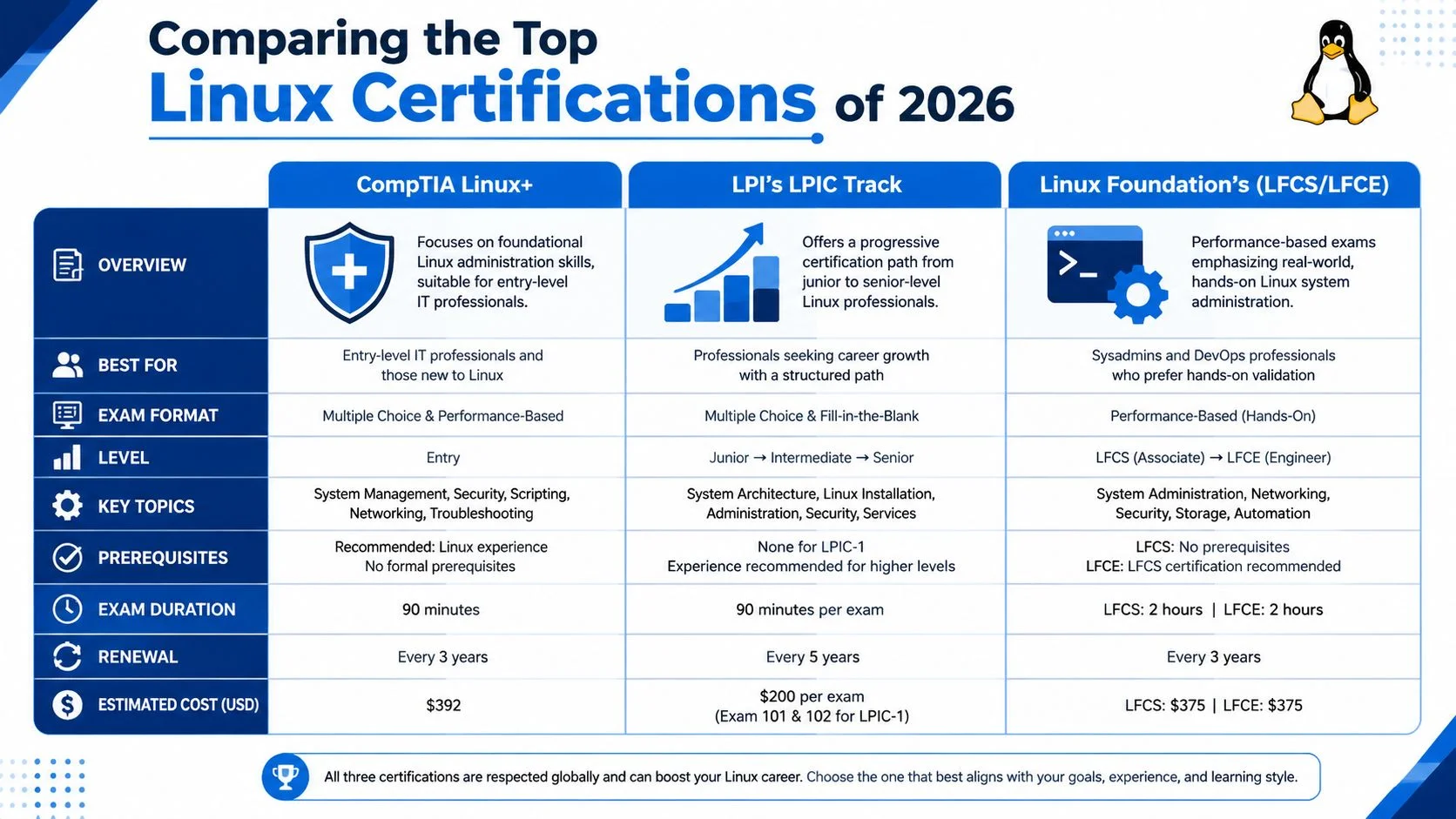
The Short Version
Four paths come up in serious Linux cert decisions:
- CompTIA Linux+
- LPI LPIC track
- Linux Foundation certifications such as LFCS
- Red Hat certifications such as RHCSA
CompTIA Linux+ has become more practical than its older reputation suggests. CompTIA says the Linux+ credential uses a performance-based format with up to 52 hands-on lab tasks in 120 minutes, scored on a 200 to 2000 scale with a 1360 passing threshold, based on the CompTIA Linux Pro certification page. That format gives Linux+ more hiring value than a purely theory-driven exam, especially for junior admins who need to prove they can work through real tasks under pressure.
Linux Certification Comparison
| Certification | Focus | Exam Format | Best For |
|---|---|---|---|
| CompTIA Linux+ | Broad Linux administration with modern operational coverage | Performance-based, hands-on task simulation | Early-career admins, support staff moving into Linux, candidates who need practical validation |
| LPIC track | Structured, vendor-neutral Linux progression | Traditional multiple-choice and fill-in-the-blank style across levels | People who want a long-term Linux-only pathway with clear progression |
| Linux Foundation LFCS | Role-aligned, hands-on Linux administration | Performance-oriented practical testing | Candidates targeting modern infrastructure and environments where practical administration matters |
| Red Hat RHCSA | Distribution-specific administration in Red Hat environments | Practical administration focus in a Red Hat context | Professionals working in or targeting enterprises standardized on RHEL |
When Linux+ Makes the Most Sense
Linux+ fits candidates who need a generalist credential with enough hands-on credibility to satisfy hiring managers. I recommend it most often to junior admins, NOC staff, and support engineers moving into systems work, especially if they have touched Linux in real environments but have not owned production infrastructure end to end.
It also works well for mixed-shop candidates. If your experience spans Windows, SaaS support, web hosting, or light DevOps work, Linux+ usually maps better to your background than a deeper specialization would. You are proving operational breadth first.
That said, Linux+ is not always the highest-ROI move. If job postings in your market are explicit about Kubernetes, AWS, Azure, OpenShift, or RHEL, a broad Linux cert may help at the margin while a role-matched credential does the heavy lifting.
When LPIC Is the Better Fit
LPIC is a better choice for people who want a long runway in Linux itself. The value is the structure. You can start with a broad base, keep progressing, and build a credential path that stays distribution-neutral.
That makes LPIC useful for consultants, trainers, and admins who expect to work across Debian, Ubuntu, SUSE, and RHEL-derived systems over time. It also suits candidates who learn best from a defined syllabus and want a certification path that keeps extending rather than stopping after one exam.
The trade-off is straightforward. LPIC often looks stronger to people who already understand Linux certification paths than to recruiters doing fast résumé screening. If you need a cert that HR recognizes quickly, Linux+ or RHCSA can be easier sells depending on the employer.
Where LFCS Fits
LFCS sits in a strong middle position. It is vendor-neutral, but it signals practical administration more clearly than a traditional question-heavy exam path.
For candidates aiming at cloud operations, platform support, or SRE-adjacent work, LFCS often has better ROI than a broad entry-level credential because it lines up with how those teams evaluate people. They want evidence that you can work on a live system, not just identify correct answers from a list.
I would pick LFCS over Linux+ if you already spend time in Linux weekly and want your certification to reflect that level of hands-on competence. If you are still building your foundation, Linux+ is usually the easier on-ramp.
When RHCSA Has the Highest ROI
RHCSA produces the strongest return when the employer environment is already clear. If the companies you want run Red Hat Enterprise Linux, RHCSA is often the shortest line between your study time and a better interview outcome.
This is common in larger enterprises, regulated environments, and organizations with formal Linux operations teams. In those settings, vendor specificity is not a drawback. It is proof that you can work inside the stack they pay for.
For that reason, RHCSA can outperform every vendor-neutral option on ROI, but only in the right market. Outside Red Hat-heavy hiring, its value narrows.
The Practical Decision Framework
Use this filter.
- Choose Linux+ if you need broad Linux proof and your background is still forming.
- Choose LPIC if you want a longer vendor-neutral Linux path.
- Choose LFCS if you already work hands-on in Linux and want that reflected in the credential.
- Choose RHCSA if your target employers are clearly RHEL-focused.
- Choose a role-based cert first if the main hiring signal is cloud, containers, security, or platform engineering.
If you are unsure, review a few live job descriptions before you commit. Count what appears in the requirements section: Linux administration, Red Hat, Kubernetes, AWS, Terraform, security hardening. That exercise usually answers the ROI question faster than any certification marketing page.
If you need practice material to transform your study strategy, use it to test whether you are ready for a broad Linux exam or whether your weak spots point toward a more specialized path.
Here's a useful explainer if you want a quick outside perspective before deciding:
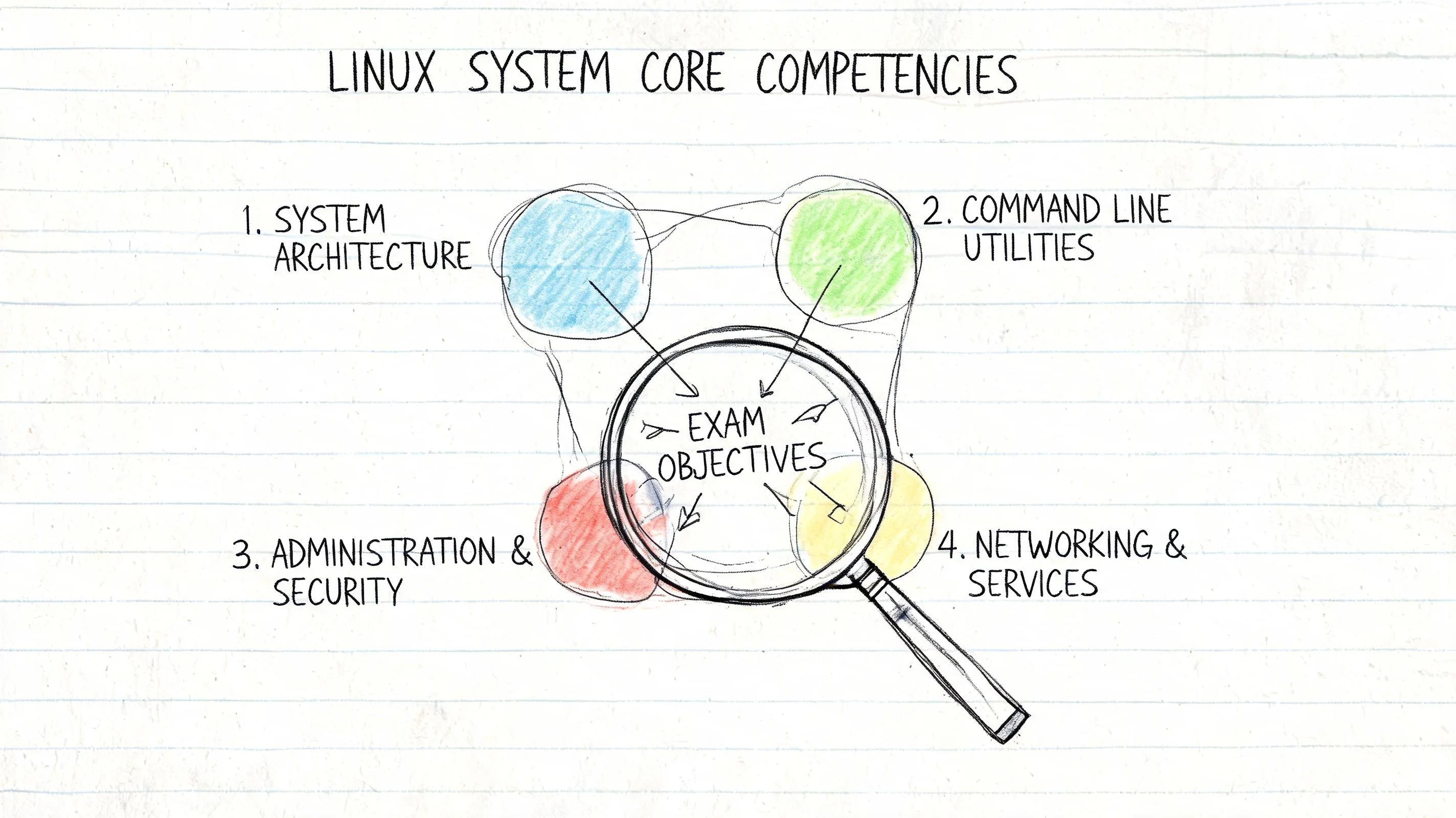
Decoding Typical Exam Objectives
People often underestimate Linux exams because the topics sound familiar: Users, permissions, storage, processes, networking. That looks basic on paper. It's not basic when the exam expects you to solve problems under time pressure.
A better way to think about objectives is by operational competency, not by chapter names.
LPI is a useful reference point for the baseline. The Linux Professional Institute says it was founded in 1999, has certified more than 350,000 people worldwide, and positions Linux Essentials as an entry-level credential. That exam is currently version 1.6 with exam code 010-160, has 40 questions in 60 minutes, and has no prerequisites, according to the Linux Essentials overview from LPI. More important than the format is the scope. It covers the command line, basic administration, and security, which is exactly the floor candidates require before moving up.
System and Storage Management
Many candidates expose whether they have truly administered Linux or just used it.
You need to understand file systems, mounting behavior, partitions, storage growth, and service interaction with the underlying OS. In practical terms, that means being comfortable with things like expanding storage, handling permissions after file moves, reading disk usage correctly, and understanding what persistence looks like after reboot.
If a certification includes storage tasks, do not treat them as trivia. Storage mistakes are the type that break deployments without warning and create difficult recovery work later.
Security and Identity
Linux security objectives usually look routine until you have to explain why access failed.
That's why user management, groups, permissions, privilege escalation, authentication flow, and host-level security controls matter so much. A junior admin who understands how identity and authorization fit together is far more useful than one who only knows how to add a user and set a password.
- Permissions literacy matters because access problems are constant.
- Authentication awareness matters because broken identity integrations stop work immediately.
- Security controls matter because modern Linux roles rarely operate outside compliance and hardening concerns.
Automation and Scripting
Candidates separate from “GUI operators.”
No one expects a junior cert holder to write production-grade frameworks. But you should be able to automate repetitive work, read shell scripts, modify them safely, and understand why scripting reduces mistakes. Even basic shell logic can save hours when you need repeatability.
Learn enough scripting to remove toil. That's a much better benchmark than trying to become a software engineer through bash alone.
Networking and Troubleshooting
This competency is the hidden core of most Linux roles. Services don't fail in tidy exam-syllabus ways. They fail because logs are noisy, dependencies are unclear, and people panic.
You need a troubleshooting sequence. Check the service state. Read logs. Verify config. Confirm permissions. Validate network path. Test name resolution. Reproduce the problem. Roll back assumptions.
If you're preparing and want to transform your study strategy, spend less time highlighting notes and more time diagnosing deliberately broken systems. That's how these objectives become usable skills instead of short-term memory.
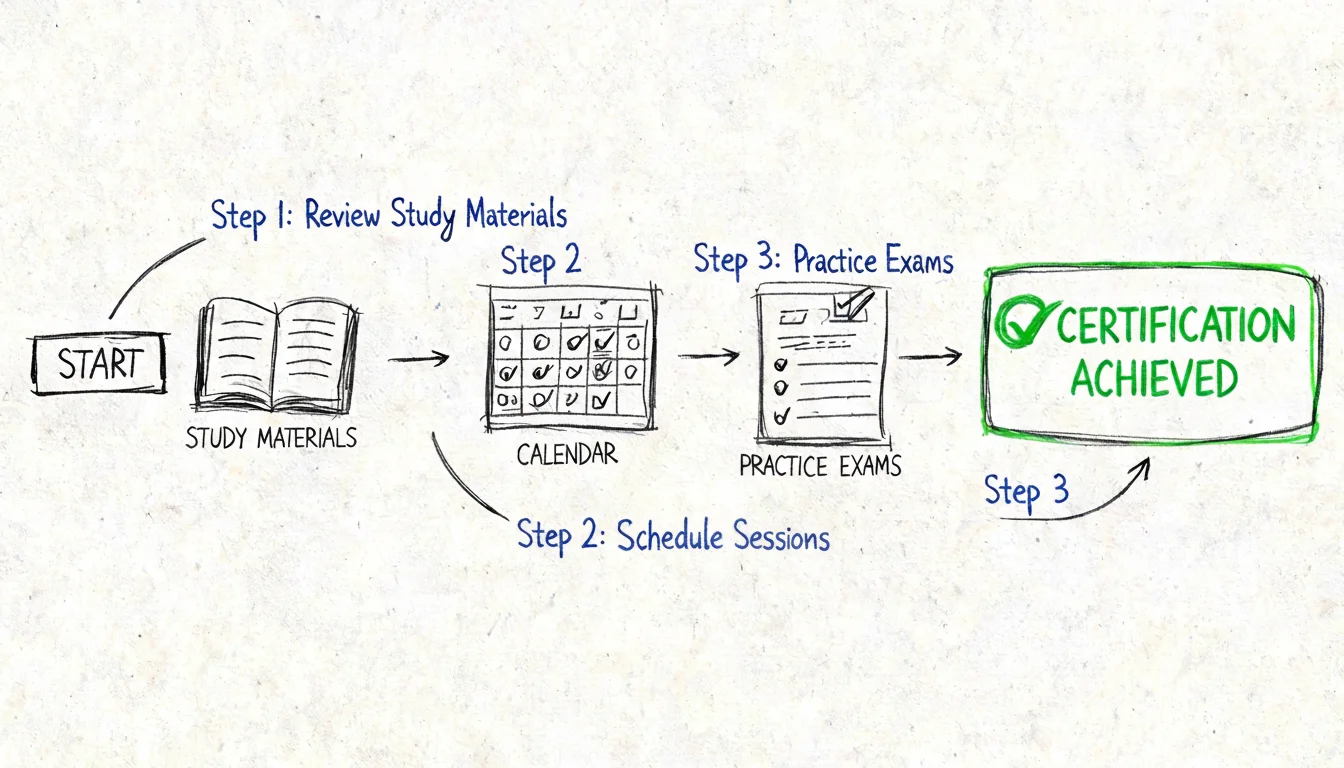
Building Your Actionable Study Plan
Most candidates fail Linux certification prep for a simple reason. They read too much and build too little.
If you want a Linux certification to pay off, treat it like an operations project. Define the target exam, build a lab, practice under constraints, then close your weak spots.
Phase One Builds the Foundation
Start with the official exam objectives and rewrite them into plain English. If an objective says “manage storage” or “configure authentication,” turn that into tasks you can perform in a lab.
Use one core learning source, not six. Mixing too many courses, books, and video playlists creates false productivity.
Good starting materials usually include:
- Official exam blueprints so you know the boundaries.
- A command-line focused Linux book or course so you learn the operating model, not just answers.
- Your own notes written as commands, symptoms, and fixes.
If you want a structured library of study guides, quizzes, flashcards, and practice materials, MindMesh Academy is one option to organize prep around certification objectives without relying only on passive video watching.
Phase Two Is Where the Real Learning Happens
Build a small lab. Use virtual machines if your target is administration fundamentals. Use containers when you want fast repetition for process and config practice. You don't need a fancy rack. You need a place where you can break things safely.
Your lab tasks should include:
- Install and re-install Linux until it feels routine.
- Create users, groups, and permissions scenarios that force you to troubleshoot access.
- Work with storage changes so you understand persistence and recovery.
- Break services on purpose and recover them from logs and config review.
This matters even more if you're targeting LPIC-1, because LPI's structure is a staged pathway. LPIC-1 is version 5.0, requires passing exams 101-500 and 102-500, each 90 minutes with 60 multiple-choice and fill-in-the-blank questions, and it serves as the prerequisite for LPIC-2 and LPIC-3, as described on the LPIC-1 overview page. That multi-stage design rewards disciplined fundamentals, not cramming.
Phase Three Tests Performance, Not Comfort
Now simulate the exam. Time yourself. Don't pause to search every answer. Mark the tasks or domains where hesitation keeps showing up.
Use a review loop like this:
- First pass for broad coverage.
- Second pass for repeated mistakes.
- Final pass for speed and accuracy under time pressure.
Don't ask, “Do I recognize this topic?” Ask, “Can I perform the task without hand-holding?”
Phase Four Locks in Exam Readiness
Your final review should be narrow. Focus on commands you confuse, workflows you skip, and troubleshooting sequences you still perform inconsistently.
The last few days aren't for learning everything. They're for reducing avoidable errors:
- Trim your resources so you're not bouncing between materials.
- Review weak domains rather than re-reading strengths.
- Sleep and schedule realistically because Linux exams punish mental sloppiness.
That's the point where preparation starts to look like competence, which is exactly what you want the certification to represent.
Essential Resources and Your Next Steps
You do not need a bigger stack of study material. You need a short list of resources that match the exam and the job you want after it.
Start with the resources that build admin judgment, not just recall. Official exam objectives keep scope tight. Man pages and distro documentation train the habit every competent Linux admin uses on the job. A local lab gives you repetition under your own control. Community forums, issue trackers, and technical discussion spaces help you see how working administrators reason through failures, edge cases, and ugly trade-offs.
Keep one eye on current hiring reality while you study. A general Linux certification still pays off for entry-level support, junior admin, and mixed infrastructure roles. It is often the fastest way to prove baseline competence if your experience is thin. But if your target roles already expect containers, CI/CD, Kubernetes, or a specific enterprise distro, the better return often comes from pairing Linux fundamentals with a role-based credential instead of stopping at a broad cert.
That changes how you choose resources. If your exam touches containers or modern operations topics, add hands-on material that reflects production habits rather than tutorial shortcuts. CloudCops Docker best practices is useful for that because it focuses on operational discipline, not just getting a container to run once.
Your Next Move
Choose the shortest path that closes an actual gap:
- New to Linux. Build command-line fluency, file permissions, package management, services, networking basics, and log reading before worrying about specialty badges.
- Already working with Linux systems. Pick the certification that matches the environment employers are paying for in your region, whether that is vendor-neutral Linux, Red Hat, or a cloud platform track.
- Aiming at cloud-native roles. Get one general Linux cert only if you still struggle with daily admin tasks. Otherwise, spend the next certification cycle on Kubernetes, cloud administration, or distro-specific skills.
Use this week to test fit, not motivation. Install a Linux VM and spend one uninterrupted session working only from the shell. Create users, change permissions, edit config files, restart a service, inspect logs, break something small, then fix it. If that session feels slow but manageable, a general Linux certification is probably a good first investment. If it feels easy, your ROI may be better with a more specialized credential.
Frequently Asked Questions about Linux Certs
Is a Linux certification worth it for beginners?
Yes, if you need structure and proof of fundamentals. For a beginner, the biggest value isn't the badge. It's the forced discipline around command line work, system basics, permissions, services, and troubleshooting.
Should I choose a Linux cert or a cloud cert first?
Choose based on your current gap. If cloud concepts make sense to you but Linux administration feels shaky, start with Linux. If you already manage Linux comfortably and your target jobs are cloud-heavy, a cloud or platform cert may produce better ROI first.
Are vendor-neutral certs better than Red Hat certs?
Not automatically. Vendor-neutral is better when you want portability across environments. Red Hat is better when the jobs you want are clearly built around RHEL.
How long should preparation take?
That depends on experience, not calendar promises. Someone already using Linux daily can move much faster than a beginner. Use task readiness as the benchmark. If you can perform the objectives in a lab without constant reference checking, you're getting close.
Do Linux certs still matter if I already have AWS or Azure?
Yes, especially if your cloud work sits on Linux systems you need to manage or troubleshoot. Cloud knowledge and Linux administration reinforce each other. The cloud cert proves platform familiarity. Linux proves operating depth.
What's the safest first step if I'm undecided?
Read job postings for the roles you want, then compare those requirements against your current gaps. That keeps you from studying for a cert that sounds respectable but doesn't move you toward your actual target.
Ready to put this plan into action? MindMesh Academy offers certification prep resources including study guides, practice questions, quizzes, and flashcards to support your structured Linux study workflow. Pick your certification path, build a lab, and start proving the skills that employers value. You can begin building your foundation with our CompTIA Linux+ practice exam.

Written by
Alvin Varughese
Founder, MindMesh Academy
Alvin Varughese is the founder of MindMesh Academy and an enterprise architecture leader. An electrical engineer by training, he moved from factory automation in South Africa to cloud architecture at GE Appliances and Humana (Fortune 50), and holds 20 professional certifications including AWS Solutions Architect Professional, Azure DevOps Engineer Expert, and Microsoft Agentic AI Business Solutions Architect. He built MindMesh Academy after interviewing too many highly certified candidates who couldn't answer basic questions: the goal is prep that makes you better at the job, not just able to pass the exam.