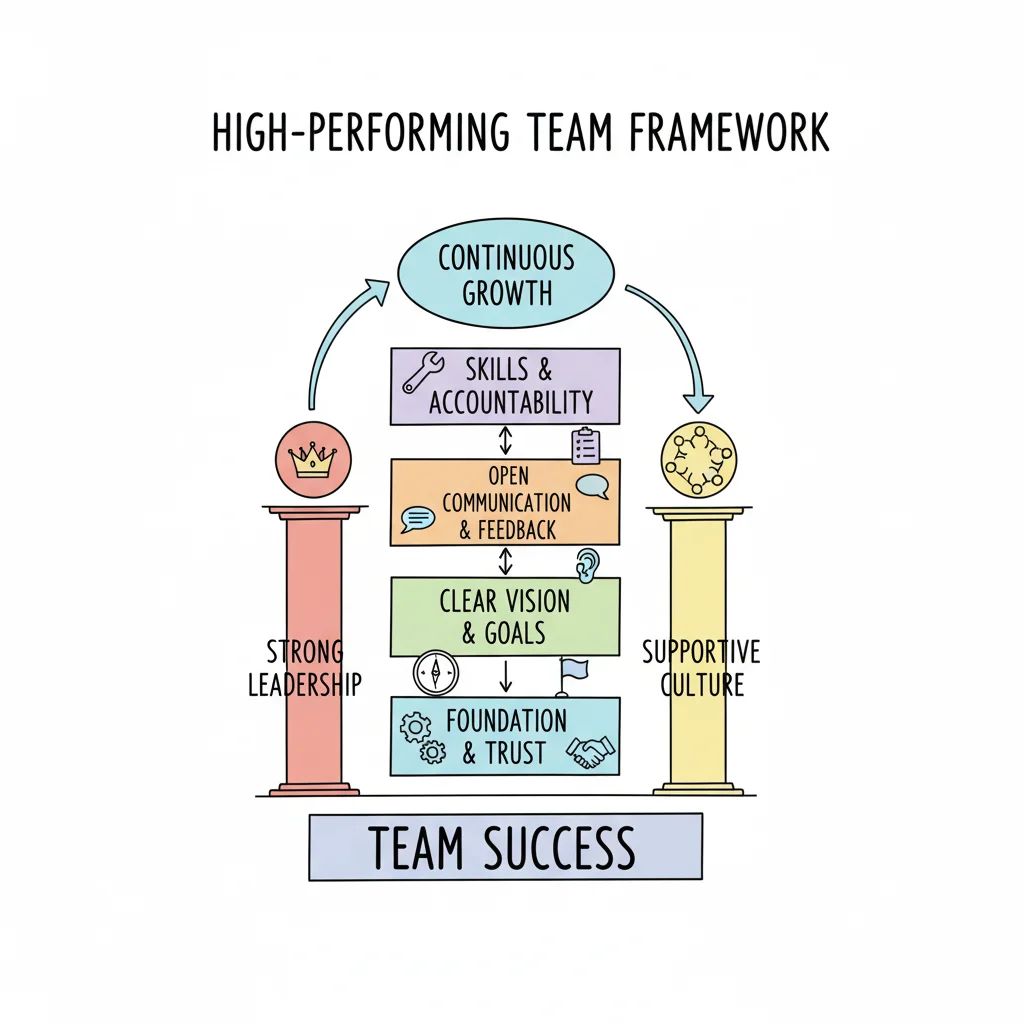
How to Build High Performing Teams from the Ground Up
Building High-Performing IT Teams from the Ground Up: A Guide for Tech Professionals
Gathering brilliant IT professionals and assigning a complex project does not automatically result in innovation. Building a team that consistently delivers at a high level—whether managing an AWS migration, a PMP-governed software rollout, or an ITIL service improvement initiative—requires a deliberate, strategic approach. You must transform individual expertise into a unified force that excels under the pressure of modern technology demands.
At MindMesh Academy, we recognize that technical skills are only one part of the equation. Success depends on a group's ability to collaborate, adapt, and innovate together. This guide provides the insights and practical strategies needed to build that environment. By focusing on collective performance rather than individual output, you can create a unit that meets every challenge with precision and speed.
The Essential Foundation of High-Performing IT Teams
What truly separates an IT team that consistently hits its objectives from one that merely struggles to stay afloat? While individual technical skill in areas such as cloud architecture, cybersecurity, or software development is necessary, the true foundation of elite performance is psychological safety. This is not just a popular corporate term. It is the shared understanding within a group that it is safe to suggest a new idea, admit to a mistake without fear of being punished, or question a technical choice without being shut down or mocked by peers.
In high-pressure technical environments, this level of trust is vital. Imagine a software development team where engineers feel they must hide a bug they created because they fear a manager's reaction. Or consider a cybersecurity team where junior staff are too intimidated to ask questions about a lead analyst's plan during a critical incident response. These silences lead to delayed projects, unpatched security gaps, and system failures that could have been avoided if communication was open.
Creating a space where IT professionals feel safe allows them to be their most creative and collaborative selves. This is how original solutions to difficult technical problems are found. It is also an effective way to improve workplace culture in any technical department. When people do not have to waste energy protecting their reputation, they can spend that energy on building better systems and solving complex puzzles.
The Power of Psychological Safety
The value of psychological safety is not just a theory; it is backed by strong data. Google’s Project Aristotle spent years looking at 180 of their internal teams to understand why some groups were more successful than others. They found that psychological safety was the most important factor in team effectiveness. It was not the combined IQ of the members or the seniority of the engineers that predicted success, but the way team members treated one another and how they handled different viewpoints.
The benefits for IT teams are significant and measurable:
- +19% productivity: This manifests as faster development cycles and more efficient ways to resolve technical incidents.
- +31% innovation: This leads to more creative solutions in AI, cloud architecture, and software design.
- -27% drop in turnover: Professionals stay with their companies longer when they feel respected and heard, which helps the business retain talent in a competitive market.
These numbers show that building trust is a core business strategy. It gives organizations a real advantage in a technical world that changes every day. High-level project management often relies on these social dynamics, and they are a central part of certifications such as the PMP or Agile scrum master exams.
The Four Pillars of Peak Team Performance
Once you have a foundation of safety, you can build the rest of the team structure. Based on work with many technical groups, I have identified four pillars that help teams stay strong and get results. Each pillar requires specific actions from leadership to ensure the team remains resilient. We will examine each one to see how to put them into practice effectively.
| Pillar | What It Means for IT Teams | Why It Matters |
|---|---|---|
| Purpose | A clear mission that every developer, architect, and ops engineer follows. Examples include "Maintain high uptime for cloud services" or "Build software that puts the user first." | This keeps technical work aligned across different roles. It provides motivation during hard projects, like a major AWS migration, and gives daily tasks a clear meaning. |
| People | Mixing the right technical skills, such as DevOps, data science, and networking. It also means helping these people grow through constant training and professional development. | Having the right talent with proper support, such as targeted certification training, is the primary driver of technical problem-solving and original ideas. |
| Process | Creating clear systems for talking and working. This includes Agile stand-ups, post-mortems where no one is blamed, and tools like CI/CD pipelines and version control. | This stops technical debt from growing and removes blocks in the deployment process. It ensures everyone understands the project scope and how to respond to incidents. |
| Performance | Setting technical goals such as SLA adherence, high code quality, and fewer security bugs. It means holding people accountable for their work and output. | This results in better engineering outcomes and a culture of excellence. It ensures the team keeps up with changes in the tech industry and hits business targets. |
Every one of these pillars is vital to success. They provide the framework for building a team that can handle any technical difficulty, from complex system integrations to emergency security patches. Supporting the "People" pillar often involves clear plans, like those found in our guide on how to upskill employees. These plans focus on specific certifications and learning paths that keep technical skills current and relevant.
Building an elite IT team is a planned and organized process. It is not something that happens by accident or by just hiring a few experts. When you apply these principles, you get great technical results. You also create a place where IT professionals can do their best work and stay creative as they solve the problems of the future.
Reflection Prompt: Look back at a past IT project you worked on. How well did the team use these four pillars? What were the strong points, and what parts could have been better to help the project succeed or keep the team together?
Designing Your IT Team’s Blueprint for Success
Great IT teams don’t just show up one day and start delivering high-quality code. They are carefully built with specific goals in mind. Before you think about deployment pipelines, server monitoring, or uptime metrics, you have to build the base. This is the design phase. Here, you create the plan for how your people will work, talk to each other, and hit their technical targets.
Think of it like an architect planning a high-availability cloud environment. An architect does not just start turning on virtual machines and hope the traffic flows correctly. They start with a design. They draw out the architecture, set the security rules, and map the network. Your team requires that same level of planning. You must define why the team exists, who does what, and which skills are missing from the group. If you get the design right, your team stands on a stable base. If you skip it, you are building on sand.
Forge a Crystal-Clear Team Purpose
A generic mission statement from the HR department rarely helps an engineer solve a production outage at 3:00 AM. It will sit in an employee handbook gathering dust. For a technical team to perform at its peak, its purpose must be sharp. It should act as a guide for every sprint, every emergency fix, and every major architectural change. This purpose has to answer one main question: "Why does our IT team exist, and what unique value do we deliver?"
A strong purpose links the daily tasks of writing code or patching servers to a real-world result. For example, a cloud engineering team doesn't just "manage Azure." Instead, their purpose might be "to build a stable, cost-effective Azure environment that lets the company launch new products faster and keeps customer data safe." This framing creates a different kind of motivation than a simple list of tickets. It gives the team a reason to care about the quality of their work. This mindset mirrors the Project Charter in PMP, which establishes the "why" before the "how" ever begins.
To find this purpose, you need to talk to the team. Do not just hand them a document. Run a session where everyone can speak. Use these questions to get the conversation moving:
- Who are our primary stakeholders/customers? (e.g., internal business units, end-users, or external clients)
- What critical IT problems do we solve for them? (e.g., protecting data from leaks, keeping the website online, or making sure the mobile app is fast)
- What does success look like—both for our stakeholders and for us as an IT team? (e.g., cutting MTTR by 20%, maintaining 99.99% uptime, or helping the company enter a new market ahead of schedule)
When the team helps write this purpose, they own it. It isn't just an order from a manager; it is a promise they made to each other.
Reflection Prompt: If you were leading a new IT project, how would you facilitate your team in defining their collective purpose to maximize buy-in and clarity?
Define Roles and Responsibilities with Precision
Confusion about who does what is a major reason IT projects fail. When a developer assumes someone else is handling the database migration, or a sysadmin thinks the security team is responsible for a specific firewall rule, things break. People get frustrated. Work gets done twice, or it doesn't get done at all. Clear roles prevent these mistakes.
This goes further than a job title like "Senior Developer" or "Systems Engineer." You need to know who is responsible for specific results. A RACI chart (Responsible, Accountable, Consulted, Informed) is a great way to fix this. It brings clarity to technical projects and daily operations. Many professionals learn this method while studying for PMP or ITIL certifications because it works.
Look at how a RACI chart works for a security patch rollout:
- The DevOps Engineer is Responsible for actually installing the patch in the dev and staging environments to see if anything breaks.
- The Cybersecurity Lead is Accountable for the outcome. If the patch isn't applied or the system is breached, they are the one who answers for it.
- The QA Engineer is Consulted to provide feedback on whether the patch changed how the application behaves for users.
- The IT Service Desk is Informed so they know why the system might be down and can tell users when it will be back up.
This simple tool stops the guessing games. It lets every person own their part of the work. When people know exactly what they are supposed to do, they are more likely to do it well. This is a key way to stop scope creep and avoid the accountability gaps that derail major IT initiatives.
The goal is a system where every task, from deploying code to responding to a hack, has a name attached to it. This creates real accountability. IT professionals usually step up when they know a specific outcome is their responsibility.
Engineer Your Team Composition Strategically
Building a team is like building a computer. You need different parts that work together to create a powerful system. The best teams rely on strategic diversity. This isn't just about what people look like; it is about how they think and what they know. You need a mix of technical skills—like front-end, back-end, security, and cloud—but you also need a mix of problem-solving styles.
If every person on the team thinks the same way, you will have blind spots. You might have five people who are great at coming up with new ideas but no one who is good at finishing the paperwork or testing the edge cases. By mixing different perspectives, you build a better engine for solving problems. You might pair an innovative cloud architect with a very careful network engineer. Or you might put a detail-oriented security analyst in a room with a big-picture project manager. This balance is vital for DevOps teams that need to move fast without breaking things.
The data backs this up. Research on high-performing teams shows that connected, diverse groups see about 21% higher profitability. They also see 41% less absenteeism and 59% lower turnover. This shows that your hiring strategy shouldn't just be about finding the person with the most certifications. It is about how those people fit together. You can see more on the tangible benefits of team connectedness to understand why these numbers matter so much.
Designing the structure of your IT team is the most important step you can take. You are setting the rules of the game. If you define the mission, assign the roles, and pick the right mix of people, you create the foundation for everything that comes next. Technical success is not an accident; it is the result of this early design work.
The Kind of Leadership That Actually Fuels IT Performance
You can design a high-quality IT team structure on paper, but the leader—a Technical Lead, Project Manager, or SRE Manager—is the person who makes that blueprint work in reality. High-performing IT leaders do not act as micromanagers who dictate every line of code or server configuration. Instead, they function as catalysts. They create the specific conditions required for a team to perform at its peak. This shift in perspective is the most effective change you can implement to reach an IT team's full potential.
View your primary role as acting as both a shield and a coach. You shield the technical team from corporate friction and administrative noise. This includes blocking unvetted feature requests from sales, limiting unnecessary meetings, and managing conflicting priorities from upper management. Once the noise is gone, you coach the team by building an environment of trust. You encourage direct technical debates and allow the team to take true ownership of their projects. As more IT departments move toward remote or hybrid setups, using actionable remote team management tips becomes an essential skill for any leader who wants to drive results.
Intentionally Cultivate Psychological Safety in Tech Environments
Psychological safety is the foundation of a high-performing IT team. It does not appear by accident. You build it through steady, intentional actions, and the process starts with leadership. Your engineers watch your behavior to see if it is safe to mention a technical blocker, suggest a non-traditional solution, or admit they caused a deployment error.
To create this foundation, the leader must act first. Model the transparency you want to see. When you admit that you lack the answer to a difficult architectural problem, you show the team that honesty is valued over appearing perfect. Share stories about your past technical mistakes, such as a major bug you missed or a database migration that required an immediate rollback. This behavior is not a weakness. It builds strength through collective learning. This approach is the core of blameless post-mortems in DevOps and SRE cultures.
Integrate these specific behaviors into your daily leadership routine:
- Practice Active Listening: When an engineer explains a difficult technical issue or proposes a new design, give them 100% of your focus. Put your phone away and close your laptop. Listen to understand the technical constraints, rather than simply waiting for your turn to speak. Try summarizing what you heard: "If I understand correctly, the primary bottleneck in this integration is the latency of the third-party API." This confirms your understanding and builds professional rapport. This habit is critical during high-pressure troubleshooting sessions and incident response calls.
- Reframe Failure as a Learning Opportunity: When a project hits a wall or a production system fails, people often look for someone to blame. Your job is to change that direction immediately. Instead of asking who caused the deployment failure, ask, "What did we learn from this incident, and how can we change our CI/CD pipelines or testing strategies to prevent it next time?" This moves the focus from individual error to systemic improvement. It allows engineers to take risks without fearing for their jobs.
- Actively Invite Dissent and Diverse Technical Opinions: You must ask for opposing views during technical reviews. In an architectural meeting, try saying, "I have outlined this design, but I want to find the blind spots. Who sees a problem with the scalability of this database schema, or who has a different approach?" This signals that constructive disagreement is required to make resilient technical decisions. It prevents "groupthink" and ensures the team considers security and performance from multiple angles before committing to a path.
Promote Open Communication in Technical Dialogues
The best IT teams communicate by combining personal care with direct challenges. They engage in honest technical conversations during code reviews and sprint retrospectives because they trust that the feedback aims for professional growth. As a leader, you define the tone for these discussions.
Start by changing how you handle meetings. Many technical meetings focus on people listening to information they could have read in an email. Change the format. Send technical documents, such as architecture RFCs (Request for Comments) or sprint planning notes, to the team before the meeting starts. Use the actual meeting time for debating solutions and making decisions. This respects the time of your engineers and focuses on solving problems together.
Consider an SRE team trying to solve microservice latency. Instead of a standard group discussion, a leader can structure the time more effectively. Give everyone three minutes to write down the biggest technical risk they see in the current proposal. Put those risks on a shared screen and address them individually. This method ensures that every person, including the quieter engineers who prefer deep analysis, provides input. It leads to a more thorough solution than a loud debate would produce.
Collaboration in IT is not about reaching a fast agreement. It is about making sure every engineer feels safe enough to provide a different technical viewpoint. Your role is to create a space where technical ideas compete based on their quality, and the most resilient idea wins, regardless of the rank of the person who suggested it.
Enable Success Through Autonomy and Obstacle Removal
Micromanagement destroys the morale of experienced IT professionals. When you control every technical choice, such as which libraries to use or the exact steps of a deployment, you demonstrate a lack of trust in the team. This stops their creativity and prevents them from solving problems on their own. It also leads to technical debt, as engineers may try to work around rigid or illogical processes.
Effective IT leaders provide two things: clarity of purpose and technical objectives and the autonomy to decide how to reach them. This involves trusting your developers and operations staff to select the right tools and build the most efficient systems. You set the "what"—the goals and Service Level Objectives (SLOs)—and they determine the "how."
Your job then changes from a director to a person who clears the path. Regularly ask your team a specific question: "What technical or organizational obstacles are getting in your way?"
The answers to this question become your priority list. The team might need access to a specific cloud resource, a faster decision from the security department, or a higher budget for automated testing tools. By handling these administrative issues and escalating technical blockers, you show the team that your role is to support them. Clearing these paths helps the team keep their momentum. Supporting the team's ability to execute is the most reliable way to build high-performing teams that can handle the demands of a modern IT environment. This approach creates loyalty and ensures the team remains productive even when technical requirements change quickly.
Building Systems for Integrated Collaboration in IT
High-performing IT teams do not communicate effectively by accident. They operate within systems designed to make cooperation feel natural, even when working across distributed locations or managing difficult project cycles. Without a clear framework, even the most talented cloud architects, developers, or cybersecurity analysts can find themselves stuck in a loop of confusion, missed deadlines, and long, unproductive meetings.
The objective is to build a collaboration engine that runs quietly in the background. When you get this right, you free up the team’s mental energy to focus on solving technical problems, creating new solutions, and delivering work that meets high standards. This involves creating a shared playbook that every team member understands and follows, similar to how well-defined APIs work for microservices.
Establishing Clear Communication Norms for IT Teams
One of the fastest ways to cause friction in an IT team is to work without guidelines for how and where communication should happen. When every message is treated as a priority and every chat channel becomes a free-for-all, you create an environment of chaos and burnout. This is why successful IT teams are deliberate about how they use their communication tools.
These teams establish simple, clear guidelines that everyone agrees to. This is not about adding unnecessary rules; it is about reducing the mental effort required to stay on the same page. This allows for more time spent on deep work and complex technical tasks.
For example, a DevOps team I worked with struggled with notification fatigue until they implemented a basic structure like this:
- Urgent & Time-Sensitive Production Issues: The team used Slack or Microsoft Teams only for critical production alerts, immediate blockers, or quick questions that needed an instant response from a specific person. The rule was that if a database went down or a build failed in production, it went here. The expectation was a fast reply.
- Project Work, Feature Development & Updates: All discussions about specific tasks, code reviews, architectural decisions, and progress updates moved to project management tools like Jira or Asana. This kept every conversation connected to a specific piece of work. It created a clear history of the project and provided context for anyone joining the task later.
- Formal Announcements & Cross-Departmental Communication: Email was used only for communicating with clients, external partners, or departments outside of IT. This kept internal team channels quiet and focused on technical delivery.
This simple discipline regarding channels prevented technical information from being lost in a sea of chat messages. It ensured the right people saw the right messages and significantly reduced the noise that interrupts a developer's day.
An IT team's communication system should protect its most important resource: the ability to focus on complex problem-solving without interruption. By defining these channels, you are not adding red tape; you are building a wall against constant distraction.
To make this clear for everyone, create a quick reference guide.
IT Team Communication Channel Guidelines
A simple chart can stop the guesswork and help new hires understand the team culture immediately. It sets expectations and ensures everyone uses the right tool for each situation.
| Scenario | Recommended Tool | Rationale |
|---|---|---|
| Urgent production incident or critical blocker | Slack/Teams (Dedicated Incident Channel) | This tool provides instant alerts and real-time talk. It allows multiple people to troubleshoot a critical event simultaneously while keeping a log for later review. |
| Sharing an update on a specific task/bug/feature | Jira/Asana/Trello/GitHub Issues | This keeps the discussion attached to the work itself. It creates a searchable history that links directly to the code or the technical requirements. |
| Formal announcement to the entire IT department or wider organization | Email or Company Intranet/SharePoint | This creates a formal record of the announcement. It is best for broad distribution where immediate interaction is not required. |
| Brainstorming a new architectural design or system feature | Miro/FigJam or a Structured Team Meeting with Whiteboard | Visual tools are better for free-form ideas and drawing diagrams. They allow for non-linear thinking that chat tools cannot handle well. |
| Asking a non-urgent technical question to a colleague | Slack/Teams (DM) or Internal Forum (e.g., Stack Overflow for Teams) | This is asynchronous. It allows the colleague to finish what they are doing before they reply, respecting their need for deep work time. |
| Documenting technical decisions, processes, or runbooks | Confluence/Notion/Internal Wiki | This builds a centralized knowledge base. It is the best place for long-term reference and helps new team members learn the systems during onboarding. |
This clarity makes technical work more efficient and reduces the stress levels of the staff.
Structuring Decision-Making and Conflict Resolution
IT projects often stall because no one is sure who makes the final technical call. When there is ambiguity about who owns a major architectural decision or who leads the response during an incident, ideas get stuck. Progress stops while the team waits for a consensus that may never come.
The RAPID model (Recommend, Agree, Perform, Input, Decide) is a helpful framework for solving this. Before starting a large project, such as moving a critical application from AWS EC2 to Azure Virtual Machines, assign people to these roles.
- Recommend: This person gathers the facts and proposes a direction.
- Agree: These stakeholders must sign off on the recommendation. For instance, a security lead might need to agree on the network configuration.
- Perform: This is the team that carries out the work.
- Input: These people provide expertise or data to the recommender but do not have a vote.
- Decide: This is the one person who makes the final choice and is accountable for it.
Using this model removes the guessing. These concepts are often covered in PMP and ITIL exams because they are vital for good governance and project execution.
Conflict is also a natural part of building technical solutions. The goal is to handle it constructively. Instead of letting disagreements over code or architecture become personal, teach the team to focus on the problem. A good rule is to keep the conversation about the technical requirement rather than the person who wrote the code.
For example, saying, "I am worried this database schema will not scale if we hit 10,000 concurrent users," is a professional observation. Saying, "You always design databases that are too slow," is a personal attack. Keeping the focus on data and requirements aligns with the conflict resolution techniques taught in major project management certifications.
Creating a Knowledge Sharing Culture in IT
On the best IT teams, expertise does not disappear when a project ends or an engineer leaves the company. These teams use systems to capture experience and turn it into shared knowledge. This is vital in areas that change quickly, like cloud computing or cybersecurity.
The After-Action Review (AAR) is an effective tool for this. It is used in incident management and aligns with ITIL Problem Management and Agile retrospectives. After a major project, a sprint, or a system outage, the team meets to answer four questions:
- What did we set out to do? This defines the original goal, like deploying a new microservice or fixing a specific server error.
- What actually happened? This is a factual look at the results. Perhaps the deployment worked but caused a memory leak that required a patch.
- Why did it happen that way? This looks at the technical causes. Did a specific testing process fail? Did a manual step lead to a configuration error?
- What will we do differently next time? This leads to action. The team might decide to automate a pre-flight check or update an alert policy to catch issues faster.
The results of an AAR are not just for the meeting. The findings and updated best practices should be saved in a central place like Confluence or Notion. This builds an institutional memory. It helps the team avoid making the same mistakes twice and helps junior members learn from senior staff.
These practices are the foundation of effective knowledge management strategies that lead to long-term success in technology. By setting up these systems, you turn collaboration from an unpredictable process into a reliable method for getting work done.
Measuring What Matters for Continuous IT Improvement
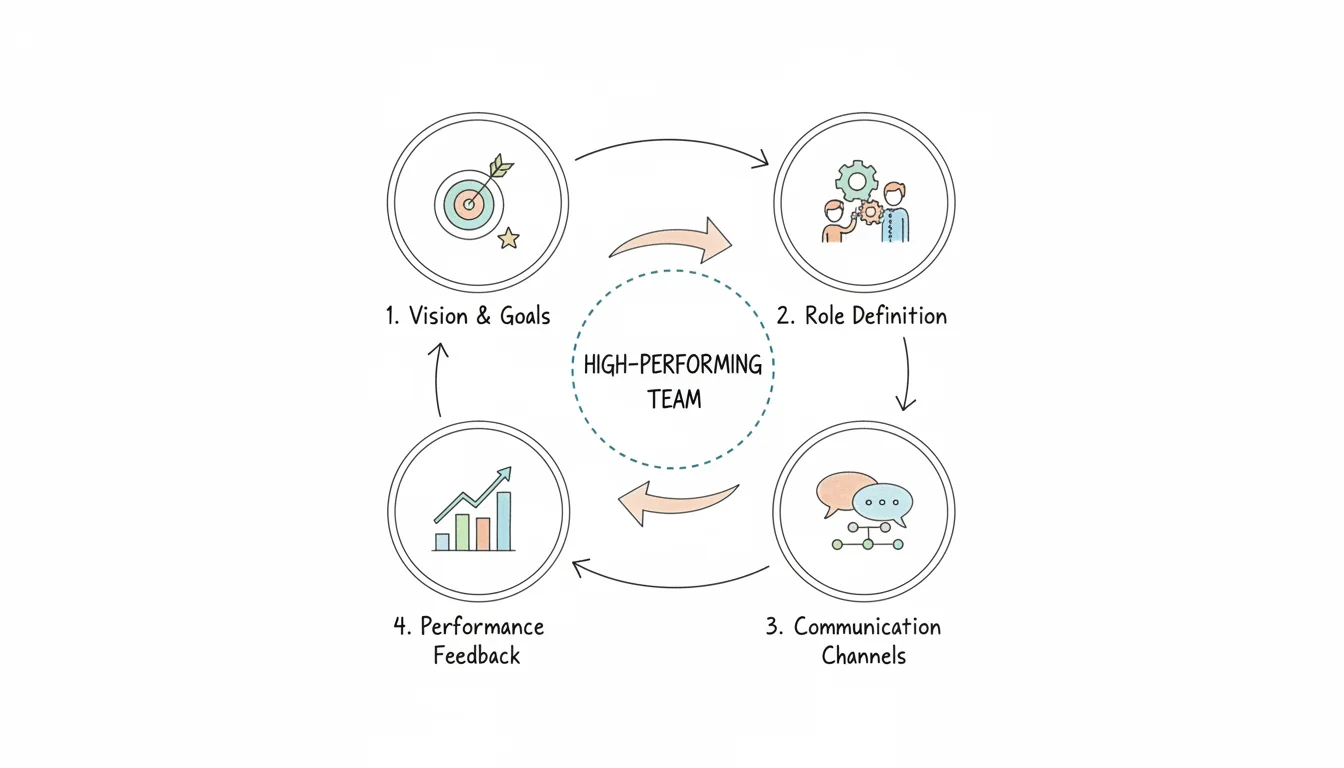
Building a high-performing IT team requires you to look beyond surface-level numbers. While tracking daily output is a standard part of the job, metrics like lines of code committed, tickets closed, or deployment frequency are almost always lagging indicators. These figures tell you what has already happened in the past. They are like looking at the scoreboard after a game is over.
The real advantage comes from measuring the leading indicators. These represent the underlying health and dynamics of the IT team itself. To understand this, look at how technical monitoring works. A system alert about high CPU usage tells you a problem is currently happening. In contrast, proactive monitoring of application logs, network latency, and database performance can help you predict potential issues before they impact your users. When you focus on internal metrics like role clarity, psychological safety, and peer accountability, you stop reacting to problems. Instead, you develop a resilient, engaged team that is ready for long-term success.
Gauging IT Team Health as a Predictive Tool
The "soft skills" of teamwork are actually hard data in disguise. When you systematically measure your IT team's health, you create a powerful predictive tool. This data helps you forecast project success, operational stability, and how fast your team can innovate. Research consistently shows that team health explains much of the difference between low- and high-performing technology units.
One study of 110 teams (verify the sample size in the cited study) found that drivers like clear goals, role clarity, and psychological safety accounted for 69–76% of the variation in their outcomes (verify current percentages in the original McKinsey research). This proves that by assessing these core drivers, you can gain an accurate forecast of future performance. You can then take targeted action to fix gaps before they cause a project to fail. You can discover more about how team health drives business outcomes and how these principles apply to technical organizations.
The most effective IT leaders do not treat team health as a vague or "fuzzy" feeling. They treat it as a critical dataset. They take the team's pulse to spot issues—like signs of burnout or a breakdown in collaboration—before these problems derail project delivery or stop critical operations. This creates a feedback loop for improvement in technical environments. For example, if an engineer feels they cannot speak up about a flaw in an architectural plan, that silence eventually leads to technical debt or system failure. Measuring health brings these silent risks to the surface.
Implementing Practical Feedback Mechanisms in IT
Gathering this data does not need to be expensive. You can build simple, consistent rituals that make feedback a normal part of how your IT team operates.
- Simple, Anonymous Surveys: Use a free tool like Google Forms to send a short, anonymous survey every quarter. Ask questions on a 1-5 scale that are relevant to an IT environment. For instance: "I feel safe to voice a dissenting technical opinion during code reviews," or "I am clear on my role and what is expected of me in our current sprint," or "Our team effectively manages technical debt." This provides quantifiable data that you can track over time to identify trends and areas for improvement. Anonymity is key here because it allows junior staff to be honest about the leadership or technical direction without fear of consequences.
- Structured Team Retrospectives: At the end of every project, sprint, or major incident, hold a retrospective. A "Start, Stop, Continue" framework is very effective. This is not a session to assign blame. It is a structured conversation aimed at making technical processes and team collaboration better. Ask: "What should we start doing (like more pair programming)?" "What should we stop doing (like skipping security reviews or running meetings without agendas)?" "What should we continue doing (like our daily stand-ups)?" Document the action items and follow up on them. This is a basic practice in Agile methodologies that ensures the team learns from every mistake.
Consistency is critical. By making these practices part of your IT team's rhythm, you normalize self-reflection. You build a culture where everyone feels responsible for improving how the team works and how it delivers technical solutions.
Setting Meaningful IT Performance Metrics
Team health is the foundation, but you still need to measure tangible output. The goal is to set performance metrics that align with your shared technical goals without encouraging bad habits. Frameworks like OKRs (Objectives and Key Results) or KPIs (Key Performance Indicators) work well for this. These concepts are often covered in certifications like PMP, ITIL, or various Agile programs.
Consider a customer support team that handles technical issues. A bad KPI would be "number of tickets closed per day." If you only track volume, agents will rush through calls. they might provide quick fixes that don't actually solve the problem just to hit their numbers. This leads to frustrated customers and repeat tickets.
A balanced approach for an IT Service Desk integrates efficiency and quality:
- KPI 1: Average First-Response Time (Efficiency): This tracks how quickly a customer's initial technical query is acknowledged.
- KPI 2: Customer Satisfaction Score (CSAT) (Quality): This measures how satisfied customers are with the technical support they received.
- KPI 3: Mean Time To Resolve (MTTR) (Effectiveness): This is the average time it takes to fully resolve a technical issue from the moment it is reported.
- KPI 4: Ticket Resolution Rate (Effectiveness): This is the percentage of issues resolved without needing to escalate the problem to a higher-level engineer.
This balanced scorecard keeps the team focused on the right outcomes: solving problems quickly and correctly. For software development teams, relevant metrics might include "Cycle Time" (the time from a code commit to production) or "Deployment Frequency." For cloud operations, you might track "Uptime Percentage," "Cloud Cost Efficiency," or "Security Compliance Score." These metrics tie back to the team’s purpose. They give everyone a shared definition of success. Creating and analyzing these feedback loops is a form of ongoing training. You can learn more about how to measure training effectiveness in our guide.
By measuring both team health and technical performance, you bridge the gap between how your IT team works and what it produces. This creates a sustainable cycle. A healthy, engaged team is naturally better equipped to hit ambitious targets, creating a solid foundation for a high-performing IT unit.
Your Burning Questions Answered: Practical Advice for IT Leaders
A solid playbook provides a foundation, but leading a technical team requires solving practical, day-to-day problems. These aren't abstract theories. They are the actual obstacles that technical managers and project leads encounter when trying to turn a group of individuals into a high-functioning unit. You need answers you can use on Monday morning to see real results in your department.
Let's address the specific questions that come up most often in IT leadership.
How Long Does It Really Take to Build a High-Performing IT Team?
There is no single number that applies to every situation. In IT, the timeline depends on your starting point. You might be revitalizing a department burdened by massive technical debt and low morale, or you might be hiring a brand-new cloud engineering team from the ground up. Factors like the size of the team, the specific tech stack you use, how clearly you define goals, and how much backing you have from executives all change the math. You aren't flicking a switch; you are building a structure that needs time to stabilize and grow.
However, if you focus on specific improvements—like building psychological safety and defining technical objectives clearly—you should see measurable progress within three to six months. This is the window where you typically notice a change in how people work together. You will see more honest technical discussions and better communication during outages. Incident response times often start to drop during this period as the team finds its rhythm. In the first month, you might only see a change in how people speak during meetings. By month six, you should see those changes reflected in the quality of the code and the speed of deployments.
It is vital for IT leaders to recognize that high performance is not a destination. Technical excellence changes as the industry moves. A team that is fast today might be slow tomorrow if they stop learning. The initial work gets the team off the ground, but the most effective groups are the ones that constantly look for ways to improve their daily workflows.
Can an IT Team Get to a High-Performing State Without a Strong Leader?
It is extremely unlikely. While a group of senior, highly autonomous engineers might stay productive for a short period on their own, a leader is usually the one who builds the environment where that productivity is possible. Without a person to set the direction and resolve technical conflicts, even the best talent tends to stall or drift into silos.
The IT leader acts as the person who builds the conditions for success. They focus on these specific areas:
- Establish Psychological Safety: They lead by admitting when they do not have an answer or when they make a mistake. This sets the standard for blameless post-mortems and open technical debates where people feel safe to suggest new ideas without fear of ridicule.
- Set a Clear Why: They connect every technical task to a business goal. Whether the team is migrating to a new cloud provider or refactoring a legacy database, the leader ensures everyone knows why the work matters. This clarity is a requirement for successful PMP and Agile projects. When an engineer knows a database optimization will reduce customer checkout times by two seconds, they work with more focus.
- Run Interference: They protect the engineering team from office politics, shifting corporate priorities, and scope creep. By handling these distractions, the leader allows the engineers to focus on writing code and shipping features. If a marketing executive asks for a "quick" feature change mid-sprint, the leader is the one who says no to protect the team's capacity.
Without this leadership, teams often lose their way. They might get stuck in endless debates over technical choices or lose track of what the business actually needs. A strong leader avoids micromanagement and instead works to remove the barriers that prevent the team from doing their best work.
What's the Single Biggest Mistake for IT Leaders to Avoid?
The most common error is hiring for technical brilliance while ignoring how a person fits into the group. Leaders often chase the "10x developer" or a specific cloud expert but fail to ask how that person handles a disagreement. This leads to the "brilliant jerk" problem. You end up with a group of talented individuals who cannot work together, which eventually ruins project timelines and team morale. A team of competent engineers who trust each other will almost always beat a group of superstars who refuse to collaborate.
You must prioritize how a team works together over what a single person knows. This requires a change in how you interview candidates. Stop looking only at their coding skills and start using behavioral questions that test for empathy and conflict resolution. Watch how a candidate behaves during a pair programming session or a whiteboarding exercise. Do they listen to feedback? Do they explain their reasoning clearly? Can they disagree with a peer without being dismissive or aggressive?
If you take one lesson from this guide, let it be this: you are not just collecting individual technical specialists. You are building a single unit that must solve problems together. When you prioritize the health of that unit, the technical results follow. Avoid the temptation to hire a genius who destroys the team's ability to communicate.
At MindMesh Academy, we believe great IT leadership comes from a mix of constant learning and practical application. To gain the skills needed to lead technical teams, handle large projects, and encourage innovation, check out our certification prep courses. You can prepare to pass with confidence and build your future in IT by visiting Explore IT Certification Practice Exams.

Written by
Alvin Varughese
Founder, MindMesh Academy
Alvin Varughese is the founder of MindMesh Academy and an enterprise architecture leader. An electrical engineer by training, he moved from factory automation in South Africa to cloud architecture at GE Appliances and Humana (Fortune 50), and holds 20 professional certifications including AWS Solutions Architect Professional, Azure DevOps Engineer Expert, and Microsoft Agentic AI Business Solutions Architect. He built MindMesh Academy after interviewing too many highly certified candidates who couldn't answer basic questions: the goal is prep that makes you better at the job, not just able to pass the exam.