What is Service Desk Management: A Comprehensive IT Support Guide
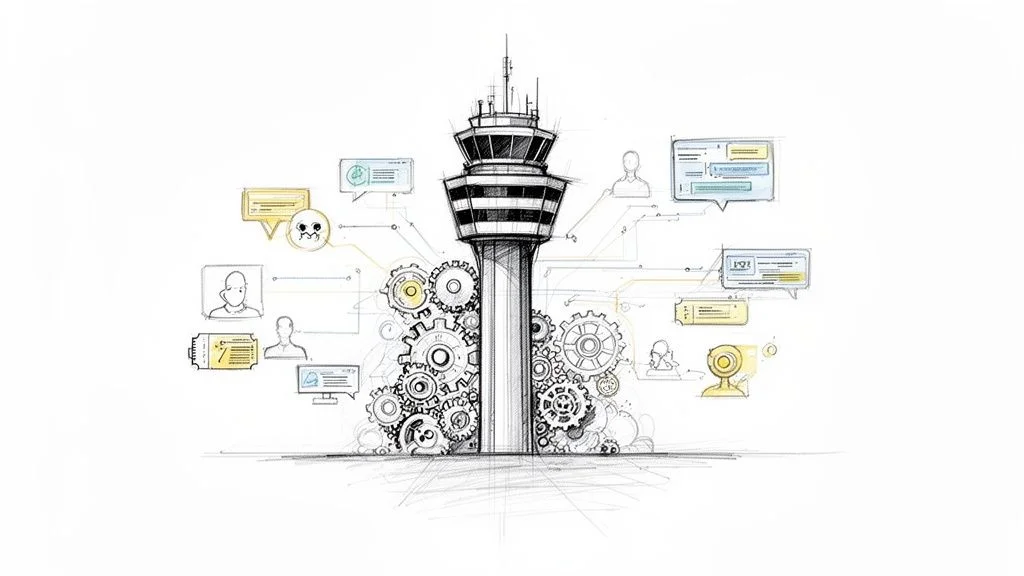
Service desk management is all about orchestrating an organization's IT services to keep business operations humming along without a hitch. It's so much more than a simple 'fix-it' shop; it's a critical strategic function. Think of it as the air traffic control tower for a company's technology, managing everything from sudden outages to routine user requests. For IT professionals, understanding this discipline is fundamental, not just for daily operations, but for excelling in certifications like ITIL, CompTIA, and even project management roles where service delivery is key.
Defining The Modern Service Desk
So, what is service desk management, really? At its heart, it's the discipline of organizing IT support to be the Single Point of Contact (SPOC) between the people using the technology and the teams who manage it. This isn't just about basic troubleshooting; it's a strategic approach to overseeing the entire lifecycle of IT services to make sure they're consistently adding value to the business. This holistic view is a core tenet for anyone pursuing an ITIL Foundation certification.
Here’s a helpful way to look at it: a traditional help desk is like an emergency room. It's focused on fixing immediate, isolated problems as they pop up. A service desk, on the other hand, is more like a primary care physician. It definitely treats acute issues, but it also manages the overall health of the system, tracks its history, and offers proactive advice to prevent future problems. That holistic view is what elevates it to a critical business function.
A Strategic Business Partner
The modern service desk has evolved far beyond a simple call center. It's an information hub that constantly gathers data on recurring issues, user needs, and system performance. This insight is pure gold for making smarter technology investments, improving business processes, and stopping widespread disruptions before they even start. By aligning what IT does with what the company needs, the service desk becomes a direct contributor to productivity and employee happiness. This strategic alignment is a key concept frequently tested in certification exams.
To truly get a handle on service desk management, it helps to start by understanding what IT support is in the first place, since the service desk is the core of it all.
The growing strategic importance of this function is obvious when you look at the numbers. The global IT service desk market is projected to skyrocket from USD 3,615.15 million in 2025 to an estimated USD 13,395.02 million by 2033. This explosion is fueled by a massive shift toward technology-driven operations. In fact, help desk software adoption leaped from just 11% in 2020 to 53% in recent years, proving just how essential it has become. You can dive into the full analysis of global service desk trends and forecasts on MarketResearch.com.
A well-run service desk doesn't just solve problems; it prevents them. By analyzing trends and user feedback, it transforms from a reactive support center into a proactive engine for continuous improvement and business enablement. This proactive approach is a cornerstone of effective IT Service Management (ITSM).
Let's break down the core components of service desk management into a simple table to see how it all fits together.
Service Desk Management at a Glance
| Core Component | Primary Goal | Example Action |
|---|---|---|
| Incident Management | Restore normal service as quickly as possible. | Fixing a crashed application, resolving a network outage, or restoring access to an AWS S3 bucket. |
| Request Fulfillment | Handle standard, pre-approved user requests. | Granting access to a software license, provisioning a new Azure VM, or setting up a shared folder. |
| Problem Management | Find and fix the root cause of recurring incidents. | Investigating why a server crashes every Friday and deploying a permanent fix, or analyzing repeated application errors after a patch. |
| Knowledge Management | Create and share information to empower users and IT staff. | Writing a self-help article on how to connect to the new office Wi-Fi, or documenting a common software installation procedure. |
This table provides a snapshot, but each of these components works together within an ITSM framework to create a seamless support experience that keeps the business moving forward. Understanding how these practices interrelate is vital for ITIL certification candidates.
Key Objectives of Service Desk Management
The ultimate mission is to deliver timely, effective, and high-quality IT services every single time. This is accomplished by focusing on a few core objectives that align with broader ITSM goals:
- Restoring Normal Service: Getting things back online fast to minimize business impact when something breaks. Think of the urgency in restoring a critical enterprise application.
- Fulfilling User Requests: Efficiently handling everyday needs like password resets, new hardware requests, or provisioning software access.
- Improving Communication: Serving as the main channel between the IT department and everyone else in the company, ensuring clear, consistent messaging.
- Driving Proactive Support: Digging into the root causes of recurring problems to solve them for good, preventing future disruptions and enhancing system stability.
The Core Functions That Power a Modern Service Desk
To really get what service desk management is all about, you have to look at the engine that keeps it running. There are four key functions that work together to handle everything from a forgotten password to a full-blown system outage, making sure the business doesn't grind to a halt. Think of these as the day-to-day operations that define an effective service desk and are central to ITIL's Service Operation module.
This flow chart gives a great visual of how a user's request travels from the moment they report it until the right IT team resolves it, with the service desk acting as the central hub.
 Caption: A visual representation of how the service desk acts as the Single Point of Contact, channeling user requests to the appropriate IT teams for resolution.
You can see how the service desk acts as a filter. It directs issues to the right people, preventing specialized IT teams from getting bogged down and giving users one reliable place to turn for help. This structured approach is a hallmark of efficient service delivery.
Incident Management: The First Responders
Think of Incident Management as the fire department of the service desk. Its one and only job is to get things back to normal as fast as humanly possible when something breaks. An incident is any unplanned interruption that messes with an IT service, from a slow network to a total system crash.
Imagine the company’s cloud-based email service goes down. The sales team is dead in the water, and marketing can't get its newsletter out. Incident Management jumps in, not to perform a deep forensic analysis of why the server failed, but to get it back online. Now. The focus is pure speed and damage control. An ITIL exam might present a scenario where a critical AWS EC2 instance is unresponsive, and the immediate priority is always restoration.
The mantra for Incident Management is "restore first, investigate later." It’s all about finding a quick workaround or a fix to get people working again. The deeper "why" can wait.
This is where you see the real evolution of the service desk. First-level resolution (FLR) rates are a huge measure of success. Back in 2017, the industry average for FLR was 64%. That jumped to an impressive 74% by 2019, and the goal now is to hit 80%. The reason is simple economics: a ticket solved on the first call costs between $12–$25, while an escalated issue can balloon to anywhere from $75–$600.
Reflection Prompt: Consider a recent IT issue you faced. How quickly was it resolved? Was it handled by Incident Management, or did it require a deeper investigation?
Request Fulfillment: The Concierge Service
While Incident Management deals with the unexpected, Request Fulfillment handles the routine, everyday stuff. This is less like a fire department and more like a concierge service for pre-approved, low-risk, standard requests. For an IT professional, mastering this process ensures smooth provisioning and user onboarding.
What kind of requests are we talking about?
- Getting Access: A new marketing hire needs access to the company’s social media scheduling tool, or a developer needs elevated permissions to an Azure resource group.
- New Equipment: A developer needs a second monitor for their workstation, or a project manager (PMP candidate, perhaps?) requests a new software license.
- Information: Someone needs to know the guest Wi-Fi password for a client visiting the office, or documentation for a specific API.
These follow a predictable, well-defined path. Since they're often pre-approved and documented, there's no complex risk assessment needed, and they can be handled quickly—often through a self-service portal or a simple automated workflow.
Problem Management: The Detective Work
Okay, so the firefighters in Incident Management put out the fire. Now, Problem Management shows up to play detective. The goal here isn't just to fix the immediate issue but to find the root cause of incidents so they stop happening for good. This proactive approach is crucial for long-term system stability and efficiency, a key focus in ITIL.
Let's go back to that email outage. Incident Management rebooted the server and got everyone working. But a week later, it crashes again. And again the week after that. That's no longer just an incident; it's a recurring problem.
The Problem Management team would dig in and might find a faulty bit of code in a recent patch, a failing power supply in the server rack, or an intermittent connectivity issue with an external cloud provider. By finding and fixing that root cause, they prevent future outages and improve the overall resilience of IT services. You can see how this all connects within the ITIL framework in our guide on the ITIL 4 service desk practice.
The Escalation Process: A Structured Path for Support
Let's be real: the first person you talk to can't solve every single issue. That's why a clear escalation process is so critical. It’s a structured path for moving a ticket up the chain to someone with more specific expertise or authority. Understanding this tiered system is important for any IT support professional, as it defines your role and responsibilities.
This tiered system keeps things efficient:
- Tier 1 Support (Frontline Agents): These are your frontline agents. They handle the common, well-documented incidents and service requests using scripts and the knowledge base. For example, a password reset or troubleshooting a basic printer connection.
- Tier 2 Support (Specialized Technicians): When Tier 1 is stumped, the ticket gets bumped to Tier 2. This team has more specialized technical skills in areas like networking, databases, or specific business applications (e.g., configuring complex firewall rules or diagnosing application-specific errors).
- Tier 3 Support (Experts & Vendors): This is the highest level of internal support. We're talking system architects, senior engineers, or even the third-party vendors who built the hardware or software (e.g., a Microsoft engineer for a critical Windows Server issue, or an AWS solutions architect for a complex cloud migration problem).
This flow ensures that simple fixes are handled quickly and cheaply, while the really tough problems get the expert attention they need without delay.
Key Roles and Common Organizational Structures
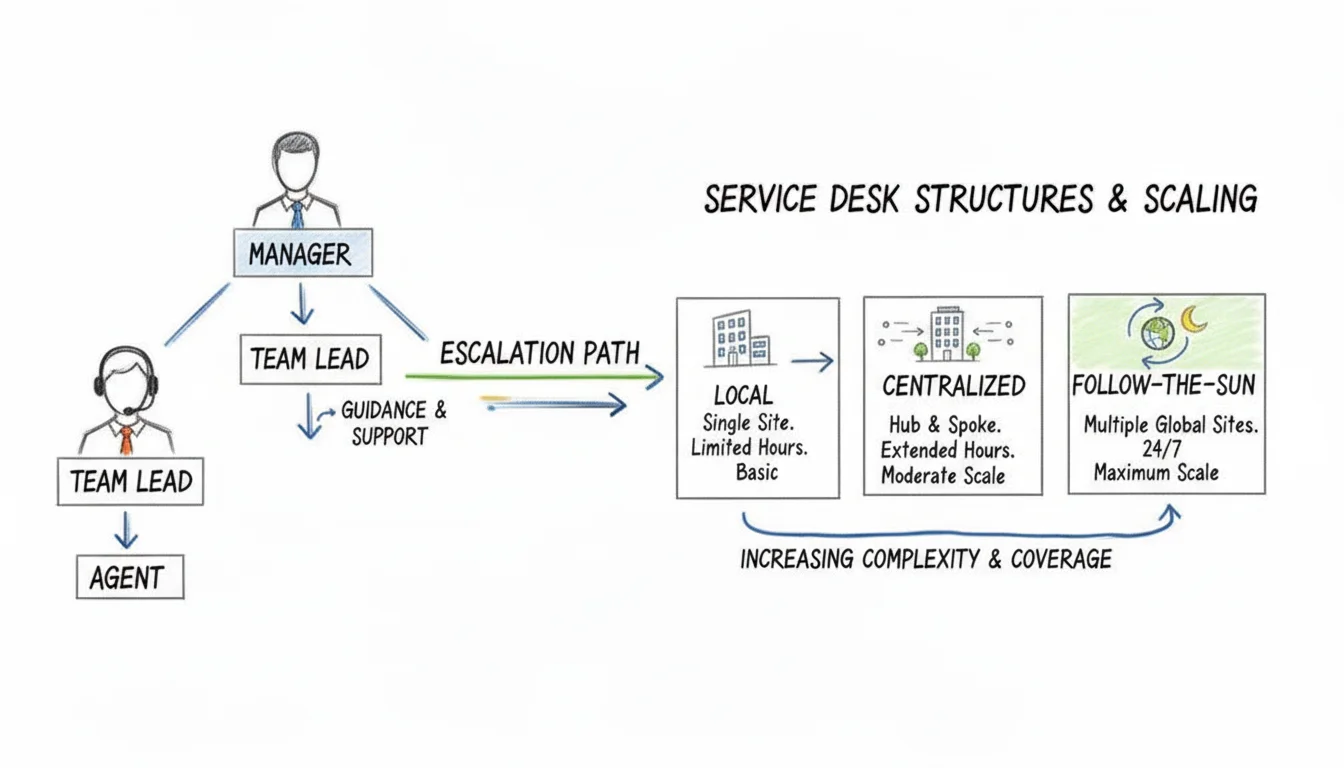
Any great service desk hinges on two things: having the right people in the right seats and an organizational structure that actually helps them do their job. A service desk isn't some anonymous ticket queue; it’s a team of real people, organized to provide reliable, consistent support. Getting a handle on these roles and structures is the key to understanding how a service desk truly works and grows, and how you might progress your career within an IT department.
Think of it like a well-run restaurant. You have servers, a head chef, and a manager. Each person has a specific job, but they all work together to deliver a great experience. A service desk is no different.
 Caption: Visualizing the key roles and organizational models, from individual agents to global "follow-the-sun" support structures.
Defining the Core Service Desk Roles
Let's break down the essential positions that make up the backbone of any high-performing service desk. Understanding these roles is crucial for grasping how an IT department functions and for career planning in IT operations.
-
Service Desk Agent (Level 1 Analyst): These are your frontline responders. They're the first voice a user hears, tasked with logging incidents, handling routine requests, and knocking out common issues with help from the knowledge base. Their big goal? A high First Contact Resolution (FCR) rate. This role is often an entry point for those new to IT support.
-
Service Desk Team Lead: The team lead is both a mentor and the first point of escalation for the agents. They jump in on trickier technical problems, manage the day-to-day ticket flow, keep an eye on SLAs, and coach the agents to help them grow. This role requires a blend of technical expertise and leadership skills.
-
Service Desk Manager: This person is all about the big picture. The manager oversees the entire service desk operation, from digging into performance metrics and managing budgets to setting the long-term strategy. They make sure the service desk is pulling in the same direction as the rest of the business and always getting better. This role often requires a strong understanding of ITSM frameworks like ITIL and business acumen.
Common Service Desk Organizational Models
As a company grows, so do its support needs. Service desk structures are designed to flex and adapt, whether that means supporting a single office or providing 24/7 coverage around the globe. Certification exams might test your knowledge of these models in various organizational contexts.
The structure of a service desk is not one-size-fits-all. The right model depends entirely on the organization's size, geographic distribution, and the specific needs of its users.
Here are three common models, each with a simple analogy to make sense of it:
-
Local Service Desk (The Neighborhood Shop): In this setup, the service desk team is physically located right alongside the users they support. This is fantastic for hands-on help and building relationships (e.g., an IT team supporting a single university campus), but it gets expensive fast and is tough to scale across multiple sites.
-
Centralized Service Desk (The National Call Center): Here, one team supports everyone from a single, central location. This approach is way more efficient and cost-effective, making it easier to standardize processes and manage resources. It's the go-to model for most medium and large businesses seeking to optimize their IT support.
-
Follow-the-Sun (The 24/7 Global Network): Built for global giants, this model uses multiple service desks in different time zones to provide seamless, round-the-clock support. As the team in London clocks out, the team in Sydney is just getting started, ensuring someone is always there to help. This model is critical for businesses with global operations that cannot afford downtime.
This global, distributed approach is quickly becoming the new standard, especially as companies face talent shortages and high turnover. The global help desk outsourcing market is projected to swell from nearly $10 billion to $18.3 billion by 2033, driven by a search for stability and savings. This is underscored by the rise of nearshoring to Latin America, where shared services are hitting an 87% satisfaction rate, easily outpacing other regions. You can dig deeper into these help desk outsourcing trends from Auxis.
You can't manage what you don't measure. It's an old cliché, but in service desk management, it's the absolute truth. To evolve from a simple, reactive help desk into a strategic partner for the business, you have to get serious about tracking the right data. This isn't just about counting how many tickets you close; it's about digging into the numbers that reveal how efficient you are, how happy your users are, and how well you're actually performing.
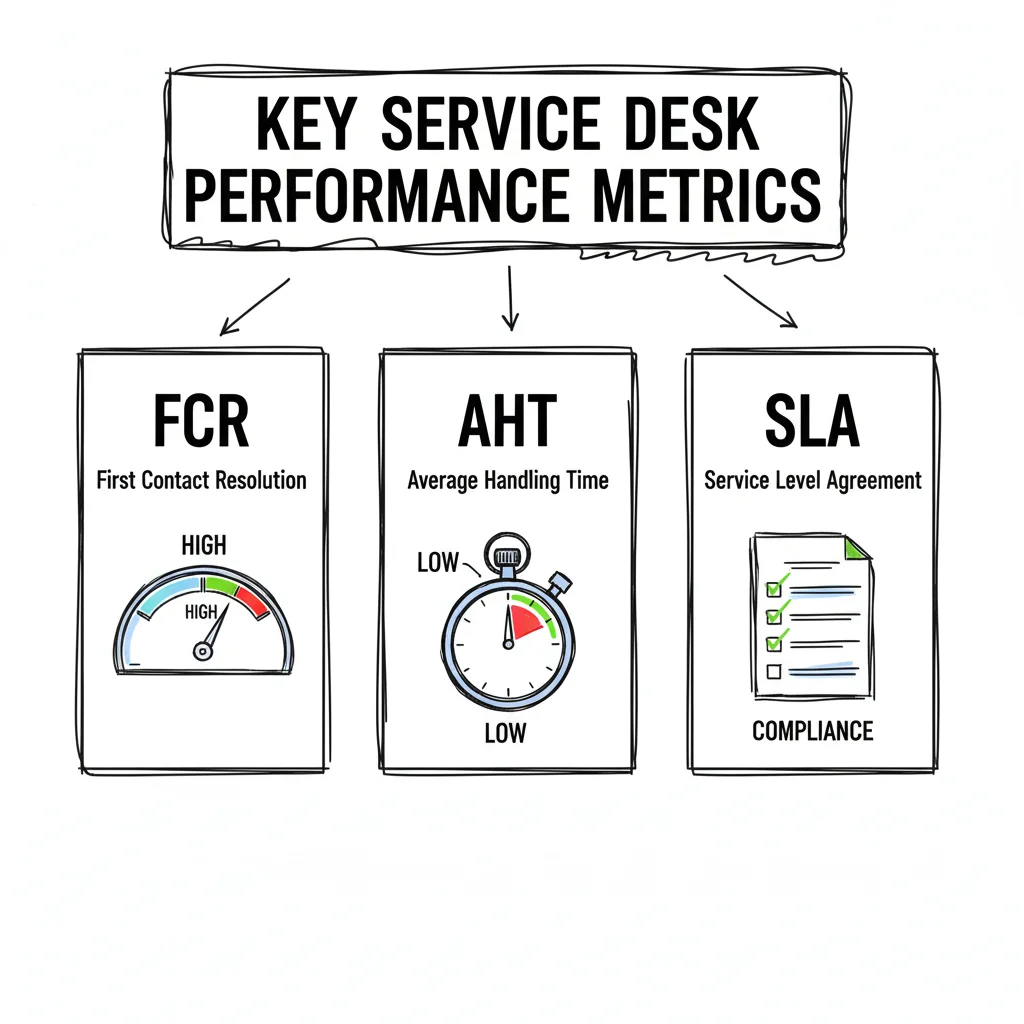 Caption: Key metrics like First Contact Resolution (FCR), Average Handle Time (AHT), and Service Level Agreements (SLAs) are vital for evaluating service desk performance.
Getting a firm grasp on these metrics is non-negotiable for any IT pro, especially if you're gearing up for exams from ITIL, CompTIA, PMP, or ServiceNow. Performance measurement is always a major focus, so let's cut through the jargon and look at the critical numbers that really define service desk success.
Differentiating SLAs, OLAs, and KPIs
Before we jump into the raw numbers, it's crucial to understand the framework that gives them meaning. Think of these three elements as working in concert to set clear expectations and then measure how well you're meeting them. This distinction is a frequent topic in ITIL and other service management certifications.
-
Service Level Agreements (SLAs): This is your formal promise to the end user or the business. An SLA is a contract that clearly defines the level of service to expect, spelling out things like response times and resolution targets for different issues. For example, an SLA might guarantee that a critical system outage will get a response within 15 minutes and be resolved within 4 hours. Breaching an SLA can have financial penalties or impact customer trust.
-
Operational Level Agreements (OLAs): While SLAs are external-facing, OLAs are internal handshakes. An OLA lays out how different IT teams—like networking, infrastructure, and applications—will collaborate to help the service desk meet its SLA promises. An OLA might require the networking team to fix an escalated router issue within two hours, ensuring the overall SLA isn't breached. Without robust OLAs, internal handoffs can become bottlenecks.
-
Key Performance Indicators (KPIs): These are the specific, hard numbers you track to see if you're hitting the targets defined in your SLAs and OLAs. KPIs are the raw data that tells you, without ambiguity, whether you're on track or falling behind. For example, "First Contact Resolution Rate" is a KPI that helps gauge efficiency and user satisfaction.
To really get to grips with these agreements, our detailed guide explains what a Service Level Agreement is and how it all fits together.
The Most Important Service Desk KPIs
You could track dozens of different metrics, but a handful of core KPIs will give you the clearest snapshot of your service desk's health. Focusing on these ensures you're measuring what actually moves the needle for both your team's efficiency and the business's bottom line. For certification candidates, knowing these KPIs and their significance is essential for understanding service delivery.
A great service desk doesn't just track metrics; it uses them to tell a story about performance, identify areas for improvement, and demonstrate its value to the entire organization.
Below, we'll break down the essential KPIs that every service desk manager should have on their dashboard.
Essential Service Desk KPIs Explained
Tracking the right KPIs turns raw data into a powerful story about your service desk's performance and value. Here are the most critical metrics to watch.
| KPI (Key Performance Indicator) | What It Measures | Why It Matters for the Business / Certification Relevance |
|---|---|---|
| First Contact Resolution (FCR) | The percentage of tickets resolved by the Tier 1 agent during the initial interaction, with no need for escalation. | High FCR is a direct indicator of efficiency and user satisfaction. It means users get their problems solved quickly, minimizing productivity loss. The industry benchmark for FCR is around 74%. For ITIL, a high FCR demonstrates efficient service operation and reduces costs by preventing escalation. |
| Average Handle Time (AHT) | The average duration of a single transaction, from the moment an agent picks up a call or ticket until all related work is completed. | AHT is a key productivity metric for agents. While a low AHT is good, it must be balanced with FCR and user satisfaction to ensure quality isn't sacrificed for speed. Often studied in conjunction with call center efficiency and resource allocation for CompTIA A+ and ITIL. |
| Ticket Volume Trends | The total number of incoming tickets over a specific period, often analyzed by day, week, or month. | Analyzing trends helps with resource planning and proactive problem management. A sudden spike in tickets related to a specific application might signal an underlying issue that needs attention, or indicate a need for more staffing. Essential for capacity planning and incident analysis in ITIL. |
| Customer Satisfaction (CSAT) | A measure of how satisfied users are with the support they received, typically collected via a post-interaction survey. | CSAT provides direct feedback on the user experience. It's the ultimate measure of service quality and helps identify agents or processes that need improvement. Directly aligns with ITIL's "Focus on Value" guiding principle and is a key measure of service success. |
| Cost Per Ticket | The total monthly operational cost of the service desk divided by the monthly ticket volume. | This metric connects service desk activities directly to the bottom line. Reducing cost per ticket through automation or improved processes demonstrates tangible financial value. Critical for IT financial management, often discussed in ITIL Service Strategy and Operations. |
By consistently monitoring these KPIs, you can move beyond simply fixing problems and start proactively improving the entire IT support experience.
How The Service Desk Fits Into ITSM And ITIL
*Caption: A concise explanation of how the service desk integrates with broader IT Service Management (ITSM) and the ITIL framework.*To really get a handle on service desk management, you have to see where it fits in the bigger IT picture. A service desk doesn't exist in a silo; it's the most visible, hands-on piece of two massive concepts in the tech world: IT Service Management (ITSM) and ITIL. This relationship is critical for certification exams, particularly ITIL.
Let's break it down with a simple analogy.
- ITSM is the overall philosophy. It's the entire strategic mindset of managing an organization's technology as a collection of services that deliver value to the business. Think of it as the strategic blueprint for all IT operations.
- ITIL is the detailed playbook. It’s a globally recognized framework packed with best practices and proven processes for putting that ITSM philosophy into motion. It provides the "how-to" guide for achieving ITSM goals.
So where does the service desk land? It’s the front lines. The service desk is the single point of contact where all the high-level strategies of ITSM and the practical guidance of ITIL come together to actually help people. It's where the rubber meets the road.
The Service Desk As A Core ITIL Practice
In the most current version, ITIL 4, the "Service Desk" is officially defined as a key practice. It’s the designated channel for all communication between the IT department and the people it serves, capturing demand for everything from fixing broken things (incidents) to providing new things (service requests). Grasping this hierarchy is non-negotiable if you're studying for certifications, as it's a staple on exams. Questions often focus on the service desk's role in the service value chain.
For a deeper look at this framework, check out our guide on what ITIL service management is and how it works.
This tight integration means the service desk is far more than just a help line—it's a critical data-gathering machine. Every single interaction offers a goldmine of information about the health of IT services, user happiness, and where things can get better. This data feeds directly into one of ITIL’s most important guiding principles: continual improvement.
Putting ITIL Principles Into Action
The service desk is where ITIL's sometimes-abstract principles become real, everyday activities. For IT professionals pursuing ITIL certifications, this connection makes the concepts tangible.
The service desk doesn't just use ITIL; it is a living embodiment of ITIL's core principles. It transforms theoretical best practices into practical, value-driven outcomes for the business and its users.
Think about it. The ITIL principle of Focus on value is the daily mission of every service desk agent. Each ticket they close isn't just a task; it's an act of co-creating value by helping someone get back to their job, whether that's restoring access to a critical application or provisioning a new virtual machine.
Likewise, the principle of Start where you are is perfect for service desk management. Instead of trying to rip and replace everything at once, it encourages teams to look at their current workflows and find small, smart ways to improve. It's about evolution, not revolution, directly feeding into ITIL's continual improvement practice.
When you see this connection, it becomes clear that a well-run service desk is the engine that powers a successful ITSM strategy, with the ITIL framework serving as its trusted map.
Essential Best Practices For Service Desk Excellence
Knowing the theory behind service desk management is one thing, but putting it into practice is a completely different ballgame. The real magic happens when you translate those concepts into action—that’s what separates a service desk that just gets by from one that truly drives the business forward.
The best teams I've seen get there by sticking to a core set of best practices. These aren't just buzzwords; they're proven strategies for making things run smoother, keeping users happy, and making sure IT support is actually helping the company achieve its goals. If you're studying for an ITIL or ServiceNow certification, pay close attention—exam questions love to test your ability to apply these ideas to real-world situations.
Empower Users With Self-Service And Knowledge Management
One of the most powerful moves you can make is to give users the tools to help themselves. A solid self-service portal paired with a rich knowledge base is your best friend here. This combination deflects all those common, repetitive tickets and frees up your agents to dig into the really tough problems. This is a classic example of ITIL's "Optimize and automate" guiding principle.
But for this to work, your knowledge base can't be a digital graveyard of outdated documents. It needs to be a living, breathing resource that’s constantly getting better.
- Make Knowledge Creation a Habit: Get your agents into the habit of creating or updating a knowledge article every time they close a ticket with a new solution. This could be anything from a step-by-step guide for configuring a new VPN client to troubleshooting a common error in an HR application.
- Let AI Do the Heavy Lifting: Modern service desk tools, like those found in ServiceNow, can scan an incoming ticket and automatically suggest relevant articles to both the user and the agent. It’s a huge time-saver and can significantly boost First Contact Resolution (FCR) rates.
- Track What Works: Keep an eye on which articles people are actually using and ask for feedback. This is the only way to make sure the content stays useful and current.
When you do this right, your First Contact Resolution (FCR) rate will naturally go up because agents have proven fixes right at their fingertips, and users can find answers independently.
Relentlessly Focus On The Customer Experience
At the end of the day, the true measure of your service desk is how happy your users are. It’s easy to get lost in technical stats like ticket volume, but you have to shift your focus to the overall customer experience. This means making every single interaction as painless and effective as possible. A huge part of this involves implementing strategies for exceptional customer support to ensure you’re not just solving problems, but building trust. This aligns directly with ITIL's "Focus on value" principle.
The best service desks don't just close tickets; they build relationships. They understand that behind every ticket is a person trying to do their job, and the goal is to help them succeed with minimal friction.
To make this happen, you have to constantly ask for feedback and, more importantly, act on it. Simple post-ticket surveys are great for measuring Customer Satisfaction (CSAT). Read the comments to find patterns—maybe a process is confusing, or a specific agent needs a bit more coaching—and then make real changes based on what you learn. This iterative improvement is key to delivering consistent value.
Standardize Processes With Proven Frameworks
Consistency is the foundation of a reliable service. You can’t have different agents handling the same issue in completely different ways. This is where a framework like ITIL (Information Technology Infrastructure Library) comes in, giving you a structured, repeatable guide for managing everything from incidents and problems to changes. Standardizing processes is crucial for scalability, efficiency, and meeting compliance requirements.
You don't have to boil the ocean and implement all of ITIL at once. Start with the fundamentals:
- Standardize Incident Logging: Make sure every ticket captures the same key pieces of information, every single time. This might include the user's name, contact info, asset ID, the exact error message, and steps already taken.
- Define Priority Levels: Create a simple, clear matrix for prioritizing tickets based on their business impact and urgency. No more guesswork. For example, a critical system outage impacting all users might be "Priority 1 - Urgent," while a non-urgent software installation request might be "Priority 4 - Low."
- Establish Escalation Paths: Document exactly who gets a ticket and when it needs to be escalated, clearly defining the hand-off points between Tier 1, Tier 2, and Tier 3 support.
Getting these basic workflows standardized ensures every user gets a consistent quality of service. It also cuts down on mistakes and makes it way easier to train new hires and measure your team's performance accurately. These foundational practices are heavily emphasized in ITIL Foundation exams.
Got Questions? We've Got Answers
Even with a solid plan, a few questions always come up when you start getting into the weeds of service desk management. Let's tackle some of the most common ones to clear up any confusion, especially if you're new to this or studying for an exam.
What’s The Real Difference Between A Help Desk And A Service Desk?
People throw these terms around like they're the same thing, but the difference is all about strategy and scope. Think of a help desk as tactical. It’s reactive, focused on the immediate "break-fix" stuff that pops up. Your laptop won't connect to the printer? Call the help desk. It's the emergency room for your day-to-day tech problems, primarily focused on restoring service.
A service desk, on the other hand, is strategic and much broader. It’s the central hub for all IT services, built around frameworks like ITSM and ITIL. It doesn't just fix problems; it manages the entire service lifecycle. This includes handling incidents, fulfilling service requests (like getting a new hire set up with software or provisioning a new cloud resource), managing changes, and building a knowledge base. In short, a help desk is just one piece of what a full-fledged service desk does, designed for a more holistic approach to IT service delivery.
How Are Automation And AI Changing The Service Desk Game?
Automation and AI are fundamentally shifting how service desks operate, moving them from reactive to highly proactive and efficient. Instead of having skilled analysts tied up with password resets all day, these technologies handle the repetitive, high-volume tasks. AI-powered chatbots can answer common questions around the clock, using natural language processing to understand user queries, and self-service portals let users handle simple requests on their own time.
It's predicted that by 2029, agentic AI will be able to autonomously resolve 80% of common customer service issues without a human ever getting involved. This completely frees up the team to focus on bigger, more complex problems.
Beyond that, machine learning algorithms can sift through mountains of ticket data to spot trends, automatically categorize tickets, and even predict major incidents before they take down a critical business service (e.g., flagging unusual server load patterns in an AWS environment). This means faster resolutions, lower costs, and happier users, representing a significant advancement in IT service delivery.
What Are The First Steps To Setting Up A Successful Service Desk?
Jumping straight into buying new software is a classic mistake. A successful service desk starts with a solid strategy, adhering to principles like ITIL's "Start where you are" and "Progress iteratively with feedback."
Here’s a simple starting path:
- Define Your Goals: First, figure out what the business actually needs from IT support and get a real understanding of what your users are trying to accomplish. What value should the service desk deliver?
- Map Your Processes: Next, sketch out your core processes. How will you actually handle an incident from start to finish? What does the workflow for a new software request look like? Documenting these current states is crucial.
- Choose the Right Tool: Then, find an ITSM tool (like ServiceNow, Jira Service Management, or BMC Helix) that fits the processes you just defined and has room to grow. Don’t try to shoehorn your process into a tool that wasn’t built for it.
- Set Clear Roles & SLAs: Finally, define who does what on your team and establish a few simple Service Level Agreements (SLAs). This sets clear expectations from day one and gives you a baseline to measure your performance against. This also provides the foundation for ongoing continual improvement.
Ready to master these concepts and ace your certification exams? MindMesh Academy provides expert-led study guides and evidence-based learning tools for ServiceNow, CompTIA, AWS, and more. Start your journey at ITIL 4 Foundation Practice Exams.

Written by
Alvin Varughese
Founder, MindMesh Academy
Alvin Varughese is the founder of MindMesh Academy and an enterprise architecture leader. An electrical engineer by training, he moved from factory automation in South Africa to cloud architecture at GE Appliances and Humana (Fortune 50), and holds 20 professional certifications including AWS Solutions Architect Professional, Azure DevOps Engineer Expert, and Microsoft Agentic AI Business Solutions Architect. He built MindMesh Academy after interviewing too many highly certified candidates who couldn't answer basic questions: the goal is prep that makes you better at the job, not just able to pass the exam.