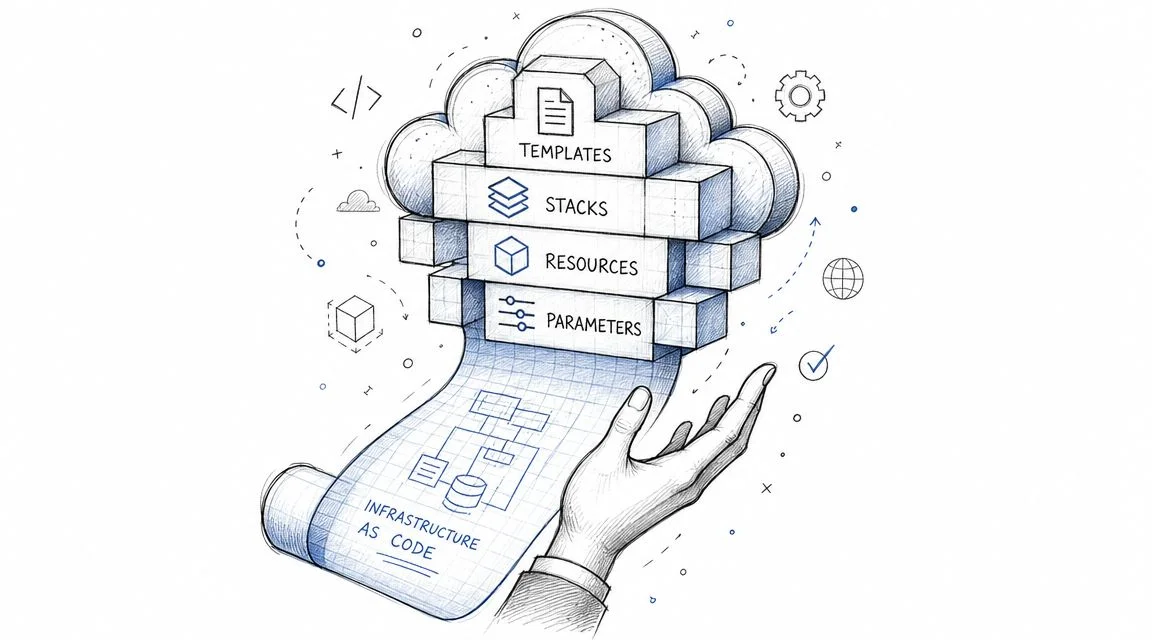
What Is Cloud Formation? AWS IaC Guide for 2026
What is AWS CloudFormation? Your Guide to IaC
AWS CloudFormation is AWS's Infrastructure as Code (IaC) service, helping you define and deploy AWS resources using simple text templates. If you currently set up environments by clicking through the console, CloudFormation offers a repeatable, controlled alternative to that slow, error-prone process.
If you're studying for an AWS certification, you've likely seen this pattern. Questions often focus on repeatable deployments, preventing configuration drift, or scenarios involving stack rollback, change review, or failed production updates. CloudFormation is foundational to many of these concepts.
For exam prep, don't view CloudFormation as simply 'that YAML tool.' Instead, approach it as a methodology. AWS wants you to understand how infrastructure can be declared, deployed consistently, reviewed safely, and governed centrally. This is precisely what CloudFormation helps achieve.
What Is CloudFormation and Why It Matters
Manual infrastructure setup often fails in predictable ways. One engineer might create an S3 bucket with encryption enabled, while another forgets. A test environment could have one security group rule, production another, and no one notices until deployment day. The longer a team relies on manual, click-by-click setup, the harder it becomes to understand what truly exists.
AWS CloudFormation addresses this by allowing you to define infrastructure in a text file and deploy it as code. Instead of guessing, "I think I created an EC2 instance, a subnet, and a load balancer," you describe the exact desired state in a template, and AWS provisions it for you.
This is why certification exams focus on it. CloudFormation isn't just about automation. It provides repeatability, consistency, and control.
Why AWS professionals keep coming back to it
CloudFormation has been available for a long time, which is significant. It launched on February 25, 2011, supporting JSON templates. AWS later added YAML support in 2016, making templates easier for many teams to read and write, as noted in the AWS CloudFormation history overview.
This timeline reveals something important for the exam: CloudFormation is not a minor feature. It's a mature, foundational AWS service that many other AWS tools are built upon.
CloudFormation is easiest to understand when you think of it as version-controlled infrastructure. If the template is correct, the environment can be recreated.
The practical why
In practice, CloudFormation helps teams:
- Standardize environments so development, test, and production follow the same design.
- Reduce human error because engineers aren't manually repeating the same setup.
- Support governance by making infrastructure changes visible and reviewable.
- Improve teardown discipline because resources can be removed in an organized way.
For exam questions, remember this distinction: CloudFormation is AWS's native declarative IaC service. 'Declarative' means you define the end state—you don't script every low-level action. You tell AWS what the final infrastructure should look like, and the service handles the provisioning logic. This distinction is often key to selecting the correct answer.
Decoding CloudFormation Core Concepts
CloudFormation becomes clearer once you separate the design from the deployed result. Consider a house: The blueprint is the plan on paper. The house itself is the finished structure where people live. In CloudFormation, the blueprint is the template, and the finished house is the stack.

AWS describes CloudFormation as a declarative service: you define the desired end state in a template, and CloudFormation provisions and manages the resources. This declarative approach helps prevent configuration drift and supports repeatable environments, as explained in the AWS CloudFormation User Guide.
The terms you must know
Template A text file written in JSON or YAML that describes the AWS resources you want.
A template is your source of truth. If an exam question asks what contains the resource definitions, parameters, and outputs, the answer is the template.
Stack The deployed collection of resources created from a template.
If the template is the recipe, the stack is the actual meal. When you create, update, or delete resources using CloudFormation, you're typically interacting with a stack.
Resources The individual AWS components CloudFormation creates, such as an S3 bucket, IAM role, or EC2 instance.
Resources are the core of the template. No resources means no real infrastructure.
Supporting pieces that confuse many learners
Parameters allow you to supply input values at deployment time. Instead of hardcoding a bucket name or environment name, you pass it in, making a single template reusable.
Mappings store lookup values within the template. They are useful when a template needs to select values based on region or environment. Candidates often confuse these with parameters. The simple distinction is: parameters are user input, while mappings are predefined within the template.
Outputs expose useful values after deployment. For example, a stack might output a bucket name or load balancer DNS name, allowing another team or system to use that information.
Conditions allow CloudFormation to decide whether to create a resource or apply a property based on specific logic. A common example is creating a resource only within a production environment.
A simple mental model
Use this simple chain to understand the flow:
- Template defines the infrastructure plan.
- Parameters customize that plan for specific deployments.
- Resources are the actual AWS components created.
- Stack is the running collection of those deployed resources.
- Outputs report useful details after deployment is complete.
This mental model also helps when considering broader infrastructure strategies, such as managed IT infrastructure solutions, where consistency and operational control outweigh one-off manual setups.
If you can explain the difference between a template and a stack without hesitation, you've cleared one of the most common AWS exam stumbling blocks.
The CloudFormation Workflow in Action
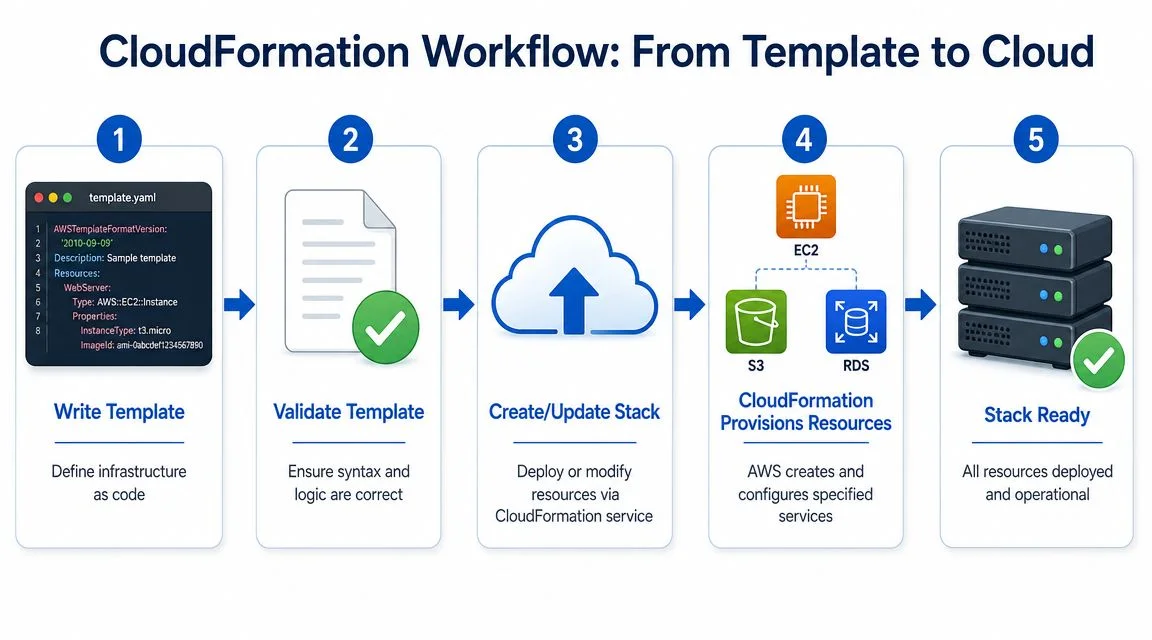
A template on its own doesn't do anything. Its value emerges when you move it through the lifecycle of create, update, and delete.
A typical workflow starts with a YAML template stored in Git. An engineer validates it, deploys it as a stack, reviews the events, and later updates it when the architecture changes. This integrates CloudFormation into everyday delivery, making it more than a one-time setup tool.
Here's the flow at a glance.
Creating a stack
You start by submitting a template to CloudFormation. AWS then reads the declared resources, determines dependencies, and begins provisioning.
One of the operational strengths here is speed and order. CloudFormation can provision independent resources in parallel. If any resource fails during creation, it can roll back the entire stack to maintain a clean, stable environment. This behavior helps maintain a clean, stable environment.
This exam detail matters: if AWS asks which service can automatically reverse a failed infrastructure deployment at the stack level, CloudFormation is a strong candidate.
Updating safely
Organizations rarely create infrastructure once and leave it untouched. They update it—perhaps by adding bucket versioning, changing instance size, or attaching a new IAM policy.
This is where Change Sets become important. A change set lets you preview what CloudFormation is about to do before you apply an update. For certification questions, consider change sets a risk-reduction feature, helping you review the potential impact before execution.
Practical rule: If an exam question mentions “reviewing infrastructure changes before deployment,” look for Change Sets.
Later in a pipeline, you might combine template validation, change review, and deployment into one controlled workflow. This video offers a useful walkthrough of the process in action.
Deleting a stack
Deletion is one of CloudFormation's most underrated features. In many environments, resource creation gets documented, but teardown is often forgotten. CloudFormation makes deletion systematic because the stack represents a managed collection of resources.
This is valuable for labs, testing, and temporary environments. For certification scenarios, remember this phrase: deleting the stack typically deletes the resources managed by that stack, unless a specific retention behavior is configured.
Analyzing a Sample CloudFormation Template
The fastest way to understand CloudFormation is to inspect a small template and read it as AWS would. Below is a simple YAML example that creates an S3 bucket and returns its name as an output.
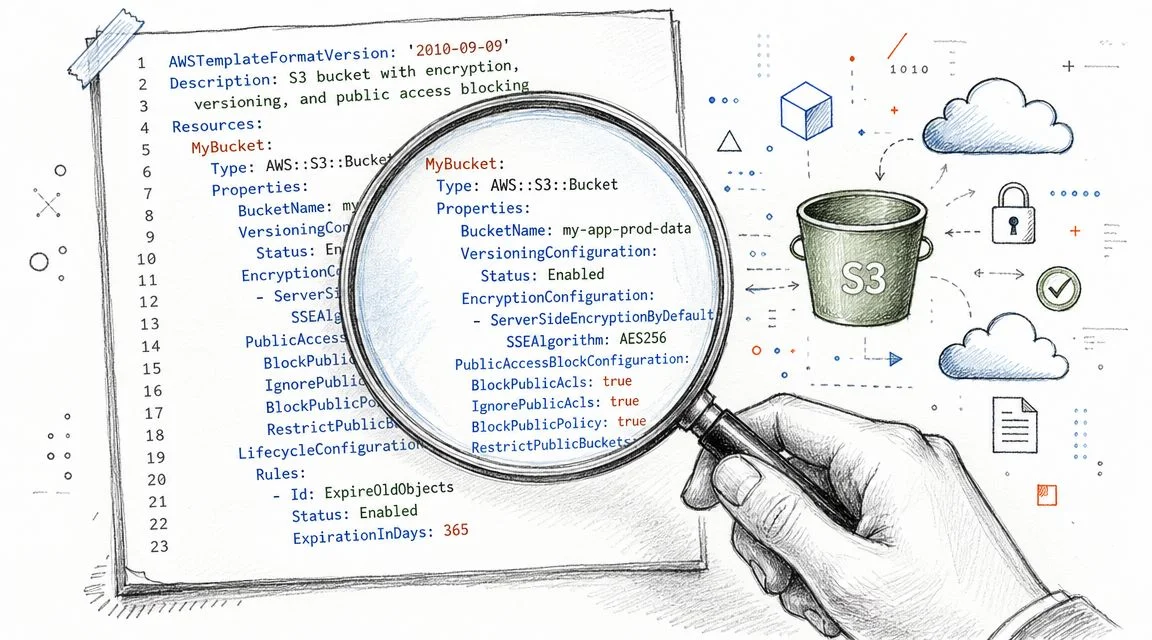
AWSTemplateFormatVersion: '2010-09-09'
Description: Simple S3 bucket example

Parameters:
  BucketName:
    Type: String
    Description: Name of the S3 bucket

Resources:
  MyBucket:
    Type: AWS::S3::Bucket
    Properties:
      BucketName: !Ref BucketName

Outputs:
  BucketOutputName:
    Description: The created S3 bucket name
    Value: !Ref MyBucket
Read the template from top to bottom
The first line declares the template format version. For the exam, you typically don't need to memorize this line thoroughly, but you should recognize it.
The Description field is optional but helpful, giving humans a quick summary of the stack's purpose.
Next comes Parameters. This template asks for BucketName during deployment, meaning you can reuse the same file for different environments without rewriting the template.
What the resource block actually does
The Resources section is where CloudFormation creates actual infrastructure. Here, the logical ID is MyBucket, and its type is AWS::S3::Bucket.
Inside Properties, the bucket name comes from !Ref BucketName. This line can initially confuse many students. !Ref means "use the value of this parameter or resource." In this case, it pulls the parameter value supplied during deployment.
When you see
!Ref, ask yourself, “Is this pointing to a parameter or to another resource?” That usually clears up the confusion.
Why outputs matter
The Outputs section returns useful information after the stack completes deployment. Here, it outputs the created bucket's name.
While this may seem minor, outputs become very useful in larger environments. They allow other stacks, scripts, or engineers to consume values without manually looking them up. For exams, outputs often appear in questions about stack integration and post-deployment visibility.
A good study habit is to take this exact template and modify it in three ways:
- Add a second parameter for environment naming.
- Create another resource such as a bucket policy.
- Return another output that a downstream stack could use.
This kind of hands-on practice makes understanding syntax questions much easier.
CloudFormation vs Other IaC Tools like Terraform
AWS exams sometimes test your judgment, not just your memory. You may understand what CloudFormation does, but you also need to know when it's the better fit and when another IaC tool makes more sense.
The most common comparison is CloudFormation vs. Terraform. Both define infrastructure as code. Both support repeatable deployments. However, their design choices differ.
CloudFormation and Terraform side by side
| Attribute | AWS CloudFormation | HashiCorp Terraform |
|---|---|---|
| Primary focus | AWS-native infrastructure as code | Multi-cloud and cross-platform infrastructure as code |
| Syntax | JSON or YAML | HCL |
| State handling | Managed through AWS stack model | Uses Terraform state |
| AWS integration | Deep native integration with AWS services and permissions | Strong AWS support, but not AWS-native |
| Best fit | AWS-centric organizations | Multi-cloud or hybrid environments |
| Governance model | Strong alignment with AWS-native controls | Flexible across providers |
How to choose in real life
Choose CloudFormation when your environment primarily lives in AWS and you want native integration with AWS services, IAM patterns, and AWS-specific features. It's often the straightforward answer in certification scenarios that emphasize AWS-managed services and native governance.
Choose Terraform when a team needs to manage AWS alongside other cloud providers or non-AWS platforms using a single workflow. That broader reach is its primary advantage.
Some teams don't choose one exclusively; they combine tools within a larger automation approach. For a broader view of that ecosystem, this article on how to use Ansible and Terraform together is a useful companion.
For the exam, don't overcomplicate the comparison. If the question points to deep AWS-native control, CloudFormation is usually the safer answer. If it points to multi-cloud standardization, Terraform often fits better.
Common Use Cases and Best Practices
CloudFormation is much easier to remember when you connect it to real tasks teams perform weekly. It isn't just for "creating resources." It supports how organizations build, repeat, and govern infrastructure over time.
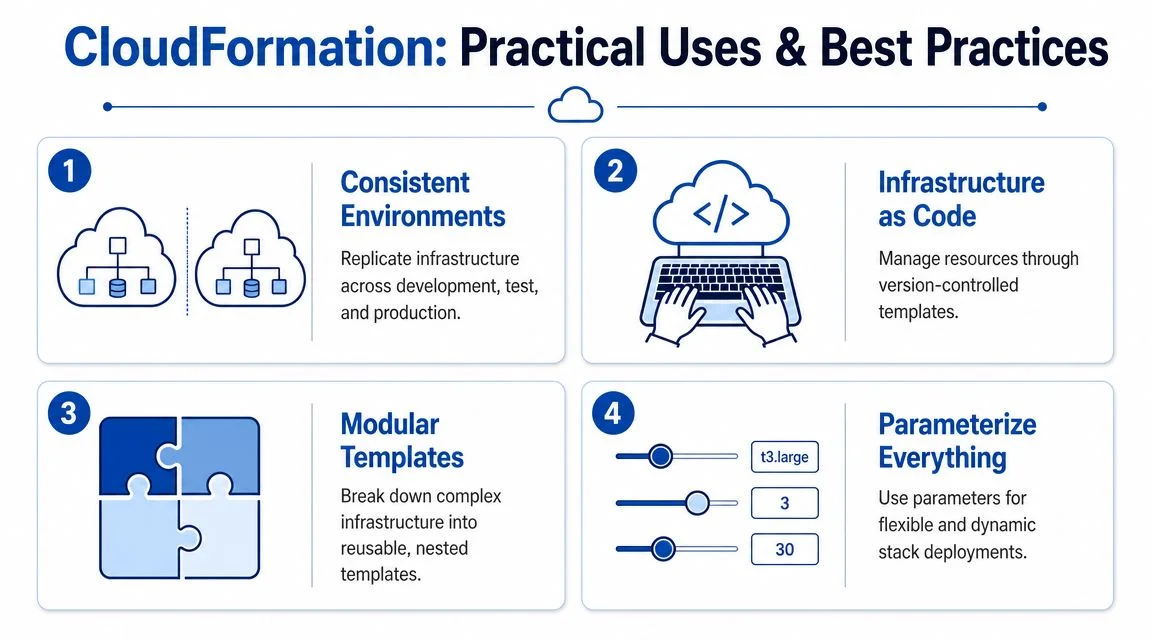
Common use cases you should recognize
A classic use case is consistent environments. When a team wants development, testing, and production to follow the same pattern, CloudFormation provides a single template-based method to deploy those environments repeatedly.
Another common use case is CI/CD-driven infrastructure. Teams store templates in Git, review changes, and deploy through pipelines instead of manual console clicks.
You'll also find CloudFormation supporting higher-level AWS tools. Services and frameworks like AWS SAM and eksctl rely on CloudFormation behind the scenes. This is useful context for exam questions that ask what's happening internally.
Best practices worth memorizing
Industry commentary notes that CloudFormation can reduce stack deployment time by up to 40% compared with manual provisioning. This helps explain why teams adopt it for scaled environments, as detailed in this CloudFormation efficiency summary.
This benefit is easiest to realize when teams follow solid habits:
- Parameterize templates so one template can work across environments without hardcoded values.
- Modularize large designs with nested stacks, keeping complex systems readable and reusable.
- Use StackSets when infrastructure must be deployed across multiple accounts or regions.
- Protect critical resources with stack policies and termination protection.
- Review before updating with change sets instead of pushing blind modifications.
What this looks like for learners and teams
If you're helping a small company move to AWS, CloudFormation often becomes part of the operating model, not just the migration itself. This guide for small business AWS migration provides useful context on how structured cloud adoption benefits from repeatable infrastructure practices.
For those studying beyond the associate level, a focused guide to AWS DevOps for IT professionals can help position CloudFormation within the larger DevOps toolchain, alongside deployment workflows, monitoring, and governance.
Advanced Exam Topics and Troubleshooting
Many certification questions become trickier at higher levels. You're no longer just asked what a template is, but what happens when governance, scale, or failure enters the picture.
Advanced topics that appear in harder questions
Nested stacks help break a large template into smaller, reusable pieces. StackSets solve a different problem: they push stack deployments across multiple accounts or regions. If an exam asks about centralized rollout at an organizational scale, think StackSets, not nested stacks.
Drift detection matters when someone changes infrastructure outside CloudFormation. The service can help identify whether the actual environment has diverged from the declared template. This is a favorite exam theme because it tests your understanding of the dangers of manual changes.
CloudFormation also extends beyond native AWS resources. It can manage third-party tools via public and private extensions, and CloudFormation Hooks can intercept deployments to enforce policy—such as blocking the creation of an unencrypted S3 bucket—as explained in this CloudFormation extensions and Hooks overview.
Hooks are easy exam bait because many candidates still think CloudFormation only creates AWS resources. It also participates in policy enforcement.
Common troubleshooting patterns
If a stack enters an UPDATE_ROLLBACK_FAILED state, don't guess. Check the stack events first; CloudFormation usually tells you which resource triggered the failure.
For circular dependency errors, inspect how resources reference each other. These occur when CloudFormation cannot determine a valid creation order.
For study practice on scenario-heavy questions, resources like MindMesh Academy AWS Developer exam prep can help you get used to how AWS phrases failure analysis and deployment-governance questions.
When troubleshooting CloudFormation, always think in this order:
- Read stack events.
- Identify the failing resource.
- Check references, permissions, and property values.
- Decide whether rollback behavior or change review would have prevented the issue.
MindMesh Academy offers certification prep across AWS and other IT tracks, including study guides, practice exams, and progress-focused learning tools for IT professionals who want to strengthen both exam performance and practical understanding. If you're building your AWS foundation or working toward a higher-level certification, sharpen your AWS skills and test your knowledge with our AWS Solutions Architect Associate practice exam.

Written by
Alvin Varughese
Founder, MindMesh Academy
Alvin Varughese is the founder of MindMesh Academy and an enterprise architecture leader. An electrical engineer by training, he moved from factory automation in South Africa to cloud architecture at GE Appliances and Humana (Fortune 50), and holds 20 professional certifications including AWS Solutions Architect Professional, Azure DevOps Engineer Expert, and Microsoft Agentic AI Business Solutions Architect. He built MindMesh Academy after interviewing too many highly certified candidates who couldn't answer basic questions: the goal is prep that makes you better at the job, not just able to pass the exam.