Exam Help for Reading Network Diagrams
Reading Network Diagrams for Certification Exams
When you're facing network diagrams on an exam, the first step is always to find the source, destination, and the specific question being asked. Only then should you trace the packet across each link, carefully checking subnet boundaries, VLAN membership, and routing decisions. Resist the urge to interpret every symbol before you understand which traffic flow truly matters.
For your next practice question, get into the habit of writing three key pieces of information next to the diagram: the source IP address and its prefix, the destination IP address, and the precise action you need to determine. This action might involve picking a next hop, finding a failed connection, or identifying an Access Control List (ACL) direction. If the wording feels unclear, practice finding the key clue in an exam question before diving into the topology analysis.
How to Read Network Diagrams for Exams
Think of a network diagram as a collection of facts, not a complete picture of everything the network can do. A line connecting two devices on the drawing only establishes a physical or logical link. It doesn't mean their interfaces are up, their VLAN settings agree, or that security rules permit traffic.
These skills directly support the network fundamentals and IP connectivity sections in Cisco's official CCNA exam topics.
Prioritize Interface and Link Labels Over Device Icons
While icons offer valuable context, the labels on interfaces and links usually hold the answer. A simple switch icon, for instance, doesn't tell you if the device also performs Layer 3 routing.
| Diagram Detail | What it helps you determine | What you shouldn't assume |
|---|---|---|
| IP address and prefix | Whether a destination sits on the source's local subnet | Similar-looking addresses always share the same subnet |
| VLAN ID | Which Layer 2 broadcast domain a port belongs to | All connected switches carry every VLAN |
| Access or trunk label | Whether the link serves a single access VLAN or carries specified VLANs | A trunk automatically routes between VLANs |
| Interface name | Where a route, address, or ACL applies | The left side of the drawing is always inbound |
| Gateway address | Where a host sends traffic for off-subnet destinations | The gateway must be a dedicated router |
| Link state or legend | Whether a path is usable under the stated conditions | Every visible line is currently forwarding traffic |
Effective exam preparation means turning these labels into a clear packet path, rather than just memorizing definitions. Focus on the details relevant to the question first; you can consider unrelated links and devices later.
Distinguish Between Physical and Logical Paths
A physical diagram illustrates cabling and device connections. A logical diagram, on the other hand, highlights relationships like subnets, VLANs, and routed networks. Exam questions might combine both views.
Two PCs can connect to the same switch but reside in different VLANs, preventing direct communication. Conversely, a single VLAN can span multiple switches via trunks that carry that specific VLAN. Neither physical proximity nor the number of switches tells you if routing is necessary.
Always mark every point where traffic needs to cross a Layer 3 boundary. This function could be handled by a router, a routing-enabled multilayer switch, or a firewall, depending on the configuration shown. Don't assign capabilities based solely on an icon.
Trace a Packet From Source to Destination
Follow the same sequence for every network topology you encounter. This method prevents you from prematurely jumping to a familiar-looking answer choice.
- Identify the traffic: Record the source, destination, and any specified protocol or port.
- Check the source subnet: Use the source device's IP prefix to decide if the destination is local or remote.
- Choose the first next hop: For a local destination, the host sends directly. Otherwise, it typically uses its configured default gateway.
- Check the Layer 2 path: Follow access ports, VLAN memberships, and relevant trunks to the next hop device.
- Check each routing decision: At every Layer 3 device, identify the matching route and the outgoing interface.
- Check policy and return traffic: Review any applicable filtering rules, then trace how the response packet gets back to the original source.
For IPv4 over Ethernet, Address Resolution Protocol (ARP) resolves the next hop's IPv4 address into a MAC address. Remember that this next hop isn't necessarily the final destination. If the destination is remote, the host normally resolves its gateway's MAC address.
When you're checking your reasoning, articulate each transition aloud: "The destination is outside this subnet, so the host sends the frame to its gateway." Getting a correct answer without this clear explanation might mean it was a lucky guess.
Calculate Subnet Membership Instead of Visual Guessing
Never assume different third octets automatically mean different subnets. For example, 10.10.2.10/23 and 10.10.3.20/23 both belong to the same 10.10.2.0/23 subnet. However, with /24 prefixes, these two addresses would belong to separate subnets.
Always use the prefix provided in the question. If an address, mask, or gateway is missing, first determine if the question actually requires it before inventing a value.
Worked Example: Finding the Next Hop and the Failure Point
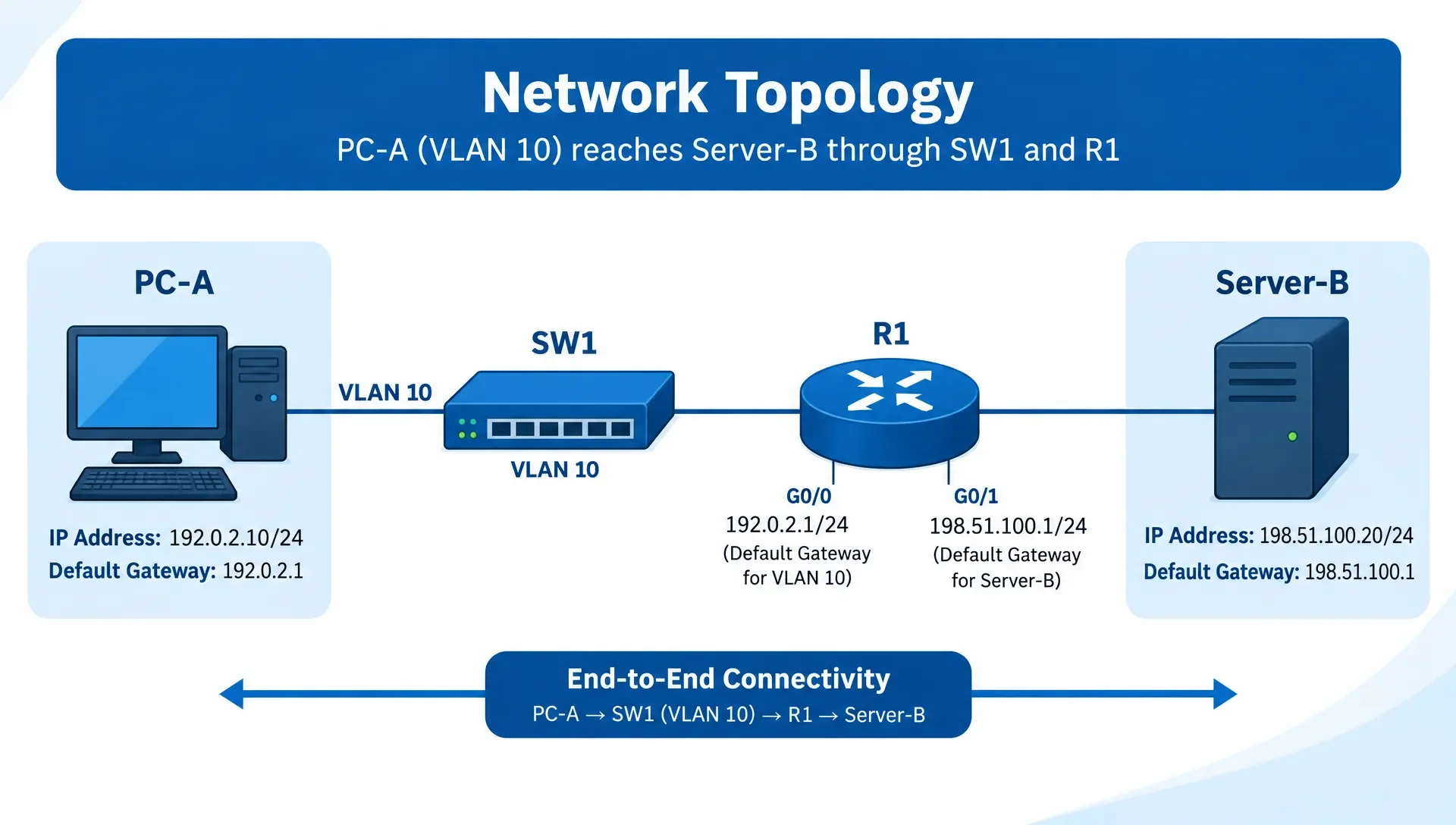
Let's look at this simplified IPv4 Ethernet network. Assume all interfaces are up, no ACLs block traffic, and no Network Address Translation (NAT) is configured. The router connects two directly attached networks.
| Device or Interface | Address or Configuration |
|---|---|
| PC-A | 192.0.2.10/24, default gateway 192.0.2.1 |
| SW1 | PC-A and router-facing ports are access ports in VLAN 10 |
| R1 G0/0, connected to SW1 | 192.0.2.1/24 |
| R1 G0/1, connected directly to Server-B | 198.51.100.1/24 |
| Server-B | 198.51.100.20/24, default gateway 198.51.100.1 |
Use this example to make three separate decisions: which address PC-A resolves, what changes at R1, and which configuration error could disrupt connectivity.
Which address does PC-A resolve with ARP?
PC-A compares the destination address (198.51.100.20) with its own /24 subnet (192.0.2.0/24). Since Server-B isn't in 192.0.2.0/24, PC-A selects its default gateway, 192.0.2.1, as the next hop.
Assuming its ARP cache lacks a usable entry, PC-A broadcasts an ARP request for 192.0.2.1. SW1 forwards this broadcast within VLAN 10. R1's G0/0 interface, which owns 192.0.2.1, replies with its MAC address.
PC-A then sends an Ethernet frame addressed to R1's G0/0 MAC address. Inside that frame, the IPv4 packet still carries 198.51.100.20 as its destination IP address.
This distinction is crucial: the destination MAC identifies the next hop on the local Ethernet segment, while the destination IP identifies Server-B. SW1's management IP, if it has one, isn't the gateway just because the frame passes through SW1.
What changes when R1 forwards the packet?
R1 removes the incoming Ethernet encapsulation and inspects the destination IP address (198.51.100.20). Its connected route for 198.51.100.0/24 points to G0/1.
R1 resolves Server-B's MAC address if necessary, then constructs a new Ethernet frame. This new frame uses R1 G0/1's MAC address as the source and Server-B's MAC address as the destination.
Without NAT, the source and destination IP addresses remain 192.0.2.10 and 198.51.100.20. The IPv4 Time-to-Live (TTL) value decreases by one when R1 forwards the packet.
When analyzing packet headers for exam questions, describe the two Ethernet segments separately. The frame entering R1 and the frame leaving R1 have distinct MAC addresses, even though they contain the same source and destination IP addresses.
Server-B sends its response traffic through its default gateway, 198.51.100.1, because PC-A's subnet (192.0.2.0/24) is outside Server-B's subnet (198.51.100.0/24). The response follows the reverse routed path in this example.
What if one configuration label changes?
Suppose PC-A's default gateway changes to 192.0.2.254, and no device owns that address. PC-A still identifies Server-B as a remote destination, but it can't resolve its configured gateway. The failure occurs before R1 ever receives the packet.
Now, restore the correct gateway but move PC-A's switch port into VLAN 20, while R1's switch-facing port stays in VLAN 10. Without an additional path between those VLANs, PC-A's ARP broadcast will never reach R1's G0/0 interface.
These two failures can produce similar symptoms, but they demand different solutions. One is a gateway configuration issue; the other is a Layer 2 separation problem. Always trace the packet until the first required operation fails, then evaluate the answer choices against that specific point of failure.
Read Routing Tables and ACLs Alongside the Diagram
A network topology identifies possible paths. Routing entries and security policies are what actually determine which of those paths a packet can use.
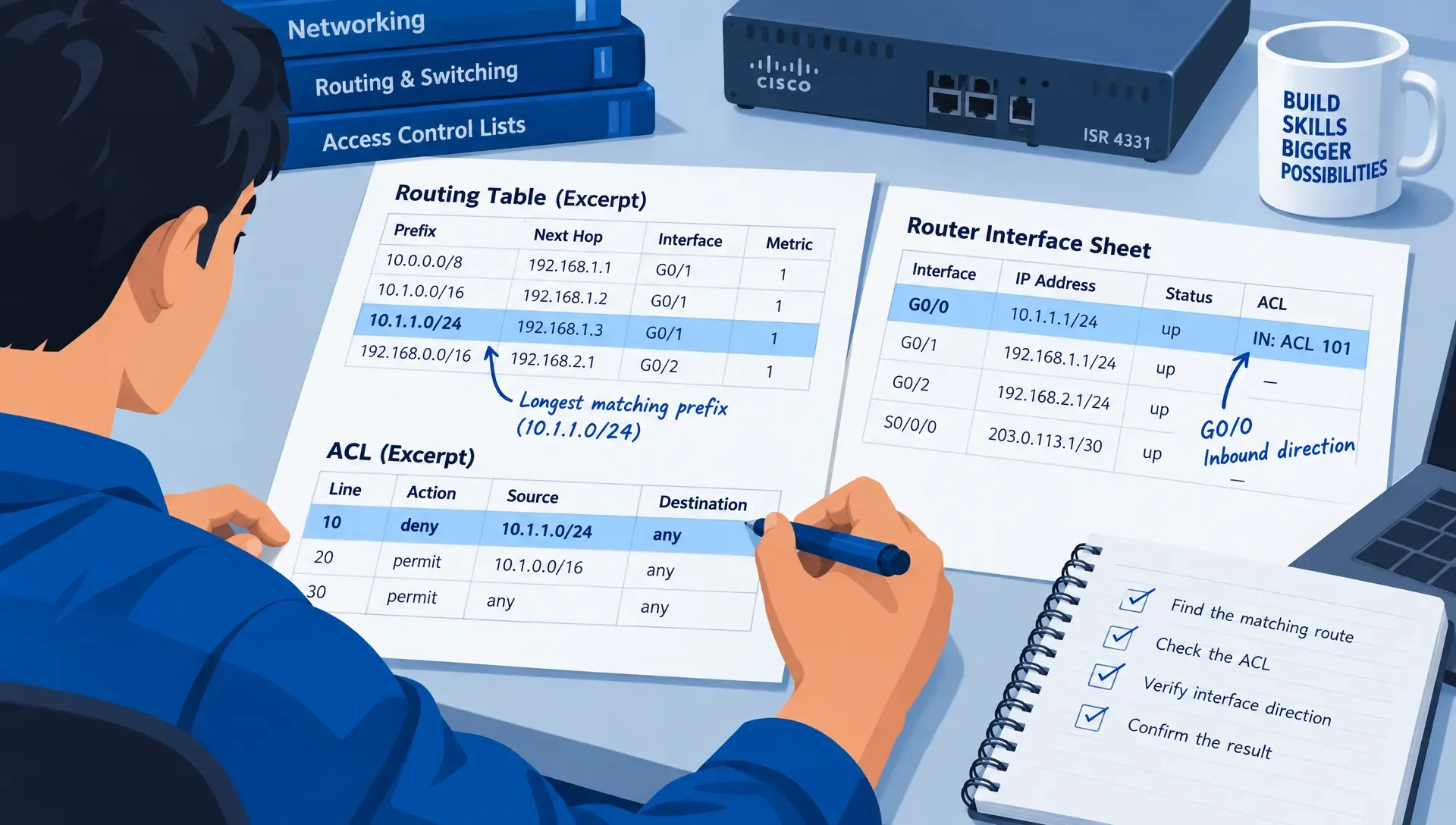
Select the Longest Matching Route
For this routing example, assume all three entries are installed in a router's table and their next hops are reachable. The destination IP address is 10.20.30.40.
| Installed Route | Next Hop | Does it match? |
|---|---|---|
10.20.30.0/24 | 192.0.2.2 | Yes, most specific match |
10.20.0.0/16 | 192.0.2.3 | Yes, less specific match |
0.0.0.0/0 | 192.0.2.254 | Yes, default route (least specific) |
The router chooses the /24 route because it has the longest matching prefix. It doesn't select the default route just because that route points towards an Internet or upstream-router icon on the diagram.
Cisco's route selection documentation clearly explains the difference between selecting routes for the routing table and choosing the longest matching installed route when forwarding traffic.
When studying route selection, keep these two decisions distinct. Administrative distance affects which routes get into the routing table, but it doesn't make a less-specific installed route win out over a more-specific matching route for packet forwarding.
Interpret ACL Direction from the Device's Perspective
For an interface-based ACL, "inbound" means the packet enters the device through that interface. "Outbound" means the packet leaves through it. These terms don't refer to left-to-right or right-to-left on a diagram.
In our worked example, traffic from PC-A to Server-B enters R1 on G0/0 and leaves on G0/1. Therefore, an inbound ACL on G0/0 and an outbound ACL on G0/1 can inspect this forward traffic. A G0/1 inbound ACL, however, applies to traffic entering R1 from Server-B's side.
For Cisco IOS IP ACL questions, also examine rule order and the implicit deny at the end. Cisco's IP access list configuration guidance details sequential matching and the implicit deny rule.
Always read source and destination fields in the direction of the packet you're currently evaluating. Return traffic reverses those endpoints. Don't assume a stateless ACL automatically permits a response just because it permitted the original request; always check the applicable rules and any explicitly stated stateful behavior.
Practice Network Diagrams Without Memorizing the Layout
Test your explanations, not just your multiple-choice answers. After solving a diagram question, cover the solution and write a concise packet trace. Include the initial gateway choice, each routed boundary crossed, and the return path.
Then, change one meaningful detail in the diagram. Move the source port to another VLAN, alter an IP prefix, or switch an ACL from inbound to outbound. Decide whether your original answer still holds true. A change to the page layout shouldn't affect your reasoning, but a change to the network configuration likely will.
This method complements practice strategies that avoid memorizing question patterns. You're testing your understanding of the relationships between labels, not your ability to recognize a familiar drawing.
If you miss a question, pinpoint the exact decision you got wrong: subnet membership, next-hop resolution, VLAN forwarding, route selection, or policy evaluation. Review that specific topic before attempting a different topology.
Once your packet traces are consistently accurate, use the Network+ exam readiness and strategy guide to integrate diagram work into your broader preparation. Only introduce timing constraints after you can consistently explain the path accurately.
Frequently Asked Questions
What should I look at first in a network diagram question? First, pinpoint the source, destination, and the specific decision the question asks for. Then, read the relevant IP prefixes, gateway addresses, and interface labels. This helps narrow your focus to the traffic that matters.
How do I know if a packet needs a router? Compare the destination IP address with the source host's subnet using the provided prefix. If the destination is outside that subnet, it typically requires a gateway (router). Also, check VLAN membership: hosts that seem to share an IP subnet can still fail to communicate if they're separated at Layer 2.
Does a trunk link enable devices in different VLANs to communicate? No, not by itself. A trunk can carry traffic for multiple VLANs while maintaining their separation. Communication between VLANs requires an appropriate Layer 3 function and its configuration, along with any necessary policy permissions.
Why does the destination MAC address change while the destination IP stays the same? On a routed Ethernet path, each router constructs a new Ethernet frame for the next segment. The MAC addresses identify the endpoints of that specific segment. Without NAT, the IP packet retains its original source and destination IP addresses as it travels toward the final destination.
Where can I get help if I understand definitions but struggle with diagram questions? Look for practice questions that include detailed explanations of the forwarding path. Identify the first decision you made incorrectly, review that topic, and then attempt a different diagram. Simply repeating the same drawing until you remember the answer won't help you build transferable skills.
Check Your Packet Trace With CCNA Practice
For any topology, write down both the outbound and return paths before looking at the solution. Be sure to include the gateway choice, relevant VLANs, the route matched, and any ACL direction.
Then, use MindMesh Academy's CCNA practice exam questions and explanations to verify your reasoning. Your next study focus should be the first forwarding decision you couldn't justify, not every networking topic at once.

Written by
Alvin Varughese
Founder, MindMesh Academy
Alvin Varughese is the founder of MindMesh Academy and an enterprise architecture leader. An electrical engineer by training, he moved from factory automation in South Africa to cloud architecture at GE Appliances and Humana (Fortune 50), and holds 20 professional certifications including AWS Solutions Architect Professional, Azure DevOps Engineer Expert, and Microsoft Agentic AI Business Solutions Architect. He built MindMesh Academy after interviewing too many highly certified candidates who couldn't answer basic questions: the goal is prep that makes you better at the job, not just able to pass the exam.