CompTIA Security Plus Exam: Ultimate 2026 Guide
CompTIA Security+ (SY0-701) Exam: A Practical Study Guide
You're likely in one of two places right now. Either you already work in IT and want to move closer to security, or you're looking at cybersecurity from the outside, trying to figure out which certifications actually open doors.
That's where the CompTIA Security+ exam comes in. It's often the point where "I'm interested in security" turns into "I can prove I understand the basics employers expect." The exam can feel broad. It covers threats, architecture, implementation, operations, and governance. For many learners, that breadth feels intimidating.
It doesn't have to stay confusing. If you approach Security+ as a map of how real security teams think, and if you pair that with a study method built for retention, the exam becomes much more manageable.
Your Entry Point to a Cybersecurity Career
Many learners come to Security+ after building useful technical experience. Maybe you've worked help desk, desktop support, networking, cloud administration, or systems administration. You already understand users, outages, permissions, devices, and the pressure of keeping systems running. Security is often the next logical step.
The jump can still feel awkward. You know enough to see how important cybersecurity is, but you may not know how to prove that knowledge in a way hiring managers recognize. That's why Security+ matters. It gives structure to your learning and signals that you understand core security work, not just isolated tools.
If you're still sorting out where security roles can lead, it helps to explore cybersecurity career paths so you can connect certification effort to real job directions. Security+ is especially useful when you want a credential that sits near the beginning of that path but still carries weight.
A practical starting point is to treat Security+ as both a knowledge framework and a career filter. It helps you answer three questions:
- What security teams need to know: Not just malware names, but access control, secure design, incident handling, and risk thinking.
- What to study first: Security+ gives you a clear structure, so you're not jumping randomly between YouTube videos, blog posts, and lab screenshots.
- How to prepare with purpose: A focused system like CompTIA certification exam preparation can help organize your effort around exam goals instead of scattered notes.
Coach's view: If you can explain why a control exists, not just what it's called, you're already studying the right way.
Security+ isn't the final destination. It's the point where your IT background starts turning into a cybersecurity identity.
Understanding the CompTIA Security+ Certification
Imagine you're scanning a job posting for a junior security analyst role. It asks for familiarity with threats, access control, incident response, and risk. Then you see a line that appears again and again across early-career listings: Security+.
That pattern matters because CompTIA Security+ validates broad, vendor-neutral security knowledge. It doesn't train you to work inside one company's product. It checks whether you can understand the security ideas that show up across many tools, teams, and environments. For someone building a cybersecurity career, that makes Security+ less like a product manual and more like a map of the field.
It also gives your study time structure. Many beginners collect notes from videos, flashcards, blogs, and labs without a clear system for deciding what to review next. Security+ helps solve that problem because the certification defines the core topics. An evidence-based study method then helps you retain them. This useful combination means the exam tells you what to learn, and spaced repetition plus adaptive review helps you keep it.
Who Security+ is for
Security+ fits learners who already work with technology and want a clearer path into security.
- IT support professionals who understand users, systems, and troubleshooting, and now need security context.
- System and network administrators who want to strengthen their defensive decision-making.
- Recent graduates who need a credential that signals practical baseline knowledge.
- Career changers who need a structured framework instead of scattered study.
Early security work often blends responsibilities. You might review permissions in the morning, investigate an alert after lunch, and help document a policy by the end of the day. Security+ matches that reality because it focuses on transferable security thinking.
Why employers pay attention
Employers use Security+ as a quick signal that a candidate has studied the shared language of cybersecurity. It doesn't prove expert-level ability, and it doesn't replace hands-on practice. It does show that you can discuss common controls, recognize security problems, and make reasonable first-step decisions.
That matters for hiring managers because entry-level candidates often come from different backgrounds. One applicant may have help desk experience. Another may come from college labs. Another may be changing careers from networking or systems administration. A certification with broad coverage gives employers a common reference point.
If you are still new to attack terminology, reviewing common types of cyberattacks for resellers can help you see the kind of threat patterns Security+ expects you to recognize at a foundational level.
What Security+ actually signals
Security+ signals readiness in several connected areas:
- Threat awareness: Identify common attack methods and defensive responses.
- Secure design: Understand how systems should be built and configured.
- Control implementation: Apply security in practice, rather than discussing it only in theory.
- Incident response basics: Know the first steps when something goes wrong.
- Risk and governance thinking: Connect technical choices to business and policy needs.
A useful way to view the certification is this: Security+ works like a foundation course in how defenders think. The exam isn't asking whether you memorized isolated terms. It's asking whether you can connect a problem, a control, and a response.
That's why many instructors encourage students to study in layers. First, learn the concept. Next, test recall with short review sessions over several days. Then apply it to a scenario. That approach reflects the way MindMesh Academy frames certification prep. Strong exam preparation comes from matching the exam blueprint with a learning system that helps knowledge stick.
Security+ earns attention because it gives beginners a practical study framework and gives employers a familiar benchmark. For many learners, it's the point where general interest in cybersecurity starts turning into disciplined, testable skill.
Deconstructing the Security+ Exam Objectives (SY0-701)
The SY0-701 version of Security+ is easier to handle once you stop seeing it as a giant list and start seeing it as a model of how defenders work. Security professionals don't solve problems in neat categories during the day. But the exam domains mirror the questions they repeatedly face: What can hurt us? How should we build systems? How do we secure them? What do we do when something goes wrong? How do we align all of that with business rules?
This graphic shows the high-level structure.
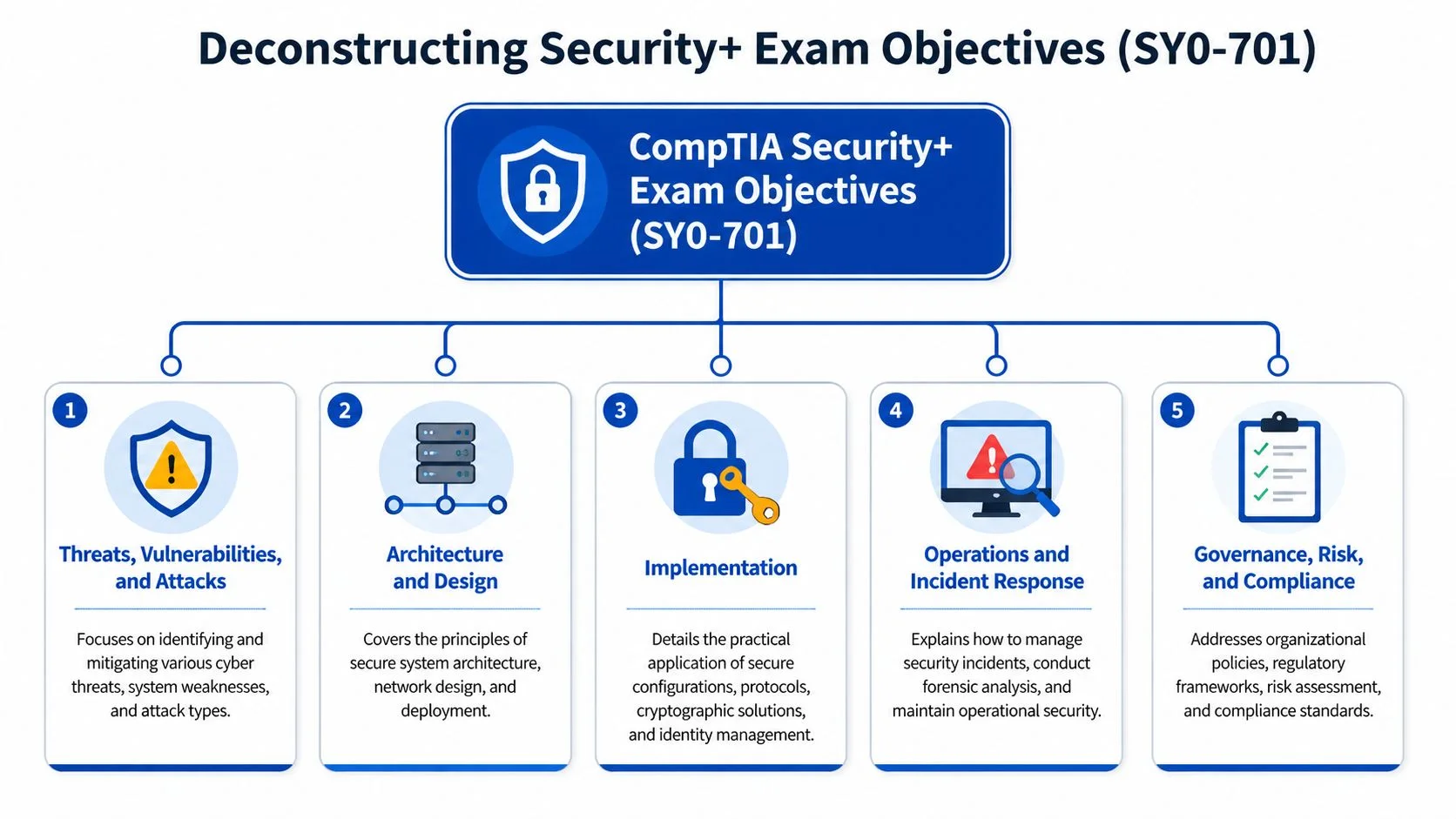
The five domains at a glance
| CompTIA Security+ (SY0-701) Exam Domains | Percentage of Exam |
|---|---|
| General Security Concepts | 12% |
| Threats, Vulnerabilities, and Mitigations | 22% |
| Security Architecture | 18% |
| Security Operations | 28% |
| Security Program Management and Oversight | 20% |
Threats are not trivia
Many learners start by memorizing lists of malware, social engineering types, and attack terms. That's a weak approach. The exam wants you to recognize patterns and choose the right defensive response.
If a phishing message tricks a user, that's not just a vocabulary item. It's a failure in user awareness, email security, identity controls, and response readiness. If you need a plain-language refresher on attacker behavior, this guide to common types of cyberattacks for resellers is useful because it frames attacks in terms of how they affect businesses, not just how they're named.
Think of this domain like learning to spot weak points in a building. You're not collecting labels for doors and windows. You're learning where intruders are likely to get in and what controls reduce that risk.
Security architecture prevents bad design
Architecture is where many students get abstracted into confusion. They read about segmentation, secure network design, cloud models, and resilience, then wonder what any of it looks like in real life.
Use a simple analogy. Architecture is the floor plan of your defense. If implementation is installing locks, architecture is deciding where the doors should be in the first place. A badly designed environment can't be saved by a few extra tools.
This domain pushes you to think before deployment. Where should sensitive systems live? How should access flow? What belongs in a more restricted zone? What design choices reduce blast radius if something fails?
Implementation makes security real
Implementation is practical. You're applying controls, configuring access, using secure protocols, supporting identity management, and working with cryptographic concepts. This is the domain where "I've heard the term" stops being enough.
A firewall is a useful example. Students often memorize that a firewall filters traffic. Better understanding sounds like this: a firewall acts like a bouncer who checks who gets in, where they're trying to go, and whether the request matches the rules. That mental model helps far more than reciting a definition.
Operations test your behavior under pressure
Security operations covers monitoring, incident response, forensic awareness, and the practical work of handling events. This is the domain that asks whether you can stay organized when something is wrong.
A strong exam answer often comes from asking, “What should the defender do first to reduce damage and preserve good decision-making?”
This is why logging, alert review, escalation, containment, and documentation matter. Security isn't only prevention. It's response.
Governance and oversight keep security from chaos
Many technical learners want to rush past policies, governance, risk, and compliance. Don't. This content exists because technical controls without business alignment usually fail.
Policies tell people what's expected. Risk management helps teams decide what needs the most attention. Compliance requirements shape how controls are documented and enforced. Governance makes security repeatable instead of improvisational.
If you struggle with this domain, connect it to familiar workplace behavior. Change control, acceptable use, least privilege, vendor reviews, and formal approvals are all governance ideas in action.
Mastering the Exam Format and Logistics
You sit down for the exam, the timer starts, and the first screen is a performance-based question instead of the quick multiple-choice warm-up you expected. That moment rattles candidates who studied the right topics but never trained for the experience of the test itself.
Security+ becomes much more manageable once you know the rules of the room. The exam includes up to 90 questions in 90 minutes, uses multiple-choice and performance-based formats, and requires you to work under time pressure without losing accuracy. Treat that format as part of your study plan, not as a detail to glance at the night before.
That distinction matters because exam success has two parts. You need to know the material, and you need a method for recalling and applying it on command. That's why strong preparation uses the exam blueprint together with evidence-based practice, such as spaced review for definitions and repeated scenario drills for judgment.

What the question types demand
Multiple-choice questions test recognition, comparison, and decision-making. The challenge is that Security+ rarely asks for a bare definition. It usually wraps the concept in a short situation and asks for the best next step, the strongest control, or the most likely explanation.
Performance-based questions (PBQs) test whether you can use the concept. A PBQ may ask you to interpret logs, place controls in the right order, match tools to tasks, or make choices inside a small simulated environment. If multiple-choice is like identifying the right tool on a workbench, a PBQ is closer to using that tool on a real task.
Students often freeze because PBQs feel different, not because they are impossible. The fix is practice that mirrors the exam. Review short scenarios. Explain your reasoning out loud. Revisit missed questions after a delay so your brain strengthens the weak spot instead of just rereading the answer.
Handling the clock without rushing
Time pressure hurts judgment when you treat every question like a puzzle that must be solved immediately. A better approach is to treat the exam like triage.
Use this sequence:
- Read for the task word first. Look for phrases like best, first, most secure, or least privilege. They tell you what kind of answer the exam wants.
- Answer clean wins quickly. If you know it, select it and move on.
- Flag time-heavy questions. A stubborn item can steal minutes from easier points later in the exam.
- Return with a narrower lens. On your second pass, eliminate clearly wrong choices and compare the remaining options against the exact wording.
- Save a few minutes for review. Small wording mistakes are common under pressure.
This works well with adaptive study habits. If you keep missing identity questions or log analysis scenarios in practice, spend more review cycles there than on topics you already answer correctly. That's the same principle MindMesh Academy emphasizes: study time should follow evidence, not guesswork.
Registration and scheduling basics
The logistics are simple if you handle them early.
- Set up your testing account through the official registration process and confirm the exam code before checkout.
- Choose your delivery option based on how you focus best. Some candidates prefer a test center. Others prefer online proctoring from home.
- Book your date from your study progress, not your optimism. If your practice scores are inconsistent, give yourself more time.
- Read the testing rules in advance. Online exams have workspace, webcam, and check-in requirements. Test centers have arrival and ID rules.
- Run a systems check early if you plan to test online.
Your previous networking study can help here too. Candidates coming from CompTIA Network+ content often find the testing style familiar, even when the security scenarios are more demanding.
One last coaching point. Schedule the exam only after your review system is already working. If your calendar says "study" but your method is mostly rereading, fix the method first. A good date supports preparation. It doesn't create it.
Your Evidence-Based 90-Day Study Plan
You sit down for a practice set after a week of steady studying. The first few questions feel familiar. Then a scenario asks for the best control in a messy real-world situation, and suddenly the facts in your notes feel scattered. That gap is the core challenge of Security+. The exam isn't just asking, “Have you seen this term before?” It's asking, “Can you recognize the pattern, recall the right concept fast, and choose well under pressure?”
That's why your study method matters as much as your study hours. Many candidates put in real effort and still feel stuck because they rely on rereading, highlighting, and passive video watching. Those methods can create recognition, but Security+ rewards recall and application. As noted earlier, first-time candidates who prepare without a structured approach often struggle. A better plan trains memory on purpose and adjusts to your weak spots before exam day exposes them.
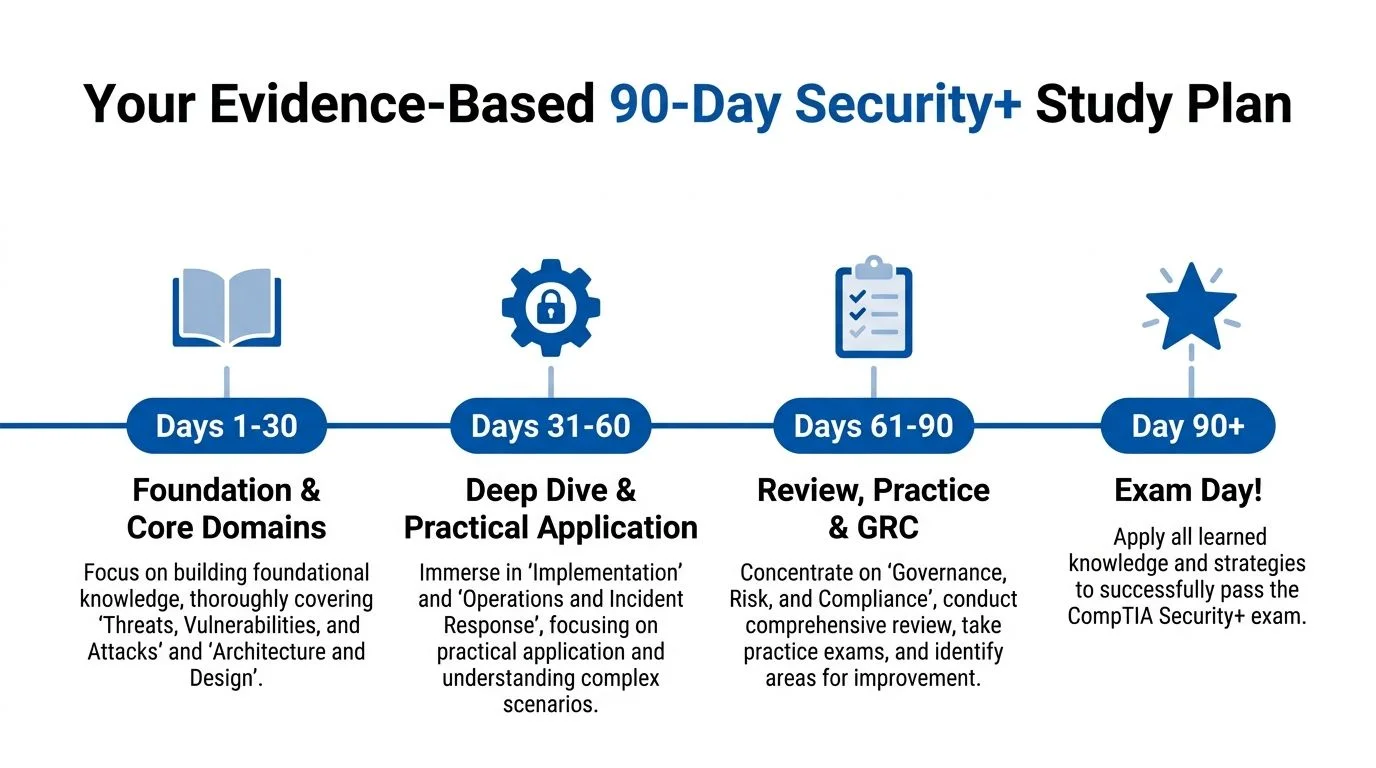
This timeline gives you a practical rhythm.
Why spaced repetition beats cramming
Your brain treats security knowledge in layers. Some facts are simple labels, like acronyms or port-related concepts. Others are decision rules, like choosing the best authentication method or identifying the first incident response action. If you cram, those layers blur together. If you review in spaced intervals, the brain has to pull the answer back up after a short period of forgetting. That retrieval strengthens memory.
A gym analogy helps here. One marathon workout leaves you sore. Repeated sessions with recovery build strength. Spaced repetition works the same way for memory.
For Security+, this approach helps most with:
- Acronyms and terminology
- Control comparisons
- Protocol and authentication concepts
- Incident response sequences
- Risk and governance language
Adaptive learning adds the second half of the system. Instead of giving every topic equal time, it gives more review cycles to the areas where your performance says you need help. That matters because weak areas rarely announce themselves clearly. A student may feel “pretty good” about identity and access management, then miss every question that compares federation, SSO, and privileged access controls. Adaptive review catches that pattern early.
A structured platform can support that process by combining question practice, flashcards, and progress tracking in one place. MindMesh Academy uses that model by centering study around practice questions, spaced repetition, and adaptive review, so learners can spend more time fixing weak areas and less time repeating what they already know. If your networking base still feels shaky, reviewing related CompTIA Network+ content can help, because many Security+ topics become clearer once subnetting, routing, ports, and common protocols feel natural.
A 90-day rhythm that builds confidence
Ninety days works best when you treat it as three distinct phases. Each phase has a job. If you try to do everything at once, your study plan turns into a pile of materials instead of a training system.
Days 1 to 30: Build the mental framework
The first month is for understanding the map. Focus on broad security concepts, common threat types, vulnerabilities, mitigations, architecture, and foundational operations. Go slower than you think you need to.
A strong weekly pattern looks like this:
- Study new material on most days: Keep sessions focused and consistent.
- Review older material briefly every day: Short recall sessions beat passive rereading.
- Use flashcards for high-friction terms: Acronyms, command uses, and similar-looking concepts belong here.
- End the week with mixed questions: Train topic switching early.
Many students make the same mistake in this phase. A topic sounds familiar, so they assume it's learned. Familiarity is only the first step. You want recall, then explanation, then application.
Days 31 to 60: Shift toward use, not exposure
The second month is where knowledge starts behaving like skill. Spend less time copying notes and more time working through scenario questions, explaining your reasoning out loud, and checking why the wrong options are wrong.
Use a simple loop:
- Read a topic.
- Answer questions on that topic.
- Write down what confused you.
- Review only those weak points.
- Test yourself again later in the week.
That loop works because it closes the gap between “I read it” and “I can use it.” It also creates feedback, which is the missing ingredient in many study plans.
Study checkpoint: If you can explain a control in plain English, compare it to a similar control, and say when you would use it, you're getting close to exam-ready understanding.
Days 61 to 90: Become exam preparation, not just content study
The final month is for tightening recall, improving speed, and cleaning up weak domains. By now, governance, risk, and compliance topics usually make more sense because you can connect policy decisions to technical controls you already studied.
Your main tasks in this phase are:
- Mixed-domain practice sessions.
- Targeted review of repeated mistakes.
- PBQ-style practice.
- Short daily flashcard review.
- One final pass through your weakest topics.
Keep your resource list small here. Too many books, videos, and practice banks can create conflicting wording and muddy your judgment. Pick a few trusted materials and use them with discipline.
A weekly template you can actually maintain
A realistic plan beats an ambitious one you abandon after ten days.
| Day | Focus |
|---|---|
| Monday | New topic study and short recall review |
| Tuesday | New topic study and topic-specific questions |
| Wednesday | Flashcards and weak-area review |
| Thursday | New topic study and scenario practice |
| Friday | Mixed review across earlier topics |
| Saturday | Longer practice session and error analysis |
| Sunday | Light review or rest |
Rest is part of studying. Memory consolidation needs it. If your brain is overloaded, an extra two hours of tired reading often produces less than twenty minutes of focused recall.
Use the plan like a coach uses game film. Track misses. Review patterns. Adjust the next week based on evidence, not mood. That's how a broad exam becomes manageable. Over ninety days, small accurate corrections add up to confidence you can trust.
Exam Day Strategies and Your Career Next Steps
By exam day, your goal isn't to feel zero nerves. Your goal is to channel preparation into calm decisions. Anxiety often comes from trying to force certainty on every question. Security+ doesn't require that. It requires enough clarity to choose the best answer available.
This process view helps keep the day in perspective.
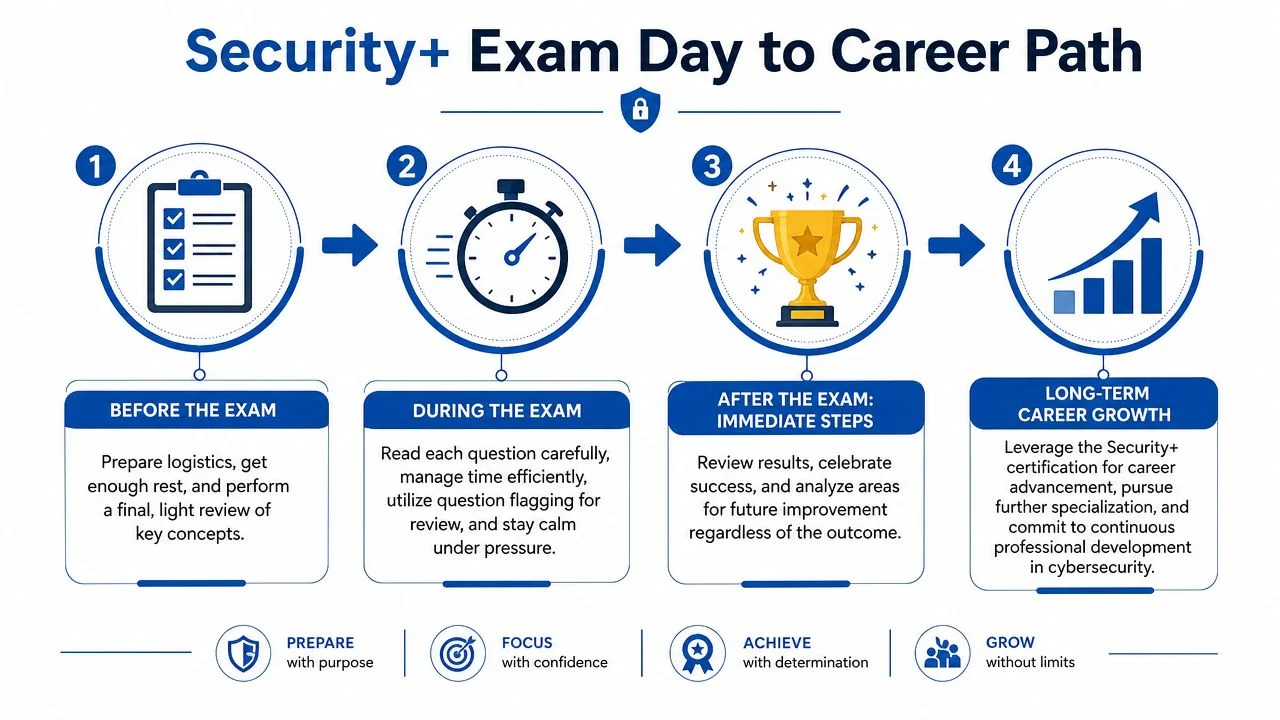
What to do before and during the test
Keep the final day simple. Don't try to learn fresh material in a panic. Review lightly, confirm your logistics, and protect your energy.
A few exam-room habits make a real difference:
- Read the actual question first: Scenario wording can be long. Find what the item is asking.
- Watch for qualifiers: Words like best, first, most likely, and least effective change the answer.
- Treat PBQs strategically: If one is eating too much time, move on and return later.
- Use flagging well: Flagged questions are not failures. They're time-management tools.
- Stay procedural: Solve the question in front of you. Don't replay the one you just struggled with.
For a quick visual reset before exam day, this walkthrough is worth a look:
What passing changes
Passing Security+ doesn't mean you're finished learning. It means you've crossed an important threshold. You now have a recognized credential that supports movement into entry-level and early-career security roles, especially positions where foundational security knowledge matters alongside IT operations skills.
That can strengthen your profile for positions such as:
- Security analyst
- Systems administrator with security responsibilities
- SOC support or junior security operations work
- Technical support roles with a security focus
Just as important, Security+ gives you a stronger base for future study. If your long-term path points toward leadership, architecture, or advanced security management, broader resources like CISSP study materials can help you see how foundational concepts expand into deeper professional practice.
Passing Security+ isn't proof that you know everything. It's proof that you can think in security terms and keep building from there.
If the result isn't what you wanted
If you don't pass, don't turn one result into a verdict on your future. Treat it like an incident review. What domains felt weak? Did timing hurt you? Did PBQs throw you off? Did you study actively or mostly consume content?
That mindset matters in cybersecurity work too. Strong professionals don't deny mistakes. They analyze them and improve the system.
Frequently Asked Questions About the Security+ Exam
A common moment for Security+ candidates looks like this: You open your notes after work, see acronyms from five domains, remember that the exam includes PBQs, and wonder whether you're already behind. That feeling is normal. The fix isn't more panic or more tabs. The fix is a clearer map.
Is Security+ hard for beginners?
Security+ can feel difficult at first because it tests judgment, not just recall. You need to recognize what a control does, why it fits a situation, and what risk it reduces.
That said, beginners pass it every cycle.
The students who make steady progress usually do three things well. They build the basics first, review over time instead of cramming, and practice retrieving answers from memory. Spaced repetition helps you keep terms and concepts. Scenario questions help you apply them. Together, those methods make a wide exam feel more manageable.
What version of the exam should I study for?
If you are studying now, use materials written for SY0-701. Exam versions matter because domain weighting, terminology, and example scenarios can shift. Studying from the wrong version is like practicing with an outdated network diagram. Some parts still look familiar, but key paths have changed.
Before you commit to a book, course, or question bank, confirm that it clearly says SY0-701.
How long is the exam and what score do I need?
Security+ gives you 90 minutes to work through the exam. The passing result is a scaled score of 750.
Those numbers should shape your study method. Do not study only for accuracy. Study for recognition speed too. A good rhythm is short timed sets during the week, then longer mixed sessions on weekends. That trains both recall and pacing.
What kinds of questions appear on the exam?
You should expect both multiple-choice questions and performance-based questions, often called PBQs. PBQs ask you to do something with the knowledge, such as interpret a scenario, place controls correctly, or work through a configuration-style task.
PBQs work like a lab practical in a classroom. Memorizing a definition helps, but it's not enough by itself. You need to connect the concept to an action. That's why active practice matters more than rereading. If your study routine includes flashcards for recall, mixed quizzes for discrimination, and scenario drills for application, you are preparing in the same way the exam tests.
What if I fail on the first attempt?
Treat the result like a troubleshooting report. Look at weak domains, identify whether the problem was content gaps, timing, or PBQ discomfort, and rebuild your plan around that evidence.
Many candidates improve on the second attempt because their studying becomes more precise. Instead of rereading everything, they review missed concepts more often, test themselves more frequently, and spend time on the question types that slowed them down.
How should I study if I'm busy and working full-time?
Use smaller sessions and repeat them consistently. Twenty to thirty focused minutes each day usually beats one exhausting weekend cram session.
A practical pattern is simple. Review old material briefly. Learn one small new topic. Then close your notes and recall what you just studied from memory. That cycle keeps cognitive load under control and helps information stick. Adaptive review also helps because it gives more time to weak areas and less time to what you already know.
Do I need hands-on experience before taking Security+?
No. You do not need a security job title before you sit for the exam.
Hands-on exposure still helps a lot. If you have supported users, reset permissions, worked with endpoints, used a ticketing system, or handled basic networking problems, you already have useful reference points. Security+ often makes more sense when you can tie a concept to a real task you have seen before.
Where should I start if I feel overwhelmed?
Start smaller than you think.
Pick one SY0-701 study guide, one trustworthy set of practice questions, and one review method you will consistently use. Then break the exam into weekly targets. One domain can become several smaller chunks. One chunk can become a few daily sessions. That's how a large certification becomes a process you can control.
If you want a structured way to prepare without relying on random notes and scattered tabs, MindMesh Academy offers certification study tools built around practice, spaced repetition, and targeted review. This kind of system helps turn a broad exam into a daily plan you can follow. Ready to get started? Explore the CompTIA Security+ (SY0-701) Study Guide on MindMesh Academy.

Written by
Alvin Varughese
Founder, MindMesh Academy
Alvin Varughese is the founder of MindMesh Academy and an enterprise architecture leader. An electrical engineer by training, he moved from factory automation in South Africa to cloud architecture at GE Appliances and Humana (Fortune 50), and holds 20 professional certifications including AWS Solutions Architect Professional, Azure DevOps Engineer Expert, and Microsoft Agentic AI Business Solutions Architect. He built MindMesh Academy after interviewing too many highly certified candidates who couldn't answer basic questions: the goal is prep that makes you better at the job, not just able to pass the exam.