
CompTIA IT Fundamentals Study Guide: Your 2026 Plan
CompTIA IT Fundamentals Study Guide: Your Current Study Plan
You’ve likely been here before: opening a browser tab, searching for beginner IT certifications, and quickly facing a pile of unfamiliar terms. Networking. Databases. Security. Operating systems. Perhaps you’re changing careers, still in school, or the family’s unofficial tech support, wondering if that interest could become a profession.
That's a common starting point for many.
The good news is that your first certification doesn't need to feel like an overwhelming leap. A strong CompTIA IT Fundamentals study guide should organize the subject, not intimidate you. It should clarify what's important, what can wait, and how to build understanding layer by layer.
For complete beginners, CompTIA ITF+ works well because it introduces the IT field broadly before asking you to specialize. You don’t need years of technical experience to begin. What you need is a plan, consistent practice, and a way to review what you learn before it slips away. MindMesh Academy aims to provide the structured support to make this process effective.
Your First Step into IT
Many new learners feel they're behind before they even start.
They compare themselves to people who already build PCs, write scripts, or talk comfortably about networks. Then they assume they need to catch up before they're "allowed" to study IT. This belief stops more people than the material itself.
CompTIA ITF+ gives beginners a clearer starting point. It was designed for people with no prior IT experience, which makes it less daunting than jumping straight into a more advanced credential. Instead of asking you to master one specialty, it helps you learn the fundamental language of technology first.
Consider someone switching from retail, teaching, or office administration into tech. On day one, deep specialization isn't usually their primary need. They need answers to simpler questions:
- What does hardware do?
- How is software different from an operating system?
- What is a database?
- Why does security matter in everyday work?
- How do all these parts connect?
That's why ITF+ builds confidence. It breaks down a vast subject into smaller, manageable categories.
Practical rule: Your first certification should reduce confusion, not increase it.
A good beginner plan also helps you see what comes after the exam. Once you understand the basics, paths like support, networking, and cybersecurity become clearer. If you want to accelerate your IT career with CompTIA certifications, it helps to begin with a credential that teaches the language of the field before advanced topics appear.
You don't need to know everything right now. You need a first foothold. This exam can provide exactly that.
Decoding the CompTIA ITF+ Exam Blueprint
Before you study, understand the rules of the game.
The CompTIA IT Fundamentals (ITF+) FC0-U61 exam is for beginners. It features multiple-choice questions, includes 75 questions, allows 60 minutes, and requires a passing score of 650 on a 900-point scale. This exam is specifically for individuals with no prior IT experience.
What the exam is really testing
This isn't an expert-level troubleshooting exam. It checks whether you understand the foundations of modern IT well enough to recognize terms, basic concepts, and common relationships between systems.
This matters because beginners often overstudy in the wrong way. They dive into advanced details when the exam actually asks, “Do you understand what this technology is, what it does, and where it fits?”
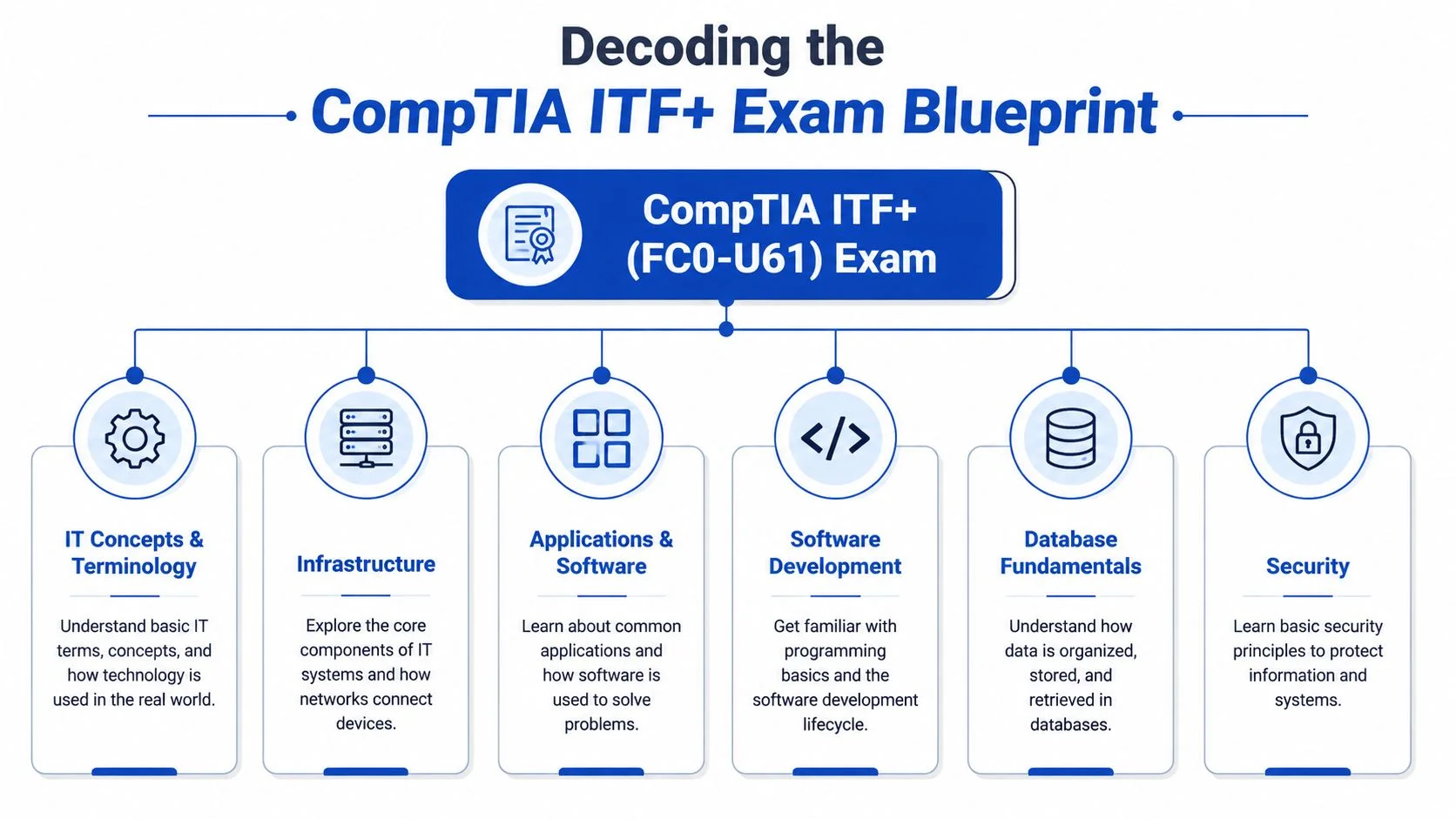
Here's a high-level map of the exam:
| Domain | Key Topics Covered |
|---|---|
| IT Concepts and Terminology | Basic computing ideas, common IT language, data and system basics |
| Infrastructure | Hardware components, devices, peripherals, setup, and basic networking environment |
| Applications and Software | Operating systems, application types, installation, removal, and software licensing |
| Software Development | Programming logic, algorithms, development ideas, and how software is created |
| Database Fundamentals | Tables, records, fields, and the basic purpose of databases |
| Security | Threat awareness, safe practices, access control, and foundational protection concepts |
How to think about the six domains
Each domain answers a different beginner question:
- IT Concepts and Terminology asks, “What are people in IT talking about?”
- Infrastructure asks, “What physical and technical pieces make a computer environment work?”
- Applications and Software asks, “What runs on a system, and how do users interact with it?”
- Software Development asks, “How do programs get built?”
- Database Fundamentals asks, “Where does data live, and how is it organized?”
- Security asks, “How do we protect systems and information?”
This structure is more important than most beginners realize. If you study domain by domain, the exam feels manageable. If you treat it like one giant subject called “IT,” it quickly becomes messy.
A note on exam versions
The FC0-U61 version was the active standard until the introduction of the Tech+ (Plus) FC0-U71 series in July 2024. If you're preparing now, always confirm which exam version you plan to take before buying materials or booking the test.
When study resources don't match your exam version, even good study time can become wasted study time.
Your blueprint isn't just a list. It's your boundary line. If a topic doesn't map back to the exam objectives, it likely doesn't need your attention yet.
Your 6-Week ITF+ Study Timeline
Most beginners do better with a paced schedule than with bursts of motivation.
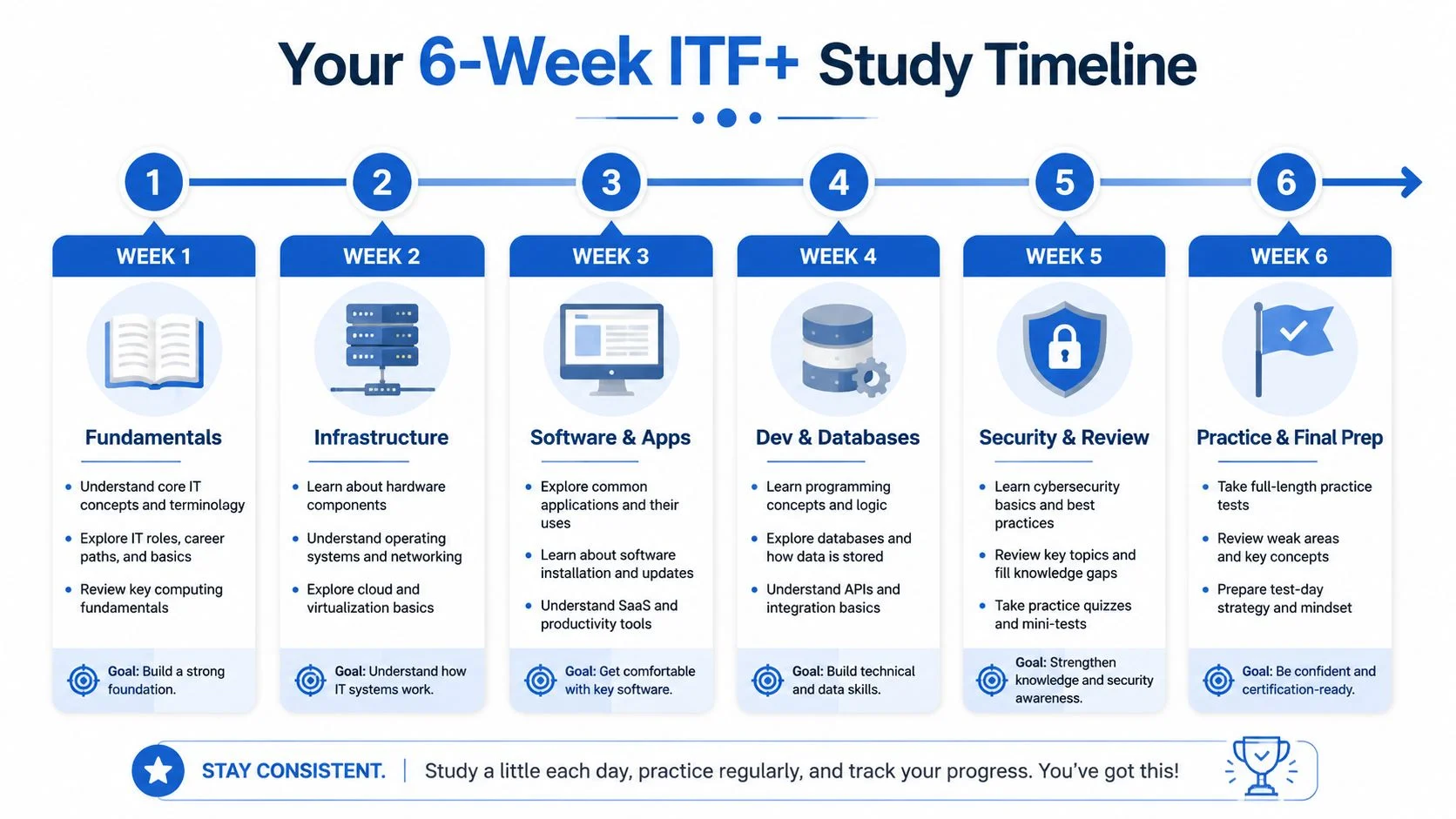
Preparation for ITF+ typically takes 4 to 6 weeks. Structured 6-week plans are commonly recommended to cover the six domains without overload. This timeline is long enough to build memory and short enough to keep momentum.
Week by week study map
This framework assumes consistent study, not cramming. If life gets busy, extend the weeks a bit. Keep the order and the rhythm.
| Week | Focus | What to do |
|---|---|---|
| Week 1 | IT Concepts and Terminology | Learn the basic vocabulary of computing. Make simple notes in your own words. |
| Week 2 | Infrastructure | Study hardware, devices, ports, storage, and how systems connect physically. |
| Week 3 | Applications and Software | Cover operating systems, application types, software management, and licensing ideas. |
| Week 4 | Software Development and Database Fundamentals | Learn basic coding logic, then switch to how data is stored in tables, records, and fields. |
| Week 5 | Security and cumulative review | Study threats, safe practices, access, and review everything from earlier weeks. |
| Week 6 | Practice and final preparation | Use timed review sessions, short quizzes, and a full exam-style run-through. |
What a weekly rhythm should look like
Don't try to make every study session identical. Variety helps.
A useful weekly pattern looks like this:
- Early in the week: Learn new material from your main resource.
- Midweek: Rewrite difficult topics in plain language.
- Later in the week: Quiz yourself without looking at notes.
- End of week: Review mistakes and revisit weak spots.
This cycle works because learning isn't the same as remembering. Reading a page on storage devices may feel productive. Recalling the difference between memory and storage the next day is what proves you learned it.
How to keep the plan from falling apart
Beginners often break their schedule in one of three ways:
They study too wide
They open five resources at once, compare every explanation, and turn a beginner exam into a research project. Pick one main guide, one source of practice questions, and the official objectives as your checklist.
They don't review old topics
Week 3 shouldn't erase Week 1. If you only move forward, earlier material fades. Keep a short review block in every week, even when focused on a new domain.
They wait too long to self-test
You don't need to “finish everything” before checking your understanding. Use small quizzes early. They reveal confusion while it's still easy to fix.
A study plan works best when it tells you not only what to learn, but also when to return to it.
A simple daily template
If you like structure, try this:
- Start with recall. Write down what you remember before opening notes.
- Study one focused topic. Keep the scope small.
- Do a few questions. Use them to test understanding, not to chase a score.
- Log weak points. One notebook page of mistakes can become your best final review sheet.
The strongest CompTIA IT Fundamentals study guide isn't the longest one. It's the one you can follow consistently for six weeks without burning out.
Mastering the Core ITF+ Concepts
The exam covers broad territory, but a few ideas cause the most confusion for beginners. Usually, it isn't because they're too hard, but because the words sound abstract.
The fix is to connect each topic to something familiar.
Infrastructure in plain English
A computer is easier to understand when you stop seeing it as a mysterious box.
Think of the motherboard as a city map. It doesn't “do all the work” itself, but it gives everything a place to connect. The CPU is the worker making decisions. RAM is the short-term desk space where current tasks sit. Storage is the filing cabinet that keeps information when power is off.
That one analogy clears up a lot of beginner confusion.
Here's another common mix-up:
- RAM is for what the system is actively using right now.
- Storage is for what the system keeps over time, even when powered down.
If your computer slows when many programs are open, that often points to short-term working space being stretched. If your device can't hold more files, that points to long-term storage limits.
Networking without the jargon fog
Networking feels harder than it is because people throw around terms before beginners know the big picture.
A network is just a way for devices to communicate and share resources. Your laptop talking to a printer on the same office setup is networking. Your phone using Wi-Fi to reach a website is networking too.
Think of a network like a delivery system:
- Devices are houses and offices.
- Data is the package.
- Rules for delivery are the instructions that make sure the package reaches the right place.
- Routers and switches help move traffic where it needs to go.
You don't need to become a network engineer for ITF+. You need to understand that devices don't work in isolation. They depend on organized communication.
If networking starts to seriously interest you, broader foundational reading like the Mindmesh Academy CompTIA N10-009 Network+ study guide can help you see where beginner concepts eventually grow.
If a term feels confusing, ask a simpler question first. “What job does this thing perform?” usually gets you unstuck faster than memorizing the definition alone.
Applications and software that actually make sense
Beginners often hear “software” and treat it as one giant category. It helps to split it into layers.
An operating system is the base environment that lets the device function and gives other programs a platform to run on. An application is what the user opens to complete a task, like writing, browsing, messaging, or organizing data.
A simple analogy works here:
| Part | Analogy |
|---|---|
| Operating system | The building itself |
| Application | The businesses operating inside the building |
Without the building, the businesses have nowhere to operate. Without applications, the building exists but doesn't do much for the user.
This also explains why software installation matters. Installing a program means making it available inside the system environment so the user can access it properly.
Software development for non-programmers
Many beginners get nervous when they see software development in the objectives. They assume they need to learn full programming.
They don't.
At this level, the exam focuses more on understanding the logic behind software than on becoming a developer. Think of a program as a recipe. It contains ordered instructions. If a certain condition happens, the recipe takes one path. If something else happens, it takes another.
That's the basic idea behind concepts like:
- Algorithms, which are step-by-step instructions
- Conditions, which help a program choose between paths
- Loops, which repeat actions until something changes
Even if you never write production code, understanding this logic helps you think more clearly about how technology behaves.
Databases without intimidation
A database is just an organized system for storing and retrieving information.
If you've used a spreadsheet, you already understand the rough shape of a database table. Information is organized into rows and columns. Each row represents a record. Each column represents a type of information about that record.
For a beginner, it helps to picture a school office:
- One table might hold student records.
- Each row is one student.
- Each column stores something like name, class, or contact information.
That mental model is enough to make many database questions less scary.
Security as everyday behavior
Security can sound dramatic, but beginner security is mostly about good habits and basic awareness.
A firewall is easy to understand if you imagine a security guard at a building entrance. It checks what tries to come in or go out and helps enforce the rules. Strong passwords, updates, cautious clicking, and access control all fit the same pattern. They reduce avoidable risk.
Security questions often become easier when you stop looking for complicated hacker scenarios and start asking, “What basic action helps protect a system or user?”
How to study concepts so they stick
When you learn a new topic, don't stop at recognition. Push one step further.
Try this short method:
- Name it. What is it called?
- Define it. Explain it like you're talking to a friend.
- Describe its job. What role does it play?
- Connect it. What other concept does it depend on?
- Give an example. Where would you see it in real life?
That approach turns memorization into understanding. And understanding is what carries you through unfamiliar exam questions.
Smart Study Techniques for Lasting Knowledge
Most beginners spend too much time rereading and too little time retrieving.
That's the root problem.
You can spend an hour with a book open and still remember very little the next day. Passive review feels comfortable because the material looks familiar while you're seeing it. The exam doesn't care what looks familiar. It measures what you can recall under pressure.

Active recall beats passive review
Active recall means pulling information out of memory without looking first.
That can be as simple as closing your notes and answering questions like:
- What does RAM do?
- How is an operating system different from an application?
- What is the purpose of a database?
- Why does a firewall matter?
If you can explain the answer clearly from memory, you're building usable knowledge. If you can't, that gap is useful. It tells you exactly what to revisit.
Spaced repetition prevents the forgetting slide
The second mistake beginners make is reviewing only once.
Spaced repetition means returning to material at planned intervals instead of trying to lock it in through one long session. A short review today, another after a break, then another later, is more effective than one exhausting cram session.
A practical rhythm looks like this:
- Same day: Quick recap after learning.
- Next review: Revisit after some time has passed.
- Later review: Test again when the topic feels less fresh.
- Final review: Bring it back into a mixed practice session.
Short, repeated retrieval sessions build stronger memory than long rereading sessions.
Adaptive study keeps you honest
Not every topic deserves equal time.
If you already understand software categories but keep missing database questions, your study plan should change. That's adaptive learning in plain terms. You adjust based on weakness, not preference.
Many learners avoid this because weak areas feel uncomfortable. But those weak areas are exactly where your score improves fastest. The best study system keeps pulling your attention back to what you don't know well yet.
How to apply this without overcomplicating it
You don't need a fancy setup.
Use one notebook or one digital doc with three running lists:
| List | Purpose |
|---|---|
| Know well | Topics you can explain cleanly without help |
| Shaky | Topics you partly understand but mix up |
| Weak | Topics you miss, avoid, or forget quickly |
Study from the bottom up. Start with weak, then shaky, then do quick maintenance on "know well."
This is also where a structured learning platform can help. When your study system supports active recall, repeated review, and focus on weaker domains, it removes a lot of the guesswork that beginners usually struggle with.
Developing Your Practice Test Strategy
Practice tests are often misunderstood.
Beginners treat them like final verdicts. They take one, get discouraged, and decide they're not ready for IT. That's the wrong lesson. A practice test is a diagnostic tool. It tells you where to direct your next block of effort.
Use practice tests in cycles
The strongest approach is simple:
- Take a practice test.
- Review every missed question.
- Group mistakes by domain.
- Restudy only those weak areas.
- Retest after review.
That cycle works because scores alone don't teach you much. Patterns do.
If you miss questions from infrastructure and security but do fine on applications, your study plan should reflect that immediately. That's also one reason many learners eventually appreciate progress dashboards and category-level feedback. They make patterns visible faster than manual note-taking.
Read your mistakes like clues
When you miss a question, ask what kind of miss it was:
Was it a knowledge gap?
You didn't know the concept. That means you need content review.
Was it a confusion gap?
You knew the topic but mixed up two similar terms. That means you need comparison practice, not more broad reading.
Was it a question-reading problem?
You understood the content but rushed. That means your issue may be pacing, not knowledge.
This kind of analysis matters beyond this exam. If you're someone exploring how structured diagnostics can support broader skill development, tools that assess patterns of strength and weakness can be useful in many learning contexts. One example is BuddyPro's guided quiz, where you can assess your personalized AI potential and reflect on how your current strengths map to technology-focused growth.
Don't chase novelty. Chase clarity.
Many learners keep hunting for new question banks when what they really need is deeper review of the same errors.
Use practice material to answer three questions:
- Which domains still feel unstable?
- Which terms do I keep confusing?
- Can I explain why the correct answer is right?
If you can only recognize the answer after seeing it, you're not done yet.
Here's a helpful benchmark from verified prep guidance: learners are advised to aim to consistently score above the 650 passing threshold on practice tests before scheduling the actual exam. That doesn't mean perfection. It means dependable readiness.
A simulator can also help if you want more exposure to exam-style thinking in nearby CompTIA topics. For example, the CompTIA A+ Core 1 exam simulator shows how repeated question practice can train pacing and pattern recognition.
Here's a useful point to keep in mind before your next mock exam:
Practice tests don't prove whether you belong in IT. They reveal what to study next.
Final Prep and Exam Day Readiness Checklist
The final stretch should feel calm, not chaotic.
By this point, your job isn't to learn everything in the world of IT. Your job is to tighten what you already know, reduce avoidable mistakes, and walk into the exam with a clear head.
Final week checklist
- Review the exam objectives: Use them as your last coverage check so no domain gets ignored.
- Take one full timed practice session: Simulate the pace and notice where your attention slips.
- Revisit your error log: Focus on repeated mistakes, not random details.
- Trim your notes: Reduce everything to a short review sheet of terms, comparisons, and weak spots.
- Protect your energy: Sleep, meals, and routine matter more now than one last marathon cram session.
The best final review is targeted. Broad panic-review usually creates more stress than progress.
Exam day checklist
- Bring what you need: Have your identification and any required test-day items ready in advance.
- Arrive early or check in early: Don't let logistics drain your focus before the first question appears.
- Read carefully: Beginner exams often test distinctions between similar ideas.
- Watch the clock without obsessing: Keep moving if a question stalls you.
- Answer every question: Don't leave points behind if you can make a reasoned choice.
If nerves show up, that's normal. Pressure before a first certification exam is a common experience. What matters is that you've built a process. You're not guessing. You're walking in with a study framework, practical review habits, and a clearer understanding of what the exam is asking.
That's real preparation.
Ready to find your next certification path? MindMesh Academy offers certification study support designed to help learners build understanding, track weak areas, and study with methods that go beyond cramming. Explore all our certifications.

Written by
Alvin Varughese
Founder, MindMesh Academy
Alvin Varughese is the founder of MindMesh Academy and an enterprise architecture leader. An electrical engineer by training, he moved from factory automation in South Africa to cloud architecture at GE Appliances and Humana (Fortune 50), and holds 20 professional certifications including AWS Solutions Architect Professional, Azure DevOps Engineer Expert, and Microsoft Agentic AI Business Solutions Architect. He built MindMesh Academy after interviewing too many highly certified candidates who couldn't answer basic questions: the goal is prep that makes you better at the job, not just able to pass the exam.