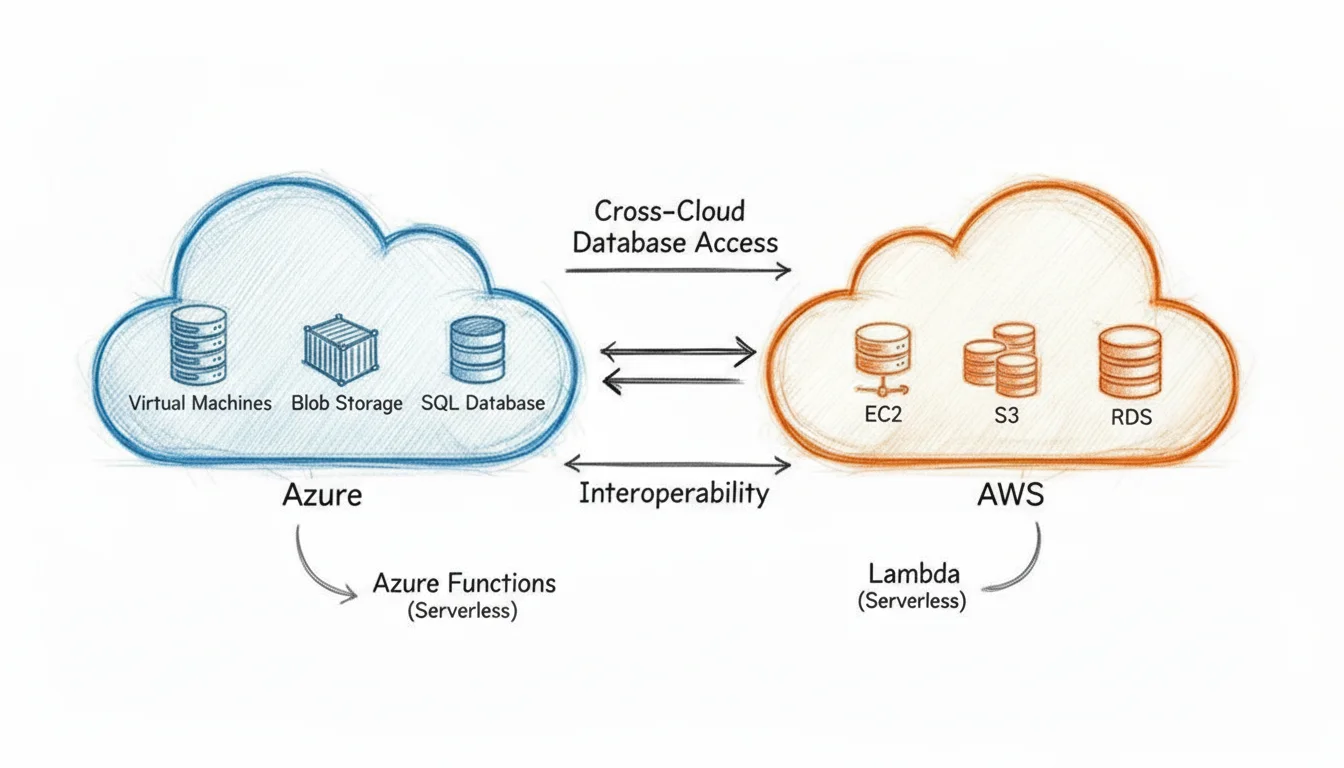
Compare Azure and AWS Services a Definitive Guide for IT Pros
The strategic choice between Amazon Web Services (AWS) and Microsoft Azure highlights fundamental differences in market approach and service philosophy. AWS maintains the industry's broadest and deepest service portfolio. It remains a pioneer and the preferred platform for startups, developers, and organizations prioritizing innovation alongside a vast technical toolkit. Conversely, Azure uses its deep enterprise history and tight integration with Microsoft software to attract large, established corporations already invested in that software stack.
For IT professionals, understanding these distinct strategies is critical for making architectural decisions and planning career development paths. The final decision often depends on specific organizational priorities. Some teams value an unparalleled breadth of services and a massive user community. Others prefer a unified experience within an existing enterprise environment. Grasping these differences ensures you select the right cloud provider for your specific workload requirements and long-term business goals.
AWS vs. Azure: A Strategic Market Analysis for IT Pros
Before analyzing a technical, service-by-service comparison, IT professionals should understand the strategic market positions held by AWS and Azure. These two cloud providers control the global cloud market, yet they reached this status through different strategies that target specific audiences and use varied technical strengths.
Amazon Web Services (AWS) established the public cloud market, securing a major first-mover advantage. This early start allowed Amazon to build a large and diverse service catalog that attracted a wide, loyal user base. AWS remains a frequent choice for startups and technology-focused companies that require rapid innovation and a broad set of tools to build custom applications.
Microsoft Azure expanded into a market leader by focusing on its existing enterprise footprint. For organizations that already use Microsoft products like Windows Server, Office 365, and Active Directory, Azure serves as a logical extension of their local IT infrastructure. Its integrated nature, hybrid cloud capabilities, and familiar management tools make it a standard choice for many Fortune 500 companies.
Market Share and Growth Trajectory
Competition in the cloud sector remains high. As of Q4 2025, AWS holds the lead with an estimated 28% share of the global cloud infrastructure market (verify current figures on the vendor site). The provider reported $35.6 billion in revenue for that specific quarter, highlighting its massive scale and continued role as the market leader.
Microsoft Azure continues to close this distance. It currently holds a 21% market share and serves as a primary driver for Microsoft's Intelligent Cloud unit. That unit maintains an annual run rate of $131 billion. Azure’s growth is supported by its deep integration with the Microsoft software stack, which an estimated 85% of Fortune 500 companies use for daily operations. This trend is a major factor for IT professionals who focus on enterprise-level solutions.
To gain a more detailed understanding of these market shifts, you can view the full cloud market share analysis at https://www.mindmeshacademy.com/blog/articles/azure-vs-gcp-vs-aws to track current trends.
Key Takeaway for Certification Candidates: AWS leads in total scale and service depth. This makes certifications like the AWS Certified Solutions Architect highly valuable for general cloud roles. Azure’s rapid growth among large organizations means that Azure certifications, such as the AZ-104 Azure Administrator, are equally vital for those working in corporate enterprise environments.
Core Strengths and Ideal Customer Profiles
Identifying the target audience for each platform helps clarify technical comparisons and strategic planning. AWS functions as a massive, equipped workshop for developers and businesses that want every possible tool to build new services from scratch. Azure excels at helping organizations modernize their existing Microsoft-based systems while moving workloads to the cloud.
For a detailed look at these strategic differences, our partners created an Azure vs AWS comparison guide.
The following table provides a summary of the core strengths and typical use cases for each platform.
Quick Comparison: AWS vs. Azure at a Glance
This table summarizes the main advantages and common use cases for AWS and Azure. It serves as a reference point for IT pros who are evaluating different cloud strategies.
| Attribute | Amazon Web Services (AWS) | Microsoft Azure |
|---|---|---|
| Main Advantage | Offers the widest selection of services, holds the largest market share, and has a massive community for technical support. | Provides deep integration for enterprise environments, strong hybrid cloud options, and licensing discounts for existing users. |
| Target Audience | Startups, software companies, and organizations that prioritize a large selection of cloud-native services. | Large corporations, government agencies, and businesses that already rely on the Microsoft product suite. |
| Unique Selling Point | The first-mover advantage resulted in mature Infrastructure-as-a-Service (IaaS) and Platform-as-a-Service (PaaS) models. | Direct connections with existing software like Office 365 and Active Directory help simplify migrations of legacy workloads. |
This high-level perspective shows that both are powerful platforms, but their models serve different business goals. These differences influence everything from specific technology choices to the skills your team needs to develop. Both platforms offer the scale required for modern operations, but the choice often depends on your current software commitments and your goals for future development.
Comparing Foundational Compute Services
Virtual machines (VMs) are the core building blocks for almost any cloud-based application. IT professionals usually start their cross-platform evaluation by looking at Amazon EC2 and Azure Virtual Machines. These services allow you to provision and manage virtual servers. However, their specific approaches to instance types, pricing, and scaling methods shape your architectural decisions. Performance, uptime, and monthly spending depend heavily on these choices.
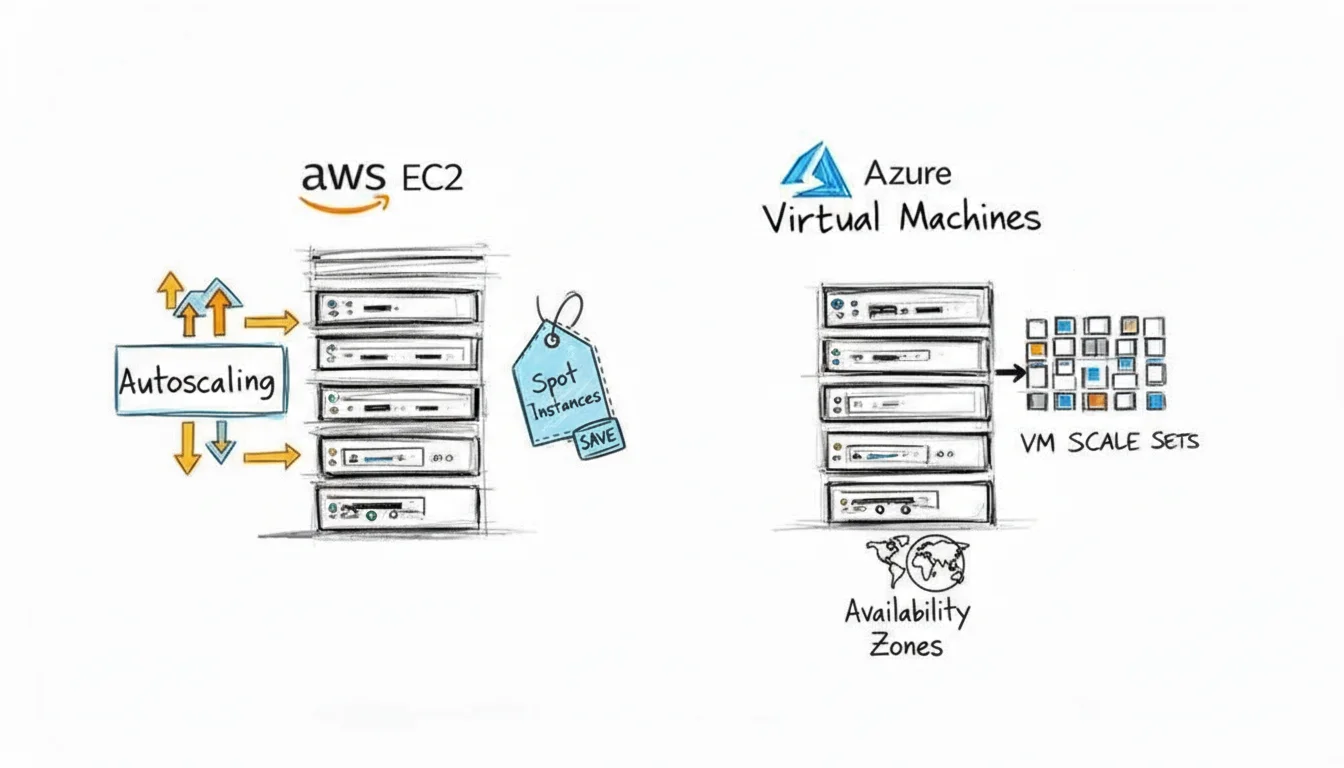
Understanding the technical mechanics of each platform is necessary for building resilient and cost-effective applications. Your selection of compute resources affects raw performance, availability guarantees, and the total cost of ownership over time.
Instance Families and Workload Specialization
Both cloud providers maintain large catalogs of VM types, organized into instance families. These families target specific workloads to ensure you aren't paying for resources you don't use. AWS groups its EC2 instances into logical categories such as General Purpose (M-series), Compute Optimized (C-series), and Memory Optimized (R-series). Azure follows a similar structure with its D-series for standard tasks and the E-series for applications that require high memory capacity.
Hardware specialization is where the two providers often vary. AWS has a longer operational history and offers specialized hardware like its own Arm-based Graviton processors. For software that is compatible with Arm architecture, these chips can provide a much better price-to-performance ratio. This specific advantage is a frequent topic on exams like the AWS Certified Solutions Architect - Associate.
Azure focuses on integration with existing Microsoft software and high-end enterprise needs. You can find Azure VMs tailored for SAP environments or high-performance computing (HPC) tasks that require InfiniBand networking for low-latency communication between nodes. Large organizations that already use Microsoft licenses often find these specific optimizations attractive for migration. To evaluate these choices further, you can review our guide on evaluating compute options like EC2.
Practical Takeaway for Architects: Both platforms provide specialized VMs for different tasks. AWS offers more custom hardware options like Graviton to help optimize costs for modern applications. Azure focuses on providing VMs configured for enterprise environments and Microsoft software, which simplifies the process for companies moving existing workloads to the cloud.
Economic Trade-Offs With Spot Instances
You can significantly reduce your cloud bill by using spare capacity for workloads that are fault-tolerant or stateless. AWS calls this Spot Instances, while Azure uses the term Spot Virtual Machines. Both options offer discounts of up to 90% (verify current pricing on the vendor site) compared to standard on-demand rates. This represents a massive saving for batch processing or testing environments.
The operational models for these discounted instances differ in important ways:
- AWS Spot Instances: Prices change dynamically based on the current supply and demand for EC2 capacity in a specific region. AWS provides a two-minute warning before it reclaims the instance. Your application must be able to shut down quickly or save its current state during this window.
- Azure Spot VMs: Azure offers more price stability. You can set a maximum price you are willing to pay, or you can allow the VM to be deallocated whenever Azure needs the capacity back. Azure does not use a dynamic bidding market in the same way AWS does.
The AWS market model can lead to the lowest possible price, but it creates more volatility. Azure provides better cost predictability for financial planning. Choosing between them depends on how much interruption your application can handle and your team's ability to automate responses to capacity changes. This is a core part of cost optimization objectives for cloud certifications.
Scalability and High Availability
Automating how an application grows or shrinks is a standard requirement for cloud architectures. AWS uses Auto Scaling Groups to handle this, while Azure uses Virtual Machine Scale Sets (VMSS). Both services perform the same task: they automatically add or remove VMs based on performance metrics or schedules you define.
The integration methods differ. AWS Auto Scaling is part of a broader system that includes Elastic Load Balancing and CloudWatch. It scales naturally based on real-time performance data. Azure VMSS is a native component of the Azure Resource Manager (ARM) model. This makes it easy to manage a whole set of VMs as one resource. It works well with infrastructure-as-code (IaC) workflows and unified resource management tools.
Resilience also depends on how you place instances across hardware. Both providers have methods to ensure a single hardware failure doesn't take down your entire application:
- AWS Placement Groups: These give you control over where your EC2 instances live physically. A "Spread" placement group ensures that every instance stays on separate hardware racks. This prevents a single rack failure from causing a total outage.
- Azure Availability Sets: This concept protects against failure by distributing VMs across different "fault domains" and "update domains." Fault domains are groups of servers that share a power source and network switch. Update domains are groups of hosts that Azure patches at different times during maintenance. This setup protects your application from both unexpected hardware failures and planned service updates.
Reflection Prompt: Imagine an application that requires 99.99% uptime. How would you choose between different instance families and spot instances to meet that goal? Which scaling mechanism fits your team's current operational style?
Both platforms provide the tools needed to build stable, scalable systems. The final choice usually depends on which management style your team prefers and which cloud ecosystem they already know. These concepts are frequently tested in advanced exams like the AWS Certified Solutions Architect - Professional or the Azure Solutions Architect Expert. Your ability to distinguish between these placement and scaling models is essential for passing those certifications and managing production environments effectively.
Comparing Cloud Storage Solutions
When building in the cloud, your storage decisions are foundational. A well-designed storage architecture is critical for ensuring an application runs smoothly, performs at high levels, and operates cost-effectively. Initially, the two leading object storage services—Amazon S3 (Simple Storage Service) and Azure Blob Storage—appear almost identical. Both offer extremely durable, highly available, and massively scalable storage solutions for unstructured data.
As you look closer at their tiering systems, performance characteristics, and integration points within their broader technical environments, important distinctions emerge. Choosing between them is not simply about finding a place to store files. It is about analyzing your data lifecycle, access patterns, and retrieval needs to align them with the most appropriate storage class. Small errors in this planning phase lead to overpaying for storage or encountering high latency when data is needed. These issues impact everything from big data analytics pipelines to long-term compliance archives.
Object Storage Tiers: Cost vs. Retrieval Time
Both S3 and Blob Storage use a spectrum of storage tiers. These tiers allow you to optimize cost against access speed. The principle is direct: the less frequently you access your data, the less you pay to store it. The trade-off involves slower retrieval times and, in many cases, specific retrieval fees. AWS and Azure map their primary tiers in a similar fashion, which makes it easier to compare the two directly:
- Frequent Access: For data in constant use, AWS S3 Standard and Azure Hot are the default choices. They offer the lowest latency at the highest price per GB stored. These tiers work well for active website assets, frequently updated documents, or transactional data that requires immediate availability.
- Infrequent Access: For data accessed occasionally, such as once a month, AWS S3 Standard-IA and Azure Cool provide cheaper storage. There is a per-GB fee for data retrieval. Use these for backups or older data that must be available immediately but is not checked daily.
- Archive Access: For long-term data retention where retrieval times of a few hours are acceptable, AWS S3 Glacier Flexible Retrieval and Azure Archive offer cost-effective storage. Retrieval times for S3 Glacier Flexible Retrieval range from minutes to hours, while Azure Archive typically takes several hours. This tier is suited for compliance data, long-term backups, or historical records.
- Deep Archive: For the absolute lowest storage price on data rarely or never expected to be retrieved, AWS S3 Glacier Deep Archive provides extreme savings. Retrievals can take up to 12 hours, but the cost benefits are significant. Azure’s standard Archive tier effectively covers this ultra-low-cost, long-term retention use case as well.
One of the most common and expensive mistakes made by IT teams is leaving data in a "hot" tier long after it has become "cold." Legacy application logs or old project files often sit in expensive storage for years. Setting up reliable lifecycle policies to automatically transition data down the tiers is one of the most effective cost-saving measures you can implement on either platform. For example, moving data from S3 Standard to S3 Glacier Deep Archive after 90 days can reduce costs by over 90% (verify current pricing and savings percentages on the vendor site). This is a critical concept for any cloud cost optimization or architectural certification.
This strategic tiering capability is a hallmark of mature cloud platforms. It is also an area of constant competition. Azure’s cloud revenue climbed 33% in Q1 2025, capturing nearly 25% of the global cloud market (verify current market data on the vendor site). This growth forces both platforms to innovate and compete on price and features. You can find more details about the Azure and AWS market share to see how this rivalry shapes the services available to IT professionals.
Block and File Storage Showdowns
Beyond object storage, virtual machines require persistent block storage, and many enterprise applications require shared file systems. Here, the conversation shifts from access tiers to raw performance metrics, elasticity, and protocol support.
Block Storage: EBS vs. Azure Disk Storage
When provisioning virtual hard drives for your virtual machines, you choose between Amazon Elastic Block Store (EBS) and Azure Disk Storage.
- Amazon EBS: This service offers a wide range of volume types. Options range from the versatile general-purpose SSDs (gp3) to the high-performance Provisioned IOPS SSDs (io2 Block Express). A standout feature is its elasticity. You can modify a volume's type, size, and performance characteristics like IOPS and throughput while the volume is in use. This allows you to scale resources without downtime, which is vital for mission-critical applications.
- Azure Disk Storage: This service also provides a tiered system, ranging from Standard HDDs to Premium and Ultra Disks. Ultra Disks are the solution for extreme performance demands. They allow you to adjust IOPS and throughput dynamically without needing to detach the disk. This provides a clear advantage for large databases and high-performance computing workloads that experience spikes in demand.
File Storage: EFS vs. Azure Files
For shared file storage that multiple virtual machines access at the same time, the main contenders are Amazon Elastic File System (EFS) and Azure Files.
- Amazon EFS: This is a fully managed NFS (Network File System) service. It integrates directly with Linux-based EC2 instances. It automatically scales storage capacity and performance as you add or remove files. This eliminates the need for manual provisioning or complex capacity planning. EFS is built to handle thousands of concurrent connections, making it a strong choice for containerized applications and web server farms.
- Azure Files: The significant differentiator for Azure Files is its dual-protocol support for both SMB (Server Message Block) and NFS. This makes it a powerful solution for hybrid cloud setups and for organizations requiring native Windows file share compatibility. It simplifies the migration of legacy applications from on-premises data centers to the cloud. By supporting SMB, Azure Files allows Windows instances to connect to shared storage using the same methods they use in a traditional local network.
Understanding the differences in block and file storage is essential for any cloud architecture certification, such as the AWS Certified Solutions Architect or Azure Solutions Architect Expert. Pay close attention to scenarios involving database storage, shared application data, and hybrid cloud migrations. In these exams, you will often be asked to choose a storage type based on whether the application requires a specific protocol or a specific level of IOPS.
Ultimately, the choice often depends on your team's existing expertise and your application's operating system. EFS is a straightforward choice for Linux-centric, cloud-native workloads. Conversely, Azure Files, with its SMB support, shines in enterprise environments with a mix of Windows and Linux servers. It makes the management of traditional applications much easier during a transition to the cloud. Both providers continue to update these services, so checking the current limits and pricing on their respective sites is always a best practice before finalizing a design. Regardless of which provider you choose, the key is to match the storage performance to the actual needs of the workload to avoid wasted spend.
Cloud Databases: Relational and NoSQL Analysis
Choosing the right database is a fundamental architectural decision for any IT professional. It acts as the engine driving application performance, scalability, and transactional integrity. When you examine the database offerings from Azure and AWS, you will find powerful options for both relational and NoSQL workloads. However, their internal designs and core strengths cater to different operational needs.
The choice involves more than a simple comparison of SQL versus NoSQL. You must evaluate managed capabilities, replication methods, and how each service fits into the cloud environment. Making the right choice results in responsive, resilient applications. Choosing the wrong service often leads to performance lags and expensive, manual migrations later.
The following decision tree provides a high-level view of how to approach the initial choice between core storage services on each platform.
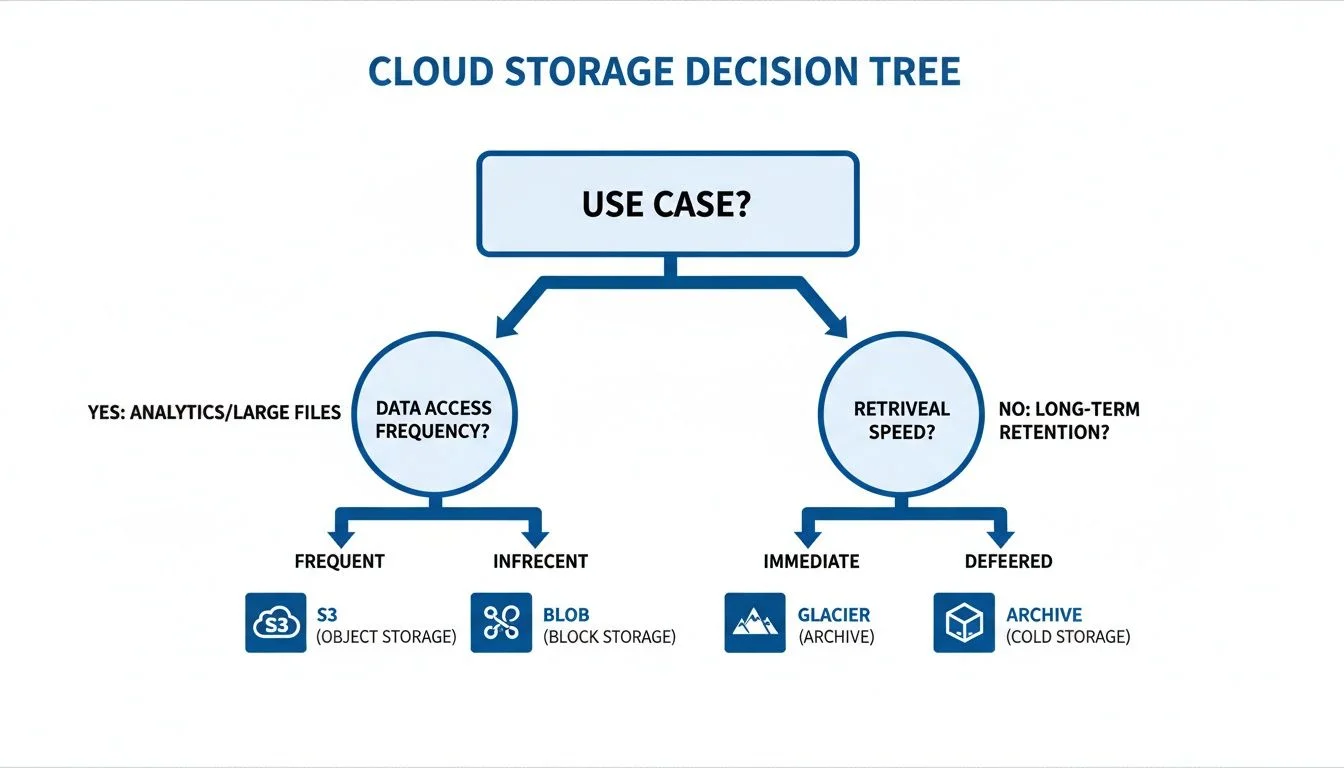
As illustrated, your specific use case—whether it involves high-performance big data analytics or long-term archiving—guides you toward services like Amazon S3, Azure Blob Storage, AWS Glacier, or Azure Archive. This marks a vital first step in your overall data strategy.
Relational Database Showdown
Relational databases remain the foundation for transactional systems, such as e-commerce checkouts and financial ledgers. The primary comparison in this space pits Amazon RDS/Aurora against Azure SQL/Azure Database for Open Source.
Amazon uses a two-pronged strategy for relational data. Amazon RDS (Relational Database Service) is a managed service that supports standard engines like MySQL and PostgreSQL, alongside commercial options like SQL Server and Oracle. However, the flagship offering is Amazon Aurora. This is a cloud-native relational database compatible with MySQL and PostgreSQL. It was re-engineered with a distributed storage system to deliver massive performance gains, often exceeding traditional databases by 5x. Aurora also replicates data six times across three Availability Zones to ensure high availability.
Within the Microsoft Azure catalog, Azure SQL Database is the primary managed service. It is an intelligent, scalable service based on the SQL Server engine, designed for cloud-native applications. For teams that prefer open-source tools, Azure provides managed services for MySQL, PostgreSQL, and MariaDB. These options offer automated patching, backups, and scaling, which reduces the burden on database administrators.
The Key Differentiator for Certification: Amazon Aurora stands out by separating compute resources from storage. This innovation allows it to support up to 15 low-latency read replicas and perform near-instant crash recovery. These technical details are essential for the AWS Certified Solutions Architect - Professional exam. Azure SQL excels with its serverless compute tier. This feature automatically scales compute based on workload demand and can pause during periods of inactivity to save costs. This makes it an efficient choice for Azure Solutions Architect Expert certification scenarios.
Navigating NoSQL Options
When an application requires a flexible schema and horizontal scaling—such as IoT data streams, real-time gaming leaderboards, or product catalogs—NoSQL is the standard choice. The primary matchup here is Amazon DynamoDB versus Azure Cosmos DB.
DynamoDB is a key-value and document database built for one thing: consistent, single-digit millisecond performance at any scale. It is a fully managed, serverless database that removes the need to manage instances. Its on-demand capacity mode allows the database to handle spiky or unpredictable traffic without manual intervention. This makes it an excellent fit for serverless architectures using AWS Lambda.
Azure Cosmos DB is a different type of service. It is a globally distributed, multi-model database. This means it supports several different APIs—including SQL (Core), MongoDB, Cassandra, Gremlin (graph), and Table—all running on a single, unified backend.
- Global Distribution: Cosmos DB allows you to add regions to your database with a few clicks. It supports multi-region writes, which means users in different parts of the world can write to their local database copy. This minimizes latency for global user bases and simplifies complex deployment strategies.
- Consistency Models: Most databases offer only strong or eventual consistency. Cosmos DB provides five well-defined levels: Strong, Bounded Staleness, Session, Consistent Prefix, and Eventual. This allows architects to choose the exact balance between data accuracy and speed. For instance, "Session" consistency ensures that a user sees their own updates immediately, while "Eventual" consistency provides the highest performance for background tasks.
Reflection Prompt: If you were designing a global e-commerce platform that needed to handle millions of transactions per second, how would your choice between DynamoDB and Cosmos DB impact your data model, replication strategy, and overall architecture? Consider consistency requirements and geographic distribution.
The right choice depends on your application's requirements. If you need a fast, low-maintenance key-value store with a simple data model, DynamoDB is the most direct and cost-effective path. However, if you are building a global application that requires different data models or needs multi-region write capabilities, the features of Cosmos DB are more appropriate. One offers specialized speed; the other provides global versatility. Understanding this distinction is vital for any cloud architect.
Analyzing Cloud Networking and Security Models
Networking and security serve as the foundation for any cloud deployment. They act as digital walls, traffic controllers, and gatekeepers that protect your applications and data. When comparing Azure and AWS in this area, you will find that while both aim to solve the same fundamental problems, they approach them from different philosophies. Understanding these differences is essential for IT professionals who want to build secure and manageable cloud environments. These topics appear frequently in major cloud certification exams.
The Foundation: Virtual Networks
At the core of cloud networking, both platforms provide a private, isolated segment of their infrastructure: Amazon Virtual Private Cloud (VPC) and Azure Virtual Network (VNet). Both services allow you to define your own custom IP address space using CIDR blocks, segment that space into subnets, and control how traffic flows using custom route tables and network gateways. These services provide what is effectively a private data center in the cloud.
The real divergence appears in how internal network traffic is secured. AWS uses a layered security approach involving Security Groups and Network Access Control Lists (NACLs). Security Groups are stateful firewalls that operate at the instance level. Because they are stateful, if an inbound request is allowed, the outbound response is automatically permitted regardless of outbound rules. NACLs are stateless firewalls that operate at the subnet level. They require you to explicitly define both inbound and outbound rules for traffic. This dual-layered control allows for fine-grained configuration, but it requires managing two separate components, which can increase the complexity of your troubleshooting process.
Azure simplifies this with Network Security Groups (NSGs). An NSG is a stateful firewall that can be applied to either a subnet or a specific network interface (NIC). By consolidating this functionality, Azure’s model often feels more direct. This is helpful for professionals moving from traditional on-premises networking backgrounds who are used to working with Windows Firewall or standard hardware appliances. While AWS requires you to think about security at both the subnet and instance levels using different tools, Azure lets you apply the same NSG logic across different parts of your network.
Reflection Prompt for Security Architects: If you needed to implement a "deny all, allow by exception" security posture within your cloud network, how would the differences between AWS Security Groups/NACLs and Azure NSGs influence your design and management strategy? Which approach do you find more straightforward for auditing?
Identity: A Tale of Two Philosophies
The philosophical divide between AWS and Azure is most evident in identity and access management (IAM). This is a direct comparison between AWS Identity and Access Management (IAM) and Azure Active Directory (Azure AD), which Microsoft has rebranded as part of the Microsoft Entra ID family.
AWS IAM was built specifically for the cloud. Its primary purpose is managing access to AWS resources. It answers a specific question: "Which principal has permission to perform this action on this specific AWS resource?" You attach granular JSON policies directly to users, groups, or roles. You can also attach policies to the resources themselves, such as an S3 bucket policy. This resource-centric model works well for cloud-native workloads where every component is defined on a service-by-service basis.
Azure Active Directory, or Entra ID, has deep roots in the enterprise world. It evolved from the on-premises Active Directory that has supported corporate identity management for decades. Because of this history, Entra ID is user-centric. Its main mission is managing user identities and their access to applications. These applications might live in Azure, exist as SaaS products like Microsoft 365, or remain on-premises.
The Core Distinction for IT Leadership: AWS IAM is an authorization system designed for AWS resources. Azure AD (Entra ID) is an enterprise-wide identity and authentication system that also manages access to Azure resources. This makes Azure a logical choice for companies that want to extend their existing corporate directory into the cloud. It simplifies identity management for hybrid environments.
This user-first approach gives Azure an advantage in hybrid setups. Tools like Entra Connect make syncing your on-premises Active Directory with the cloud a standard procedure. This enables a single sign-on (SSO) experience that covers Microsoft services and thousands of third-party applications. While AWS provides solutions for integrating with external identity providers using SAML or OIDC, the process is often more integrated within the Azure environment, especially for organizations with a heavy Microsoft footprint. This distinction is vital for understanding identity management in certifications like CompTIA Security+, Azure AZ-500, or AWS SCS-C03 (verify current exam codes on the vendor site).
Comparing Web Application Firewalls
To protect web applications from attacks like SQL injection, cross-site scripting (XSS), and other OWASP Top 10 threats, you need an effective Web Application Firewall (WAF). In the AWS environment, you use AWS WAF. In Azure, this capability is often used as a feature of the Azure Application Gateway.
- AWS WAF: This is a standalone service. You can attach it to several AWS resources, including an Amazon CloudFront distribution, an Application Load Balancer (ALB), or an API Gateway. It provides flexibility by allowing you to use pre-packaged rule sets from AWS or third-party vendors. You can also write custom rules from scratch to gain granular control over specific traffic patterns.
- Azure Application Gateway with WAF: Azure uses an integrated approach. The WAF is a feature of the Application Gateway, which is a Layer 7 load balancer. This service combines traffic management, SSL offloading, and web application security into one component. It uses pre-configured rules based on the OWASP Core Rule Sets. This helps teams deploy protection against common threats quickly.
The difference comes down to the deployment model. AWS WAF is a decoupled service, which gives you the flexibility to protect different types of endpoints across your architecture. Azure’s integrated approach simplifies the architecture and management. It provides a single point of control for both load balancing and security. This can be an advantage for teams that value operational efficiency. Understanding these architectural choices is important for anyone preparing for cloud security certifications.
When you look at the networking and security options, AWS often provides more "knobs and dials" for manual tuning. Azure tends to provide more "out of the box" integration with existing enterprise tools. Both platforms are capable of hosting highly secure workloads, but the administrative experience differs based on these underlying philosophies. AWS professionals often spend more time crafting specific resource policies, while Azure professionals focus on managing user identities and conditional access policies that span the entire organization. Regardless of the platform you choose, mastering these networking and identity components is the most important step in securing your cloud footprint.
Comparing AI and Machine Learning Capabilities
Artificial intelligence (AI) and machine learning (ML) are no longer secondary features. They represent the current battleground for cloud leadership and a vital skill set for modern IT professionals. Comparing Azure and AWS in this category requires evaluating two different architectural philosophies. Both providers supply a full range of services, including pre-trained APIs for rapid deployment and broad platforms for training custom models from the ground up.
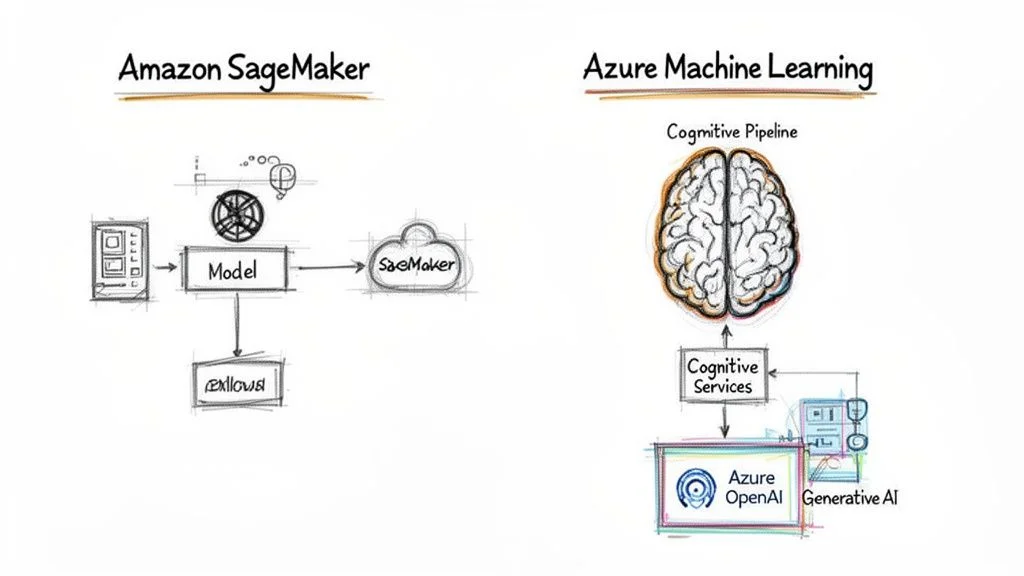
AWS offers Amazon SageMaker, a broad service built to handle every phase of the machine learning lifecycle. Azure provides Azure Machine Learning, which centers on team collaboration and provides an integrated workspace for data science projects.
MLOps Platforms: SageMaker vs. Azure Machine Learning
The machine learning operations (MLOps) platform serves as the foundation for each cloud strategy. Amazon SageMaker functions as a modular toolbox. It provides specialized utilities for distinct stages of the ML process. You might use SageMaker Studio as your development environment, Data Wrangler to prepare and clean your data, and separate modules to train, tune, and host your models. This design provides high flexibility. It allows engineering teams to pick specific components to fit their existing internal workflows without being forced into a single path.
Azure Machine Learning uses a unified, workspace-heavy approach. The goal is to provide a single environment where teams manage datasets, track experiments, and deploy endpoints from one interface. Many users find the graphical UI and built-in features more direct, particularly for teams just starting with MLOps. This platform emphasizes asset sharing and versioning across a group of data scientists. When you choose a platform, compare these native options against other machine learning platforms for AI teams.
Financial investment drives this competition. The Azure AI business now generates $13 billion (verify latest fiscal reports on Microsoft Investor Relations) in annual revenue. For engineers, this competition results in better tools and more job openings. Certifications are a way to prove expertise in these tools. The AWS Certified Solutions Architect remains a high-value credential for infrastructure professionals. Meanwhile, Azure AI certifications, such as the Azure AI Engineer Associate, are gaining ground as more enterprises adopt the Microsoft stack for their data intelligence projects.
Key Takeaway for AI Practitioners: SageMaker provides a granular toolkit that gives experts total control over every stage of the MLOps pipeline. It is the preferred choice for highly specific, custom workflows where you need to manage every hyperparameter. Azure Machine Learning offers an integrated workspace that excels at team collaboration and project organization, making it a frequent choice for large enterprise environments that prioritize accessibility and shared governance.
Pre-Trained Cognitive Services
Building a model from scratch is not always necessary. Developers who want to add intelligent features to an app can use pre-trained APIs. These services are ready for immediate use and do not require deep data science knowledge. They allow you to add complex functionality like image recognition or sentiment analysis with a simple API call.
- AWS: Provides specific services like Amazon Rekognition for identifying objects and faces in images, Amazon Polly for generating lifelike speech from text, and Amazon Transcribe for converting audio to text.
- Azure: Groups its tools under the Azure AI Services brand. This collection includes Vision, Speech, Language, and Decision APIs. They are all built for easy connection to existing web and mobile applications, often sharing a common identity and security model through Microsoft Entra ID.
Generative AI has changed the competitive environment. Azure currently holds a significant advantage through the Azure OpenAI Service. This partnership allows companies to access models like GPT-4, DALL-E, and Codex within their own private cloud environment. It provides a secure way for a business to use generative AI while maintaining strict privacy and data residency standards. This means your data is not used to train the public models. To learn more about these tools, see the guide on Microsoft Foundry and Azure AI services.
Common Questions: Azure vs. AWS for IT Professionals
Choosing between Azure and AWS involves more than comparing technical specifications. It requires a clear understanding of how each platform influences your long-term costs, your career growth, and your ability to meet specific business goals. Here are direct answers to the questions IT professionals ask most often when comparing these two providers. Getting these details right helps you build a better cloud strategy and prevents expensive mistakes.
Is AWS or Azure Better for a Startup?
AWS is frequently the first choice for startups for several practical reasons. It provides a vast selection of services and a pay-as-you-go pricing model that includes generous free tiers. This allows small teams to build, test, and scale applications without requiring a large upfront investment. Because AWS has a massive user base, finding technical documentation and community support is straightforward. Most configuration challenges you encounter have likely been solved and documented by others online.
However, Azure is a strong contender for new companies. Programs like Microsoft for Startups offer significant cloud credits that can cover infrastructure costs for a long period. If your team already uses tools like GitHub and Visual Studio, the integration within Azure can provide a noticeable productivity boost. For a startup with a limited number of engineers, using a platform that connects directly to their existing development tools can be more beneficial than having access to every niche service AWS offers.
Is Azure Cheaper Than AWS?
There is no single "cheaper" cloud provider. The total cost of ownership depends on your specific workload, how much data you transfer, and your existing software agreements. AWS is often very competitive on pricing for standard Linux-based compute tasks. You can lower these costs further by using Spot Instances for workloads that can handle interruptions or by using Reserved Instances for predictable, long-term resource needs.
Azure provides a major financial advantage for businesses that already use Microsoft software through the Azure Hybrid Benefit. This program allows you to apply your existing Windows Server and SQL Server licenses to your cloud virtual machines. This can result in a significant reduction in software costs compared to standard rates (verify current pricing and eligibility on the Microsoft site). To determine the most cost-effective option for your project, you must model your expected resource usage in both the AWS and Azure pricing calculators. This type of analysis is a fundamental part of cloud cost management and is a key skill for any certified cloud professional.
Which Certification is More Valuable?
Both AWS and Azure certifications carry significant weight in the job market, but their value depends on your career goals and the types of companies you want to join.
- AWS Certifications: These are widely regarded as the industry standard because of the platform's high market share. Earning a credential like the AWS Certified Solutions Architect, Developer, or SysOps Administrator can open doors at a variety of organizations, including high-growth startups and global tech firms.
- Azure Certifications: These are often required for roles within large corporations, government agencies, and organizations that have a long history of using Microsoft technologies. Credentials such as the Azure Administrator Associate (AZ-104) and Azure Developer Associate (AZ-204) prove that you can manage identity and infrastructure within a complex enterprise environment.
The most effective strategy for an IT professional is to learn both platforms. Companies are moving toward multi-cloud architectures to improve reliability and avoid being locked into a single provider. An engineer who is certified and competent in both AWS and Azure is a versatile asset. This dual-cloud proficiency allows you to design better systems and pass your certification exams with confidence.
Ready to master the concepts behind these powerful cloud platforms and prepare for your next career step? MindMesh Academy provides expert-curated study materials, evidence-based learning methods, and real-world scenarios to help you succeed. Start the process of becoming a certified cloud expert at https://mindmeshacademy.com.
If the comparison has pushed you towards AWS, the AWS certification path sets out which exam to sit first and how the tracks branch after it.
Ready to Get Certified?
Prepare with study guides, practice exams, and spaced repetition flashcards at MindMesh Academy. Use these resources to pass with confidence:

Written by
Alvin Varughese
Founder, MindMesh Academy
Alvin Varughese is the founder of MindMesh Academy and holds 20 professional certifications including Microsoft Agentic AI Business Solutions Architect, AWS Solutions Architect Professional, and Azure DevOps Engineer Expert. He's held senior engineering and architecture roles at Humana (Fortune 50) and GE Appliances. He built MindMesh Academy to share the study methods and first-principles approach that helped him pass each exam.