Cognitive Science in Education for IT Exam Success
Cognitive Science in Education for IT Exam Success
You've likely been there before. You open a certification study guide after work, highlight half a page, speed-watch a video, answer a few practice questions, and feel productive. Two days later, you barely remember the difference between similar cloud services, security models, or command syntaxes.
That's not usually a motivation problem. It's often a method problem.
As an educator, I see this constantly with IT professionals preparing for exams like AWS, Azure, CompTIA, PMP, and ServiceNow. Smart people put in real effort, but they study in ways that make learning feel fluent in the moment and fragile a week later. They confuse recognition with recall. They stack too much new material into one sitting. They reread instead of retrieving.
Cognitive science in education offers practical ways to make learning stick, even when your schedule is packed with work, meetings, and home responsibilities.
Most study advice names techniques like spaced practice, retrieval, or chunking but rarely answers the questions adult learners truly ask: When should I use this? What content fits it? What if I only have short study blocks? That gap matters. A recent review argues that cognitive science guidance should adapt to the right time, content, and students, rather than being treated as one-size-fits-all advice. It specifically calls for clearer guidance for educational technology and professional learning for time-constrained adults in this review of implementation guidance.
That's our focus here: a playbook for applying these techniques in the messy reality of exam prep while working full time.
Why Your Study Method Matters More Than Hours Logged
Consider Raj, a systems administrator studying for a networking certification. He has a notebook full of detailed summaries, dozens of highlighted pages, and a growing sense of panic. Every evening he logs another study session, but his quiz results swing wildly. Some days he feels ready; other days, a simple question on routing, access control, or troubleshooting knocks him sideways.
The obvious conclusion? Raj needs more hours. Usually, that's wrong.
He needs a better connection between study and memory. If your method keeps information visible but never forces it back out of your head, you can spend a long time studying without building durable knowledge. Hours logged measure effort. They don't automatically measure learning.
Why busy professionals get stuck
Adult IT learners face different challenges than full-time students. Your attention is split. You study late, in short bursts, after making decisions all day. You already have prior knowledge in some areas and significant gaps in others. You're not learning for a seminar discussion; you're learning for a timed exam that expects fast recall and accurate discrimination between similar options.
That's why generic advice often feels frustrating. "Use active learning" sounds nice, but it doesn't tell you whether to self-quiz before reading, after reading, or the next day. "Review regularly" doesn't tell you what to review when your topics range from IAM policies to subnetting to incident response workflows.
Practical rule: If your study session feels smooth because everything is in front of you, there's a good chance your memory isn't doing enough work.
The better question to ask
Instead of asking, “How many hours should I study?” ask:
- What am I asking my brain to do? Recognition, recall, comparison, or application?
- When should I revisit this topic? Immediately, tomorrow, or after a short gap?
- Who am I as a learner? A beginner who needs structure, or an experienced practitioner who needs discrimination and exam-speed recall?
- What form should the practice take? Flashcards, scenario questions, diagrams, command recall, or teach-back explanation?
Cognitive science is particularly useful here. It helps you match the method to the mental task. Memorizing service names is not the same as diagnosing a networking scenario. Learning a framework is not the same as choosing the best answer among four plausible options under time pressure.
A strong study plan doesn't just add effort. It routes effort to the right place.
What effective study feels like
It often feels less comfortable than rereading. You hesitate. You forget. You mix things up. You discover weak spots earlier than you'd like.
That discomfort is useful. It shows you where memory is thin and where understanding hasn't stabilized yet. In exam prep, that's exactly the information you need.
Understanding How Your Brain Builds Knowledge
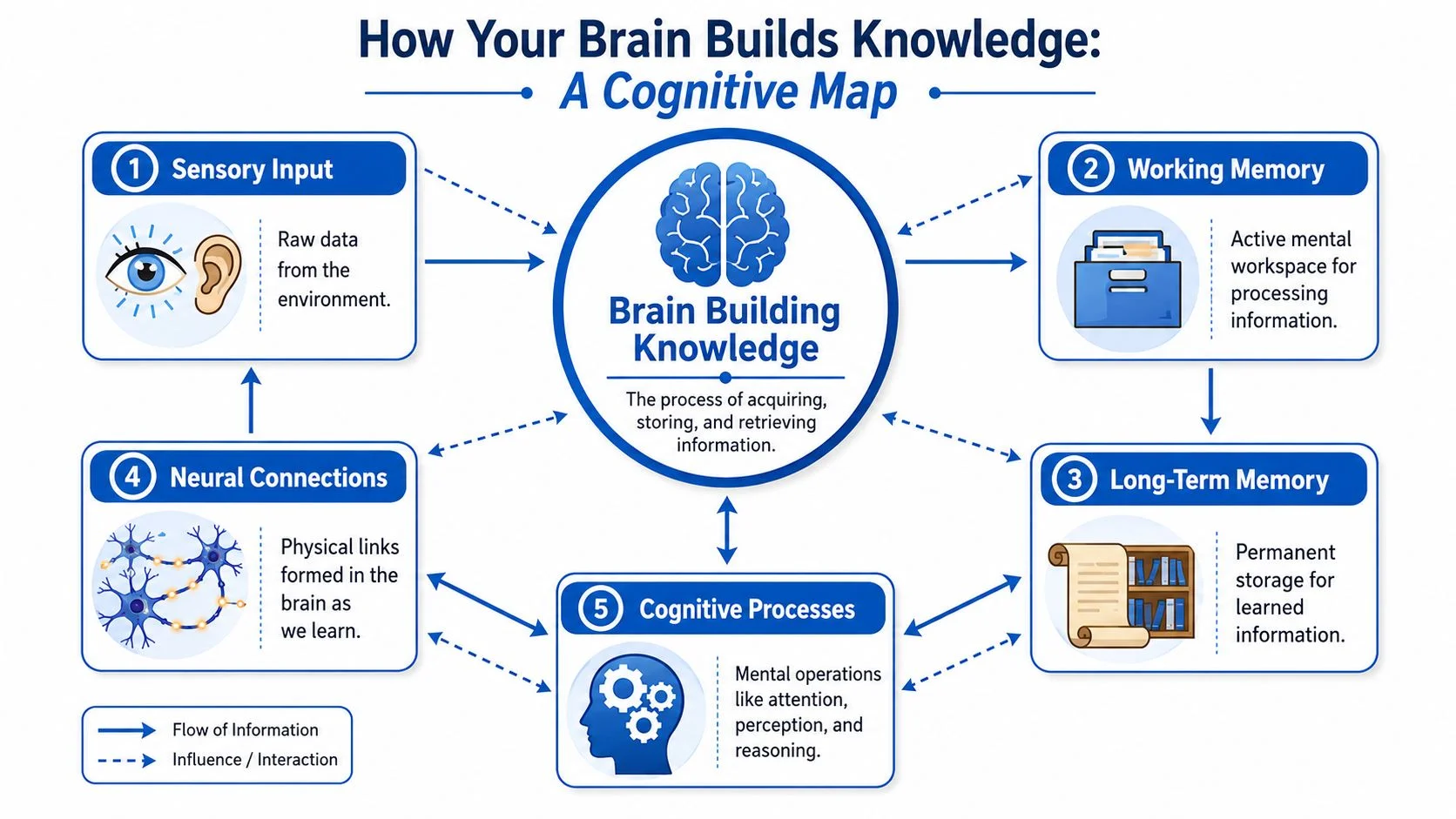
Your brain doesn't learn like a download folder. It learns more like a computer system with limited live processing space and a much larger storage system.
Working memory is like RAM. It's where you hold and manipulate information right now. Long-term memory is more like persistent storage. It holds what you can bring back later. Study works when you move information from that fragile, active workspace into a structure that lasts and can be used under pressure.
Working memory is narrow
If you've ever tried to learn subnetting while also decoding unfamiliar notation, remembering formulas, and comparing CIDR ranges, you've felt cognitive overload. Too many moving parts hit working memory at once. When that happens, your brain doesn't calmly sort everything into storage. It starts dropping pieces.
That's why beginners often say, “I understand it when I look at the example, but I can't do it alone.” The example reduces the processing burden. Independent performance raises it again.
A useful mental model:
| Memory system | Tech analogy | What it does in study |
|---|---|---|
| Working memory | RAM | Holds a small amount of information while you think |
| Long-term memory | SSD or library | Stores concepts, patterns, facts, and procedures for later use |
Long-term memory stores patterns, not just facts
People often think memory means storing isolated details. For exam success, that's too narrow. Strong learners build schemas, which are organized mental frameworks.
A schema lets you stop treating every problem as brand new.
For example, a beginner studying cloud architecture may see a scenario as a pile of unrelated details: storage type, permissions, region, encryption, cost, and resilience. A more advanced learner has a framework. They recognize the pattern first. Then they decide which detail matters most.
That's why expertise feels faster. Experts don't always process more raw information. They often process it in larger, meaningful chunks.
Cognitive load decides whether learning sticks
Cognitive load is the amount of mental effort your task demands. Some of that effort is necessary. Solving a hard troubleshooting problem should require thought. But some load comes from poor study design.
Common overload points for certification candidates include:
- Jumping too far ahead: Reading advanced scenario questions before you know the core vocabulary
- Using messy notes: Scattering definitions, screenshots, and commands across too many apps and tabs
- Studying similar topics together too early: Mixing concepts before you can distinguish their basic features
- Consuming without processing: Watching long videos without pausing to summarize or recall
When working memory is overloaded, effort rises while retention often falls.
What to do instead
Keep the first pass through new material simple. Narrow the task. Build clean mental hooks.
A good sequence looks like this:
- Learn the core idea in plain language.
- See one concrete example that makes the idea visible.
- Practice a small recall task without looking.
- Add variation later once the base pattern is stable.
Suppose you're learning identity and access management. Don't start with a giant matrix of every role, policy type, exception, and service integration. Start with the basic question: Who can do what, on which resource, under what conditions? That frame becomes the schema. The details have somewhere to attach.
Why this matters for exam prep
Certification exams punish fragile knowledge. They don't just ask if something looks familiar. They ask whether you can retrieve the concept, distinguish it from close alternatives, and apply it in a scenario.
This means the primary goal of studying isn't covering material. It's building memory structures you can access quickly and accurately.
Three Powerful Techniques to Supercharge Your Learning
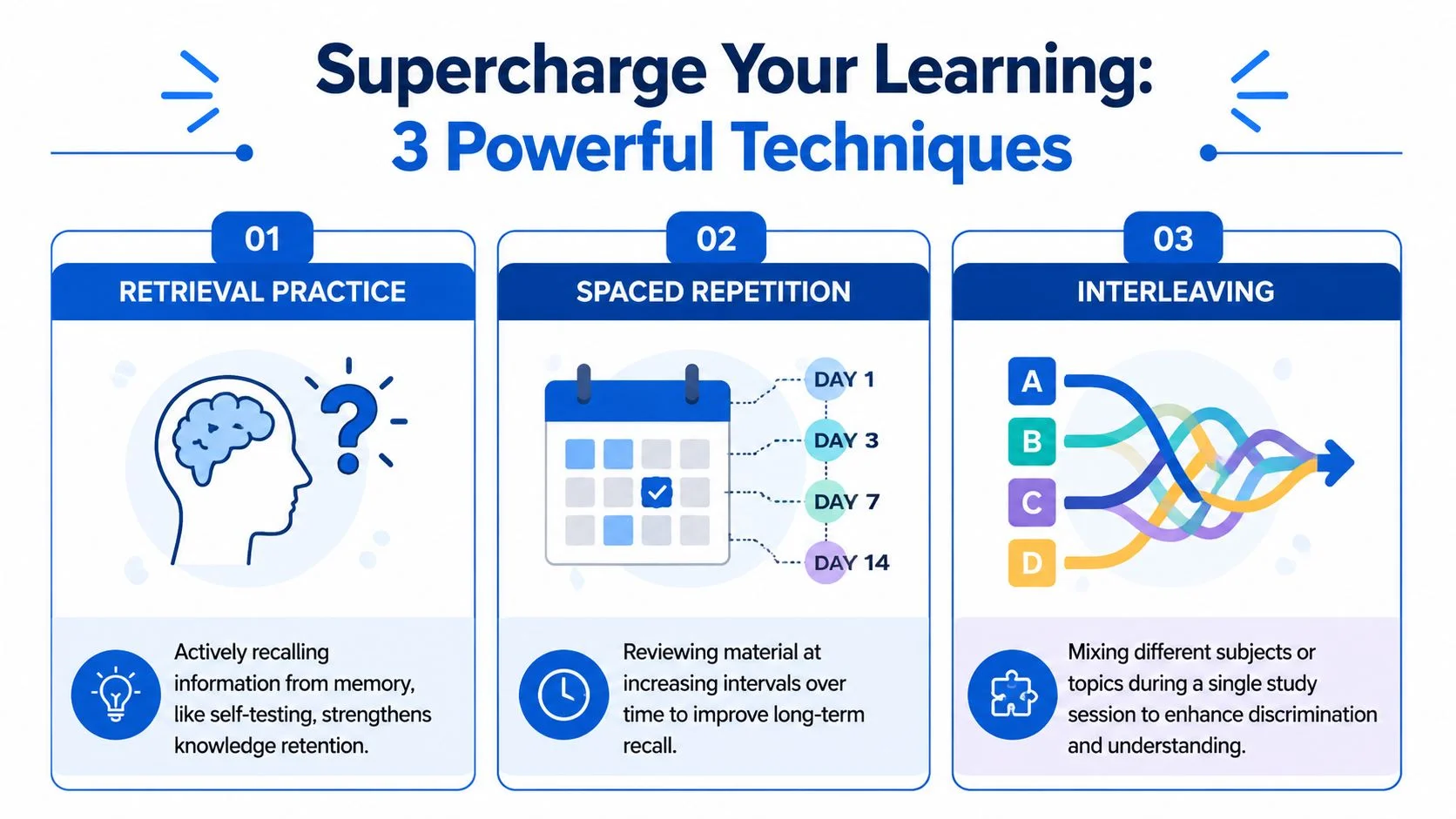
Most study methods fail because they keep information visible. The three techniques below work because they make memory do the work. For IT certification candidates, that's the difference between “I reviewed that” and “I can answer this under exam conditions.”
Retrieval practice builds usable memory
Retrieval practice means pulling information out of memory before you look at the answer. Not recognizing it. Recalling it.
If you're preparing for AWS, that might mean closing your notes and writing down the differences between security groups and network ACLs from memory. If you're studying CompTIA Linux+, it might mean recalling command purpose and syntax without peeking. If you're working toward PMP, it could mean reconstructing process relationships or situational decision rules from memory.
The weaker alternative is rereading. Rereading feels efficient because the page is familiar. But familiarity can trick you. The exam won't ask whether the page looked familiar.
A better session opener is a blank-page dump. Before reviewing a topic, write what you remember. Then compare. The gap between what you thought you knew and what you recalled is your real study map.
Use this test: If you can explain a concept without prompts, you know it better than if you can only recognize it in notes.
Spaced repetition turns forgetting into reinforcement
Spaced repetition means revisiting material after some time has passed, not immediately repeating it until it feels easy. That delay matters because a small amount of forgetting makes recall more effortful, and effortful recall strengthens memory more than instant review.
For IT learners, this is especially valuable because certification content often includes layered categories, command options, service names, and troubleshooting logic. Those details blur together if you cram them.
A practical example:
- Study VLANs and switching basics on Monday.
- Recall key ideas briefly on Tuesday.
- Revisit them on Thursday using practice questions.
- Check them again over the weekend in mixed review.
That pattern is much stronger than reading the same chapter three times in one evening.
If you want a simple parallel from another domain, these effective language learning techniques show why repeated recall across time works so well when you need fast access to stored knowledge.
Interleaving improves discrimination
Interleaving means mixing related topics instead of studying one category in a long uninterrupted block. This helps when the exam expects you to choose between similar answers.
Blocked study says: “Today is only firewalls.” Interleaved study says: “Today I'll compare firewalls, IAM controls, encryption choices, and logging scenarios.”
That sounds harder because it is harder. But that difficulty is productive. It trains your brain to notice what kind of problem is in front of you.
For Azure learners, for example, one set of questions might ask about identity, another about governance, another about storage options. If you study these in isolation for too long, you may know each topic separately but struggle when the exam mixes them. Interleaving prepares you for the mixed environment you'll encounter.
Here's a quick comparison:
| Study habit | What it feels like | What it trains |
|---|---|---|
| Rereading | Smooth, familiar | Recognition |
| Retrieval practice | Effortful, revealing | Recall |
| Cramming | Intense, fast | Short-term exposure |
| Spaced repetition | Repetitive but strategic | Durable memory |
| Blocked study | Organized, predictable | Isolated topic fluency |
| Interleaving | Messier, more demanding | Topic discrimination |
How to combine them
Don't treat these as separate camps. The strongest study plans combine them.
A single session might look like this:
- Start with retrieval: Five questions from memory before opening anything
- Review with spacing: Revisit a topic you studied earlier in the week
- End with interleaving: Mix practice across two or three related domains
If you want a more exam-focused example of combining these methods, this guide on mastering exam preparation shows how memory aids and advanced study techniques fit into certification prep.
Your Actionable IT Certification Study Schedule
A study method only matters if it survives your calendar. Most IT professionals don't have long, quiet afternoons. They have short sessions before work, during lunch, or after a full day of tickets, calls, or project deadlines.
This means your schedule should do three things at once. It should introduce new material, revisit older material, and force recall without making every session feel chaotic.
A one-week template for a networking exam
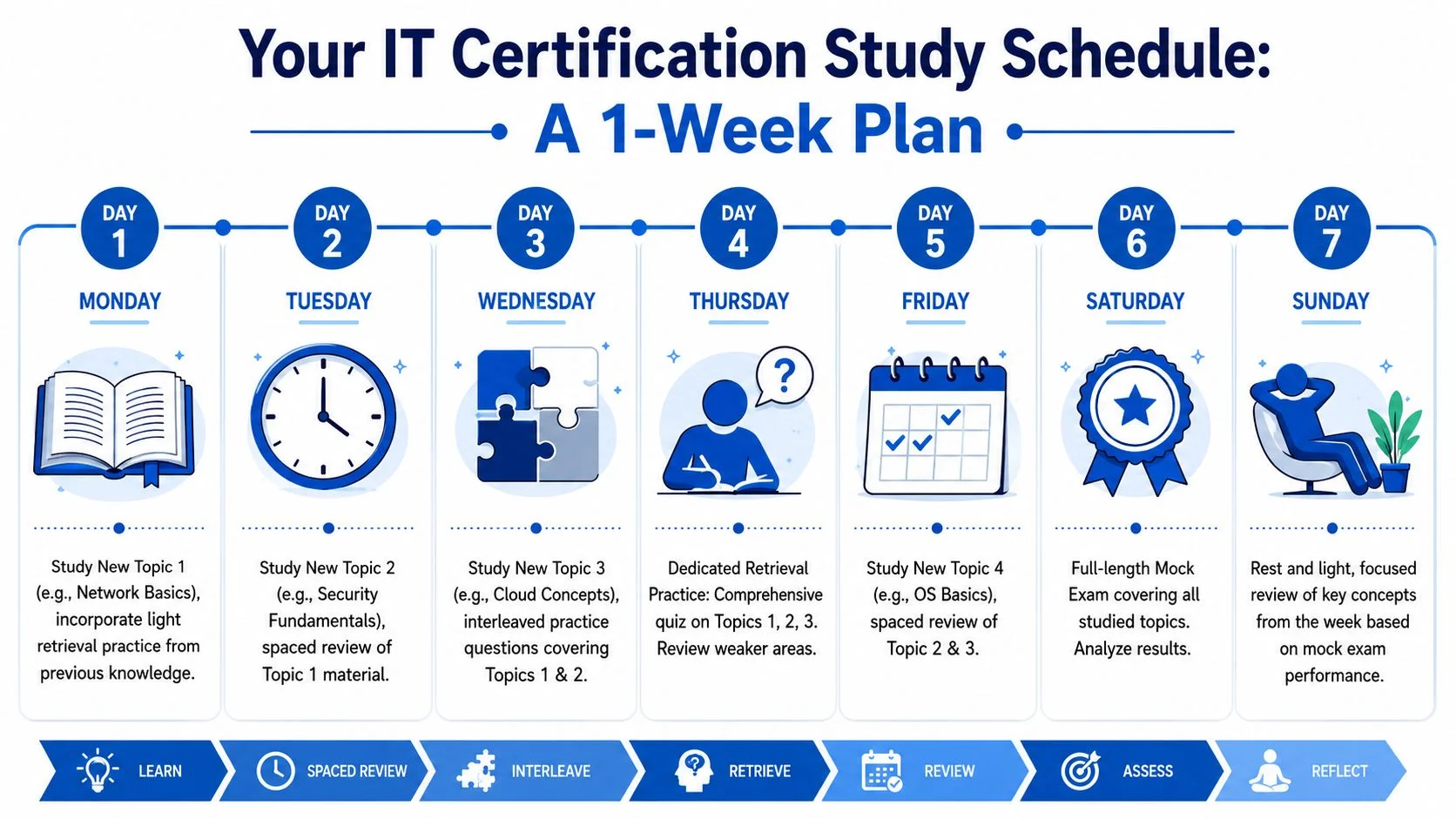
Below is a practical model you can adapt for CompTIA Network+, AWS networking content, or any infrastructure-heavy certification.
| Day | Main focus | How to study |
|---|---|---|
| Monday | New topic A | Learn core concepts, then do a short no-notes recall |
| Tuesday | New topic B | Begin with a brief recall of topic A, then learn topic B |
| Wednesday | Mixed practice | Interleave questions from topics A and B |
| Thursday | Retrieval day | Use quizzes, flashcards, or whiteboard recall for both topics |
| Friday | New topic C | Review weak spots from earlier topics, then add topic C |
| Saturday | Mock-style practice | Answer mixed scenario questions and review errors |
| Sunday | Light consolidation | Short targeted review, no heavy cramming |
What each day should feel like
Monday is for building the base. Keep it narrow. If the topic is subnetting, don't also cram in routing protocols and wireless standards. Learn the core process. Then close the book and solve one or two examples from memory.
Tuesday starts with a short look back. Not a full review. Just enough retrieval to reactivate Monday's work. Then you shift to a fresh topic, such as network security fundamentals.
Wednesday should feel less tidy. That's the point. Mix question types. Ask yourself whether a problem is really about addressing, access control, or troubleshooting logic before solving it.
Field note: If every study session covers only one isolated topic, the first mixed practice test will feel harder than expected.
A realistic session blueprint
If you only have about half an hour, use this structure:
- First few minutes for retrieval from a previous topic
- Middle block for one new concept or one worked example
- Final block for mixed questions or self-explanation
If you have a longer weekend session, resist the temptation to fill it with passive review. Use that time for scenario questions, recall drills, and error analysis. That's where understanding gets sharper.
How to adapt the template
This schedule works best when you tune it to the content.
- For fact-heavy exams: Lean more on flashcards and short recall prompts.
- For scenario-heavy exams: Spend more time explaining why one answer is better than another.
- For technical command exams: Practice exact recall, not approximate memory.
- For framework exams: Use comparison charts and teach-back summaries.
If you want another practical planning reference, MindMesh Academy's preparation guide for exams gives a helpful way to think about structuring preparation without relying on last-minute cramming.
How Technology Can Automate Effective Study Habits
Good study systems reduce friction. This matters because the hardest part of exam prep often isn't understanding the advice. It's remembering to apply it consistently when life gets busy.
Technology can help by handling the timing and organization that many learners struggle to manage on their own.
What technology should automate
A useful learning platform should reduce the overhead around three jobs:
- Scheduling review: Bringing topics back at sensible intervals so you don't have to track every revisit manually
- Triggering retrieval: Putting questions in front of you before notes, not after
- Surfacing weak areas: Showing where your confidence and performance don't match
This matters more than flashy dashboards. A polished interface won't help much if it encourages passive browsing instead of active memory work.
For professionals juggling work and study, the best tools act like a training partner. They remember what you studied, prompt you at the right time, and make weak spots visible before exam day.
Why this matters for adult learners
Manual spaced repetition systems can work well, but they also create administrative work. You have to sort cards, decide what to review, and keep the rhythm going. If you miss a few days, the backlog can feel annoying enough that you stop.
Adaptive systems remove some of that burden. They can present older material when you're likely to benefit from revisiting it, keep practice varied, and help you focus on decision-making instead of logistics.
That's also why many professionals are now exploring broader digital workflows built around the leading AI apps for productivity. The value isn't novelty. It's offloading repetitive organization so your attention stays on difficult thinking.
A good example of how this mindset carries into technical learning can be seen in this Azure AI Copilot agent study, where the challenge isn't only learning concepts but managing how tools, prompts, and workflows fit together.
A short walkthrough helps make the point:
What technology can't do for you
No platform can replace attention. It can prompt retrieval, but it can't care on your behalf. It can schedule review, but it can't make you wrestle with a concept you keep avoiding.
Use technology to automate the mechanics, not the thinking. Let the system handle reminders, spacing, and progress signals. You handle explanation, judgment, and application.
Moving from Passing Exams to Mastering Your Career
The best outcome of cognitive science in education isn't just a pass result. It's a different relationship with learning.
When you study through retrieval, spacing, and carefully mixed practice, you build knowledge that's easier to use outside the exam. You're not just memorizing enough to survive test day. You're building patterns you can call on during troubleshooting, design discussions, change reviews, and real project work.
Exam prep can become professional strength
This matters in IT because the field keeps changing. Today's certification target becomes tomorrow's baseline knowledge. New services appear. Security guidance evolves. Toolchains shift. If your study method depends on cramming, every new learning demand feels expensive.
If your method helps you store and retrieve knowledge efficiently, professional development gets lighter. You learn faster because you know how to build memory on purpose.
Passing an exam proves you reached a checkpoint. Learning how to learn changes everything after that checkpoint.
What durable learning looks like on the job
You'll notice it in practical moments:
- Troubleshooting speed: You recognize patterns sooner instead of scanning every option from scratch.
- Clearer explanations: You can teach a teammate because the concept is organized in your head.
- Better judgment: You compare alternatives rather than grabbing the first familiar answer.
- Less relearning: Old topics come back faster because the memory trace is stronger.
This is also where learning systems matter at the organizational level. Teams that support structured practice, coaching, and review workflows tend to create better long-term capability than teams that rely on one-off bootcamps or binge study. If you work with training operations or structured cohorts, tools like test prep center software can be useful to explore because they reflect the broader challenge of turning study into a managed process rather than a last-minute event.
The shift worth making
Stop treating effective study as a temporary hack for one certification. Treat it as a career skill.
Use retrieval when you want memory you can access. Use spacing when you want retention that lasts beyond the weekend. Use interleaving when you need to distinguish between similar solutions under pressure. Keep cognitive load low when material is new, then increase complexity as your schemas strengthen.
That's how exam prep stops being a cycle of forgetting and restarting. It becomes practice for the way you want to learn for the rest of your career.
If you want a study platform built around evidence-based certification prep, prepare for your next challenge with a MindMesh Academy AWS Cloud Practitioner practice exam.

Written by
Alvin Varughese
Founder, MindMesh Academy
Alvin Varughese is the founder of MindMesh Academy and an enterprise architecture leader. An electrical engineer by training, he moved from factory automation in South Africa to cloud architecture at GE Appliances and Humana (Fortune 50), and holds 20 professional certifications including AWS Solutions Architect Professional, Azure DevOps Engineer Expert, and Microsoft Agentic AI Business Solutions Architect. He built MindMesh Academy after interviewing too many highly certified candidates who couldn't answer basic questions: the goal is prep that makes you better at the job, not just able to pass the exam.