10 AWS Security Best Practices Experts Swear By
10 AWS Best Practices Security Experts Swear By
Welcome to MindMesh Academy's definitive guide on mastering cloud security within Amazon Web Services (AWS). For IT professionals, understanding and implementing robust security measures is no longer just a best practice; it's a fundamental requirement for operational integrity, data protection, and career advancement. As more organizations migrate critical workloads to AWS, the demand for certified cloud security expertise is skyrocketing. This article dives deep into the top 10 actionable AWS best practices security professionals rely on daily to safeguard their infrastructure, crucial knowledge for anyone pursuing certifications like the AWS Certified Security – Specialty or AWS Certified Solutions Architect – Professional.
We'll move beyond generic advice to explore each practice with practical examples, detailed implementation tips, and specific insights designed to help you build a resilient and secure AWS environment. This guide serves as a practical, hands-on resource, covering critical areas such as Identity and Access Management (IAM), comprehensive audit logging with CloudTrail, advanced network controls within your Virtual Private Cloud (VPC), and robust data encryption both at rest and in transit. You'll learn how to leverage AWS Config for continuous compliance, manage credentials securely with Secrets Manager, and utilize AWS GuardDuty for intelligent threat detection. While our focus is on AWS specifics, remember that a strong cloud security posture complements broader cybersecurity strategies, much like these general cybersecurity tips for businesses apply across diverse IT landscapes.
Whether you're studying for an AWS certification exam, securing a large-scale enterprise deployment, or enhancing your personal development in cloud technology, these principles will form the bedrock of your cloud security strategy. Let's begin building your digital fortress, grounded in expert-level AWS security knowledge.
1. Identity and Access Management (IAM) - The Principle of Least Privilege
The Principle of Least Privilege (PoLP) isn't just a suggestion; it's the bedrock of effective AWS best practices security and a concept frequently tested in AWS certification exams. This foundational security concept dictates that any user, application, or service should only be granted the absolute minimum permissions required to perform its specific, legitimate functions. By strictly limiting access rights, you drastically reduce the potential "blast radius" of a security breach. Whether stemming from compromised credentials, an insider threat, or a misconfigured application, PoLP minimizes the damage an attacker can inflict.
 Caption: The Principle of Least Privilege (PoLP) is foundational for securing your AWS environment, ensuring users and services only have the permissions they absolutely need.
Why PoLP is a Core Practice for IT Professionals
Adopting a least privilege model shifts your security posture from a permissive "deny-by-exception" to a restrictive "allow-by-exception" approach. This is critically important in dynamic cloud environments where identities and roles can proliferate rapidly. Consider a scenario for the AWS Certified Solutions Architect – Associate exam: a developer needs to deploy an application to EC2. Following PoLP, they might be granted permissions to launch instances and deploy code to a specific environment, but explicitly denied termination rights for production instances. This prevents accidental outages and unauthorized changes. Similarly, companies like Netflix famously utilize fine-grained IAM roles for each of their microservices, ensuring that a compromise in one service doesn't grant an attacker broad access to their entire infrastructure. This granular control is a prime example of defense in depth.
Beyond PoLP, modern security paradigms increasingly emphasize implementing a Zero Trust security model, where no user or device is trusted by default. This approach complements PoLP by adding continuous verification to every access request, reinforcing your cloud security posture.
Actionable Tips for Implementation and Certification Prep
To effectively apply the principle of least privilege and excel in your certification studies, move beyond simple role creation and integrate these advanced strategies into your workflow:
- Test Before You Deploy: Always use the IAM Policy Simulator to validate that policies work as intended before applying them to production. This prevents both overly permissive access and operational disruptions caused by insufficient permissions—a common scenario tested in practical security exams.
- Audit and Refine Continuously: Regularly use AWS Access Analyzer to identify and review unused permissions. This tool is invaluable for right-sizing policies based on actual usage, removing unnecessary access rights, and continuously tightening your security posture. Think of this as a constant security hygiene process, vital for any robust IT security framework.
- Set Maximum Permission Ceilings with Boundaries: Implement permission boundaries on IAM roles that you delegate to developers or other teams. A permission boundary acts as a hard limit, ensuring that even if a user has permission to create new policies, they cannot grant permissions beyond what the boundary allows. This is a powerful control mechanism for delegated administration scenarios.
- Justify Every Permission: Maintain clear documentation that outlines the business justification for each permission granted. This practice is vital for compliance audits (e.g., PCI DSS, HIPAA) and helps enforce a culture of security-conscious development, which is a key tenet of ITIL service management.
By mastering these techniques, you can transform IAM from a basic access tool into a powerful security enforcement mechanism. This understanding is critical for anyone preparing for AWS security certifications. For a deeper dive into policy construction, including advanced scenarios, explore these resources on designing policies for least privilege access.
Reflection Prompt:
Consider an application you've worked with. How would you apply PoLP to its AWS IAM roles and users? What AWS services would you use to test and validate those permissions?
2. Enable Multi-Factor Authentication (MFA) for Root and Privileged Accounts
Multi-Factor Authentication (MFA) is a critical defense layer, moving beyond a single point of failure (a password) to require multiple forms of verification before granting access. This simple yet incredibly powerful security control dramatically reduces the risk of account compromise. Even if an attacker manages to steal a user's password, they cannot access the account without the second factor, making MFA an indispensable element of modern AWS best practices security and a fundamental requirement for most compliance frameworks.
Why MFA is Non-Negotiable for IT Professionals
Activating MFA is non-negotiable for the AWS account root user, which holds unrestricted "super-admin" access to all resources and billing information. Losing control of the root account is arguably the worst security event in AWS. Beyond the root user, enforcing MFA for all privileged IAM users – such as administrators, DevOps engineers, and security analysts – is equally important. This practice directly prevents unauthorized actors from performing sensitive actions like deleting production databases, reconfiguring network access, or exfiltrating critical data. For example, in the context of an AWS Certified SysOps Administrator – Associate exam, you might encounter scenarios where a lack of MFA leads to a critical security incident. Many leading tech companies, including GitHub and Stripe, mandate MFA for any user accessing production environments, recognizing it as a fundamental control against credential-based attacks. Financial institutions, driven by stringent regulatory requirements, often require hardware MFA keys for high-privilege access, underscoring its importance in regulated industries like finance and healthcare.
Certification Insight:
AWS certifications frequently test your knowledge of MFA for the root user and privileged IAM users. Questions often revolve around how to enforce MFA for IAM users (e.g., using IAM policies) and the best type of MFA for the root account.
Actionable Tips for Robust MFA Implementation
Properly implementing MFA involves more than just enabling it. To build a resilient and user-friendly MFA strategy, integrate these advanced practices into your security operations:
- Prioritize Hardware Keys for Root: For the root account, always use a hardware security key (like a YubiKey supporting FIDO2/U2F) instead of a virtual MFA application. Hardware keys are significantly more resistant to phishing and malware, providing the highest level of protection against sophisticated attacks. Store this key securely.
- Enforce MFA with IAM Policies: Attach an IAM policy to privileged user groups that explicitly denies all actions unless the session was authenticated with MFA. This ensures that even if MFA is somehow disabled on a user account or bypassed, the policy will prevent unauthorized activity. This "MFA Everywhere" policy is a powerful preventative control.
{
"Version": "2012-10-17",
"Statement": [
{
"Sid": "DenyAllExceptMFA",
"Effect": "Deny",
"NotAction": "iam:*MFA",
"Resource": "*",
"Condition": {
"BoolIfExists": {
"aws:MultiFactorAuthPresent": "false"
}
}
}
]
}
Code Block: Example IAM policy snippet to enforce MFA for all actions except MFA-related ones.
- Plan for Recovery: Create and document a secure root account MFA recovery process before you ever need it. This involves understanding AWS Support's identity verification procedures and ensuring you have the necessary documentation readily available to regain access if a device is lost or inaccessible. Treat this recovery plan like a disaster recovery plan.
- Test Replacement Procedures: Regularly test your MFA device replacement and recovery procedures for both root and privileged IAM users. This ensures your team can handle a lost or broken device quickly, minimizing operational disruption without compromising security.
Reflection Prompt:
Beyond your personal AWS accounts, how might you ensure consistent MFA enforcement across a large enterprise with hundreds of AWS accounts and thousands of IAM users? What challenges might you face?
3. Enable CloudTrail for Comprehensive Audit Logging
AWS CloudTrail is a fundamental service for governance, compliance, and operational auditing of your AWS account. It provides a detailed event history of all AWS account activity, logging every API call made—whether through the AWS Management Console, SDKs, command-line tools, or other AWS services. This immutable audit trail is indispensable for security analysis, resource change tracking, and troubleshooting, making it a cornerstone of AWS best practices security.
Why CloudTrail is Essential for Security and Compliance
Without a comprehensive log of all actions, you are effectively blind to what is happening within your environment. CloudTrail provides the "who, what, when, and where" for every action, which is critical for security investigations and meeting stringent compliance standards like PCI DSS, HIPAA, and GDPR, all of which mandate detailed audit trails. For example, during the 2019 Capital One data breach, CloudTrail logs were instrumental in identifying the unauthorized API calls and understanding the attacker's movements within their infrastructure. This level of granular visibility allows security teams to reconstruct events, determine the blast radius of an incident, and implement preventative measures to stop future occurrences.
This practice is a key component of a robust AWS security strategy, ensuring that all activities are recorded and available for review. The detailed logs serve as a definitive source of truth for both security forensics and operational accountability, which is a common focus in the AWS Certified Security – Specialty exam.
Actionable Tips for Optimal CloudTrail Configuration
To maximize the security benefits of CloudTrail, go beyond simple activation and integrate these advanced configurations into your security operations:
- Activate on Day One, Across All Regions: Enable CloudTrail in all AWS regions as one of the very first steps when setting up a new AWS account. For multi-account organizations, use an Organization Trail to automatically apply this setting to all existing and future member accounts, centralizing log collection and ensuring consistent coverage.
- Secure Your Logs in a Dedicated Account: Store CloudTrail logs in a dedicated, highly restricted S3 bucket, preferably in a separate "log archive" AWS account. This account should have read-only access for security teams and strict controls (e.g., S3 Bucket Policies, Versioning, MFA Delete) to prevent deletion or modification of logs. This ensures the integrity of your audit trail.
- Ensure Log Integrity with Validation: Enable log file validation to create a digitally signed digest file for your logs. This feature provides a cryptographic way to verify that the log files have not been tampered with or altered after being delivered by CloudTrail, a crucial requirement for forensic investigations.
- Monitor Sensitive Actions with CloudWatch Alarms: Configure CloudWatch Alarms based on critical CloudTrail events to get real-time alerts for high-risk API calls. Examples include:
StopLoggingorDeleteTrailcalls (indicating an attempt to disable logging)AuthorizeSecurityGroupIngresswith0.0.0.0/0(potential open ports)CreateUser,AttachUserPolicy,AddUserToGroup(IAM changes) These alerts enable rapid response to suspicious activity.- Log Data-Level Activity for Granular Insight: For critical resources like S3 buckets containing sensitive data or DynamoDB tables, enable data events in your trail. This logs object-level API operations (e.g.,
GetObject,DeleteObject,PutObjectfor S3), providing granular insight into data access patterns and potential data exfiltration attempts.
Mastering these configurations transforms CloudTrail from a passive logging service into a proactive security monitoring and forensics tool, a skill highly valued in professional environments and on certification exams. For a deeper understanding of setup, check out these resources on configuring service and application logging with CloudTrail and CloudWatch.
Reflection Prompt:
Imagine a security incident where sensitive data was unexpectedly deleted. How would CloudTrail logs help you investigate, and what specific details would you look for?
4. Implement VPC Security with Network Access Controls
Controlling network traffic is a foundational aspect of AWS best practices security. Your Virtual Private Cloud (VPC) acts as a virtual, isolated network boundary for your AWS resources, and securing it involves a multi-layered approach using both stateful Security Groups (SGs) and stateless Network Access Control Lists (NACLs). This strategy creates a robust defense-in-depth model, isolating critical resources and meticulously controlling both inbound and outbound traffic to prevent unauthorized access.
 Caption: AWS VPC security leverages layered controls like Security Groups at the instance level and NACLs at the subnet level for comprehensive traffic filtering.
Why VPC Security is Crucial for Cloud Architects
Effective VPC security establishes network-level segmentation, which is critical for protecting sensitive data and maintaining compliance (e.g., HIPAA, PCI DSS). For instance, a healthcare organization can place its HIPAA-sensitive databases in private subnets with strict NACL rules, preventing any direct internet access. Meanwhile, an e-commerce platform might use VPC Endpoints to allow its application servers to communicate with services like Amazon DynamoDB or Amazon S3 without traversing the public internet, significantly reducing the attack surface. This is a common architectural pattern explored in the AWS Certified Solutions Architect – Professional exam.
By treating the network as a primary security control, you can enforce traffic flow policies that align precisely with your application architecture. This prevents lateral movement by attackers and ensures that components can only communicate over approved protocols and ports.
*Caption: Watch this video to understand the fundamentals of AWS VPC and how it forms the backbone of your cloud network security.*Actionable Tips for Building a Secure VPC
To build a secure and manageable VPC network, you must go beyond the default settings and apply deliberate controls. Integrate these advanced strategies into your network security operations:
- Prioritize Security Groups (Instance-Level Stateful Firewall): Use security groups as your primary firewall for instances. They are simpler to manage due to their stateful nature. Start with a "default deny" rule for all inbound traffic and explicitly allow only the specific ports and source IPs/Security Groups required for your application to function. Always ask: "Does this instance really need public access on this port?"
- Use Descriptive Naming: Name your security groups and their rules descriptively (e.g.,
sg-webapp-allow-https-from-alb,sg-database-allow-mysql-from-app-sg). This practice simplifies audits, makes troubleshooting easier, and ensures teams understand the purpose of each rule without deep inspection. - Leverage VPC Flow Logs for Visibility: Enable VPC Flow Logs to capture detailed information about the IP traffic going to and from network interfaces in your VPC. Analyze these logs using Amazon CloudWatch Logs, Amazon Athena, or third-party Security Information and Event Management (SIEM) tools to detect anomalies, troubleshoot connectivity issues, and aid in incident response.
- Implement VPC Endpoints for Private Connectivity: For services like S3 and DynamoDB, use VPC endpoints to ensure traffic between your VPC and these AWS services does not leave the Amazon network. This significantly enhances security, can improve performance, and reduces data transfer costs.
- Audit Rules Regularly (Crucial for Compliance): Periodically review and audit all security group and NACL rules to remove unused or overly permissive entries. This ongoing hygiene practice is critical for maintaining a strong security posture over time and addressing potential configuration drift, a common audit finding.
Building a multi-layered network defense is a critical skill for any AWS professional, particularly those focused on architecture and security. For a more detailed breakdown of these components, you can explore the various network security components in AWS.
Reflection Prompt:
Consider a web application with a public-facing load balancer, application servers in a private subnet, and a database in another private subnet. Sketch out the Security Group and NACL rules you would apply to each component to enforce a least privilege network posture.
5. Encrypt Data at Rest Using AWS KMS and Encryption Services
Encrypting data at rest is a non-negotiable component of a robust AWS best practices security strategy and a fundamental requirement for many compliance regimes. This critical control involves encoding data stored in services like Amazon S3, Amazon RDS, and Amazon EBS, rendering it unreadable to unauthorized parties who might gain physical or logical access to the underlying storage. AWS Key Management Service (KMS) is the central nervous system for this process, providing a managed service to create, control, and audit the cryptographic keys used for encryption.
Why Encryption at Rest is a Compliance and Security Imperative
Implementing encryption at rest is fundamental for regulatory compliance (like HIPAA, PCI DSS, GDPR, and FedRAMP) and for protecting sensitive information against direct data exfiltration. If an attacker bypasses other security layers and accesses the storage media (e.g., an exposed EBS snapshot or an S3 bucket with misconfigured public access), encryption serves as the last line of defense, ensuring the data remains confidential. For example, healthcare providers universally leverage KMS to meet strict HIPAA encryption mandates for Protected Health Information (PHI). Similarly, financial institutions often use AWS CloudHSM, which integrates with KMS, to meet more stringent FIPS 140-2 Level 3 compliance for high-assurance workloads, a concept often discussed in advanced security architectural discussions.
This practice is essential because it shifts security from relying solely on access controls to embedding protection directly into the data itself. Even if a snapshot, backup, or even a discarded hard drive is inadvertently exposed, the data remains secure without the corresponding decryption key. Understanding this distinction is crucial for the AWS Certified Security – Specialty exam.
Actionable Tips for Robust Data-at-Rest Encryption
To properly implement encryption at rest, you need a clear strategy that goes beyond simply checking a box. Integrate these specific tactics into your security operations:
- Enforce Universal Default Encryption: Enable default encryption on all new S3 buckets, EBS volumes, and RDS instances. This sets a secure baseline, ensuring that no data is ever stored in plaintext, even if a developer forgets to specify encryption settings. You can enforce this using AWS Config rules to flag non-compliant resources.
- Choose the Right Key Type Strategically:
- Use AWS-managed keys (AWS-owned keys, AWS managed CMKs) for simplicity and automatic management when AWS handles the key lifecycle.
- For greater control over key policies, auditability, and lifecycle, or for compliance with specific regulations, use customer-managed keys (CMKs). This allows you to define granular IAM policies on the key itself, controlling who can use it and for what purpose. This choice is often a discussion point in architecture reviews.
- Automate Key Rotation: Enable automatic annual key rotation for your CMKs directly within KMS. This security best practice limits the potential impact of a compromised key by automatically generating new cryptographic material each year while transparently keeping older versions available for decrypting existing data.
- Add Encryption Context for Enhanced Security: Use encryption context when making API calls to encrypt data via KMS. This feature adds an additional layer of authenticated data (key-value pairs) that must be matched exactly during decryption. This helps prevent the misuse of keys across different applications or data types, adding an extra layer of protection.
- Monitor and Audit Key Activity Rigorously: Configure CloudWatch alarms and CloudTrail logging for all KMS key usage. This allows you to detect and respond to suspicious activities, such as unexpected decryption requests, excessive API calls to KMS, or attempts to delete a key, which could indicate a compromise or insider threat.
Reflection Prompt:
If you had to design a solution for a healthcare application storing sensitive patient data in an S3 bucket and an RDS database, what key management strategy (AWS-managed keys vs. CMKs) would you recommend, and why?
6. Enable Encryption in Transit Using TLS/SSL
Encrypting data in transit is a non-negotiable component of modern AWS best practices security. This practice involves using Transport Layer Security (TLS) – the modern successor to Secure Sockets Layer (SSL) – to create an encrypted channel for data as it moves between a client and a server, or between different services within and outside AWS. By encrypting this communication, you effectively shield sensitive information from eavesdropping and man-in-the-middle (MITM) attacks, ensuring data integrity and confidentiality during transmission.
Why Encryption in Transit is Critical for Data Protection
Unencrypted data flowing over a network is like sending a postcard; anyone who intercepts it can read its contents. In a cloud environment, data travels across various networks—public internet, AWS backbone, and private VPC networks—increasing its exposure. Implementing encryption in transit is essential for protecting sensitive API calls, user sessions, and critical service-to-service communication. For example, an e-commerce platform processing payments must use HTTPS (HTTP over TLS) to protect credit card numbers and personal identifiable information (PII) from being captured. Similarly, internally, microservices communicating over an Application Load Balancer should ideally use TLS to encrypt their traffic, even within a private VPC, adding another layer of defense. AWS itself enforces TLS for all its API endpoints, establishing a secure baseline for any interaction with the AWS platform.
This practice is also a fundamental requirement for virtually all compliance frameworks, including PCI DSS, HIPAA, GDPR, ISO 27001, and many more. Failing to encrypt data in transit can result in severe compliance penalties, significant reputational damage, and loss of customer trust.
Actionable Tips for Robust In-Transit Encryption
To properly implement and maintain strong encryption in transit, integrate these specific actions into your security protocols:
- Enforce Secure Protocols at the Edge: Configure public-facing services like Elastic Load Balancing (ELB) (Application Load Balancers, Network Load Balancers) and Amazon CloudFront to only accept HTTPS traffic. Implement redirects for all HTTP requests to HTTPS (
HTTP to HTTPS redirect) to ensure no communication occurs over an insecure channel. - Manage Certificates Centrally with ACM: Use AWS Certificate Manager (ACM) to provision, manage, and deploy public and private TLS certificates. ACM handles automatic renewals, which eliminates the risk of service outages due to expired certificates—a common operational headache. This service is a key component for streamlined certificate management in AWS.
- Strengthen Your TLS Configuration (Security Policies): Disable outdated and vulnerable TLS versions like TLS 1.0 and 1.1. On your load balancers (e.g., ALB Listener settings) and CloudFront distributions (e.g., Viewer Protocol Policy), select a security policy that enforces a minimum of TLS 1.2 and uses strong, modern cipher suites. This is critical for preventing downgrade attacks and protecting against known vulnerabilities.
- Force Browser-Side Encryption with HSTS: Implement HTTP Strict Transport Security (HSTS) headers in your application responses. This tells compliant browsers to communicate with your domain only over HTTPS for a specified period, even if a user explicitly types "http://" or clicks an HTTP link. This effectively prevents protocol downgrade attacks and enhances user security.
- Verify Your Configuration Regularly: Regularly use external tools like the Qualys SSL Labs Server Test or internal vulnerability scanners to analyze your public endpoints. This test provides a detailed report on your TLS configuration, highlighting any weaknesses (e.g., weak ciphers, old TLS versions) that need to be addressed. Make this a part of your continuous security auditing process.
Reflection Prompt:
You're deploying a new web application. What specific AWS services and configurations would you use to ensure all user traffic is encrypted in transit from their browser to your application servers, and why?
7. Implement Security Groups and NACLs for Defense-in-Depth
Defense-in-depth is a core security strategy that layers multiple, independent security controls to protect your resources. In AWS, this means never relying on a single firewall. Instead, you should combine Security Groups (stateful, instance-level virtual firewalls) with Network Access Control Lists (NACLs) (stateless, subnet-level virtual firewalls) to create redundant and overlapping layers of network traffic filtering. If one layer fails or is misconfigured, another is still in place to provide protection, which is central to AWS best practices security.
This layered approach is a fundamental component of a robust AWS security posture. It ensures that a single point of failure or a misconfiguration in your network setup doesn't lead to a full-scale breach. By creating these redundant checkpoints, you significantly increase the difficulty and cost for an attacker to successfully compromise your infrastructure, forcing them to bypass multiple distinct security mechanisms.
Why Layered Network Defense is Crucial for Architects and Engineers
Adopting a layered network defense is crucial for building a resilient and compliant architecture. Security Groups act as the first line of defense, directly at the instance or ENI (Elastic Network Interface) level. They are stateful, meaning if you allow outbound traffic, the corresponding inbound response is automatically allowed. NACLs, conversely, provide a broader, second line of defense at the subnet boundary. They are stateless, requiring explicit rules for both inbound and outbound traffic, regardless of the Security Group rules applied to the instances within that subnet. This distinction is often a tricky point in AWS certification exams, especially for the AWS Certified Security – Specialty.
For example, a financial services company might use a Security Group to allow inbound web traffic on port 443 to its application servers. Simultaneously, they would configure a NACL on the public subnet to explicitly deny all inbound traffic except for port 443, and crucially, deny all outbound traffic from specific private ranges to the public internet, effectively blocking reconnaissance scans and traffic destined for other ports before it ever reaches the instances. This dual-layer approach is a common requirement for meeting compliance standards like PCI DSS and SOC 2.
Actionable Tips for Implementing Defense-in-Depth Network Controls
To effectively implement defense-in-depth, you must treat each layer as a distinct and complementary control, understanding their differences:
- Layer 1 - Security Groups (Stateful, Instance-Level):
- Start with a "deny all" default posture and only create specific "allow" rules for necessary traffic.
- Always reference other Security Groups or specific IP addresses/CIDR blocks for source/destination, rather than
0.0.0.0/0unless absolutely necessary (e.g., public web server on 443). - For instance, allow SSH access (port 22) only from a specific Bastion host's IP address or the Security Group of the Bastion host.
- Layer 2 - NACLs (Stateless, Subnet-Level):
- Use NACLs for broad, coarse-grained filtering at the subnet perimeter.
- They process rules in order from lowest to highest.
- A common practice is to block known malicious IP addresses or deny entire port ranges (e.g., all inbound UDP ports) that should never be accessed from the internet at the subnet level. Remember to explicitly allow both inbound and outbound return traffic for legitimate connections.
- Monitor and Validate with VPC Flow Logs: Utilize VPC Flow Logs to monitor both accepted and, more importantly, rejected traffic from both Security Groups and NACLs. This provides invaluable insight into potential threats, helps validate that your NACL and Security Group rules are working as intended, and aids in troubleshooting connectivity issues.
- Document Each Layer's Purpose: Maintain clear and up-to-date documentation that explains the role of each Security Group and NACL rule. This is essential for troubleshooting, facilitating compliance audits, and preventing accidental security gaps during configuration changes.
Building a multi-layered network defense is a critical skill for any AWS professional, whether you're a Solutions Architect designing secure environments or a DevOps Engineer implementing them. For a more detailed breakdown of these components, you can explore the various network security components in AWS.
Reflection Prompt:
Explain the key differences between Security Groups and NACLs, and provide a scenario where a NACL would catch traffic that a Security Group might miss (assuming a misconfiguration).
8. Enable AWS Config for Compliance and Configuration Management
Maintaining a consistent and secure configuration across a dynamic cloud environment is a significant challenge. AWS Config is a core service designed to address this, acting as a resource configuration historian and a compliance engine. It continuously monitors and records your AWS resource configurations, allowing you to assess, audit, and evaluate how your resources are set up against desired policies – a critical aspect of AWS best practices security.
Why AWS Config is Indispensable for Governance and Auditing
AWS Config provides the unparalleled visibility and control needed to enforce internal policies and meet external regulatory requirements. It can answer critical questions for auditors and security teams alike, such as: "What did my production security group look like last Tuesday?" or "Are all my S3 buckets preventing public access and enforcing encryption?" For example, a financial services company can use AWS Config to automatically verify that all Amazon RDS databases have encryption enabled at rest, flagging any noncompliant resources for immediate attention. Similarly, healthcare organizations can leverage it to ensure their EC2 security group configurations align precisely with HIPAA controls, providing an auditable trail of compliance over time.
This continuous oversight is a key pillar of effective cloud security, as it helps prevent "configuration drift," where systems deviate from their intended secure baseline over time. Configuration drift is a common cause of security vulnerabilities and operational issues. Understanding AWS Config's capabilities is essential for the AWS Certified Security – Specialty and AWS Certified Solutions Architect – Professional exams.
Actionable Tips for Advanced AWS Config Implementation
To move from basic monitoring to proactive compliance enforcement, integrate these advanced AWS Config strategies into your security operations:
- Start with Managed Rules, Then Customize: Begin by deploying AWS managed Config rules. These pre-built rules cover common security best practices, such as checking for unrestricted inbound SSH/RDP traffic or ensuring MFA is enabled for the root account, providing immediate value with minimal setup. Once comfortable, explore creating custom Config rules using AWS Lambda for highly specific organizational policies.
- Automate Remediation Carefully and Incrementally: Use AWS Systems Manager Automation documents (runbooks) or AWS Lambda functions triggered by EventBridge to enable auto-remediation for noncompliant resources. Start with low-risk fixes, such as re-enabling logging on a CloudTrail trail or applying a default S3 bucket policy, before automating more critical changes. Always test automation thoroughly.
- Centralize Compliance Views with Aggregators: For multi-account environments, use a Config Aggregator to collect configuration and compliance data from all member accounts into a single, dedicated management account. This provides a unified dashboard and reporting mechanism for a holistic view of your entire organization's compliance posture.
- Integrate for Real-Time Alerts and Workflows: Connect AWS Config to Amazon EventBridge to trigger real-time notifications (e.g., via SNS to security teams) or automated workflows (e.g., Lambda functions for remediation) whenever a resource becomes noncompliant. This ensures security teams can respond instantly to configuration changes that violate policy, significantly reducing the window of vulnerability.
Reflection Prompt:
How would AWS Config help a DevOps team maintain a consistent security posture across development, staging, and production environments, and what types of non-compliance would it most effectively detect?
9. Use AWS Secrets Manager for Credential and Secret Rotation
Hardcoding sensitive information like database passwords, API keys, or OAuth tokens directly into application source code or configuration files is a significant security risk. AWS Secrets Manager provides a centralized, secure service to store, manage, and automatically rotate these secrets. This approach is a core tenet of modern AWS best practices security, as it decouples credentials from your code, reducing the attack surface and mitigating the risk of exposure through version control systems or insecure storage.
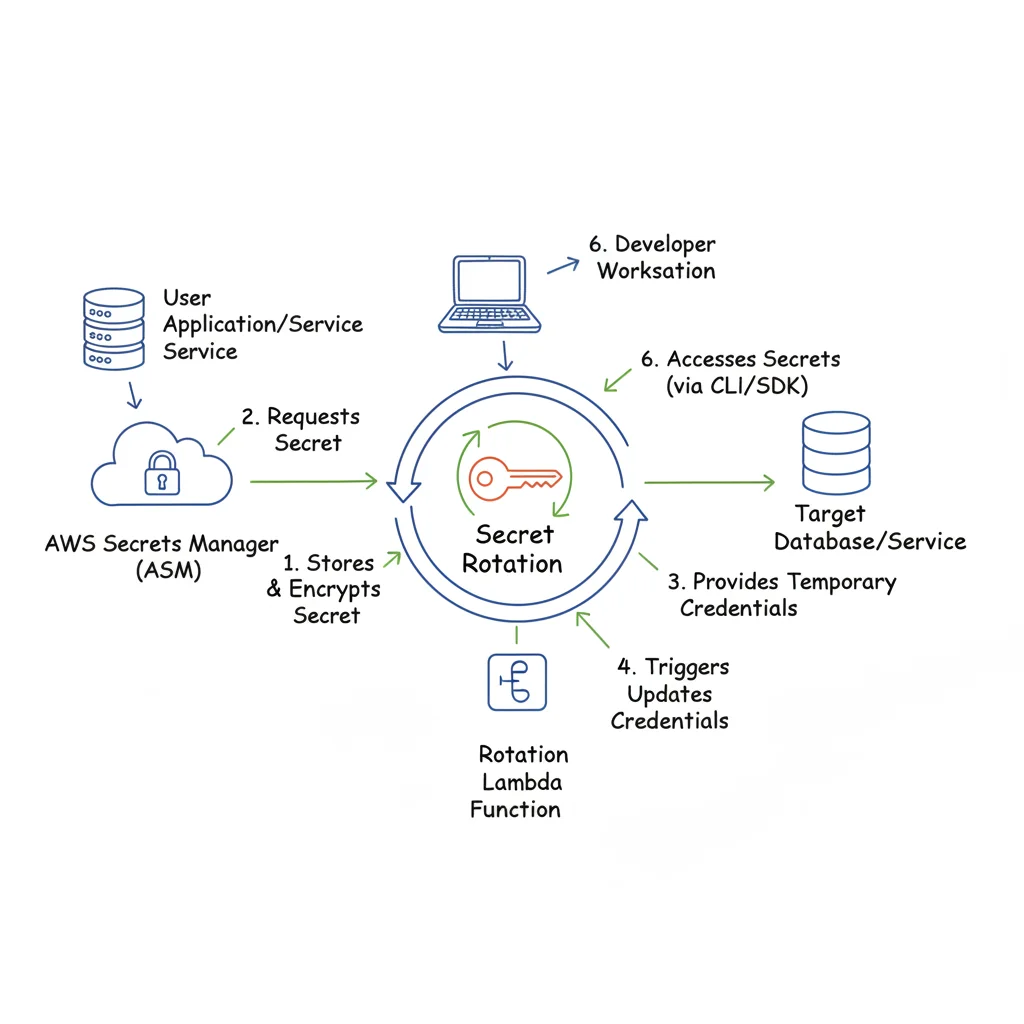 Caption: AWS Secrets Manager centralizes the management and automated rotation of sensitive credentials, enhancing overall security.
Why Secrets Manager is Crucial for Secure Application Development
By centralizing secret management, you gain unparalleled control and visibility over who accesses sensitive credentials and when. Instead of embedding a password in a config file, an application uses a secure IAM role to retrieve the secret from Secrets Manager at runtime. This model enables robust security practices, such as the automated rotation of credentials without requiring code deployments or manual intervention—a massive benefit for DevOps teams. For instance, companies like Netflix leverage this capability to rotate database credentials as frequently as every hour, drastically limiting the window of opportunity for an attacker if a credential were ever compromised. Similarly, services like Amazon RDS, Amazon Redshift, and Amazon DocumentDB integrate natively with Secrets Manager to handle password rotation seamlessly, simplifying operational overhead.
This programmatic access and frequent rotation align perfectly with the Principle of Least Privilege and Zero Trust models, as applications are only granted temporary, just-in-time access to the credentials they need. This knowledge is highly valuable for the AWS Certified DevOps Engineer – Professional and AWS Certified Security – Specialty exams.
Actionable Tips for Integrating Secrets Manager
To effectively integrate Secrets Manager into your security strategy, move beyond basic storage and adopt these advanced practices:
- Implement Automated Rotation Schedules: For supported services like RDS, Redshift, and custom secrets (using Lambda functions), configure automatic rotation with a frequent interval, such as every 30-90 days. This minimizes the lifespan of any single credential, adhering to compliance requirements and significantly reducing the risk window.
- Use Fine-Grained IAM Policies for Access: Create specific IAM policies that grant your applications or users permission to retrieve only the specific secrets they require. Avoid using wildcard permissions (
*) forsecretsmanager:GetSecretValue. Instead, specify the ARN of the secret. For example:arn:aws:secretsmanager:REGION:ACCOUNT_ID:secret:MyDatabaseSecret-XXXXXX. - Monitor for Anomalies and Access Patterns: Actively monitor CloudTrail logs for failed secret retrieval attempts (
secretsmanager:GetSecretValue) or unusual access patterns. A spike in failures could indicate a misconfiguration or a potential security event, such as an attacker attempting to brute-force credentials. Configure CloudWatch Alarms for these events. - Rotate Secrets On-Demand When Necessary: Immediately trigger a manual rotation of a secret whenever a developer with access leaves your team, if you suspect a potential compromise, or after any security incident. This ensures ex-employees or attackers cannot use old credentials.
- Leverage Client-Side Caching for Performance: For high-traffic applications, use the AWS Secrets Manager client-side caching libraries. This reduces the number of API calls to the service, improving application performance and helping manage costs, while still ensuring applications retrieve the latest secret version when needed.
Reflection Prompt:
Beyond database credentials, what other types of sensitive information (e.g., API keys, OAuth tokens) could benefit from being managed and rotated via AWS Secrets Manager in a typical application?
10. Enable AWS GuardDuty for Intelligent Threat Detection
AWS GuardDuty is an intelligent threat detection service that continuously monitors your AWS accounts and workloads for malicious activity and unauthorized behavior. Unlike traditional monitoring tools that rely solely on predefined rules, GuardDuty employs a powerful combination of machine learning, anomaly detection, and continuously updated threat intelligence feeds to identify potential threats in near real-time. This proactive approach is a critical component of a modern AWS best practices security strategy, essentially giving you an automated security analyst.
Why GuardDuty is Your Cloud Security Analyst
Manually analyzing the sheer volume of logs generated by services like AWS CloudTrail, VPC Flow Logs, and DNS logs across numerous accounts is an insurmountable task at scale for human security teams. GuardDuty automates this process, providing a fully managed detection service that uncovers a wide array of issues, including:
- Reconnaissance by attackers: Scanning for open ports or attempting unauthorized API calls.
- Compromised EC2 instances: Detecting instances serving malware, engaging in port scanning, or communicating with known command-and-control servers.
- Unauthorized data access: Identifying unusual S3 bucket access from unfamiliar locations or credentials.
- Cryptocurrency mining: Detecting unapproved cryptomining activity within your environment.
For example, a financial services firm can rely on GuardDuty to detect potential insider threats, such as an employee suddenly accessing sensitive S3 buckets from an unfamiliar IP address or at an unusual time. This capability transforms a "needle-in-a-haystack" problem into an actionable security alert, crucial for immediate response. GuardDuty's strength lies in its ability to provide high-fidelity, contextual alerts without requiring you to manage security software or constantly update threat intelligence feeds. This is often a key service to understand for the AWS Certified Security – Specialty exam.
Actionable Tips for Maximizing GuardDuty's Value
To maximize the value of GuardDuty, go beyond simple activation and integrate it deeply into your security operations:
- Centralize and Automate Enablement Across Accounts: Use AWS Organizations to enable GuardDuty across all existing and new accounts from a single management account. This ensures comprehensive and consistent threat detection coverage across your entire AWS footprint without manual intervention. Designate a "security tooling" account to aggregate findings.
- Enable in All Regions (Even Unused Ones): Activate GuardDuty in every AWS region, even those you don't actively use for your primary workloads. This is crucial for detecting unauthorized activity, such as cryptomining or resource deployment in forgotten regions, a common tactic used by attackers to evade detection.
- Automate Remediation for Rapid Response: Create Amazon EventBridge rules that trigger AWS Lambda functions in response to specific GuardDuty findings. For instance, a finding related to a malicious IP communicating with an EC2 instance can automatically trigger a Lambda function to update a security group and block that IP, or even isolate the compromised instance. This moves you from detection to automated response.
- Integrate and Correlate Findings: Forward GuardDuty findings to a centralized Security Information and Event Management (SIEM) system or AWS Security Hub. This allows you to correlate GuardDuty alerts with other security data (e.g., WAF logs, network firewall logs), providing a unified view of your security posture, reducing alert fatigue, and streamlining incident response.
- Customize and Refine Trusted IP Lists: Regularly review and maintain your trusted IP lists (e.g., your corporate VPN range) and custom threat intelligence feeds within GuardDuty. Customizing these inputs helps GuardDuty reduce false positives and allows your team to focus on the most critical, genuine threats, improving the signal-to-noise ratio of alerts.
Reflection Prompt:
If GuardDuty detects an EC2 instance communicating with a known command-and-control server, what immediate automated and manual steps would you take as a security engineer?
AWS Security Best Practices — 10-Point Comparison for IT Professionals
Here's a concise comparison summarizing the implementation details and benefits of each AWS security best practice, providing a quick reference for planning your cloud security strategy and preparing for certification exams.
| Control | Implementation Complexity | Resource Requirements | Expected Outcomes | Ideal Use Cases | Key Advantages |
|---|---|---|---|---|---|
| Identity and Access Management (IAM) - Principle of Least Privilege | Medium | IAM policies, RBAC design, auditing tools (Access Analyzer), ongoing admin time | Minimized privileges and reduced "blast radius" in case of breach | Large organizations, microservices architectures, regulated environments | Reduces attack surface, improves auditability, enhances compliance |
| Enable Multi-Factor Authentication (MFA) for Root and Privileged Accounts | Easy | MFA devices/applications, robust backup/recovery processes, user support | Dramatically lower account takeover risk from compromised credentials | AWS Root account, privileged IAM users, production access roles | Strongest protection against password-based attacks and credential compromise |
| Enable CloudTrail for Comprehensive Audit Logging | Easy | S3 (storage), log analysis tools (CloudWatch Logs, Athena, SIEM), retention planning | Complete API/activity audit trail for forensic analysis and compliance | Compliance audits (PCI, HIPAA), incident response, multi-account setups | Definitive source of truth for all AWS activity, robust forensic capability |
| Implement VPC Security with Network Access Controls | Medium | Network engineers, Security Groups, NACLs, VPC Flow Logs, subnet design | Network segmentation, reduced lateral movement by attackers | Sensitive workloads, HIPAA/PCI compliance, private service communication | Fine-grained traffic control, network isolation, defense-in-depth |
| Encrypt Data at Rest Using AWS KMS and Encryption Services | Medium | KMS keys/policies, potential CloudHSM, key rotation schedules, monitoring | Data confidentiality, strong compliance readiness (GDPR, HIPAA) | Databases (RDS, DynamoDB), S3 buckets, EBS volumes, regulated data stores | Centralized key management, audit trail for key usage, data protection by default |
| Enable Encryption in Transit Using TLS/SSL | Easy | TLS certificates (ACM), secure TLS configuration (ELB, CloudFront), renewal automation | Prevents eavesdropping and Man-in-the-Middle (MITM) attacks | Public-facing web applications, APIs, internal service-to-service communication | Industry-standard protection, builds trust, meets most compliance mandates |
| Implement Security Groups and NACLs for Defense-in-Depth | Medium | Rule management, thorough documentation, continuous monitoring (VPC Flow Logs) | Layered network defense, reduced single-point failures in network security | Complex multi-tier architectures, compliance-driven environments, granular control | Redundant filtering mechanisms, catches misconfigurations, enhances resilience |
| Enable AWS Config for Compliance and Configuration Management | Medium | Config rules (managed/custom), aggregators, remediation Lambdas, storage costs | Continuous compliance visibility, historical configuration tracking, drift detection | Multi-account compliance management, auditing, change tracking, automated governance | Automated compliance checks, proactive identification of security posture deviations |
| Use AWS Secrets Manager for Credential and Secret Rotation | Medium | Secrets Manager service, application integration, custom rotation logic (Lambda) | Eliminates hardcoded credentials, automatic rotation, improved auditability | Database credentials, API keys, OAuth tokens, CI/CD pipeline secrets | Secure storage and retrieval, automatic credential lifecycle management, audit logs |
| Enable AWS GuardDuty for Intelligent Threat Detection | Easy | Monitoring costs, SIEM/EventBridge integration, analyst review/triage | Early detection of malicious activity, anomaly detection across AWS services | Threat hunting, automated anomaly detection, incident response enablement | ML-driven findings, low initial configuration overhead, continuously updated threat intelligence |
From Theory to Practice: Embedding Security into Your AWS DNA
Navigating the vast landscape of AWS can feel complex, but securing your cloud environment doesn't have to be an insurmountable challenge. For IT professionals, the journey from understanding security concepts to implementing them effectively is one of continuous improvement and vigilance. Throughout this guide, we've dissected ten foundational pillars that constitute a robust security posture, transforming abstract principles into tangible, actionable steps. Mastering these AWS best practices security protocols is not just about ticking boxes on a compliance checklist; it's about building a resilient, secure-by-design foundation for your applications and data that can withstand evolving threats.
The core theme connecting all these practices – from enforcing the Principle of Least Privilege with IAM to leveraging GuardDuty for intelligent threat detection – is a fundamental shift from a reactive to a proactive security mindset. Instead of waiting for a security event to occur, this approach involves creating layers of defense that anticipate, detect, and mitigate threats before they can escalate. Think of it as building a digital fortress where every component, from the outermost walls (VPCs and NACLs) to the inner vaults (data encryption with KMS), is independently secured and continuously monitored. This comprehensive strategy is exactly what AWS certification exams emphasize.
Key Takeaways for Building a Resilient Cloud Posture
To distill these extensive practices into immediate priorities, focus on three critical, interconnected areas: Access Control, Data Protection, and Continuous Monitoring.
- Mastering Access Control: Your first and most critical line of defense is controlling who can access what. This starts with diligently applying the Principle of Least Privilege across all IAM roles and users. It also means enforcing MFA on all sensitive accounts without exception and securely managing credentials with AWS Secrets Manager. Remember, weak access control remains the most common entry point for attackers in cloud environments.
- Comprehensive Data Protection: Data is your most valuable asset, and protecting it requires a two-pronged strategy. Encrypting data at rest using services like KMS, S3 server-side encryption, or RDS encryption ensures it remains unreadable even if the underlying storage medium is compromised. Equally important is encrypting data in transit with TLS/SSL to prevent eavesdropping and Man-in-the-Middle (MITM) attacks as information moves across networks.
- Vigilant and Automated Monitoring: You cannot protect what you cannot see. This is where services like CloudTrail, AWS Config, and GuardDuty become indispensable. CloudTrail provides the immutable "who, what, when, and where" for every API call, forming your critical audit trail. AWS Config ensures your resources remain compliant with your security policies and detects configuration drift. GuardDuty acts as your 24/7 automated security analyst, using machine learning to detect anomalous activity that might indicate a threat.
Your Actionable Next Steps: A Self-Audit Checklist
Implementing these AWS best practices security measures is an ongoing process, not a one-time project. We encourage you to begin by conducting a thorough audit of your current AWS environment against the ten practices outlined in this article. Use this checklist as your starting point:
- Review IAM Policies: Start with your most privileged users and roles. Are their permissions scoped down to the absolute minimum required using conditions and resource-specific ARNs? Is MFA enforced for all critical accounts?
- Verify Encryption Settings: Check your S3 buckets, EBS volumes, RDS databases, and other data stores. Is encryption enabled by default, and are you using appropriate KMS keys?
- Audit Network Controls: Examine your Security Groups and NACLs. Are there overly permissive rules (like
0.0.0.0/0for SSH or RDP) that can be tightened? Are you using VPC Flow Logs for visibility? - Confirm Logging and Monitoring: Ensure CloudTrail, AWS Config, and GuardDuty are enabled in all active and inactive regions, with logs securely stored and monitored for alerts.
- Secrets Management: Are you using AWS Secrets Manager for all sensitive credentials, with automated rotation configured where possible?
By methodically addressing these areas, you systematically reduce your attack surface and help build a culture where security is integrated into every stage of the development and operations lifecycle. This commitment not only protects your organization from financial and reputational damage but also builds trust with your customers and stakeholders, demonstrating a serious commitment to safeguarding their data. The ultimate goal is to make security an enabler of innovation, not a barrier, allowing your teams to build confidently on AWS.
Ready to transform this knowledge into certified expertise? The concepts discussed here are critical for passing AWS certification exams and advancing your career as an IT professional. MindMesh Academy offers comprehensive, hands-on courses designed to help you master AWS best practices security and achieve your certification goals. Visit MindMesh Academy to explore our curriculum and start building a more secure cloud future today. Your journey to becoming a certified AWS security expert begins here.
Ready to Get Certified?
Prepare with expert-curated study materials at MindMesh Academy:

Written by
Alvin Varughese
Founder, MindMesh Academy
Alvin Varughese is the founder of MindMesh Academy and an enterprise architecture leader. An electrical engineer by training, he moved from factory automation in South Africa to cloud architecture at GE Appliances and Humana (Fortune 50), and holds 20 professional certifications including AWS Solutions Architect Professional, Azure DevOps Engineer Expert, and Microsoft Agentic AI Business Solutions Architect. He built MindMesh Academy after interviewing too many highly certified candidates who couldn't answer basic questions: the goal is prep that makes you better at the job, not just able to pass the exam.