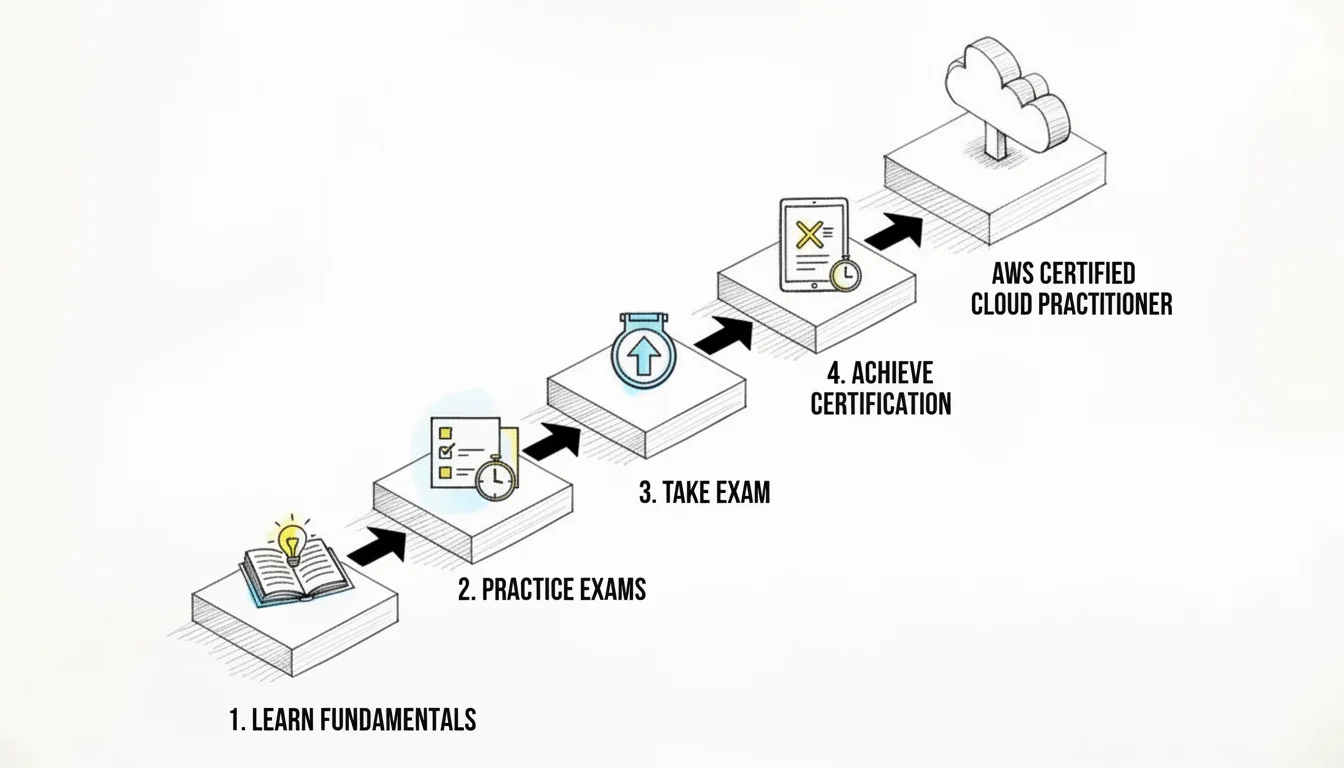
Your Ultimate AWS Certified Cloud Practitioner Exam Guide
Your Ultimate AWS Certified Cloud Practitioner Exam Guide: A MindMesh Academy Blueprint
Earning your AWS Certified Cloud Practitioner (CLF-C02) certification is a strategic move to advance your career. This credential serves as a definitive entry point into cloud computing. IT professionals, project managers, sales experts, and finance analysts all benefit from understanding Amazon Web Services (AWS) fundamentals, as these skills are essential in the modern enterprise.
MindMesh Academy provides high-quality educational content that gives you the knowledge and confidence to excel. This guide breaks down every necessary topic, turning abstract concepts into actionable insights. You will learn to approach the exam with clarity and prepare to earn a passing score. By following this blueprint, you can build a strong technical foundation and demonstrate your cloud expertise. This certification process validates your professional knowledge and helps you stand out in a competitive job market.
Your Blueprint For Acing The AWS Cloud Practitioner Exam
The AWS Certified Cloud Practitioner (CLF-C02) exam is not a difficult technical investigation. Instead, it is a validation of your foundational cloud fluency. It confirms that you understand core concepts, essential services, and the business value that the AWS Cloud provides. You must understand what the cloud is, how AWS implements specific features, and why these tools matter for businesses globally.
 A visual representation of the foundational concepts tested in the AWS Certified Cloud Practitioner exam.
Before analyzing specific AWS services and their functions, you must understand the rules of the exam. Learning the structure of the test is a critical step when you are building an effective study plan.
Deconstructing The CLF-C02 Exam
On exam day, you will have 90 minutes to answer 65 questions. These questions use two formats. Multiple-choice questions have one correct answer and three distractors. Multiple-response questions require you to select two or more correct answers from five or more options.
To earn your certification, you must achieve a scaled score of 700 out of 1000. This standardized score ensures that AWS evaluates all candidates consistently across different exam versions. Reaching this score is a realistic goal if you use a structured approach and dedicate enough time to preparation.
AWS carefully develops these questions to test your knowledge across four thematic areas called domains. Understanding the weight of each domain is a strategic advantage. It tells you exactly how to distribute your study hours to get the highest return on your effort.
The AWS Certified Cloud Practitioner exam is a globally recognized foundational credential. It is available in over a dozen languages. You can choose flexible testing options, such as visiting a physical testing center or taking the exam from home through online proctoring. This accessibility makes the certification a useful asset for professionals in any region.
The Four Pillars of The Exam
To study effectively, you must identify where the most points are located. AWS is transparent about the focus of the exam. This clarity helps you avoid guessing about which topics to prioritize.
The table below shows the four domains and their weight on the exam. This provides a roadmap for your learning process.
| Exam Domain | Percentage of Exam (%) |
|---|---|
| Cloud Concepts | 24% |
| Security and Compliance | 30% |
| Cloud Technology and Services | 34% |
| Billing, Pricing, and Support | 12% |
Cloud Technology and Services (34%) and Security and Compliance (30%) represent 64% of your total score. These two areas require the most study time. Do not ignore Billing, Pricing, and Support at 12%, however. These points often determine whether a candidate passes or fails. Understanding pricing models is a vital skill for anyone who manages cloud resources. This is similar to how a project manager with a PMP certification must track and control project budgets.
After you understand the concepts, use practice tests to confirm your knowledge. To find the best resources for the current exam, you can read our review of the 7 best AWS Cloud Practitioner practice exams for 2025.
Success requires a clear and strategic study plan. AWS offers official resources to help you start. When you pass the exam, you receive a 50% discount on any future AWS certification exams. This benefit makes it much more affordable to pursue specialized roles later in your career.
Reflection Prompt: Considering these domain weightings, which areas align best with your current professional experience, and which might require more dedicated study time? How would you adjust your learning plan accordingly?
Mastering The Core AWS Concepts And Services
To succeed on the AWS Certified Cloud Practitioner exam, you must move beyond simple memorization of service definitions. It is more effective to view each core AWS service as a specific tool in a digital toolkit. Your goal is to understand what each tool is called, what it actually does, and how it addresses specific business challenges. This functional knowledge is what the current AWS CLF-C02 exam evaluates. Instead of repeating facts, you should be able to determine when to use one service over another based on a given set of requirements.
Consider a standard scenario: you are building a new web application. You need computational resources to run your code, a place to store user files, and a secure network to keep your data safe. AWS provides services designed for each of these tasks. These services work together to create a stable environment for any application.
 A simplified architecture showing how core AWS services like EC2, S3, and RDS interconnect to form a functional application environment.
Virtual Servers And Infinite Storage
Your application requires computational power to process requests and run logic. In the AWS environment, this requirement is met by Amazon Elastic Compute Cloud (EC2).
EC2 provides virtual servers that you can launch in minutes. You can rent these resources by the second or the hour (verify current pricing models on the AWS site). If you need a basic machine for a small blog or a development project, you can provision a small instance. If you need to process large datasets or run machine learning models, you can choose a high-performance instance with more CPU and memory. AWS provides many instance types, allowing you to select the exact resources you need. This ability to scale your capacity up or down is a fundamental part of cloud computing that you will see on the exam.
In addition to compute power, every application needs a way to store files. This might include images, videos, logs, or database backups. For these needs, AWS offers Amazon Simple Storage Service (S3).
You can think of S3 as a highly reliable digital filing cabinet with unlimited capacity. You store your data as objects inside containers called buckets. S3 is designed for 99.999999999% durability, which is often referred to as eleven nines. This level of reliability ensures that your data remains safe even if hardware fails in a data center. Because S3 is object storage rather than a traditional file system, it is ideal for hosting static website content, storing large archives, or acting as a repository for big data analytics. It allows you to store and retrieve any amount of data at any time.
Key Takeaway: EC2 provides the compute power for your applications to run, while S3 offers highly durable and scalable object storage for all your data, without worrying about server management.
Creating Your Private Cloud Network
Building cloud infrastructure without a network is like building an office without any internal wiring or security. Your resources need a secure and isolated environment to communicate. This function is handled by Amazon Virtual Private Cloud (VPC).
A VPC is a private, isolated section of the AWS cloud that you define. It allows you to launch AWS resources in a virtual network that mirrors a traditional data center. You have complete control over this environment, including the selection of your own IP address range and the creation of subnets. You can configure public subnets for resources that must be reached from the internet, like a web server. You can also create private subnets for resources that should never be accessed directly from the outside, such as your internal databases. Understanding how VPCs provide isolation and how route tables and gateways control traffic is essential for passing the security and networking portions of the exam.
A strong understanding of these foundational services—EC2 for compute power, S3 for highly durable storage, and VPC for secure, isolated networking—is required. This trio forms the base upon which almost all other AWS services are built and deployed.
Managing Databases The Easy Way
Modern applications rely on databases to store and retrieve structured information. Managing a database on your own involves many manual tasks, such as installing software, managing backups, and applying security patches. AWS offers managed database services to handle these repetitive tasks for you. Two specific services appear frequently on the Cloud Practitioner exam.
The first is Amazon Relational Database Service (RDS). This service makes it easier to set up, operate, and scale a relational database. It supports several popular engines, including MySQL, PostgreSQL, SQL Server, Oracle, and Amazon Aurora.
RDS acts as an automated administrator. It handles hardware provisioning, software installation, and database patching. It also performs automatic backups and manages failover if a problem occurs. By using RDS, you can focus on your data and application logic instead of the underlying server maintenance. You choose the engine and the instance size, and AWS takes care of the rest of the infrastructure.
The second service you must know is Amazon DynamoDB. This is a NoSQL database built for high speed and large-scale applications.
DynamoDB does not use the rigid tables and rows found in relational databases. Instead, it uses a flexible key-value model. It is designed to provide response times in the single-digit milliseconds, regardless of how much data you store or how many users are accessing the system. This makes it a preferred choice for mobile apps, gaming backends, e-commerce sites, and IoT applications. On the exam, you will likely need to decide whether a relational database (RDS) or a NoSQL database (DynamoDB) is the better fit for a specific use case.
Securing Access With Identity Management
Security is a primary concern for any cloud user. You must control who can access your AWS account and what they are allowed to do. This control is provided by AWS Identity and Access Management (IAM).
IAM is the central point for managing security in your AWS environment. You use it to create users for people and roles for applications. You can also organize users into groups to manage permissions more efficiently. Permissions are defined using policies, which are documents that list exactly what actions are allowed or denied. For example, you can create a policy that allows a user to upload files to an S3 bucket but prevents them from deleting anything.
The most important concept to remember for the exam is the principle of least privilege. This means you should only give a user or service the minimum permissions they need to do their job. Granting too much access increases the risk of accidental or malicious damage to your resources. IAM misconfigurations are a common source of security issues, so understanding how to apply permissions correctly is a vital skill for any cloud practitioner.
These services are the fundamental building blocks for most applications on the AWS platform. While this overview covers the basics, you will need to look at each service in more detail to be prepared for every exam question. You can learn more about these core AWS services and how they function to find more technical explanations and examples. By connecting each service to a specific business problem, you will be able to answer questions about the technology domain with confidence.
Understanding The AWS Shared Responsibility Model
Mastering the Shared Responsibility Model is a requirement for passing the AWS Certified Cloud Practitioner (CLF-C02) exam. This concept explains the fundamental mechanics of cloud security. Rather than memorizing a list of facts, use a practical analogy like renting an apartment. This comparison helps clarify which party is liable for specific security tasks during a security event.
In this scenario, the landlord (AWS) is responsible for the security of the building. This includes the structural integrity of the walls, the maintenance of the electrical wiring in the shared hallways, the functionality of the plumbing system, and the overall physical grounds. However, you (the tenant) are responsible for security in your apartment. You are the person who locks your front door, secures your windows, decides who receives a spare key, and manages what happens inside your private living space. The AWS Shared Responsibility Model functions with this exact division of duties. AWS manages the platform, but you control how you use it and what you store within it.
 Visualizing the clear division of security responsibilities between AWS and the customer is key to understanding cloud security.
This model creates a boundary between what AWS manages and what you, as the customer, must secure. Learning this distinction is the secret to answering many security and compliance questions on the current exam. While this guide focuses on AWS, the concept applies to other providers like Microsoft Azure and Google Cloud. Each provider has its own implementation, but the core idea remains consistent throughout the industry. Understanding this boundary helps organizations avoid security gaps that occur when both parties assume the other is handling a specific task.
What AWS Secures: The Cloud Itself
AWS assumes responsibility for the security of the cloud. This includes the global infrastructure that supports every AWS service. This infrastructure consists of physical regions, Availability Zones, and edge locations. As a customer, you do not need to worry about the physical security of data centers or the maintenance of network hardware. You also do not need to manage the underlying virtualization layer that separates different customers. AWS handles all these components directly.
Their scope of responsibility is broad and forms the security foundation of the entire platform. Consider these specific aspects of the AWS commitment:
- Physical Security: AWS safeguards its data centers with several layers of protection. This includes perimeter fences, security guards, and biometric access controls to enter server rooms. They also use video surveillance to monitor the grounds constantly. AWS treats physical access by unauthorized people as a critical threat and manages it accordingly.
- Hardware and Software Infrastructure: AWS manages the physical servers, storage devices, and networking equipment. They ensure these pieces of hardware function correctly and remain secure. This responsibility extends to the virtualization software, such as hypervisors, that makes services like Amazon EC2 possible.
- Global Network Security: AWS protects the network infrastructure that connects its services and regions worldwide. This includes implementing protections against Distributed Denial of Service (DDoS) attacks and ensuring secure routing for data moving across the AWS global backbone.
- Managed Services: For higher-level managed services like Amazon S3, Amazon DynamoDB, or Amazon RDS, AWS takes on more operational security tasks. In these cases, AWS manages the underlying infrastructure, the host operating systems, and the platform layers. This reduces the work your team needs to perform, but you still control the data permissions.
If a component is part of the hardware, software, or managed service infrastructure that AWS provides, AWS is responsible for its security. By using AWS, you inherit these strong, enterprise-grade security controls. This allows your team to focus on building applications rather than managing physical server racks or cooling systems in a data center.
What You Secure: Your Stuff In The Cloud
Your role involves managing security in the cloud. This refers to how you configure and use AWS services. Most importantly, it covers the data you place within those services. In the apartment analogy, AWS provides a secure building, but you must still lock your own door. You are responsible for the safety of your belongings inside the unit and the behavior of the guests you invite over.
This domain covers your configurations, identity management, and daily security practices. Your responsibilities are just as vital as the duties handled by AWS. Security in the cloud requires careful planning and constant attention to the settings you choose.
The core takeaway for the exam is clear: AWS protects the infrastructure of the cloud, but you protect your data and applications in the cloud. Misunderstanding this distinction is a frequent cause of security incidents in cloud environments.
Your responsibilities for security in the cloud include the following areas:
- Data Encryption: You must decide whether to encrypt your data. This applies to data at rest, such as files in an S3 bucket or records in an RDS database. It also applies to data in transit as it moves over a network. AWS provides tools like the Key Management Service (KMS), but you must choose to enable and use them to keep your information private.
- Identity and Access Management (IAM): You are in control of configuring users, groups, and roles. You also define specific permissions for every person or service in your account. If you grant a user more access than they need, that security risk is your responsibility. AWS provides the IAM service, but you must define and maintain the policies.
- Operating System and Application Security: For services where you manage the operating system, like Amazon EC2 instances, you are responsible for several tasks. These include patching the OS, managing firewall rules via Security Groups and Network ACLs, and securing your application code against vulnerabilities.
- Network Configuration: AWS secures the physical network, but you configure your Virtual Private Clouds (VPCs). You are responsible for subnets and routing rules. You must ensure proper network isolation so that only authorized traffic can reach your cloud resources.
- Client-Side Data Protection: You must ensure that the devices and applications connecting to your AWS environment are secure. This includes managing how data is handled at the client endpoint before it ever reaches an AWS service.
To feel prepared for this topic in your AWS Certified Cloud Practitioner exam guide, you must be able to tell the difference between AWS's duties and your own. For a more detailed look at specific scenarios, refer to this thorough AWS Shared Responsibility Model guide. You should also verify current exam details and curriculum on the official AWS site periodically. Mastering this concept helps you pass the exam and makes you a more effective cloud user in professional settings.
Reflection Prompt: Imagine you are a security auditor for an organization using AWS. How would you explain the Shared Responsibility Model to a non-technical executive, using the apartment analogy to clarify both AWS's and the company's roles in maintaining security?
A Real-World Look at AWS Pricing, Billing, and Support
Understanding how AWS services are priced is a vital part of the AWS Certified Cloud Practitioner exam guide for several practical reasons. It is the method for achieving one of the most significant advantages of cloud computing: cost efficiency. The cloud represents a fundamental shift away from the traditional IT model, which requires purchasing expensive physical servers and infrastructure before any software is even written. AWS uses a different economic philosophy that you must understand thoroughly.
This shift involves changing how companies handle their finances. In a traditional setting, you deal with large capital expenditures (CapEx). This means spending money on physical assets like hardware, cooling systems, and data center space before you use them. AWS moves these costs into flexible operational expenditures (OpEx). Under this model, you pay as you go. Instead of investing in physical assets that might sit idle most of the time, you only pay for the exact computing resources you use, for the exact duration of that use. This pay-as-you-go model is the basis of cloud economics and is central to every topic in this section.
When you use AWS, you trade fixed expenses for variable expenses. This allows a company to be more agile. If a project fails, you can stop the services and stop paying immediately. If a project succeeds beyond expectations, you can scale up to meet the demand without waiting months for new hardware to arrive in a shipping container.
The Core AWS Pricing Models
While the pay-as-you-go approach is the default, AWS provides several specialized pricing options. These options help you control costs based on how you use the services. For a core service like Amazon EC2, you need to understand three primary models. Selecting the right model is necessary for passing the exam and for managing a cloud budget effectively.
It is not just about memorizing the names of these models. You must understand how to connect the right pricing structure to a specific business or technical requirement.
- On-Demand Instances: This is the most flexible version of the pay-as-you-go model. You pay a fixed price per hour or per second with no long-term commitment. It is the best choice for unpredictable workloads where demand rises and falls suddenly. It is also the standard choice for development and testing environments where you might only need a server for a few hours. There are no upfront costs or minimum usage requirements, making it the safest option for new projects.
- Reserved Instances (RIs): If you have applications that run all the time with a steady, predictable amount of resource usage, Reserved Instances are the most cost-effective choice. By committing to a one-year or three-year term, you can get significant discounts—up to 72% off the On-Demand price (verify current pricing on the vendor site). This is similar to a business signing a long-term lease for office space to get a lower monthly rate. It is ideal for stable, always-on production workloads that are not expected to change frequently.
- Spot Instances: This model lets you use spare AWS computing capacity that is not currently being used by other customers. Because this capacity might be taken back by AWS at any time, they offer discounts of up to 90% compared to On-Demand prices (verify current pricing on the vendor site). If AWS needs the capacity back for an On-Demand customer, they will give you a two-minute warning before the instance terminates. This makes Spot Instances a great choice for tasks that can be interrupted, such as big data processing, video rendering, or background batch jobs.
Key Takeaway: Select On-Demand for flexibility and unknown demand, Reserved Instances for steady and predictable workloads, and Spot Instances for tasks that are cost-sensitive and can handle interruptions.
Essential Tools for Managing Your Costs
Cloud costs can grow quickly if you do not have visibility into your spending. AWS offers a wide-ranging suite of tools to help you track and control your expenses. For the exam, you should focus on two specific services that help you plan your budget and monitor your actual spending.
The first tool is the AWS Pricing Calculator. This is a free web tool that lets you estimate what your monthly bill will look like before you start using any services. You can enter specific configurations, such as the number of EC2 instances you plan to run, how much data you will store in S3, and how much traffic will move in and out of your network. The calculator provides a detailed cost projection. This is a necessary tool for financial planning and for showing managers or stakeholders what a new project might cost.
The second tool is AWS Budgets. This service acts as an early warning system. You can set a budget for your total costs or for specific services. Once the budget is set, you can configure alerts that send an email or a notification through the Simple Notification Service (SNS) when your spending hits a certain level. For example, you could set an alert to notify you if your spending reaches 80% of your monthly limit. This helps prevent a large, unexpected bill at the end of the month.
Using these tools changes your approach to cloud management. Instead of waiting for a bill to arrive and then trying to explain high costs, you can forecast, monitor, and control your spending from the first day. This type of financial foresight is a necessary skill for any cloud professional.
Demystifying AWS Support Plans
The exam will also cover the different AWS Support plans. Each plan provides a different level of technical help, response times, and access to experts. You do not need to memorize every single detail of the plans, but you must know the differences between the tiers.
These plans function like a service contract. The plan you pick should match how critical your applications are to your business. A small personal project might be fine with a plan that only offers email support during business hours. A global retail company that loses millions of dollars for every hour of downtime will need the fastest response times and a direct line to engineers.
When you study, look for the factors that separate one plan from the next, such as the cost and the speed of the response for different types of technical issues. The table below covers the major differences you will encounter on the exam.
Comparison of AWS Support Plans
| Feature | Basic Plan | Developer Plan | Business Plan | Enterprise On-Ramp | Enterprise Support |
|---|---|---|---|---|---|
| Cost | Free | Starts at $29/month (verify current pricing on the vendor site) | Starts at $100/month (verify current pricing on the vendor site) | Starts at $5,500/month (verify current pricing on the vendor site) | Starts at $15,000/month (verify current pricing on the vendor site) |
| Technical Support | Account & billing only | Business hours email | 24x7 email, chat, phone | 24x7 email, chat, phone | 24x7 email, chat, phone |
| Response Times | No technical support | General guidance < 24 hrs | Production system down < 1 hr | Business-critical system down < 30 mins | Business-critical system down < 15 mins |
| Key Differentiator | Basic account support | For small-scale testing | For production workloads | Dedicated TAM, proactive guidance (lower tier) | Dedicated TAM, proactive guidance (highest tier) |
The Basic Plan is free for all customers. It is limited to support for billing questions and basic account security. It does not include any technical support for your infrastructure.
The Developer Plan is designed for people who are testing ideas or building non-production systems. It offers technical support via email during business hours. It is a good choice if you are learning the platform and need occasional help from an AWS engineer.
The Business Plan is the standard for companies that have production workloads running in the cloud. It provides 24x7 access to support engineers through email, chat, and phone. If a production system goes down, AWS guarantees a response in less than one hour.
The Enterprise Support tier, which includes the Enterprise On-Ramp, is for large organizations with systems that cannot afford any downtime. These plans provide a Technical Account Manager (TAM). A TAM is a dedicated point of contact who provides proactive advice to help you optimize your environment. The response time for the most critical issues is 15 minutes or less.
Reflection Prompt: Imagine you are the manager of an IT department for a large online store. During the holiday season, your site sees a massive increase in traffic. Which AWS Support Plan would you choose to ensure the store stays online during these peak hours? Explain your decision by looking at the response times and technical support features.
Building Your Proven Study Plan And Resource Guide
*This video offers practical tips for structuring your study time and approaching the AWS Cloud Practitioner exam.*Preparing for the AWS Certified Cloud Practitioner exam requires more than just memorizing facts in a rush. Success comes from executing a structured strategy that maintains your focus and ensures you cover all required topics. A well-designed study plan removes the uncertainty of where to start and provides a clear path toward the certification. While AWS suggests having about six months of general cloud exposure before taking the test, many people reach exam readiness much faster. It is common for determined learners to finish their preparation in one to three months. The primary factor is consistent, focused effort rather than just the total number of hours you spend reading.
Crafting Your Personalized Study Timeline
The most effective study plan is one that fits into your daily life and builds upon what you already know. Start by looking at your weekly schedule to find dedicated time slots for learning. Even 1-2 hours of focused study during the week, paired with longer blocks on the weekend, can lead to significant progress. This steady pace prevents burnout and helps you retain the material better than long, irregular cram sessions.
Here is a flexible framework that you can adapt based on how you learn best and how much time you have available:
- Week 1: The Foundational Immersion. Start by getting used to the terminology and concepts found in official AWS materials. The AWS Cloud Practitioner Essentials course on AWS Skill Builder is a free digital course that takes approximately 7-hour (verify latest course duration on AWS Skill Builder) to complete. This course is excellent for building core knowledge directly from the source. You should focus on the basic definitions of cloud computing and the fundamental reasons why organizations choose AWS over traditional data centers.
- Weeks 2-3: Service Exploration and Domain Review. Use this period to fill in any gaps and see how different cloud services connect. You can supplement the official training with a detailed video course from a provider like ExamPro. This phase is when you should explore the four specific exam domains: Cloud Concepts, Security and Compliance, Technology, and Billing and Pricing. Look for real-world use cases to help you understand how these services work in practice. For instance, learn which service is best for long-term data storage versus which one is best for running a web server.
- Final Week: Intensive Review and Practice Simulation. This is the time to sharpen your skills. Move your focus to answering practice questions and taking full-length mock exams. Your goal is to get comfortable with how the questions are phrased and how the exam software functions. You also need to build the mental stamina required to sit through the 90-minute (verify current exam duration on the vendor site) test. After every practice test, review the questions you missed to understand the concepts behind them.
The flexibility of self-paced learning is a huge benefit when you are preparing for a certification. If you are new to this style of education, looking into the benefits of pursuing education online can help you find ways to stay efficient and keep your motivation high.
The Power of Practice Questions
Practice exams are your most important study tool. They do more than just check what you have memorized; they help you learn how to apply your knowledge to different scenarios. You should treat every question as a chance to learn something new, whether you got it right or wrong. These tests simulate the pressure of the real exam and show you exactly where you need to improve.
Follow this iterative approach to get the most value from your practice tests:
- Pinpoint Your Weak Spots: Analyze your results immediately after finishing a practice test. See if you are having trouble with a specific area, such as the Shared Responsibility Model or AWS billing models. This feedback gives you a clear map of which topics need more attention during your next study session.
- Deconstruct the Explanations: Do not just look at the correct answer and move to the next question. Spend time reading the explanations for every choice, including the incorrect ones. Understanding why the right answer is correct and why the other options are wrong will help you distinguish between similar-sounding services on the actual test day.
- Aim for Mastery, Not Just Passing: Wait until you are scoring between 85-90% on high-quality practice tests before you schedule your actual exam. This score buffer helps account for the stress of the testing center and any unexpected question variations. Walking into the exam with this level of performance in your practice runs will help you pass with confidence.
While AWS does not release official passing statistics, community estimates suggest that about 70% of candidates pass on their first attempt. You can put yourself in that successful group by combining your conceptual study with a large number of practice questions.
Curated Resources for Success
The amount of study material available online can be overwhelming. It is better to choose a few high-quality resources and follow them closely rather than trying to use everything at once. Focusing on a small number of trusted sources prevents information overload and keeps your study plan manageable.
- Official AWS Training: Start with AWS Skill Builder. Because these materials are created by the people who write the exam, they are the most accurate source of information. Use the free digital courses and read the official whitepapers to understand the AWS perspective on cloud best practices.
- Top-Rated Video Courses: Providers like ExamPro, A Cloud Guru, or Udemy offer video lessons that cover every exam objective. These courses are often broken down into short, digestible segments that are easy to watch during a lunch break or commute. Many of these platforms also provide downloadable slides that serve as a quick reference during your final review.
- Hands-On Labs: Reading about a service is good, but actually using it is much more effective for long-term memory. Use the AWS Free Tier to log into the console and see the services for yourself. Following a guided lab can show you how to set up a virtual server or create a simple storage bucket without any financial risk.
One of the most important concepts to master is how AWS handles costs. This is a central part of the Billing and Pricing domain. Understanding the lifecycle of cloud spending will help you answer questions about how companies manage their budgets effectively.
The core three-step workflow for effective cloud cost management: Estimate, Control, and Optimize, crucial for the Billing domain.
The workflow shown in the diagram involves three main steps. First, you estimate costs before you build anything. Second, you control costs using budgets and alerts to make sure you stay within your limits. Third, you optimize costs by identifying resources that are not being used or by choosing cheaper pricing models. Mastery of this process is a key requirement for the exam. By using these resources and following your plan, you will be prepared for the test.
What to Expect on Exam Day
Mastering the technical material is only half the effort required for success. The other half involves preparing for the logistics and mental demands of the testing session. Approaching the exam with a clear mindset and a thorough understanding of the process can directly influence your final score. We will outline the logistical details of your exam day, from selecting a testing environment to maintaining a steady pace through the questions.
In-Person vs. Online Proctoring
Your first major decision is where you will take the exam. AWS provides two options: attending a physical testing center or using remote proctoring. The best choice depends on whether you prefer a formal, controlled space or the convenience of testing from your own home or office.
Physical testing centers provide a distraction-free environment specifically designed for exams. You arrive with your identification, and the facility staff handles the technical setup and computer configuration. This environment removes the burden of managing your own hardware or worrying about internet stability. The main trade-offs include the time required to travel to the site and potentially limited availability for your preferred time slots.
Remote proctoring allows you to take the exam from your home. This offers significant flexibility, as you can often schedule a session at almost any hour of the day. However, this option requires strict adherence to environmental and technical rules. You must have a quiet, private room and a stable, high-speed internet connection. A live proctor will monitor you for the entire 90 minutes (verify current duration on the AWS site) via your camera and microphone. Minor interruptions, such as a pet entering the room or you looking away from the monitor too often, may cause the proctor to terminate your session. You should choose the environment that best allows you to focus without external stress.
Time Management and Question Strategy
The exam timer gives you 90 minutes to complete 65 questions (verify current exam specs on the official site). This breaks down to approximately 83 seconds per question. Success requires a disciplined strategy to ensure you do not get stuck on a single difficult problem.
Use this three-step strategy to manage your time effectively:
- First Pass: Go through all 65 questions at a steady pace. Answer every question where you are certain of the solution immediately. If you feel any hesitation, do not linger on the prompt.
- Flag and Move On: If a question is difficult or requires extra thought, use the "flag for review" feature and move to the next one. This ensures you secure all the easy points first and prevents you from wasting time early in the session.
- Second Pass (Review Flagged Questions): Once you have seen every question, return to the items you flagged. You can now use your remaining time to analyze these tougher problems using the confidence gained from knowing the rest of the exam is finished.
It is easy to second-guess yourself during a certification test. Often, your first instinct is correct after reading the question carefully. Try not to overthink the straightforward items. Getting stuck on one difficult problem can drain your time and increase your anxiety. Trust your study preparation when an answer appears obvious.
Earning an AWS certification puts you in a large professional group. By early 2025, AWS reported that more than 1.05 million people (verify latest figures on the vendor site) held at least one of their certifications. This figure shows the weight that businesses place on verified cloud expertise. Many companies view the AWS Certified Cloud Practitioner (CLF-C02) as an essential baseline for roles in sales, marketing, and technical operations. You can find more information about how AWS certifications are shaping the industry on the official AWS website.
Your goal is to arrive prepared and ready to execute your plan. If you are going to a testing center, arrive 15 to 20 minutes early to settle in and complete the check-in paperwork. If you are testing online, log in well before your start time to finish the required system checks and room scans. Take a deep breath, trust the work you have put in, and focus on one question at a time.
Your Top AWS Cloud Practitioner Exam Questions Answered
Even with a solid study plan and thorough preparation, you might still have questions as your exam date approaches. Let’s address some common inquiries we receive from students at MindMesh Academy. These answers will help you enter the testing center with the clarity needed to succeed.
How Much Hands-On Experience Do I Really Need?
AWS recommends approximately six months of general cloud exposure for this certification level. However, do not let this number intimidate you. This is a suggestion rather than a strict requirement for registration (verify current requirements on the AWS site).
We have seen many students pass the exam with 1-3 months of focused study. This is especially true when they use the AWS Free Tier to explore the management console. The primary goal of the Cloud Practitioner exam is not to certify you as a technical architect or an operations expert. Instead, the test validates your foundational understanding of what core services do, why they matter for business goals, and when to use them in common situations. Practical experience helps you remember these concepts, but studying the training materials and whitepapers is often enough to pass with confidence.
Is This Certification Actually Worth It For Non-Technical Roles?
Yes, it is. The Cloud Practitioner certification is designed to benefit professionals in roles like sales, finance, project management, and executive leadership. It allows you to learn the technical vocabulary required to communicate in a cloud-driven environment.
When every stakeholder, from marketing specialists to senior executives, shares an understanding of cloud concepts, business value, and security responsibilities, cross-functional collaboration becomes much more efficient. This foundational knowledge makes you a more effective part of any organization using cloud technology. For a project manager, understanding these concepts helps when scoping projects, communicating with technical teams, and identifying potential cost savings or risks.
What Happens If I Fail The Exam?
Understand that failing a first attempt is a possibility for anyone. It is a temporary setback rather than the end of your certification goals. If you do not pass, AWS requires a 14-day waiting period before you can register to retake the exam. You will also need to pay the registration fee again for each attempt.
Use that experience as a helpful learning tool. AWS provides a detailed score report that breaks down your performance across each exam domain. This report acts as a roadmap for your next round of study. It highlights your weaker areas, showing you exactly where to focus your review. By addressing these specific gaps, you can improve your preparation and increase your chances of success on the next attempt.
Ready to turn your study plan into a passing score? MindMesh Academy offers practice exams, detailed study guides, and tools designed to help you master the material and pass your AWS Certified Cloud Practitioner exam with confidence. Explore our resources and start your path to certification at AWS Cloud Practitioner Practice Exams.

Written by
Alvin Varughese
Founder, MindMesh Academy
Alvin Varughese is the founder of MindMesh Academy and an enterprise architecture leader. An electrical engineer by training, he moved from factory automation in South Africa to cloud architecture at GE Appliances and Humana (Fortune 50), and holds 20 professional certifications including AWS Solutions Architect Professional, Azure DevOps Engineer Expert, and Microsoft Agentic AI Business Solutions Architect. He built MindMesh Academy after interviewing too many highly certified candidates who couldn't answer basic questions: the goal is prep that makes you better at the job, not just able to pass the exam.