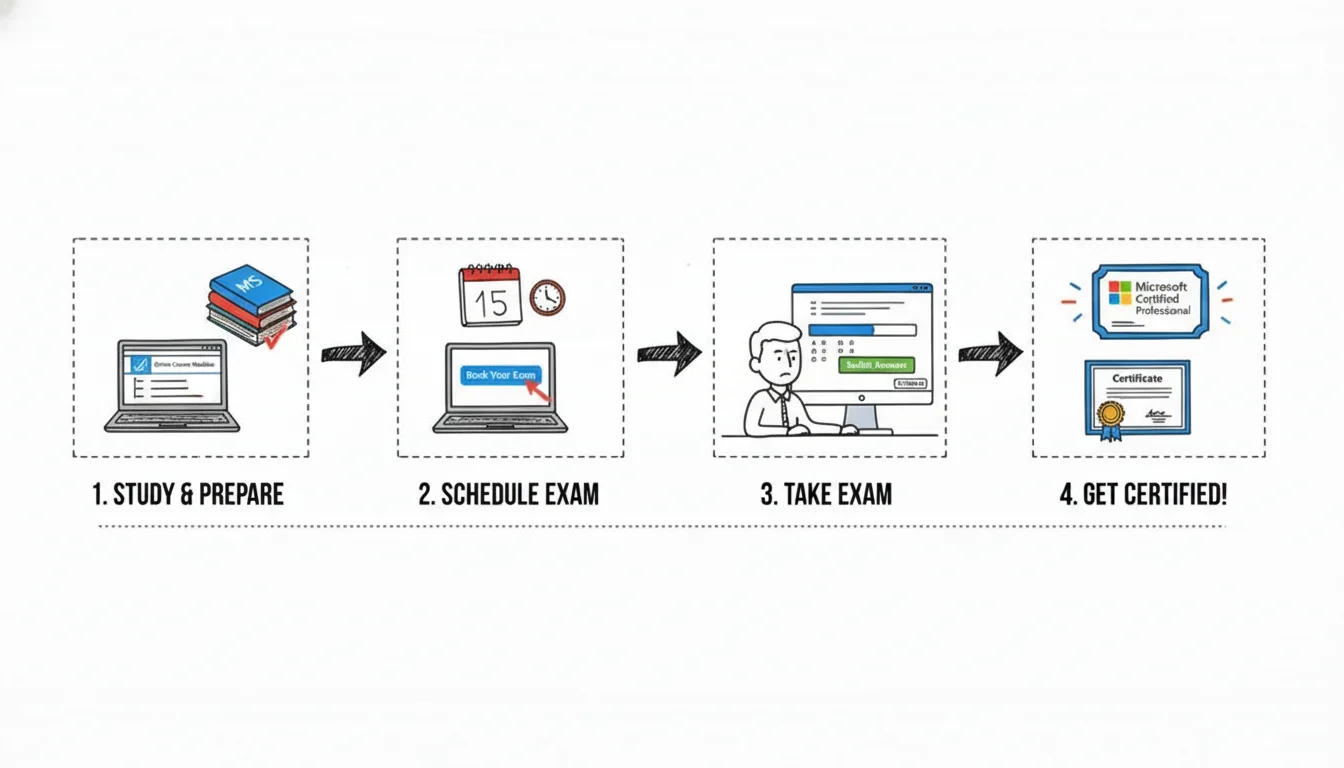
How to Get Certified with Microsoft
Earning a Microsoft certification is more than just passing an exam; it is a strategic investment in your IT career. This detailed guide, based on MindMesh Academy expertise, provides a clear, step-by-step approach. You will learn how to identify career goals, select the right credential, master the required material, and pass your proctored exam with confidence. Success requires matching your certification choice to your current skills and future goals. You might focus on Azure for cloud architecture or Power Platform for business intelligence. A disciplined study plan is the most effective tool for reaching these objectives and proving your technical proficiency across various critical domains.
Your Roadmap to Microsoft Certification
 Caption: Demonstrating the tangible career advancement and recognition that a Microsoft certification badge represents in the IT industry.
For IT professionals, earning a Microsoft certification can act as a major career booster. However, finding the right path through the many available options often feels difficult. This section provides a clear, actionable plan that allows you to start your certification process with clarity and confidence.
The value of these credentials has never been higher. This trend is directly related to the growth of cloud-based and specialized IT positions. Microsoft’s move toward a role-based certification model helps professionals more than the older versions. Instead of testing abstract product features, current exams confirm real-world skills needed for specific job roles. These positions include the Azure Administrator, the Security Analyst, or the Power BI Data Analyst. This structure ensures that the knowledge you gain while preparing for the exam is useful for your daily work immediately.
Setting the Stage for Success
Before you look at specific study materials, you should understand why this investment in your skills matters. The demand for qualified technical staff across many areas—from cloud architecture to cybersecurity—is growing. For example, the U.S. Bureau of Labor Statistics projects that jobs in computer and IT fields will grow much faster than the average for all other occupations between 2023 and 2033. Microsoft certifications provide verifiable proof of expertise in these high-demand fields. These certifications are similar to a Project Management Professional (PMP) credential for project managers or an ITIL certification for service management. They offer a recognized benchmark for technical ability.
This detailed guide will help you manage your entire certification process, from the first planning stages to long-term maintenance:
- Identifying Your Goals: Align your long-term career plans with a specific certification track. Consider areas like cloud computing, where you might look at an Azure Administrator or AWS Certified Solutions Architect credential, or focus on data analytics.
- Choosing Your Credential: Learn how to find the exact role-based certification that fits your current job function or the role you want to have in the future.
- Mastering the Material: Find the most effective study resources, such as hands-on labs, to prepare for your exam. Using practical labs is often the best way to understand how the tools work in a live environment.
- Passing the Exam: Get information on the registration process, the exam format, and specific techniques to help you pass with confidence on test day.
- Staying Current: Understand the simple, free annual renewal process that keeps your certification active and ensures your skills remain current as technology changes.
A Microsoft certification is more than a digital badge for your LinkedIn profile. It serves as a strong, verifiable signal to employers that you have the practical skills to solve difficult technical problems using industry-standard tools. It shows you are ready to provide value from your first day on the job and demonstrates your hands-on ability.
Beyond the Exam: A Career-Focused Approach
As you plan your certification path, consider the impact it has beyond just passing a test. A new credential is a strong asset for your professional brand and helps you find new career opportunities. Once you earn the certificate, improving your LinkedIn profile is a vital next step. This ensures recruiters and hiring managers see your validated expertise. Focus on showing your certification where it is easy to see, listing the specific skills you have mastered, and joining relevant industry groups to increase your professional visibility.
The goal of this process is to build a more stable and rewarding career in IT. By sticking to a clear plan and focusing on practical skills, you can earn a credential that helps your professional growth. If you are interested in the cloud, our guide on Azure learning paths and certifications is a great place to start. You can find more information here.
Choosing the Right Microsoft Certification Path
Finding the right starting point in the Microsoft certification catalog requires a clear strategy. The catalog contains dozens of exams and credentials, which can feel overwhelming if you try to look at everything at once. To find your way, you should first identify your career destination and then work backward to find the certifications that lead there. Before you look at specific exam codes or study guides, consider what you want your daily work life to look like in the future.
Your interests and existing skills should lead the way. You might enjoy the process of designing and managing cloud systems, similar to the work done by an AWS Solutions Architect. On the other hand, you might prefer working with data to find trends and help a business make better decisions. Microsoft organizes its certifications into four main groups: Azure, Microsoft 365, Dynamics 365, and Power Platform. Each group is built around specific job roles, which makes the credentials more useful when you are applying for positions in the tech industry.
Before you choose a path, think about the technical work that makes you lose track of time. Consider where you want to be in the IT field three to five years from now and what kind of impact you want to have on the organizations you work for.
Aligning Your Ambition with Certification Paths
For anyone working in technology, these certifications should be viewed as strategic career steps. They are not just digital badges to collect. A system administrator who has spent years managing physical servers and now wants to move into cloud operations will need a different set of credentials than a business analyst who wants to master data visualization. Each certification path provides a specific set of tools for a different career path.
Microsoft uses a three-tier system to help you find the level that matches your experience:
- Fundamentals: This level is the entry point for anyone new to a specific technology. These exams confirm that you understand the basic concepts and terminology of a service or platform. They are a good choice if you are just starting in IT, switching to a new technical area, or working in a non-technical role that requires you to talk to developers and engineers. This level is similar to the ITIL Foundation certification because it provides a shared language for everyone on a team.
- Associate: This level focuses on the practical skills you need to do a job every day. Associate certifications are role-based and show employers that you can handle the implementation, management, and repair of specific systems. Examples of this level include the Azure Administrator and the Microsoft 365 Administrator. You usually need some hands-on experience before you attempt these exams because they test your ability to solve real problems.
- Expert: This is the highest level of Microsoft certification. To earn an Expert credential, you usually have to pass one or more difficult exams and often need to hold an Associate certification first. These certifications prove that you have deep knowledge and can solve complex problems in areas like architecture or security. This level is comparable to the PMP for project leaders or the AWS Certified Advanced Networking – Specialty for networking professionals.
The Microsoft Learn portal is the best place to find details on every available exam. The site includes a browser that lets you search and filter certifications by job role, technical level, and specific product. This tool helps you avoid looking at exams that do not fit your specific career goals.
 Caption: A visual representation of the Microsoft Learn credentials browser, illustrating how IT professionals can easily filter and identify relevant certification paths.
Using these filters allows you to ignore the noise and focus on products like Azure or Power Platform. It makes the selection process much faster and ensures your study time is spent on the right topics.
Real-World Scenarios and Popular Choices
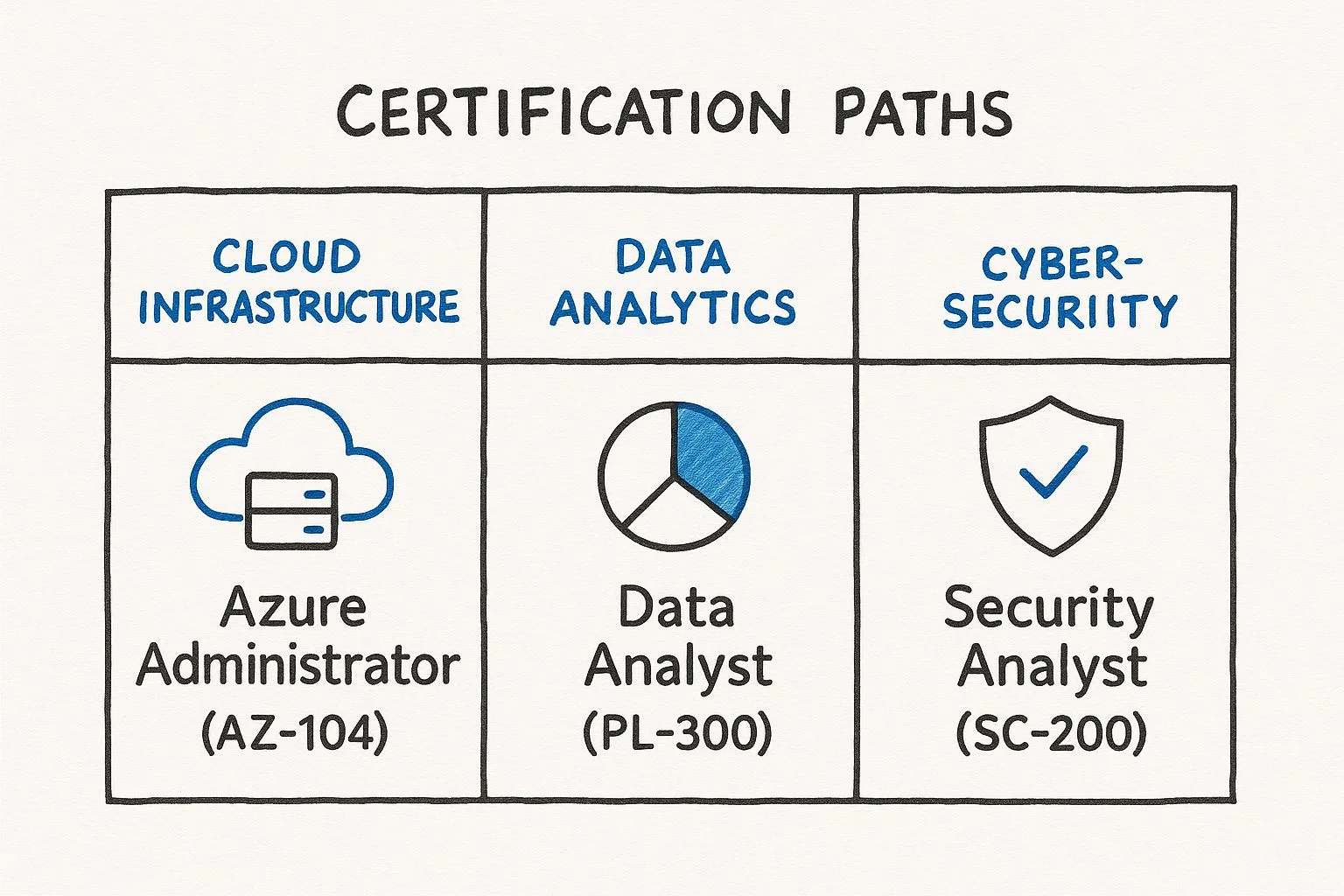
To understand how these paths work in practice, look at a few common career changes. Imagine an administrator who is very comfortable with local server hardware but wants to move into a role managing cloud resources. A good first step for this person would be the AZ-900: Azure Fundamentals exam. This provides the necessary background on how cloud billing, security, and global infrastructure work. After passing that, the next logical move is the AZ-104: Azure Administrator Associate. This is the standard credential for people who manage virtual machines, storage, and networking in the cloud.
Another example is a business analyst who wants to build their own reports without waiting for the IT department to help. This person would start with the PL-900: Power Platform Fundamentals to see what the tools can do. From there, they could move to the PL-300: Power BI Data Analyst Associate. This certification teaches the skills needed to clean data, build models, and create dashboards that provide actual value to a company.
These role-based paths are successful because they match the skills that companies are looking for right now. Microsoft Azure certifications are in very high demand because so many businesses are moving their data and applications to the cloud. Research shows that 70% of organizations believe that recognized certifications are a vital part of training for their staff. This shows that getting certified is a clear way to prove you are ready for a job. If you want to know which cloud paths are growing the fastest, you can look into the top Azure certifications to see the current trends in artificial intelligence, data science, and cloud security.
Comparing Popular Microsoft Certification Paths
The following table compares the most common certification paths. It shows the main focus of each path and the types of jobs they prepare you for. You can use this to see where your current skills might fit.
| Certification Path | Core Focus Area | Ideal for Roles Like | Example Certification |
|---|---|---|---|
| Azure Infrastructure | Cloud services, networking, storage, and compute | Cloud Administrator, Solutions Architect, Azure DevOps Engineer | AZ-104: Azure Administrator Associate |
| Data & AI | Database management, data analytics, machine learning, and AI solutions | Data Engineer, Data Analyst, AI Engineer, Machine Learning Scientist | DP-900: Azure Data Fundamentals |
| Security, Compliance, and Identity | Threat protection, information governance, identity management, and security operations | Security Engineer, Security Operations Analyst, Identity and Access Administrator | SC-200: Security Operations Analyst Associate |
| Microsoft 365 | Productivity tools, collaboration, endpoint management, and modern workplace administration | M365 Administrator, Endpoint Administrator, Teams Administrator | MS-900: Microsoft 365 Fundamentals |
| Power Platform | Low-code application development, business process automation, and data visualization | App Maker, Power BI Developer, Functional Consultant | PL-300: Power BI Data Analyst Associate |
This table makes it clear that every path is designed for a specific set of skills within the technology field. By looking at these categories, you can make an informed choice about where to put your effort.
Making Your Final Decision
To make your final choice, you should perform a quick self-assessment. These questions can help you decide which path is the best fit for your goals:
- Which job title do I want to have in the next two or three years? Spend some time looking at job postings on sites like LinkedIn or Indeed. Look for the certifications that employers ask for in the descriptions for those roles. This will tell you exactly which credentials the market values.
- What am I already good at doing? If you have a history of working with computer networks, an Azure networking specialty might be the fastest way to progress. If you enjoy writing scripts and automating tasks, you might find the DevOps certification path more interesting.
- Which technologies am I actually interested in learning? Studying for an exam takes a lot of time and effort. You will find it much easier to stay motivated if you are interested in the subject. This might be the latest developments in AI, the challenge of defending against cyberattacks, or the way business applications can improve efficiency.
Think about your answers to these questions and decide which path feels right. Write down your choice so you can begin the process of preparing for the exam.
Choosing the right certification is about finding the best fit for your specific career. A good choice will confirm what you already know, give you more confidence in your skills, and provide a clear plan for your future professional growth. Once you have picked your certification, you can start building a study plan to help you pass the exam.
Building a Study Plan That Actually Works
 Caption: A well-organized study space, essential for focused learning and effective preparation for IT certification exams.
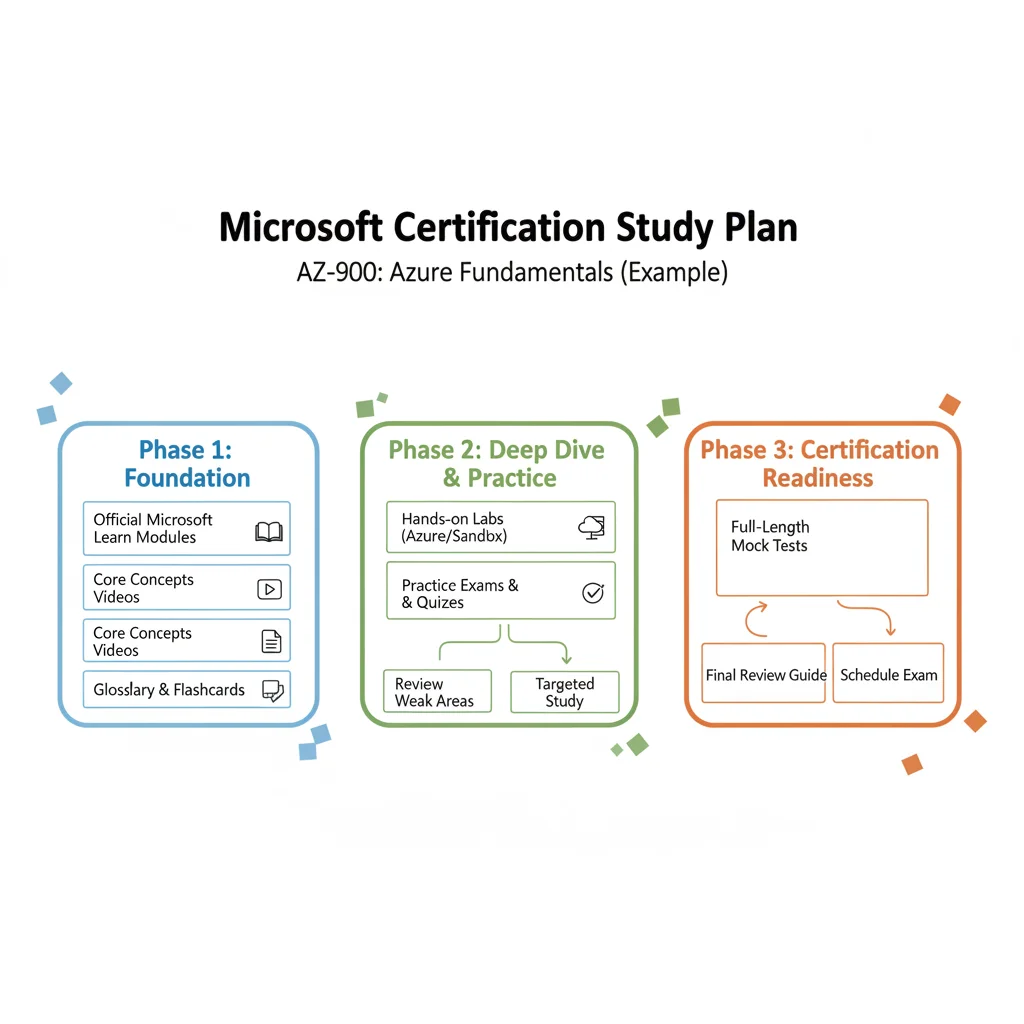
After you choose a target certification, the process shifts to creating a study plan that produces results. For IT professionals, a good plan is never a generic checklist. It is a personalized system that fits your specific learning style and your daily schedule. This approach uses official Microsoft resources, plenty of hands-on practice, and clear time management techniques to get you ready for test day.
The actual basis of your preparation is a clear understanding of the exam content. Microsoft provides this information in the official skills outline for every certification. This document acts as your guide. It is a blueprint that lists every topic, how much it counts toward your final score, and the specific tasks you must be able to perform. Download this document early. Many successful candidates print it out and use it as a physical checklist to track their progress through each technical domain. If you do not know what is on the list, you cannot know if you are ready to pass.
Start with Microsoft's Official Resources
Your primary starting point should be Microsoft Learn. This free, broad platform is a major educational asset. It contains learning paths designed to match the official exam objectives. These modules are not just static pages of text. They are built for active learning that keeps you focused on the technical requirements of the job.
- Learning Paths: These curated paths act as guided tours. They lead you through the curriculum in a logical order so you build your knowledge from the ground up.
- Knowledge Checks: These quizzes appear after most modules. They provide immediate feedback to confirm you understand the material before you move on to more difficult topics.
- Hands-On Labs: This is the most useful feature for technical learners. Many modules place you directly into a sandboxed Azure environment. You can use real Microsoft services to practice your skills without needing a paid subscription or risking a live work environment.
Many people fail because they only watch videos or read documentation without doing the work. To really learn these complex systems, you have to use them. Theoretical knowledge is just the start. Practical application is the engine that gets you to the finish line and helps you perform well on the job.
Broaden Your Horizons with Third-Party Content
While Microsoft Learn is your central hub, adding other resources can help you understand the material better. Sometimes, hearing a different explanation makes a difficult concept clear. Reliable platforms like Pluralsight, A Cloud Guru, and Udemy offer video courses taught by experts who work in the industry every day.
These external courses often use a conversational style that feels different from official documentation. This variety helps prevent burnout. Furthermore, these platforms often include their own sets of practice labs and questions. Using these gives you more ways to test your knowledge and see if you can apply what you have learned in different scenarios.
Hands-On Practice is Non-Negotiable
You must understand this: For most Associate or Expert-level exams, especially those for cloud platforms like Azure, you cannot pass without direct experience. Reading about how to configure an Azure Virtual Network is a classroom exercise. Actually deploying that network, fixing connectivity problems, and connecting it to other services is how you build real skill.
Sign up for a free Azure account or a Microsoft 365 developer tenant. These give you a real-world space where you can build, break, and fix configurations. Do not just follow the steps in a lab guide. Try to expand on the concepts by building a small project that relates to the exam objectives. This repetitive process is how abstract ideas become fixed knowledge that you can recall during the pressure of an exam.
How to Structure Your Study Time
Knowing what to study is only half the task. The other half is fitting that study into a busy life. Trying to study for eight hours on a Saturday rarely works because your brain gets tired and stops retaining information. Consistency is much more effective than intensity.
Review the skills outline and break it into small modules. Then, use time blocking to schedule your week. Set aside specific times for certain topics. For example, you might study Azure networking on Monday and Wednesday nights, then focus on identity and access management on Tuesday. This routine helps you avoid procrastination because you always know exactly what you are supposed to be working on when you sit down at your desk.
To keep information in your memory, use a method called spaced repetition. This involves reviewing material at set intervals—perhaps one day, three days, and then a week after you first learned it. This technique fights the natural tendency to forget new information. You can use flashcards or simple review lists to make this part of your daily routine.
Use Practice Exams the Right Way
Practice exams are one of your best tools, but many people use them incorrectly. The point of a practice test is not just to see your score. It is to find out exactly where you are weak so you can fix those gaps before the real test.
Follow this process to get the most out of your practice tests:
- Take a baseline test early in your preparation. Do not worry about the score. Use this first attempt to see how questions are phrased and to find the gaps in your current knowledge.
- Analyze every result. Do not just look at the ones you got wrong. Look at why you got them wrong. Did you misunderstand a concept? Did you read the question too fast? Microsoft exams often use specific phrasing that can be tricky if you are not paying attention.
- Refocus your study. Spend your time on the areas where your score was lowest. Go back to the Microsoft Learn modules, redo the hands-on labs for those topics, and look at your third-party videos again.
- Test yourself again with a new practice exam a week or two before your test date. This builds your stamina for the actual exam, which can last for several hours.
This method turns a simple test into a personalized study guide. You stop guessing what to study and start focusing on the specific topics that will help you pass with confidence. By the time you reach the testing center, you should be familiar with the question types and comfortable with the technical tasks required.
Navigating Exam Day with Confidence
 Caption: A calm and focused individual preparing for an online certification exam, highlighting the importance of a distraction-free environment.
Passing your Microsoft certification exam is the result of many hours spent in virtual labs and reviewing technical documentation. This day marks the final step in the process. Understanding the specific mechanics of scheduling and taking your test helps you stay calm so you can focus entirely on the technical questions. This section covers the operational details of the testing experience to ensure you are ready for either an in-person or online appointment.
Microsoft delivers all certification exams through Pearson VUE, a provider that manages the registration, proctoring, and scoring for these assessments. When you register, your first major choice is where to take the test. There are two main options, and each has specific requirements for the candidate.
In-Person vs. Online Proctored Exams
Selecting the right environment depends on your home setup, your local geography, and how you handle high-pressure situations.
- In-Person Testing Centers: This is the traditional way to take a certification test. You book a time at a local Pearson VUE facility and travel to that site. Upon arrival, you store your personal items—phone, watch, wallet, and bags—in a secure locker. The staff verifies your identity and leads you to a computer station in a monitored room. This is a strong choice if your home has loud neighbors, unreliable internet, or if you prefer a physical separation between your study space and your testing space.
- Online Proctored Exams: Many IT professionals prefer the flexibility of taking the exam at home or in an office. This removes the need for a commute and lets you test in a familiar setting. However, the rules for your physical space are very strict. You must be in a room with a door that closes. The desk must be completely clear of all items, including secondary monitors, papers, and even decorative items that might contain text.
If you choose the online option, you must perform a system test on your computer days before the appointment. This test checks your webcam, microphone, and internet speed to ensure the Pearson VUE software will run without technical glitches.
The Online Proctoring Experience Unpacked
If you go the online route, the process starts 30 minutes before your scheduled time. You should use this window to complete the check-in steps. First, you will download the OnVUE software. This application locks your computer so you cannot access other files or browsers during the test.
The software will prompt you to use your phone or webcam to take several photos. You will need a clear picture of your government-issued ID, a portrait of yourself, and four photos showing the front, back, left, and right sides of your desk. The goal is to prove that no one else is in the room and that you have no hidden notes or devices nearby.
A live proctor will then join a chat or voice call to review your photos. They may ask you to move your webcam to show them your wrists to check for smartwatches, or to look under your desk. Once they are satisfied with your environment, they will release the exam to your screen.
During the session, you are always being watched and recorded. You must stay within the webcam’s view at all times. If you cover your mouth, read questions out loud, or look away from the screen for too long, the proctor may give you a warning. If the behavior continues, or if someone walks into the room, the proctor has the authority to end the exam immediately. This results in an automatic failure and the loss of your exam fee.
Understanding the Exam Interface and Question Types
Microsoft exams are built to test your ability to solve problems, not just your ability to remember facts. The interface is clean, but the questions can be complex. You will see several different formats during your session.
- Multiple Choice and Multiple Response: These are standard questions. Some ask for one correct answer, while others ask you to choose two or three correct options from a list. Always read the instructions to see how many selections are required.
- Drag and Drop: You may be asked to move technical steps into the correct order. For example, you might drag the steps for configuring a virtual network into a sequence list on the right side of the screen.
- Hot Area: These questions show a screenshot of a software interface, such as the Azure Portal or a PowerShell window. You must click the specific button or menu item that completes a given task.
- Case Studies: These are some of the most difficult sections. You are given a large amount of information about a fictional company, including their current IT environment, their business goals, and their technical constraints. You then answer a series of questions based on that data. Note that once you finish a Case Study and move to the next section, you cannot go back to change your answers for that Case Study.
- Hands-On Labs: For Associate and Expert-level certifications, you might enter a live environment. The screen splits, providing a set of tasks on one side and a live Azure or Microsoft 365 portal on the other. You must actually configure the resources as requested.
The focus on practical application is why these credentials are so respected. According to a Pearson VUE study, 91% of certified candidates say they feel more confident in their technical work after passing.
Tips for Managing Time and Pressure
Most Microsoft exams last between 100 and 150 minutes, depending on the specific certification. This time includes the time spent reading the instructions and completing a survey at the end. Managing your pace is a crucial part of the test.
If you hit a question that feels impossible, do not spend ten minutes on it. Use the "Mark for Review" checkbox at the top of the screen. This feature lets you skip the question and come back to it after you have seen the rest of the exam. Often, a later question might remind you of the answer to an earlier one. Once you reach the final screen, the software will show you a list of all the questions you marked, allowing you to return to them directly.
For Case Studies, scan the requirements first. Look for keywords like "Security," "Cost," or "Availability." This helps you filter the text so you can find the specific data needed for each question. In the Labs section, focus on the result. The automated grading system checks if the resource exists and is configured correctly. It does not matter how many times you click around the portal as long as the final configuration is right.
Expect some nerves when the clock starts. If you feel overwhelmed, stop for 30 seconds. Close your eyes and take slow breaths. You have done the work, and the questions are simply a way to prove what you already know. If you want more specific advice on handling the stress of a testing environment, look at our article on overcoming exam anxiety and boosting your confidence.
Stay focused on the screen and manage your time wisely. Once you submit your final answer, you will usually receive your score immediately. This instant feedback allows you to celebrate your success or identify the specific areas where you need more study for a future attempt.
Keeping Your Microsoft Certification Current
Caption: A video guide explaining the essential steps for renewing your Microsoft certifications and staying current in the rapidly evolving tech landscape.
Passing your exam is a major achievement, but cloud technology moves fast. Services that exist today might be replaced or updated by next year. For IT professionals, earning a certificate is only the first step. You must show the industry that your knowledge remains fresh. Maintaining your certification proves that you are keeping up with new features and best practices as Microsoft releases them.
The old system of retaking expensive, three-hour exams every few years is gone. Microsoft now uses a renewal process that is more practical for working professionals. This model focuses on the newest updates to the technology rather than re-testing the basics you already proved you know. It helps you stay current without the stress of a high-stakes testing center environment.
Understanding the Annual Renewal Process
Microsoft requires a free renewal for all role-based Associate, Expert, and Specialty certifications. This happens once a year. The renewal window opens about six months before your certification is set to expire. You do not have to guess when your time is up. Microsoft sends several email reminders to the address associated with your MCP ID. You can also monitor your status by logging into your Microsoft Learn profile and clicking on the certifications tab.
The renewal system is built to be efficient for people with full-time jobs:
- Zero Cost: You do not have to pay any fees to take the renewal assessment. This is a significant change from the past, as it removes financial barriers to staying certified. Microsoft wants to encourage learning rather than collecting exam fees for existing credentials. You can verify this $0 cost policy on the official Microsoft certification pages.
- Fully Online & Flexible: You can take the assessment from any computer with an internet connection. There is no need to schedule a time with a proctor or visit a physical testing site. You can start the assessment at midnight or during a lunch break. This flexibility makes it much easier to fit professional development into a busy schedule.
- Open-Book Format: This is not a memory test. You can use Microsoft Learn and other technical documentation while you answer the questions. In a real job, an administrator would look up a specific syntax or configuration detail. This format tests your ability to find the right information and apply it correctly to a technical problem.
The renewal model is different from the original certification exam. It is a tool to confirm you have stayed active with the technology. If you fail the first time, you can try again immediately. If you fail a second time, you must wait 24 hours before trying again. You can take the assessment as many times as you need within that six-month window. As long as you pass before the expiration date, your certification remains active for another year.
Preparing for Your Renewal Assessment
Since the assessment only covers new features and changes from the last year, you do not need to study the entire original curriculum. A few hours of focused review is usually enough for most experienced professionals.
When you enter the renewal page on Microsoft Learn, you will see a list of specific modules. These are curated to show exactly what has changed since the exam was last updated. Working through these modules is the best way to prepare. They highlight new buttons in the portal, retired services, and updated security protocols.
If you are renewing the AZ-104: Azure Administrator Associate certification, for example, the renewal might focus on new tools in Azure networking. It could cover changes to how you manage identity through Entra ID or new governance features in Azure Policy. By reviewing these specific updates, you ensure your day-to-day work reflects the current state of the platform. This targeted approach is much faster than the weeks of study required for the initial exam.
Showcasing Your Renewed Credential
When you pass the assessment, your expiration date updates automatically. Your transcript will show the new date, adding exactly one year to your previous deadline. This is a good time to update your professional profiles to show that you are staying current.
Your digital badge on Credly will reflect the new date. You should take a few minutes to update your presence in the following areas:
- Update LinkedIn: You can share a post about your renewal. This tells your network and potential recruiters that you are committed to learning. Many professionals forget to update the "Licenses & Certifications" section on their profile. Make sure the expiration year is accurate so your profile does not show expired credentials.
- Refresh Your Resume: Update the dates on your CV. Recruiters look for valid certifications when they filter for technical roles. If a resume shows a certification that expired two years ago, it might look like you stopped following the technology. Keeping this date current shows you are still an active expert.
How will you use your renewed certification to improve your professional reputation this year?
By keeping your Microsoft credentials up to date, you keep them useful. An active certification is a signal to your employer that you can handle the latest challenges in the cloud. It represents a cycle of continuous learning that keeps your skills sharp and your career moving forward. Staying current ensures you are ready for the next update Microsoft releases.
Your Top Microsoft Certification Questions Answered
Even with a clear roadmap, IT professionals often have specific practical questions about the details of starting their certification process. This is understandable. Factors like cost, time commitment, and the overall return on investment are essential considerations when you start any new professional development. You need to know if the effort you put in will result in the career growth you expect.
We will look at the most frequent questions from people starting their Microsoft certification path. Addressing these questions early helps you plan your approach thoroughly and commit to your goals with confidence. Knowing what to expect allows you to clear your schedule and set a budget that works for your situation.
How Much Is This Going to Cost Me?
Cost is usually the first question people ask, and for good reason. The price of an exam depends on the difficulty level and the depth of expertise required for the role. For those in the United States, here is a general breakdown of the costs. Note that prices vary by country and region due to local currency and taxes.
- Fundamentals Exams: These entry-level certifications, such as the widely known AZ-900: Azure Fundamentals, usually cost $99 USD (verify current pricing on the vendor site). They provide an affordable way to validate your knowledge of basic cloud concepts or security principles.
- Associate & Expert Exams: These certifications focus on specific job roles and are more difficult to pass. They generally cost $165 USD each (verify current pricing on the vendor site). These are the credentials that catch the attention of hiring managers when they look for people to fill specialized technical roles.
Budgeting for your certification involves more than just the cost of the test. Microsoft Learn provides a great deal of free training, but you might also want to buy video courses or practice exams. These tools provide a different way to learn and often include simulations that mimic the actual testing environment. Some professionals also choose "Exam Replay" packages. These packages usually cost around $230 USD (verify current pricing on the vendor site) and include the exam fee plus one retake, which can reduce the stress of your first attempt.
Expert Tip for IT Professionals: Keep an eye on major events like Microsoft Ignite. Microsoft often offers "Cloud Skills Challenges" during these conferences. If you complete a specific set of learning modules, you can earn a free exam voucher. Using these programs is a smart way to lower your total certification costs.
Which Certification Is Best If I'm a Beginner?
If you are new to the technology field, changing careers, or working in a role that supports IT operations, the Fundamentals certifications are the best starting point. They teach basic concepts without getting stuck in technical jargon. These exams help you understand the big picture of how Microsoft services work and how they solve business problems.
The most popular entry-level certification is the AZ-900: Microsoft Azure Fundamentals. This exam covers the basics of cloud computing, Azure services, and how to manage security and privacy in the cloud. It is useful for almost any IT job because so many companies now use Azure for their server and application infrastructure.
Other excellent choices for beginners include:
- MS-900: Microsoft 365 Fundamentals: This is a great option if your career involves workplace tools and collaboration platforms. It covers the benefits of using cloud services and how Microsoft 365 helps with productivity, security, and compliance.
- PL-900: Microsoft Power Platform Fundamentals: This is a good choice for people who want to learn about data analysis and automation. It covers the basics of Power BI, Power Apps, and how to create simple business solutions without deep programming knowledge.
- SC-900: Microsoft Security, Compliance, and Identity Fundamentals: Choose this if you want to work in cybersecurity. It explains the core concepts of security, how identity management works, and how Microsoft handles data compliance across its cloud services.
Passing a Fundamentals exam gives you a confidence boost. It proves you have a solid grasp of the basics before you move on to the more difficult Associate-level certifications, building a foundation for your future work.
Realistically, How Long Will It Take to Prepare?
Preparation time is different for everyone. Your previous experience, the difficulty of the exam, and how much time you can study each week will change how long it takes. There is no single answer for how long it takes to be ready for an exam.
Based on the experiences of many IT professionals in the community, here are some general time estimates:
| Your Experience Level | Certification Level | Estimated Study Time |
|---|---|---|
| New to IT/Career Changer | Fundamentals (e.g., AZ-900) | 2-4 Weeks (approx. 15-30 hours total) |
| Some Relevant IT Experience | Associate (e.g., AZ-104) | 2-3 Months (approx. 60-90 hours total) |
| New to the Specific Technology | Associate (e.g., AZ-104) | 3-5 Months (approx. 90-150 hours total) |
The key to passing is consistency. Studying for one hour every day is often more effective than studying for ten hours once a week. You should always use the official "skills outline" as your guide. This document lists every topic on the test and how much weight it has in the final score. Focus your time on hands-on practice. Microsoft Learn includes free lab environments called "Sandboxes" where you can practice using Azure or Microsoft 365 without paying for a subscription.
Are Microsoft Certifications Actually Still Worth It?
Microsoft certifications are definitely still worth the effort. For IT professionals, they are more relevant than they used to be. In a competitive job market, a certification acts as proof of your skills. It helps you stand out to recruiters and can lead to a higher salary and better job opportunities.
Microsoft uses a role-based model, which means these certifications are practical. They test the skills that companies are looking for right now. This ensures that what you learn can be used to solve actual problems on the job from the first day you start. Microsoft also changed how certifications stay active. You no longer have to pay to retake the full exam every few years. Instead, you can take a free online renewal assessment every year to keep your certification current. This makes it easier to stay up to date with new technology as it changes.
A Microsoft certification is not just a badge for your profile. It shows that you are dedicated to your career and ready to work with modern tools. It is an investment that provides long-term benefits in your professional life.
Ready to start your Microsoft certification process with a study plan designed for success? At MindMesh Academy, we provide IT professionals with expert-led materials and learning techniques that work. We help you learn difficult concepts so you can pass your exams with confidence. Explore our expert-led courses today at mindmeshacademy.com and take the next step in your career.

Written by
Alvin Varughese
Founder, MindMesh Academy
Alvin Varughese is the founder of MindMesh Academy and an enterprise architecture leader. An electrical engineer by training, he moved from factory automation in South Africa to cloud architecture at GE Appliances and Humana (Fortune 50), and holds 20 professional certifications including AWS Solutions Architect Professional, Azure DevOps Engineer Expert, and Microsoft Agentic AI Business Solutions Architect. He built MindMesh Academy after interviewing too many highly certified candidates who couldn't answer basic questions: the goal is prep that makes you better at the job, not just able to pass the exam.