DynamoDB vs RDS: A Practical Guide for Modern AWS Architectures
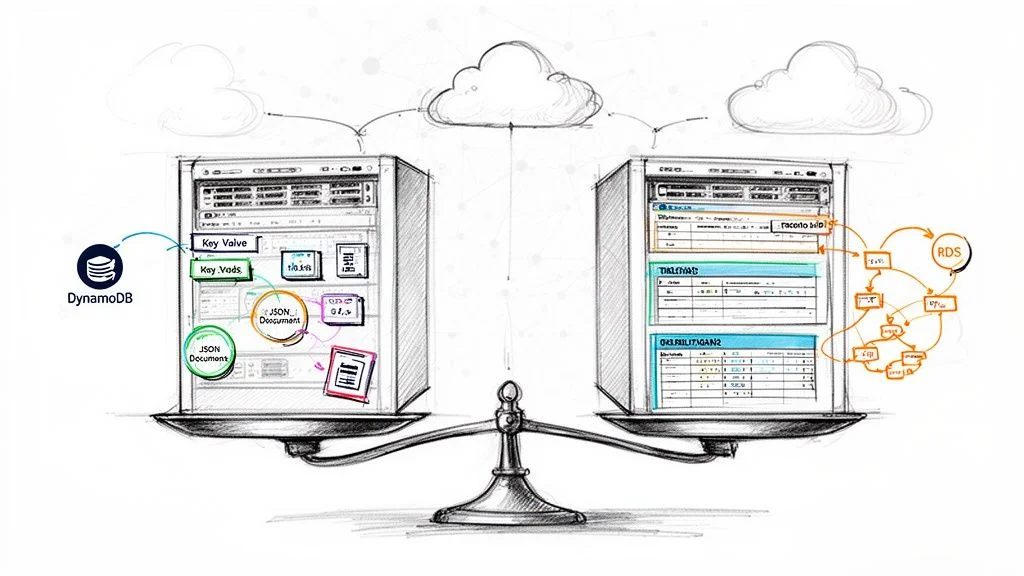
The main difference between DynamoDB and RDS involves a trade-off: NoSQL speed versus relational structure with complex query power. Amazon DynamoDB is a serverless, non-relational database built for high performance at massive scale. In contrast, Amazon RDS (Relational Database Service) provides a managed environment for traditional relational engines that handle structured data and advanced SQL operations effectively.
IT professionals working toward AWS certifications like the AWS Certified Cloud Practitioner (CLF-C02) or Solutions Architect Associate (SAA-C03) must master this distinction. Choosing between DynamoDB and RDS represents a major architectural decision. This choice dictates how your application performs, how it scales, and what it costs to run. MindMesh Academy provides the technical insights you need to select the right database for your workload.
Deciding Between DynamoDB vs. RDS: A High-Level Overview
Start with a clear picture of each service by identifying their primary advantages.
DynamoDB is a fully managed NoSQL key-value and document database. Its main design objective is providing consistent, single-digit millisecond latency, no matter how much throughput your application generates. Since it is a serverless product, AWS handles all infrastructure tasks like provisioning, patching, or scaling. You pay only for the reads, writes, and storage your application consumes. This makes DynamoDB a natural choice for high-traffic web applications, real-time bidding systems, gaming leaderboards, and IoT data streams where access patterns are defined and predictable.
Amazon RDS (Relational Database Service) is a managed service that simplifies running standard relational engines like MySQL, PostgreSQL, Oracle, or SQL Server in the AWS cloud. RDS offers the familiarity of SQL and strict data consistency through ACID compliance (Atomicity, Consistency, Isolation, Durability). It allows you to perform complex joins across multiple tables and enforce rigid data structures. This is the traditional choice for e-commerce platforms, financial applications, and content management systems where data integrity, transactional consistency, and flexible querying are essential requirements for the business.
Key Takeaway for Architects: With DynamoDB, you model your data to optimize for your application's most frequent query patterns. With RDS, you model your data based on business entities and relationships, then use SQL to query that data in almost any way your business requires after the data is stored.
Use this side-by-side comparison for an initial assessment or as a quick reference for technical certification preparation.
Quick Comparison: DynamoDB vs. RDS
| Attribute | DynamoDB | Amazon RDS |
|---|---|---|
| Data Model | NoSQL (Key-Value & Document) | Relational (Tables, Rows, Columns) |
| Schema | Flexible (Schema-on-read) | Rigid (Predefined Schema-on-write) |
| Primary Use Case | High-velocity, simple lookups, massive scale | Complex queries, joins, transactions, strong consistency |
| Scalability | Horizontal (Automatic scaling) | Vertical (Resizing instances) & Read Replicas (for reads) |
| Performance | Single-digit millisecond latency, predictable | Varies based on query complexity & instance size |
| Management | Fully Managed (Serverless), no servers to provision | Managed Service, requires instance type selection & some configuration |
The comparison above outlines the primary architectural split between these two AWS offerings. DynamoDB provides massive scale and speed by design. In contrast, RDS delivers the familiar power of relational querying while AWS manages the heavy operational tasks associated with database administration.
Architectural Foundations: Understanding the Core Differences
Choosing between DynamoDB and RDS requires a firm grasp of their underlying construction. Their core architectures differ significantly, and this distinction dictates everything from performance and scaling to day-to-day management. Getting this right is vital for your application and remains a primary topic for anyone preparing for AWS certification exams.
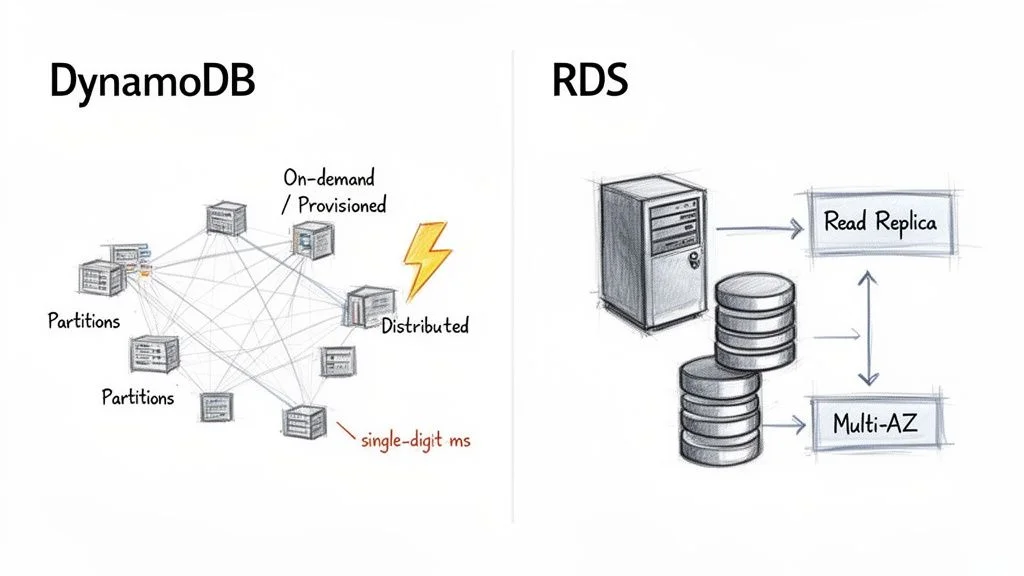
AWS built DynamoDB as a fully managed, serverless, and distributed NoSQL database. The serverless label carries significant weight. It means you never have to provision, patch, or monitor the underlying hardware. You interact with the database through an API, which lets developers focus on application logic instead of infrastructure maintenance.
DynamoDB organizes data and traffic into segments called partitions. Each partition functions as a separate unit of storage and compute, running on solid-state drives (SSDs). This distributed, partitioned design allows DynamoDB to provide consistent, single-digit millisecond latency, regardless of the size of your table. As your data volume grows or your throughput requirements change, AWS adds more partitions in the background. This allows horizontal scaling to occur without manual configuration or operational downtime.
The Serverless Power of DynamoDB
DynamoDB's capacity models reflect this serverless design:
- On-Demand Capacity: This option is the most straightforward. You pay for each read and write request your application makes. It works well for new applications, unpredictable workloads, or traffic that spikes suddenly because it scales up and down immediately. This eliminates the risk of over-provisioning and paying for unused resources.
- Provisioned Capacity: In this model, you set the number of reads (Read Capacity Units - RCUs) and writes (Write Capacity Units - WCUs) per second your application needs. This choice is more cost-effective if you understand your traffic patterns well, as it involves committing to a specific level of throughput.
Adopting a serverless approach lessens the operational load on your team. Instead of managing servers, your engineers can spend their time building efficient data access patterns that better serve the business goals.
Key Architectural Insight: DynamoDB architecture achieves high speed and scale by spreading data across many small, independent partitions. This strategy avoids the single-server bottlenecks found in traditional database designs. Understanding this concept is essential for the AWS Certified Solutions Architect Associate exam.
RDS Managed Relational Architecture
Amazon RDS follows a traditional, server-centric path. It is not a database engine itself but a managed service that hosts engines like MySQL, PostgreSQL, or SQL Server on virtual servers. These servers are essentially EC2 instances. When you use RDS, you select an instance type—such as db.t5.micro or db.m5.large—to define the CPU, memory, and networking capacity for your database environment.
AWS handles tasks like patching, backups, and OS maintenance, but you are still working with a primary database server. This is the main difference between RDS and the distributed model used by DynamoDB. The structured relational framework provides RDS with its primary strength: ACID compliance (Atomicity, Consistency, Isolation, and Durability). This makes RDS the standard choice for complex transactional workloads where data integrity is critical, such as banking platforms or inventory tracking systems. To explore these features further, consult our guide on Amazon Relational Database Service.
For high availability, RDS uses a Multi-AZ configuration. AWS replicates your primary database to a standby instance located in a different Availability Zone. If the primary instance fails, RDS initiates an automatic failover to the standby, which helps keep downtime to a minimum.
Scaling in a server-based environment like RDS is mostly vertical. If you need more processing power, you upgrade to a larger instance type. This process usually requires a brief period of downtime during a scheduled maintenance window. RDS supports Read Replicas to scale read traffic horizontally, but all write operations still must go through the single primary instance. This architecture offers the familiarity of SQL and powerful querying capabilities, yet it has scaling limits that DynamoDB was built to solve.
Reflection Prompt: How might the serverless nature of DynamoDB simplify compliance requirements or disaster recovery planning compared to managing an RDS instance for a small-to-medium business?
Comparing Data Models and Query Flexibility
The decision between DynamoDB and RDS rests on how you model your data and the methods you use to retrieve it. This choice is more than a technical preference; it is a structural decision that dictates your application's development speed and long-term maintenance requirements. Mastering these differences is necessary to pass the AWS Certified Solutions Architect Associate (SAA-C03) or the AWS Certified Cloud Practitioner (CLF-C02) exams. These principles also guide the creation of scalable, efficient systems in professional production environments.
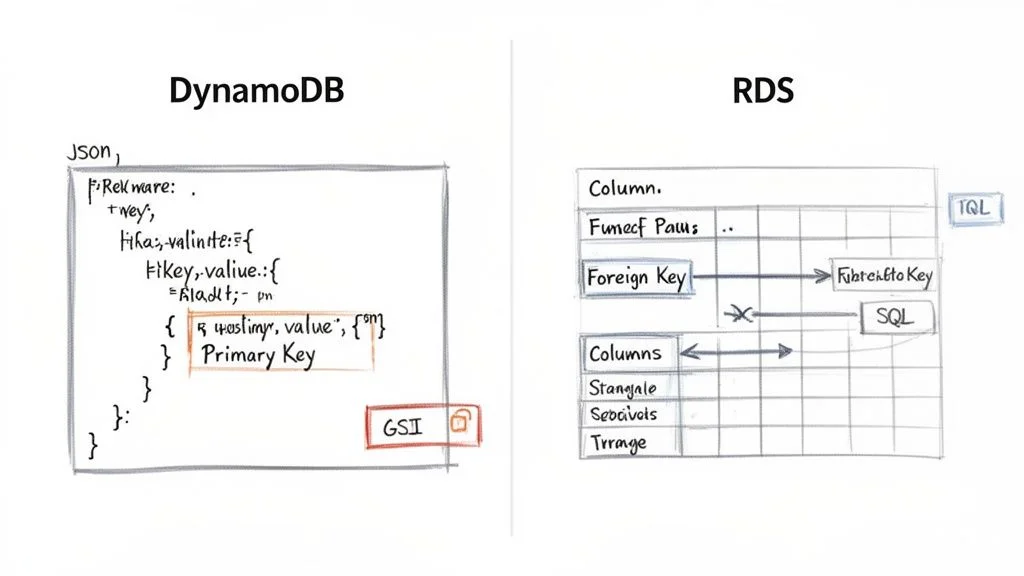
DynamoDB operates on a flexible, schema-on-read model. This system stores data as items, which function similarly to JSON documents, inside of tables. Every item in a table must have a unique primary key to identify it. Outside of that requirement, the structure of your data can change from one item to the next. You can add attributes to a specific item or remove them entirely without needing to modify the table itself. This architectural freedom is useful for applications that evolve quickly or those that manage semi-structured data. For example, in a user profile system, some users might provide social media handles while others do not. DynamoDB handles these variations without requiring a migration of the entire database.
Amazon RDS follows a strict, schema-on-write philosophy. You must define your tables, specific columns, data types, and the relationships between those tables via foreign keys before you can record any data. This structured approach acts as a safeguard for data integrity and consistency. It is the standard choice for systems where every data point must follow a strict model, such as banking platforms, financial ledgers, or inventory tracking systems. These use cases rely on referential integrity to ensure that an order cannot exist without a corresponding customer or a valid product ID.
DynamoDB’s Access-Pattern-Driven Design
In a DynamoDB environment, your data model is tied directly to the specific ways your application asks for information. You do not store data in a generalized format and figure out the queries later. Instead, you design the table structure to satisfy the exact questions your application will ask.
Identifying these access patterns early in the design phase is a requirement for success. The primary key is your central tool for organizing data for fast retrieval. This key can be a simple partition key, such as a UserID, which determines where data is stored physically. It can also be a composite key, combining a partition key with a sort key, such as UserID and OrderDate. Using a sort key allows you to group related data together and perform range queries, such as finding all orders for a specific user within the last thirty days.
Consider the design of a user profile table:
- Item: This represents a single user's data record.
- Partition Key: A unique identifier like
UserID(e.g.,user#123). - Attributes: These include fields such as
Username,Email, andRegistrationDate. - Nested Data: You can use attributes to store complex structures, like a
Preferencesattribute containing a JSON object for theme settings and notification toggles. - Global Secondary Index (GSI): If you need to search for a user by
Emailrather thanUserID, you create a GSI on the email attribute. This process creates a replicated version of your data organized by the email address. - Local Secondary Index (LSI): These are used when you want a different sort key for the same partition key used in the base table. LSIs are helpful for viewing the same group of data in multiple sorted orders.
Understanding how to use GSIs and LSIs is essential for maintaining performance and is a recurring topic in AWS certification tracks. You can find more details on these structural concepts in our guide on the Amazon DynamoDB NoSQL database.
Reflection Prompt: Imagine you are creating a social media application. When designing user profiles, would you choose a simple
UserIDpartition key or a composite key usingUserIDandAccountStatus? Which specific access patterns would make one choice better than the other?
RDS and the Power of SQL
Amazon RDS provides the full capabilities of the Structured Query Language (SQL). When your data is stored in organized, relational tables, you can write queries to extract and combine information in almost any way you choose.
The flexibility of SQL is the primary advantage of RDS. It allows you to perform heavy-duty data operations that are difficult or impossible to execute efficiently in a NoSQL environment:
- JOINs: You can merge data from several tables into one result set. For instance, you could join a
Customerstable withOrdersandShippingLabelsto see exactly where a specific product was sent and who bought it. - Aggregations: SQL allows for the use of functions like
SUM(),AVG(), andCOUNT(). When paired withGROUP BYstatements, these allow you to run analytics, such as calculating the average monthly revenue per department. - Ad-Hoc Queries: RDS supports spontaneous questions. If a business manager needs a one-time report on how many users signed up from a specific zip code during a holiday weekend, you can write and run that query immediately without changing the database design.
This query power requires a trade-off in the form of schema rigidity. If your table grows to millions of rows and you realize you need to add a new column, you must use an ALTER TABLE command. On a high-traffic production database, this can be a slow process that might temporarily lock the table and prevent other operations from completing.
Crucial Insight for Exams: A frequent scenario in AWS exams focuses on this distinction: In DynamoDB, you build your tables to match your queries. In RDS, you build your tables to match your logical data entities, then you write any query needed to interact with that data.
Query Languages and Performance Pitfalls
The way you communicate with these two databases differs significantly in syntax and execution logic.
DynamoDB Querying
DynamoDB does not use SQL. You interact with the service through the AWS API or SDKs using specific actions. Common actions include GetItem to fetch a single record using its primary key, PutItem to save data, and UpdateItem to change specific attributes. The Query action is the most efficient way to find multiple items, as it searches based on the partition key and can filter results using the sort key.
You must be careful to avoid the Scan operation. A Scan forces the database to look at every single item in the table to find the data you want. On a large table, this consumes an immense amount of read capacity and can lead to extremely high costs. If you find yourself using Scan frequently, it is usually a sign that your table design does not match your application's actual data needs.
RDS Querying RDS relies on standard SQL dialects like those found in MySQL, PostgreSQL, or SQL Server. While SQL is expressive, it has performance risks. A poorly written query that lacks proper indexing or involves complex joins across massive tables can cause the database instance to slow down or crash. Database administrators spend significant time on performance tuning, which involves checking execution plans and adding indexes to the columns that are queried most often.
The contrast between the "query-first" design of DynamoDB and the "data-first" design of RDS is the most important factor in your architectural decision. Selecting the right tool requires you to match your application's data structure and retrieval needs with the underlying philosophy of the database engine.
Performance, Scalability, and Consistency: The Core Differences
When choosing between DynamoDB and RDS, the evaluation centers on how each service manages performance and scalability. These metrics are not merely technical specifications. They dictate how an application responds under pressure, its potential for growth, and its long-term operational costs. The way these databases handle increased demand differs because of their underlying design choices.
DynamoDB was built specifically for cloud environments with a focus on automated horizontal scaling. Its primary goal is to provide predictable, single-digit millisecond latency regardless of whether the system handles ten requests or ten million. As data volume and traffic increase, DynamoDB distributes the workload across a growing number of internal servers. This happens behind the scenes without requiring manual intervention from a database administrator. This architectural approach makes DynamoDB the standard choice for applications with high-velocity data, such as real-time gaming systems, AdTech platforms, and large-scale retail sites during peak sales events.
How DynamoDB Delivers Speed at Scale
The high performance of DynamoDB comes from its key-value architecture. When you query data using a primary key, the response is almost instantaneous. For workloads that require even lower latency, AWS offers the DynamoDB Accelerator (DAX). This is a managed, in-memory cache that sits between your application and your database tables. While standard DynamoDB queries return in milliseconds, DAX can reduce those response times to microseconds. This level of speed is a requirement for latency-sensitive systems like real-time bidding engines or high-speed gaming leaderboards where even a small delay can impact the user experience.
The demand for these types of high-performance systems is driving significant growth in the database-as-a-service market. Financial projections suggest this market will reach $80.95 billion by 2030 (verify current pricing and market data on the vendor site), growing at a compound annual rate of 19.3%. AWS currently holds more than a 30% share of this market, largely due to the reliability of services like DynamoDB and RDS.
RDS Scaling: The Traditional Vertical and Horizontal Dance
Amazon RDS uses a more conventional strategy for managing growth. The primary method is vertical scaling, which involves increasing the compute and memory resources of the specific database instance. When a database encounters performance limits, you can upgrade the instance type. For example, moving from a db.m5.large instance to a db.m5.xlarge doubles the available CPU and RAM. This approach is effective for many business applications, but it has limitations. Upgrading the instance usually requires a brief maintenance window where the database is unavailable, and there is a ceiling based on the largest physical hardware AWS provides.
For applications that face a high volume of read requests, RDS supports a form of horizontal scaling through Read Replicas. You can create multiple copies of your source database and direct read-only traffic to them. This allows the primary instance to focus entirely on write operations, improving overall throughput. This setup is a common solution for reporting dashboards or content-heavy websites. However, it introduces replication lag, meaning the data on the replica might be slightly older than the data on the primary server.
Crucial Distinction for Certification Exams: DynamoDB scales both read and write operations horizontally and automatically without a defined upper limit. In contrast, RDS primarily scales reads horizontally using replicas. Scaling write operations in RDS is almost entirely a vertical process involving hardware upgrades. Architects must understand this trade-off when designing systems for global scale.
To better understand these mechanics, it is useful to study the principles of cloud computing scalability. These concepts explain why a distributed, non-relational system can offer different scaling properties than a traditional, server-based relational system.
The Consistency Question: A Tale of Two Models
Data consistency is closely tied to performance and is a recurring topic on AWS certification exams. DynamoDB and RDS handle consistency in different ways, which changes how developers must write their application code.
DynamoDB's Tunable Consistency: By default, DynamoDB uses an eventual consistency model for reads. When you write data, AWS replicates it across multiple storage locations to ensure durability. If an application reads that data immediately after the write, it might hit a storage node that has not yet received the update, resulting in the retrieval of the old data. This model offers the highest read throughput and the lowest latency, which is acceptable for social media feeds or product catalogs.
If your application cannot function with stale data—for example, when checking a bank balance or verifying ticket availability—DynamoDB allows you to perform a strongly consistent read. This ensures the application always receives the most recent version of the data. However, this comes with two costs: the request may take longer to complete, and AWS charges double the Read Capacity Units (RCUs) for the operation.
RDS's Foundational Strong Consistency: In a standard RDS configuration with a single instance, you receive strong consistency by default. This is part of the ACID properties that define relational databases. When a transaction is confirmed as successful, every subsequent read is guaranteed to see those changes immediately. This is a requirement for financial applications, inventory management, and any system where data integrity is the highest priority.
This behavior changes if you use Read Replicas. Because RDS typically uses asynchronous replication to send data from the primary instance to the replicas, there is a small delay. A read request sent to a replica is therefore eventually consistent. If your application logic requires absolute accuracy, you must direct those specific queries to the primary instance rather than a replica. Balancing the need for speed against the need for accuracy is a central part of managing an RDS environment.
Reflection Prompt: Consider an application where users can both post new content and view existing content. Where might eventual consistency be acceptable, and where would strong consistency be an absolute requirement? Think of an example for each scenario.
Breaking Down Pricing Models and Cost Management
When choosing between Amazon DynamoDB and Amazon RDS, financial planning is a primary concern. However, these services operate on entirely different economic logic. Misinterpreting how AWS bills for these resources can lead to significant and unexpected expenses once your application moves to production.
Think of DynamoDB like a utility bill for your home. You pay precisely for the amount of water or electricity you consume, and the cost scales in direct proportion to your activity. Amazon RDS functions more like renting a physical storefront. You commit to a fixed monthly lease for the space—the server instance—regardless of how many customers visit. You then pay extra for utilities like storage volume and data movement.
DynamoDB provides two distinct ways to manage costs, both of which align with its serverless nature:
- On-Demand Capacity: This is the simplest financial model for a database. You pay a specific rate for every million read and write requests processed, plus a fee for the storage used. This is often the best starting point for new applications where you cannot predict traffic. It is also ideal for workloads that experience sudden, unpredictable spikes followed by long periods of inactivity. This model ensures you never pay for idle capacity.
- Provisioned Capacity: In this model, you specify your requirements in advance by setting Read Capacity Units (RCUs) and Write Capacity Units (WCUs). By committing to these levels, you receive a much lower price per request. This approach is best for applications with steady, consistent traffic patterns where you can accurately forecast your needs. One RCU typically covers one strongly consistent read per second for an item up to 4 KB.
RDS utilizes a more traditional, instance-based billing structure. Your monthly bill depends largely on the resources you allocate rather than the specific number of queries you run.
Understanding RDS Instance-Based Costs
An RDS bill consists of several different charges that accumulate throughout the month:
- Instance Uptime: You pay an hourly rate for the virtual server that hosts your database engine, such as MySQL or PostgreSQL. This price changes based on the instance class, such as the CPU and RAM provided by a
db.m5.largeversus adb.t3.micro. Costs also vary between geographic regions. - Storage: AWS bills you per gigabyte, per month, for the disk space you reserve for your database. This includes both the active data and the space required for your automated backups and snapshots. You pay for the total allocated space, even if the database is only partially full.
- I/O Operations: Specific storage types, particularly Provisioned IOPS SSDs, charge based on the number of input and output requests. If you use General Purpose SSD (gp3) volumes, a baseline level of performance is included, but high-demand applications may incur additional costs for extra throughput.
- Data Transfer: Sending data from your database to the internet or across different AWS regions involves egress fees. While incoming data is generally free, outgoing traffic can become a major expense for data-heavy applications.
This structure makes RDS economical for applications with stable, high-volume workloads. If your database is constantly busy, a fixed hourly cost for a server is often cheaper than paying for billions of individual requests on a serverless model.
Key Insight: A frequent error in cost analysis is comparing only the base price of a small RDS instance to DynamoDB’s on-demand rates. For a workload that spikes occasionally, that RDS instance might sit idle for 90% of the day. Because you pay for 100% of the uptime regardless of usage, DynamoDB could be significantly more affordable by only charging for the active minutes of your campaign.
A Real-World Cost Scenario
Consider a company launching a mobile app for a major seasonal event. The marketing team expects a massive surge of users during a two-week launch window, followed by several months of minimal activity while the next version is developed.
- With RDS: To ensure the app doesn't crash during the launch, you would need to provision an instance—perhaps a
db.t3.medium—capable of handling the peak load. If this instance costs approximately $40 per month (verify current pricing on the vendor site), you are committed to that cost even during the quiet months. You are paying for capacity that your users are not using. - With DynamoDB On-Demand: During the quiet periods following the launch, your bill might drop to nearly $0, or stay within the free tier. When the marketing surge arrives and you serve millions of requests, the database handles the load and bills you only for those specific requests. The cost perfectly tracks the success of your campaign.
This scenario shows that DynamoDB's serverless model is superior for variable or unknown workloads. Conversely, RDS becomes the smarter financial choice for systems that run at a high, steady volume 24 hours a day.
Recent updates have shifted this value proposition further. In 2025 (verify latest annual updates on the AWS site), Amazon DynamoDB introduced significant pricing changes. On-demand pricing was reduced by up to 67% for many workloads, and the free tier was expanded. It now includes 25 GB of storage and 200 million monthly requests at no cost. You can discover more insights about these evolving database cost structures on Bytebase.
Strategies for Cost Optimization
Regardless of your database choice, active management is the only way to keep your AWS bill under control.
For DynamoDB:
- Use Auto Scaling (for Provisioned Capacity): If you opt for provisioned capacity to save money, always enable auto-scaling. This feature automatically adjusts your RCUs and WCUs based on actual traffic. It helps you avoid overprovisioning during quiet hours while ensuring you have enough capacity to prevent throttling during peak times.
- Optimize Data Model and Access Patterns: Avoid using
Scanoperations. AScanreads every item in a table, which consumes a high number of RCUs. Designing your table with efficient primary keys and Global Secondary Indexes allows you to useQueryinstead, which only reads the specific data you need. - Use the Free Tier: The DynamoDB free tier does not expire after 12 months. It is an excellent way to run small production services or development environments for free.
For RDS:
- Reserved Instances (RIs) or Savings Plans: If you plan to run a database for a year or more, commit to a Reserved Instance. This can reduce your hourly costs by as much as 72% (verify current pricing on the vendor site) compared to on-demand instance pricing. This is the most effective way to lower costs for production databases.
- Right-Sizing Instances: Use AWS CloudWatch to monitor your CPU and memory usage. If your instance never uses more than 15% of its available resources, you should move to a smaller, cheaper instance class.
- Delete Unused Databases: It is common to leave test or staging databases running after a project ends. Use automation or regular audits to identify and terminate instances that are no longer serving traffic.
Picking the Right Tool for the Job: Common Use Cases
Deciding between Amazon DynamoDB and Amazon RDS involves more than comparing technical specifications. You must match the database's specific strengths to the actual requirements of your application. You should evaluate your expected data access patterns, how you plan to scale, and the fundamental structure of your data. This selection process is a vital skill for anyone building cloud systems and appears frequently as a core topic in AWS certification exams. Let's look at several common scenarios to identify which service fits best in a DynamoDB vs RDS comparison.
An e-commerce shopping cart is a classic example where DynamoDB performs well. During peak shopping events, you might see millions of users simultaneously adding items, modifying quantities, or abandoning carts. This creates a massive volume of concurrent reads and writes. Because cart data is usually self-contained and accessed by a specific CartID, it fits the key-value model of DynamoDB. The service scales automatically to handle sudden traffic spikes, such as those found during a Black Friday sale, without dropping transactions or causing performance lag for the shopper.
A financial ledger system requires a different approach, making it a natural fit for RDS. When you manage money, every transaction must be ACID compliant to ensure data stays accurate and consistent. There is no margin for error; operations must be atomic. Financial data is also inherently relational. You need to link accounts to transactions, which then link to specific audit trails. Running balance sheets, reconciling monthly accounts, and verifying data integrity requires the complex JOIN queries and multi-table transactional logic that SQL engines provide.
For a gaming leaderboard, DynamoDB is often the superior choice. Online games often generate a firehose of write operations as millions of players update their scores at the same time. If you design your primary and sort keys correctly—perhaps using a GameID as the partition key and a Score as the sort key—you can retrieve high-score lists with millisecond latency. You can also use features like DynamoDB Streams to detect score changes and update external displays or trigger notifications in real time as the game progresses.
In contrast, a Customer Relationship Management (CRM) system is a job for RDS. CRM data is defined by its relationships. A single customer record connects to various contacts, sales opportunities, support tickets, and detailed interaction histories. Business analysts often need to run complex, ad-hoc queries to segment customer lists based on various attributes or to build sales forecasts. These operations are intuitive in a SQL environment but become significantly more difficult to execute in a NoSQL environment like DynamoDB, which requires you to know your queries before you design your table.
Key Takeaway for Exam Scenarios: If an exam question describes a workload with high-velocity, simple data access—such as user session states, IoT sensor readings, or live gaming scores—DynamoDB is usually the correct answer. If the scenario involves financial data, complex relational structures, strict data integrity requirements, or a need for flexible business reporting, RDS is the standard choice.
Cost also influences this decision, particularly when your application traffic is not steady. The following decision tree offers a framework for thinking about cost based on how predictable your traffic patterns are.
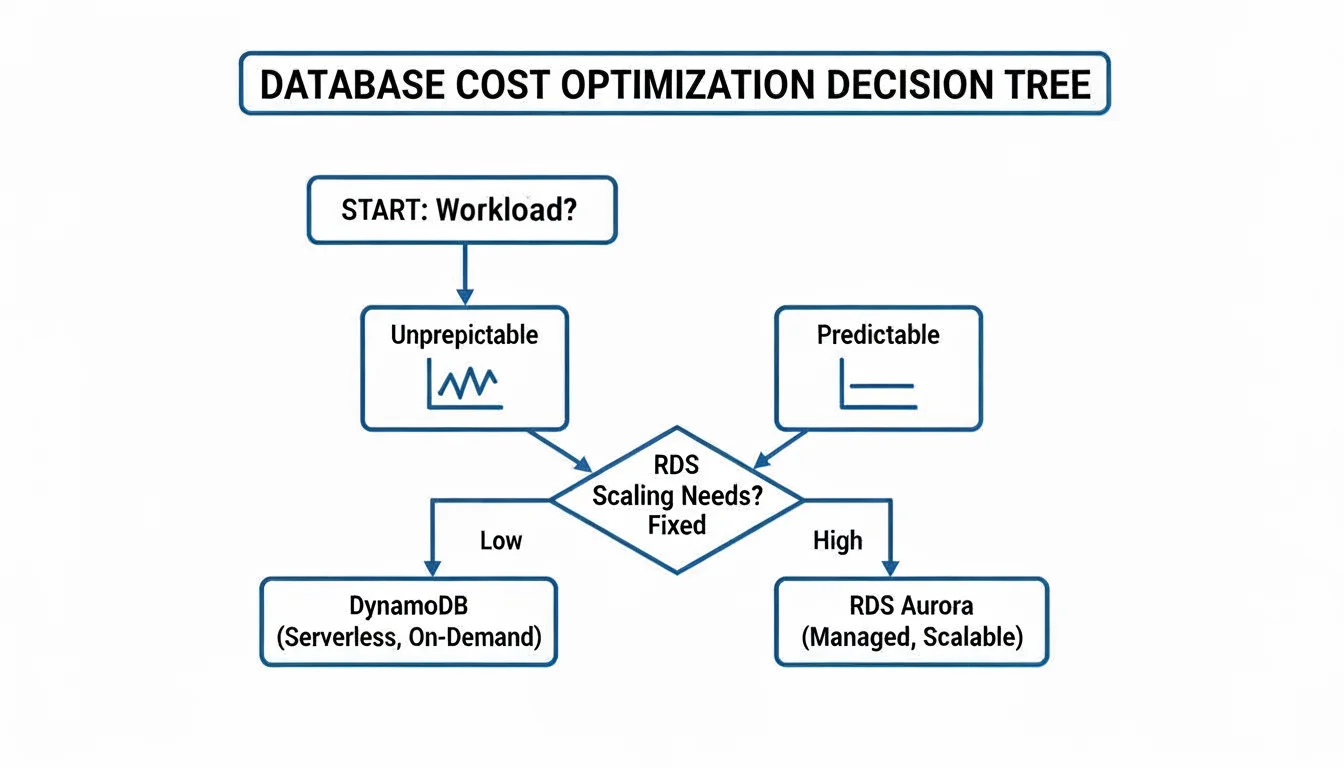
DynamoDB's on-demand pricing is often more cost-effective for spiky or unpredictable workloads where you only pay for the requests you make. For steady, predictable traffic, the provisioned model of RDS—especially when using Reserved Instances—often provides better value over the long term. To see how other databases fit into the cloud, look at our guide on evaluating AWS database options. Understanding these practical examples and the underlying architectural principles helps you select the right database for your project and prepares you to pass your certification exams with confidence.
DynamoDB vs. RDS: Answering the Tough Questions
Designing a database layer often leads to a few persistent questions. These specific dilemmas appear frequently in architectural reviews and on certification exams. Let’s address them with direct answers that connect technical capabilities to actual operational requirements.
Can RDS Scale Horizontally Like DynamoDB?
This question highlights a central architectural distinction. DynamoDB performs horizontal scaling for reads and writes without requiring manual intervention. It spreads data across partitions as throughput needs increase. RDS follows a different path. Its primary scaling method is vertical scaling, which involves increasing the hardware resources of your primary instance. This means moving to a larger instance class, such as migrating from a db.m5.large to a db.m5.xlarge (verify current instance specifications on the AWS site).
For read traffic, RDS provides a horizontal scaling option through Read Replicas. You can deploy up to five replicas to offload read-heavy queries from your primary database. However, this does not apply to write operations. Every write must still go through the single primary instance. This creates a bottleneck for write-intensive applications. In contrast, DynamoDB handles high-volume, distributed write traffic by design, making it the preferred choice for massive ingestion tasks where a single primary server would eventually fail to keep up with the demand.
Key Distinction for Exams: DynamoDB scales reads and writes horizontally by partitioning data automatically. RDS scales reads horizontally with replicas but scales writes vertically by upgrading the primary instance's power. This fundamental difference drives many architectural decisions.
Is DynamoDB Always Cheaper for Low Traffic?
Serverless models are often associated with cost savings, but that is not always true. If your workload involves very low, predictable traffic, a small RDS instance might cost less than DynamoDB. This is especially true when using a Reserved Instance (RI) plan, where you commit to a one or three-year term in exchange for a lower hourly rate. A small RI database instance can be surprisingly economical over the long term for consistent workloads.
DynamoDB becomes the more cost-effective option for spiky or unpredictable traffic. Its on-demand capacity mode ensures you only pay for the specific requests your application makes. You do not pay for idle resources during periods of inactivity. This model prevents the financial waste associated with an RDS instance that sits at 5% CPU utilization for most of the day. To determine the real cost, you must map out your hourly traffic patterns and peak throughput requirements to see where the price curves cross.
Which Is Better for Analytics and Reporting?
RDS is the superior choice for any workload requiring ad-hoc queries, business intelligence dashboards, or reports that combine data from various tables. Relational engines prioritize complex SQL operations, including multi-table joins and aggregations. If your business needs to run "what-if" scenarios or generate monthly reports from interconnected datasets, the SQL capabilities of RDS are built for that purpose.
Running analytics on DynamoDB involves more friction. Because it is a key-value store, it lacks native joins. You must export data to Amazon S3 using DynamoDB Streams or the Export to S3 feature. From there, you might use Amazon Athena for SQL queries on S3 data, or use AWS Glue to move data into Amazon Redshift for warehousing. These methods add architectural complexity and time delay compared to querying RDS directly. For more context, this definitive enterprise database comparison offers insights relevant to these architectural choices.
Ready to master AWS concepts and accelerate your career? MindMesh Academy provides expert-curated study guides to help you pass your certification exams with confidence. We cover everything from foundational knowledge to advanced architecture for current exams like the AWS Certified Solutions Architect – Associate. Start your preparation with MindMesh Academy today!
Knowing when to reach for DynamoDB over RDS is exam material across several AWS tracks. The AWS certification overview shows which exams test database selection and at what depth.

Written by
Alvin Varughese
Founder, MindMesh Academy
Alvin Varughese is the founder of MindMesh Academy and holds 20 professional certifications including Microsoft Agentic AI Business Solutions Architect, AWS Solutions Architect Professional, and Azure DevOps Engineer Expert. He's held senior engineering and architecture roles at Humana (Fortune 50) and GE Appliances. He built MindMesh Academy to share the study methods and first-principles approach that helped him pass each exam.