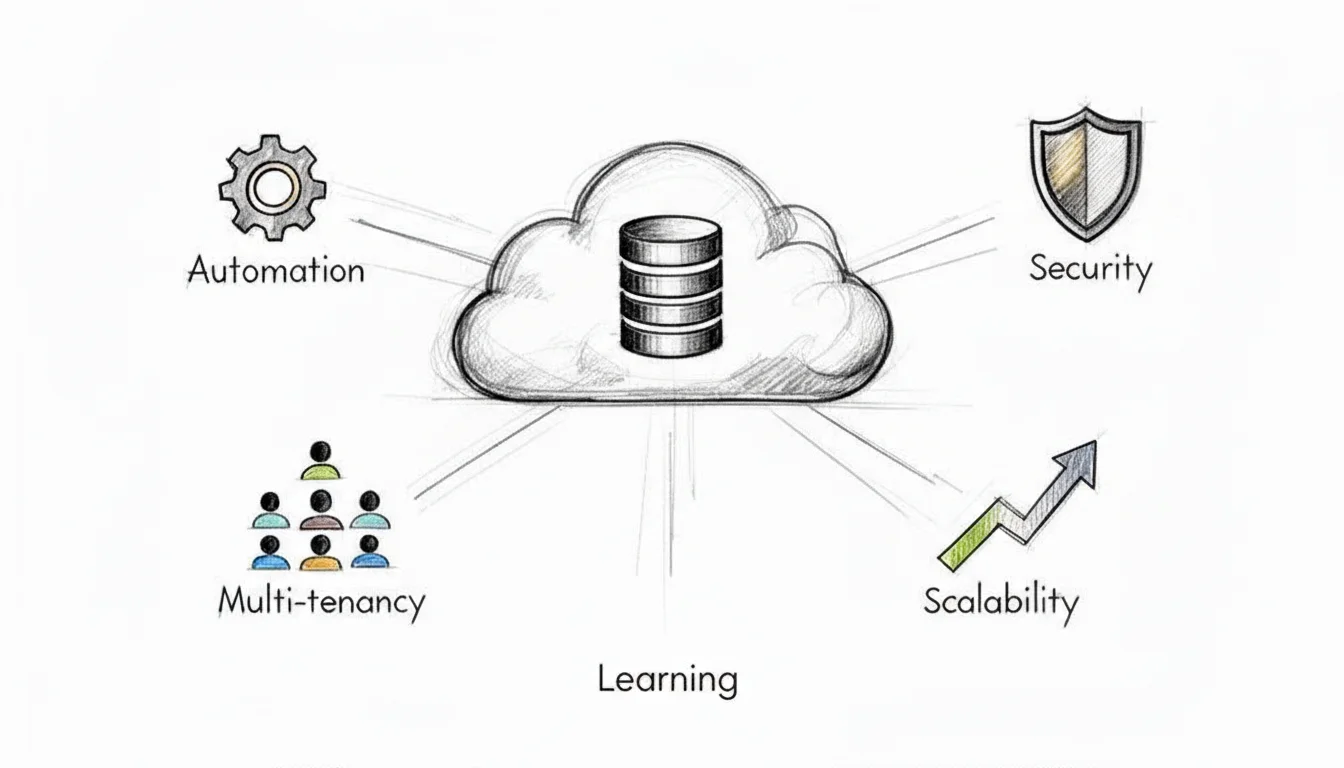
Your Guide to DB as a Service for Cloud Certification
Modern applications rely on high-performance databases to function. Previously, organizations had to build their own infrastructure, manage hardware, and handle complex maintenance manually. Database as a Service (DBaaS) changes this model by providing managed environments where the provider handles the operational tasks. You receive performance and reliability without managing the underlying servers or physical infrastructure.
At MindMesh Academy, we recognize how DBaaS influences cloud architecture and its inclusion in major IT certification exams. This guide covers core concepts and technical strategies to help you master these systems. Use this information to prepare for your cloud certification tests and gain a clear understanding of managed database solutions. By focusing on practical implementation rather than just theory, you can approach your next exam with confidence and improve your technical skills.
What Is DB as a Service and Why It Matters
At its core, DBaaS is a cloud service model where a provider handles the heavy lifting of database administration. Companies like Amazon Web Services (AWS), Google Cloud, or Microsoft Azure host and manage the entire database system for you. You do not have to deal with physical servers, manual software installations, or constant security patching. Instead, you get immediate access to a functional database through a simple API or a web-based dashboard.
This model changes how organizations plan their technology budgets. It moves database management from a large upfront capital expense (CapEx) for physical hardware and permanent licenses to a predictable, pay-as-you-go operational expense (OpEx). For students preparing for the AWS Certified Cloud Practitioner or Microsoft Azure Fundamentals exams, understanding this transition from CapEx to OpEx is a fundamental requirement.
The Shift to Managed Database Services
This change is more than a simple convenience. It represents a major move in how modern companies handle their data infrastructure. Market data shows how quickly this is happening. The global DBaaS market is growing fast; it was valued at USD 17.48 billion in 2021 and is expected to reach USD 80.95 billion by 2030. You can read more about these trends in the full DBaaS market report.
This growth is fueled by specific advantages that change IT career paths. It affects everyone from solution architects to DevOps engineers and influences broad business strategies.
- Focus on What Matters: By removing the manual work of database upkeep, your technical staff can spend their time on higher-value tasks. Developers, data engineers, and architects can concentrate on building new application features, refining data models, or finding insights in large datasets. A PMP-certified project manager no longer has to account for long periods of administrative overhead or hardware lead times in the project plan. This allows the team to meet deadlines for feature releases more consistently.
- Accessible Power: The pay-as-you-go model makes high-end technology available to everyone. Small startups can use the same reliable, scalable database solutions as global corporations without needing a massive initial investment. This creates a more level field for innovation, as small teams can use enterprise-grade tools from day one.
- On-Demand Scalability: Scaling is a major theme for the AWS Certified Solutions Architect and Azure Administrator exams. If you expect a spike in traffic from a holiday sale or a viral social media mention, you can scale resources in minutes. You can scale vertically by adding more CPU and RAM, or horizontally by creating read replicas to handle more users. When the traffic returns to normal levels, you can scale back down to save money. This flexibility is known as elasticity, and it is a core part of modern cloud architecture.
For IT professionals, including system administrators and architects, understanding DBaaS is vital. It is a topic that appears on major exams like the AWS Certified Solutions Architect, Azure Database Administrator, and ITIL 4 for service management. Knowing how to use these services is often a requirement for senior roles in cloud architecture and data engineering.
To understand the full impact of DBaaS, you should compare it to the traditional way of managing databases in your own data center.
On-Premises Database vs DBaaS: A Quick Comparison
The following table shows the differences in management, cost, and scaling between running your own database and using a DBaaS model. These distinctions frequently appear in scenario-based questions on certification tests.
| Aspect | On-Premises Database | DB as a Service (DBaaS) |
|---|---|---|
| Management | You are responsible for everything: hardware, OS, patches, backups, and scaling. | The provider manages the underlying infrastructure; you focus on your data and applications. |
| Cost Model | High upfront cost (CapEx) for servers, storage, and software licenses. | A predictable, pay-as-you-go subscription model (OpEx), paying only for consumed resources. |
| Scalability | A slow, manual process requiring extensive planning, procurement, and hardware installation. | Fast, automated scaling (both vertical and horizontal) available with a few clicks or API calls. |
| Expertise | Requires a dedicated in-house team of specialized database administrators (DBAs) and infrastructure engineers. | Reduces the need for daily administrative troubleshooting, allowing talent to focus on innovation. |
The DBaaS model is built to reduce the effort needed to keep a system running. It lets your team care about the "what"—the data and business logic—while the provider handles the "how"—the underlying infrastructure and its maintenance.
Reflection Prompt: Think about a project where database tasks caused a delay. How would using a managed service have changed the outcome, the project timeline, or the budget?
Understanding Core DBaaS Architectures
To understand the mechanics and technical benefits of DB as a service, you must examine the architectural designs that support it. These are not merely technical specifications. They are the frameworks that provide cost savings, high scalability, and the operational flexibility that defines the DBaaS model. A firm grasp of these architectures is essential for professional practice and for passing cloud certification exams.
Most public cloud DBaaS offerings operate on the principle of multi-tenancy. You can compare this to a large apartment complex. In this scenario, the cloud provider builds and manages the infrastructure—the foundation, shared utilities, water lines, and electrical wiring. Every resident, or tenant, lives in a private, secure apartment within that shared framework.
This strategy is far more efficient than constructing a separate, independent house for every individual. In the same way, a DBaaS provider runs a massive pool of hardware and software resources. The provider then creates isolated environments for each customer. This shared resource model allows for pay-as-you-go pricing, rapid scaling, and high hardware utilization rates. These factors make DBaaS a logical choice for organizations moving away from local data centers.
Relational vs. NoSQL: The Two Main Flavors
When you create a new database instance, your first major decision is choosing the database type. Cloud providers offer a broad menu of options, but these services generally fall into two categories. Each has specific technical requirements and architectural traits.
-
Relational (SQL) Databases: These are the standard tools for structured data, including services like PostgreSQL, MySQL, SQL Server (e.g., Azure SQL Database), and Amazon Aurora. They arrange data into fixed tables with strict schemas. This organization ensures strong consistency and supports complex transactions through ACID properties. ACID stands for Atomicity, Consistency, Isolation, and Durability. Financial applications, retail transaction systems, and any software requiring strict data integrity depend on these properties to ensure that a transaction either completes entirely or fails without leaving partial data.
- Certification Relevance: Expect exam questions that ask you to choose a database for OLTP workloads or tasks requiring high data integrity.
-
NoSQL Databases: This category offers more flexibility for changing data structures. Services such as Amazon DynamoDB, MongoDB Atlas (managed service), or Azure Cosmos DB store data in formats like documents, key-value pairs, or graphs. They handle unstructured data at a massive scale and with high speed. Use cases include mobile applications, IoT sensor streams, gaming leaderboards, and social media platforms where the data format changes frequently. These systems usually follow the BASE model—Basically Available, Soft state, Eventually consistent. They prioritize availability and the ability to split data across many servers over the strict consistency found in SQL systems.
- Certification Relevance: You will likely need to identify NoSQL solutions for projects involving high write speeds, massive data volumes, or schemas that are not clearly defined.
Selecting the correct database type is a required skill for cloud architects. A banking system where every cent must be tracked accurately needs a relational DBaaS. A high-traffic gaming leaderboard that processes millions of updates every minute would benefit from a NoSQL DBaaS to ensure low latency and continuous availability. To learn more about these choices, see our guide on evaluating database options like RDS, Aurora, and DynamoDB.
The Secret Sauce: Automation
The primary advantage of DBaaS is the automation layer built into the platform. This automation is the service that gives Database as a Service its name. It changes difficult, manual administrative tasks into simple API calls or clicks in a management console. By automating these processes, providers reduce the risk of human error and speed up deployment cycles.
The following diagram shows the transition from old, manually managed databases to the automated DBaaS systems used by modern engineering teams.
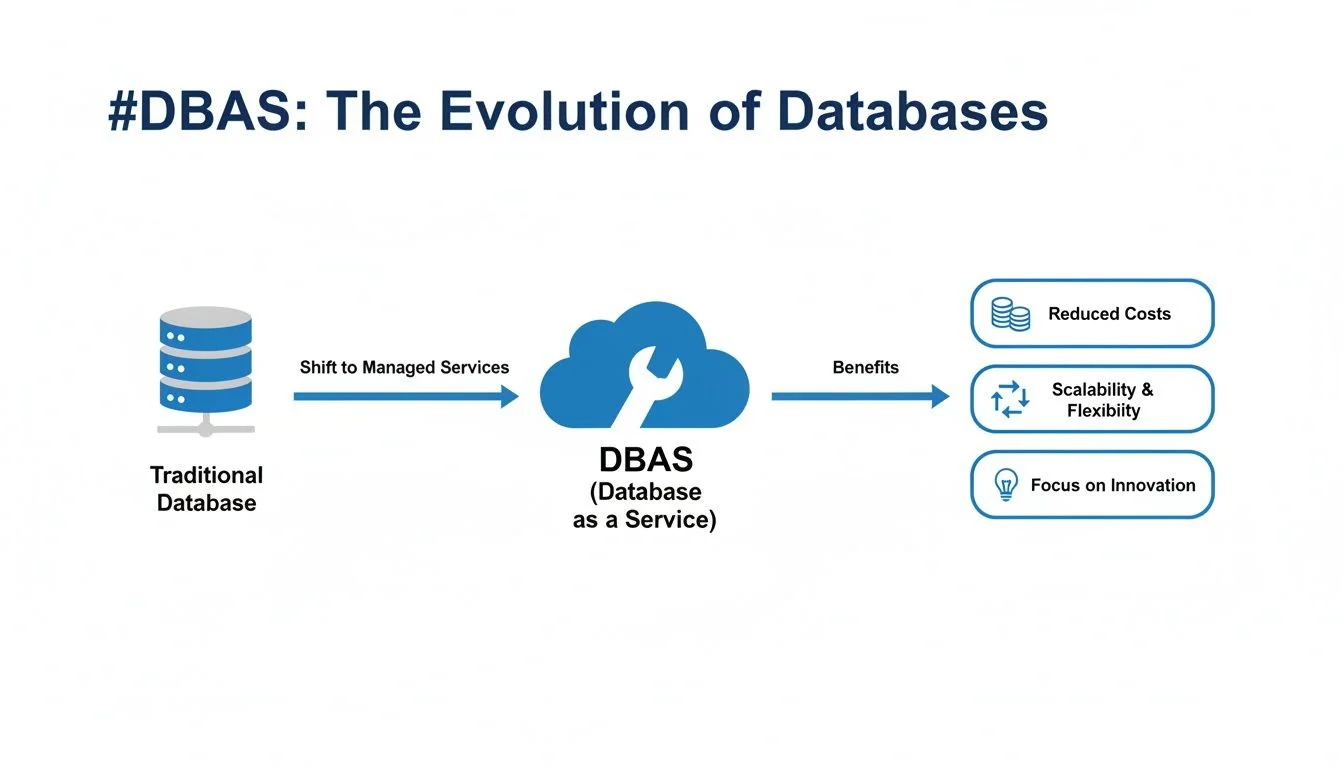 Caption: The journey from manual database management to automated DBaaS, illustrating how cloud providers abstract away complexity and enhance operational efficiency.
As shown, the DBaaS model handles the difficult tasks of provisioning, patching, and scaling. This allows DevOps and SRE teams to spend their time building application features instead of managing the underlying servers.
Key Takeaway: Automation is the engine that runs DBaaS. It manages the repetitive and time-consuming tasks of a database administrator. This capability allows providers to offer reliable and cost-effective services to thousands of customers at once. This focus shifts your work from infrastructure maintenance to application logic.
This automated management system covers several functions that appear frequently in certification exams:
- Provisioning: Setting up a new database with its network, storage, and security rules now takes minutes. In the past, this process took weeks of hardware procurement and configuration. Platforms like AWS RDS or Azure SQL Database offer a guided setup to deploy a production-ready instance quickly.
- Patching & Updates: The cloud provider manages security patches, minor version updates, and major software upgrades. These tasks happen during set maintenance windows. Modern providers often use blue/green deployments or multi-AZ failovers to apply these updates with zero downtime for the user.
- Scaling: If an application needs more memory or CPU power, automation handles the resource increase. You can add more processing power to a single instance or create read replicas to handle more traffic. For example, AWS RDS can automatically add read replicas to spread out the load, which improves performance and system resilience.
- Backups: Automated backups are a standard part of the service. These systems capture the state of the database and its transaction logs. This setup allows for point-in-time recovery, which lets an administrator restore a database to its exact condition from a few minutes prior to an error or data loss.
Knowledge of these automated features is vital for passing cloud exams. You must be able to explain how a DBaaS platform handles patching, manages backups, and scales during a traffic spike. This demonstrates a practical understanding of how modern cloud architecture functions and how to apply operational best practices in a real environment.
Automation also simplifies the recovery process. In a traditional setup, restoring a database from a backup might involve finding the right tape or disk, installing the database software, and manually replaying logs. In a DBaaS environment, this is often a one-click process initiated through the provider's dashboard. This reduces the Recovery Time Objective (RTO) and Recovery Point Objective (RPO), which are two metrics frequently discussed in high-level architectural exams.
Furthermore, these automated systems provide a level of monitoring and alerting that would be difficult to build from scratch. Most providers include built-in dashboards that track CPU usage, memory consumption, and disk I/O. You can set up alerts to notify your team if the database reaches a specific threshold. This proactive approach to database management is a direct result of the automation layer provided by the DBaaS vendor.
Reflection Prompt: How do automated patching and scaling in DBaaS relate to the principles of continuous integration/continuous delivery (CI/CD) or site reliability engineering (SRE)?
Weighing the Benefits and Trade-offs of DBaaS
Deciding to move to a DB as a service model is a major strategic choice that involves more than just swapping one piece of software for another. It is a situation defined by clear trade-offs: you gain significant operational advantages, but you must also manage certain technical constraints. To make the best choice for your company—and to pass your cloud certification exams—you must look at both the pros and the cons with a balanced, objective view.
The main advantage of DBaaS is that it lets you focus on building software instead of managing physical hardware. When you hand over the repetitive, low-level work of database management to a cloud provider, you recover your team's most limited resources: their time and their mental focus.
The Major Wins of Using DBaaS
The most visible benefit is scalability and elasticity. Imagine an e-commerce site that suddenly gets a massive wave of traffic because a product went viral. In a traditional data center environment, that spike would probably crash the servers, leading to lost sales and unhappy customers. With DBaaS, you can increase your database capacity—by resizing your instances or adding read replicas—using a few clicks in a console or a single API call. Once the traffic returns to normal, you can scale back down just as easily to save costs. This ability to adjust resources quickly is a major topic in cloud certifications, including the AWS Certified Solutions Architect Professional exam.
DBaaS also changes how an organization pays for technology. It shifts database costs from a large, upfront capital expenditure (CapEx) to a monthly operational expenditure (OpEx). You no longer have to buy expensive physical servers that might not be used to their full potential most of the time. Instead, you pay for what you use, just like a utility bill. This model makes high-end database technology available to everyone, whether it is a small two-person startup or a large global corporation. It improves agility and keeps costs under control.
This shift in data management is driving significant growth in the tech sector. The DBaaS market is expected to grow at a 19.9% Compound Annual Growth Rate (CAGR) through 2034, with North America seeing the most activity (verify current market projections on the vendor site). For any IT worker, learning these services is a smart career move. When used correctly, companies often see their total cost of ownership (TCO) for databases drop by 30-50% (verify these potential savings with specific vendor calculators). These savings come from features like automatic scaling and fewer hours spent on manual maintenance tasks. You can see more details on these trends in this comprehensive cloud database market analysis.
The value of DBaaS comes from how it takes the operational weight off your team's shoulders. The cloud provider manages tasks that are necessary but take a lot of time—like running automated backups, installing security updates, setting up high-availability clusters, and performing regular maintenance. This keeps your engineers from spending all their time on basic upkeep and lets them focus on creating new features and products that help the business grow.
Managing the Potential Downsides
However, the move to DBaaS does have challenges. One frequent concern is vendor lock-in. If you build your application to work specifically with one provider's database, such as Amazon DynamoDB or Azure Cosmos DB, moving to another provider later can be very difficult. Each cloud platform uses its own specific APIs, data formats, and features. This means moving your data is not a simple copy-and-paste job; it often requires changing the actual code of your application, which takes significant time and money.
Another factor is data gravity. As your database grows and stores more information, it becomes harder and more expensive to move it between different environments. The massive volume of data creates a pull that makes it hard to change providers or use a multi-cloud strategy without facing high costs for data transfer (egress fees) or performance issues. To understand these limits, it helps to look at the differences between on-premises vs cloud computing.
Finally, there is the issue of control. With a database you host yourself on your own servers, you have full access to the operating system. You can change every setting and install any tool you need. A DBaaS model involves a trade-off: you give up that deep level of control for the convenience of a managed service. You still control your data, your database structure, and your security settings, but you usually cannot log into the server via SSH to perform custom hardware-level diagnostics. For most businesses, this is a fair trade. But for teams with very specific compliance or technical needs, it might be a problem. You can see an example of how a managed service like Amazon DynamoDB handles these details for you to better understand these constraints.
In the end, choosing a DBaaS solution means weighing these benefits against the potential downsides. You need to make sure the service you choose fits your company's long-term strategy, technical requirements, and budget.
How to Secure Your Data in a DBaaS Environment
Moving a database to the cloud does not mean giving up control and hoping for the best. Security becomes a clearly defined partnership between you and your cloud provider. This concept is the shared responsibility model. It is a fundamental topic for certification exams like CompTIA Security+, AWS Certified Security - Specialty (SCS-C03), and Azure Security Engineer Associate. Grasping this model is also the only way to protect your company from data breaches.
A helpful comparison is a secure self-storage facility. The company owning the facility handles the perimeter fence, the main gate, the lighting, and the security cameras. This is their area of concern. However, you are the renter. You are entirely responsible for the contents inside your specific storage unit. You decide how to organize those items and, most importantly, you decide who gets a key to the lock. If you leave your unit wide open or give a key to a stranger, the facility owner cannot prevent the resulting loss.
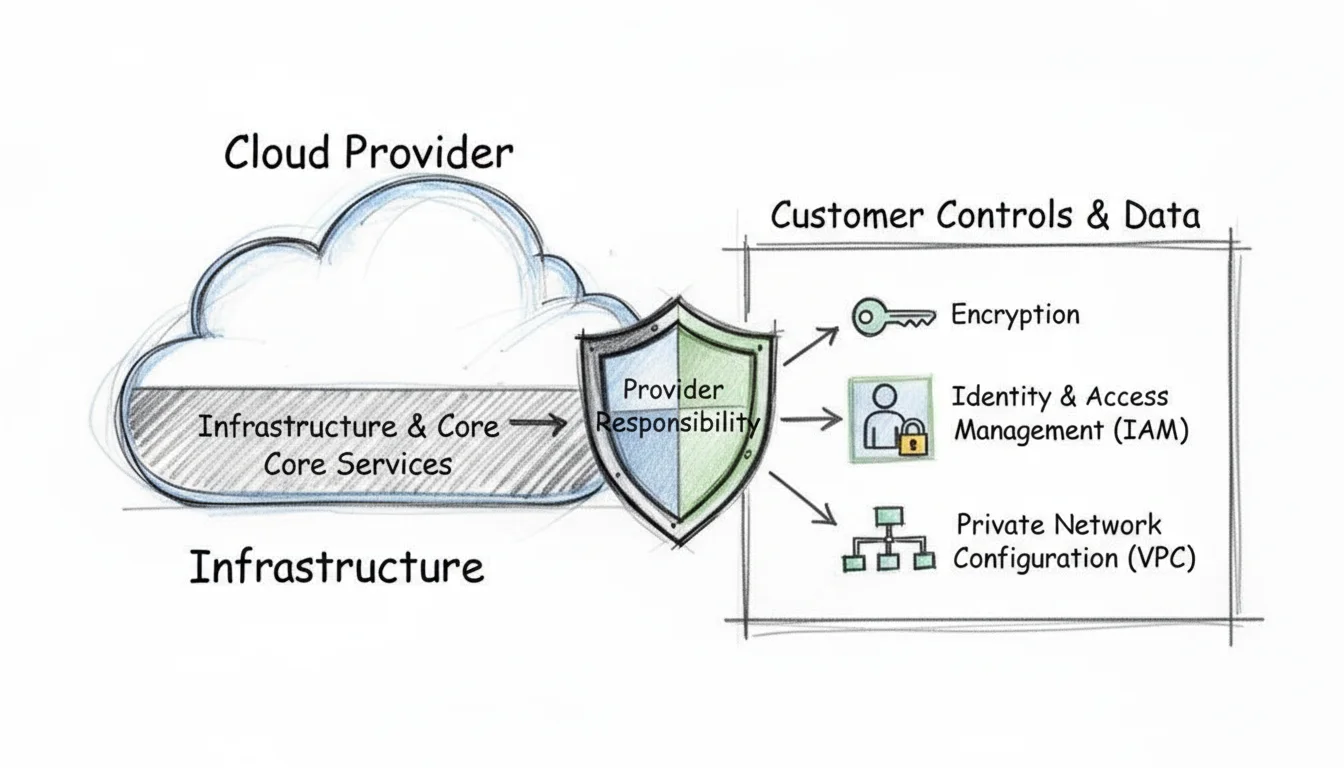 Caption: The Shared Responsibility Model in cloud security clearly delineates the provider's role in securing the cloud infrastructure and the customer's role in securing their data and access within the cloud.
In the DBaaS world, the cloud provider thoroughly secures the physical data centers. This includes the servers, the power supplies, the networking cables, and the core database engine software. Your job as the customer is to secure the data itself. You manage who can access the database, how they authenticate, and what permissions they have. To protect your assets, you must focus on three specific areas: identity management, encryption, and network boundaries.
Implementing Strong Access Controls
The first line of defense for any database is controlling who gets in and what they can do. This falls under the umbrella of Identity and Access Management (IAM). The core strategy for IAM is the principle of least privilege. This rule is simple: give users and applications the minimum level of access required to do their jobs. Nothing more.
Consider a standard web application. It might need to read from a product table to show items to customers. This application does not need the ability to drop tables or change the database schema. If the application only needs to read data, grant it "Select" permissions only. Similarly, a data analyst might need to run complex queries for a weekly report. That analyst should have read-only access and should never have the power to modify user accounts or delete records.
In cloud environments, you define these permissions using IAM policies. In AWS, these are often JSON documents that specify exactly which actions are allowed on which resources. In Azure, you use Role-Based Access Control (RBAC) to assign specific roles like "SQL DB Contributor" or "Reader."
Key Insight for Certifications: Overly permissive IAM policies are a leading cause of cloud data leaks. Certification exams frequently test your ability to identify excessive permissions. Always start with a "deny all" stance. Only add permissions as they are proven necessary. You should also perform regular access reviews to ensure that employees who changed roles or left the company no longer have active keys to the database.
Treating IAM as a secondary task is a major mistake. Correct configuration from the start is a requirement for a secure DBaaS environment. Multi-factor authentication (MFA) should also be mandatory for any human user accessing the database management console. This adds a second layer of verification that prevents a leaked password from becoming a total system compromise.
Encrypting Your Data Everywhere
Encryption acts as a final safeguard. It turns your sensitive information into a scrambled format that no one can read without a specific key. To maintain a secure environment, you must address two different states of data.
- Encryption in Transit: This protects data as it moves across the network. When your application sends a query to the database, the data travels through various switches and routers. To prevent anyone from "sniffing" this traffic, use Transport Layer Security (TLS). This is the modern version of the older SSL protocol. Most cloud providers now require TLS 1.2 or 1.3 for all database connections. You should configure your database to reject any unencrypted connection attempts immediately.
- Encryption at Rest: This protects data stored on the physical disks in the provider’s data center. Most DBaaS platforms provide a simple toggle to turn this on. When enabled, the provider handles the heavy lifting of encrypting the data blocks as they are written to the disk. You can manage the keys yourself or let the provider manage them through services like AWS Key Management Service (KMS) or Azure Key Vault. This ensures that even if a technician at the data center physically removed a hard drive, the data would be useless to them.
Many database engines also offer Encryption at Rest features like Transparent Data Encryption (TDE). This technology is built into the database engine. It encrypts the database files, log files, and backups without requiring any changes to your application code. It is an effective way to meet compliance requirements like PCI-DSS or HIPAA. By using TDE alongside disk-level encryption, you create a layered defense that makes it much harder for unauthorized parties to view your records.
Isolating Your Database with Network Security
You would not put your company's physical safe in the middle of a public sidewalk. The same logic applies to your cloud database. It should not be reachable from the public internet. You must use network isolation to keep the database hidden from potential attackers.
Cloud providers allow you to create a Virtual Private Cloud (VPC) or a Virtual Network (VNet). These are private, isolated sections of the cloud where you can launch your resources. By placing your database in a private subnet, you ensure it has no public IP address. It becomes invisible to anyone scanning the internet for open ports.
To control the traffic that reaches your database, you use security groups. These act as virtual firewalls. You can create rules that permit traffic only from specific sources. For example, you might create a rule that allows incoming traffic on port 5432 (for PostgreSQL) but only if that traffic comes from the private IP address of your web server. Any other traffic, even from within your own cloud account, is blocked by default.
Follow this checklist to keep your network configuration tight:
- Implicit Deny: Ensure your firewall rules block all traffic that is not explicitly allowed. This is the safest default state.
- Source Restriction: Never use
0.0.0.0/0in a database security rule. This would open the database to the entire world. Always specify the exact security group or IP range of your application tier. - Port Minimization: Only open the ports necessary for the specific database engine you are using. If you use MySQL, open port 3306. If you use SQL Server, open port 1433. Keep all other ports closed to reduce the surface area an attacker could target.
This strategy of using strong IAM, encryption in all states, and strict network boundaries creates a solid defense. Mastering these concepts is not just about passing an exam. It is about becoming a reliable professional who can protect a company's most valuable asset: its data. In a market where data breaches cost millions of dollars, these skills are highly valued.
Reflection Prompt: If a new application needs to connect to an existing DBaaS instance, what are the three most critical security considerations you would address before allowing that connection?
Keeping Your Database Up and Running with DBaaS
When your application’s database experiences downtime, your business often follows suit. Downtime is far more than a mere inconvenience; it directly translates into lost sales, frustrated customers, damaged brand reputation, and potential compliance penalties. This is why a DB as a service platform offers more than just simplified setup—it is a strong ally in engineering systems designed to withstand failures and maintain continuous operation, a central part of Site Reliability Engineering (SRE).
We are discussing the vital concept of business continuity: ensuring your services remain online and accessible while your data stays intact and consistent, regardless of what disaster might strike.
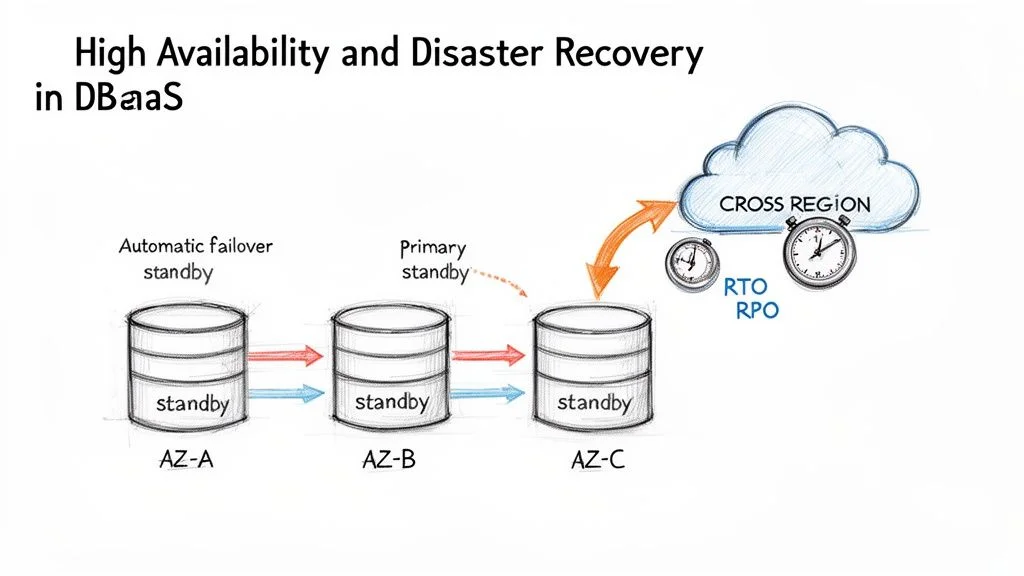 Caption: DBaaS high availability (HA) and disaster recovery (DR) strategies, demonstrating how multi-AZ deployments and cross-region replication ensure business continuity.
If you are preparing for a cloud certification like the AWS Certified Solutions Architect Associate, Microsoft Certified: Azure Solutions Architect Expert, or AWS Certified DevOps Engineer Professional, internalizing these concepts is critical. You will repeatedly encounter two fundamental terms: High Availability (HA) and Disaster Recovery (DR). HA acts as your strategy for surviving localized, small-scale failures, such as a single server hardware malfunction within a data center. DR, by contrast, is your extensive plan for enduring and recovering from a catastrophic, widespread event, like an entire data center or geographic region being taken offline.
High Availability Through Multi-AZ Deployments
The foundational workhorse of modern DBaaS high availability is the Multi-Availability Zone (Multi-AZ) deployment. An Availability Zone (AZ) is a fully isolated and independent data center, equipped with its own distinct power, cooling, networking, and physical security. While located within the same geographic region, AZs are physically separate—often placed on different flood plains or serviced by different power grids—and connected by low-latency networks. This design helps prevent failures in one zone from cascading to others.
When you enable a Multi-AZ setup for your DBaaS instance (such as AWS RDS Multi-AZ or Azure SQL Database Geo-replication), your cloud provider automatically provisions and manages a synchronized copy of your primary database in a separate Availability Zone. Every data write operation to your primary database instance is then synchronously replicated to this standby replica in near real-time. Because the replication is synchronous, the primary database waits for a confirmation from the standby before acknowledging the write as successful to the application. This ensures that the standby is always up to date with the primary.
The real advantage here lies in the automatic failover capability. If the primary database instance experiences an outage for any reason—be it a hardware failure, network interruption, or even a localized power event—the DBaaS platform instantly detects the issue through health checks. It then automatically promotes the standby replica to become the new primary. During this process, the system updates the Domain Name System (DNS) record for the database endpoint to point to the new instance. This switchover typically occurs in just a couple of minutes, without manual intervention, which helps your application stay online.
This Multi-AZ configuration serves as your first line of defense, shielding your application from localized failures that occur within a single data center environment. It is a vital strategy for achieving high availability and a frequent topic in certification exams.
Understanding Your Recovery Objectives
Before you can architect a resilient recovery plan, you must answer two fundamental questions. These key metrics form the basis of any serious Disaster Recovery (DR) strategy and are frequently assessed in certifications.
- Recovery Time Objective (RTO): How long can your application realistically afford to be unavailable following a disaster? This defines the maximum acceptable downtime. An RTO of 15 minutes means your entire application must be fully operational and serving users again within that precise window. For example, a mission-critical e-commerce site might have an RTO of mere seconds or minutes, while an internal analytics dashboard might tolerate an RTO of several hours.
- Recovery Point Objective (RPO): How much data can your business tolerate losing? This specifies the maximum acceptable amount of data loss, typically measured in units of time. An RPO of 5 minutes indicates that you cannot afford to lose more than the last five minutes of committed transactions. For a financial application, the RPO might be zero, which requires synchronous replication across regions to ensure no data is lost during a regional failure.
Your specific business requirements and the criticality of the data will dictate these RTO and RPO numbers. Achieving extremely low RTOs and RPOs often results in higher costs and more complex architectures. This trade-off is often explored in professional-level certification exams, where you must balance cost with business needs.
Disaster Recovery with Automated Backups
While Multi-AZ deployments excel at handling local failures within a region, you require an expanded plan for surviving widespread regional disasters. This is where automated backups and strategic replication become your most useful tools. DBaaS platforms provide powerful, built-in features for this purpose.
Point-in-Time Recovery (PITR): This feature goes beyond simple daily snapshot backups by continuously archiving your database transaction logs, also known as write-ahead logs or WALs. It enables you to restore your database not just to a specific day, but to an exact second within your retention period. If an engineer accidentally executes a DELETE query without a WHERE clause, PITR allows you to reverse the error by restoring to the precise moment before the action occurred. For example, you could restore the database to last Tuesday at 2:15:37 PM. This minimizes data loss and reduces the operational impact of human error.
Cross-Region Replication: For the highest level of data protection and resilience, you can automatically configure your database backups, or even actively replicate your data, to an entirely different geographic region. If an extreme event like a natural disaster or a massive power grid failure incapacitates an entire cloud region (such as US East), you can bring your database online using the replicated data stored safely in a geographically distant region (such as US West). This strategy forms the core of a resilient, enterprise-grade disaster recovery plan.
In cross-region setups, replication is usually asynchronous to avoid the performance penalties of waiting for data to travel long distances. While this may introduce a slight increase in RPO—meaning a few seconds of data might be lost in a total regional collapse—it provides a path to recovery when an entire part of the world goes dark.
For anyone pursuing advanced certifications, it is beneficial to explore various DR patterns beyond basic backups. You can deepen your understanding by investigating common backup and recovery strategies like pilot light and warm standby to solidify your knowledge for scenario-based exam questions. These patterns represent different levels of readiness and cost, ranging from keeping a minimal version of your environment running (pilot light) to having a scaled-down but functional version always available (warm standby).
By strategically layering Multi-AZ for high availability on top of automated, point-in-time backups and cross-region replication for disaster recovery, a DB as a service platform provides you with a complete toolkit for ensuring business continuity and resilience. Using these managed features allows engineers to focus on application logic rather than the manual work of managing backup tapes or configuring heartbeat scripts between servers.
Strategies for Migrating to a DBaaS Platform
*Caption: A video guide on effective strategies for migrating your databases to a DBaaS platform.*Moving an operational database into a DBaaS environment is similar to relocating a central power grid. It is a high-stakes operation that requires thorough planning and precise execution to prevent service interruptions. A well-defined and reliable migration strategy distinguishes a transition that users never notice from a project that suffers from long periods of downtime, data loss, and cost overruns.
The process begins with a detailed evaluation of your current database environment. Before you move a single row of data, you must understand your existing configuration from top to bottom. This involves taking a full inventory of every database instance in your organization. You need to document performance characteristics like IOPS (Input/Output Operations Per Second), memory usage, and CPU cycles. Usage patterns are equally important; you should know when your peak traffic occurs and how the database handles those spikes. Identify schema complexities, such as deeply nested triggers or proprietary data types, and map out every connection. Your applications, internal microservices, and external data consumers all rely on these connections, and missing even one can lead to a broken system after the move.
Choosing Your Migration Approach
After you have a clear view of your starting point and your application dependencies, you can choose a migration path. There are two primary ways to handle this, and each involves different technical requirements and business trade-offs.
Homogeneous Migration (Lift-and-Shift)
This is the most direct route. A homogeneous migration involves moving your database to a cloud provider that uses the same database engine you currently run. For example, you might move an on-premises PostgreSQL server to a managed service like Amazon RDS for PostgreSQL. Another common scenario is moving a local SQL Server instance to Azure SQL Database.
Because the engine, schema, and SQL dialect stay the same, the technical work is simpler. You rarely need to change your application code. This approach allows you to get the benefits of a managed service, such as automated backups and patching, without redesigning your entire architecture. It is an efficient way to exit a data center quickly while maintaining operational consistency.
Heterogeneous Migration (Re-platform)
This approach is more complex but can provide better long-term results. In a heterogeneous migration, you switch to a different database engine during the move. You might decide to move from a proprietary, expensive Oracle database to a cloud-native, open-source engine like Amazon Aurora or Azure Database for PostgreSQL.
Companies choose this route to modernize their technology, avoid high licensing fees, or use an engine that better fits their current needs. If a relational database is struggling with unstructured data, moving to a NoSQL engine could be the right choice. The difficulty here lies in the work required to convert the schema and transform data types. You will likely need to rewrite parts of your application code and perform extensive testing to make sure the new system performs as well as the old one.
This shift is usually driven by specific business goals. The DBaaS market is expected to reach USD 138.9 billion by 2034 (verify current market projections on industry analyst sites). This growth is happening because organizations report that switching to managed services can reduce infrastructure costs by up to 50%. Companies see managed databases as a way to handle the volume of data in modern systems without needing a massive team of administrators.
The Five Phases of a Successful Migration
No matter which path you take, a database migration follows a five-phase process. Following these steps helps keep the project on schedule and reduces the risk of data corruption. As you plan, you should also look at Top Database Migration Best Practices to avoid common mistakes that others have made.
- Assessment and Planning: This is the most important stage. You define what is being moved and where it is going. You must pick a target service and set performance targets. This includes your Recovery Time Objective (RTO), which is how long you can afford to be offline, and your Recovery Point Objective (RPO), which is how much data you can afford to lose if something goes wrong. You also need to schedule your "cutover window"—the specific time when you will switch traffic to the new database.
- Schema Conversion: If you are changing database engines, this step is vital. You will use specialized software like the AWS Schema Conversion Tool (SCT) to rewrite the source schema into a format the new engine understands. This includes converting tables, views, and stored procedures. It is rarely a 100% automated process; your engineers will likely need to manually fix complex logic that the tool cannot translate perfectly.
- Data Migration: Now you move the data. Tools like the AWS Database Migration Service (DMS) or the Azure Data Migration Service handle this. You usually start with a full load, where all existing data is copied to the cloud. Then, you use Change Data Capture (CDC) to replicate any new changes that happen on the source database while the migration is in progress. This keeps the two databases synchronized and allows for a faster switch later.
- Testing: You must test everything. Do not skip this phase to save time. You need to verify that all the data arrived correctly and that no records were dropped. Run load tests to see if the new database can handle your peak traffic. Check your reporting tools, APIs, and batch jobs. If your application expects a specific response time from a query, make sure the new DBaaS instance meets that requirement.
- Cutover: This is the final step where you switch over to the new system. You update your application settings to point to the new database endpoint. After the switch, monitor the system closely. Look for errors or latency issues. Once you are sure the new environment is stable and performing well, you can shut down your old on-premises hardware. Most teams do this during late-night or weekend hours when traffic is lowest.
To see how these strategies look in practice, consider how the actual data transfer happens.
DBaaS Migration Strategies Overview
The table below shows different ways to move data. Each method has a different effect on your application uptime and requires different levels of technical skill.
| Strategy | Description | Best For | Downtime | | :---------------------- | : :------------------------------------------------------------------------------------------------------------------------------------------------------------------------------------------------------- | :------------------------------------------------------------------------ | :------------------------------------------------ | | Offline (Backup/Restore) | You create a full backup file of your local database. You upload this file to cloud storage, such as Amazon S3 or Azure Blob Storage, and then restore it to the managed instance. | Smaller databases, typically under 100 GB, where the business can tolerate being offline for several hours. | High (The time it takes to backup, move the file, and restore it) | | Online (Replication) | You set up a live link between your old database and the new one. Data flows continuously. When the new database is fully caught up, you make a quick switch. | Large or critical databases that need to stay online. This keeps downtime to just a few minutes or even seconds. | Minimal (Only the time it takes to point the app to the new link) | | Hybrid Approach | You use a backup file to move the majority of the data quickly (seeding). Once that is done, you turn on live replication to handle the small amount of data that changed during the move. | Very large databases in the terabyte range. This avoids the slowness of moving everything over a network link while still keeping downtime low. | Minimal (Similar to online replication results) |
The method you choose depends on your database size and how much downtime your users can tolerate. If you have a 500 GB database and can only be down for five minutes, an online replication strategy is your only real choice. If you have a small internal tool that no one uses on Sundays, an offline backup and restore is much simpler and cheaper.
By breaking the process into these phases and selecting the right tools, you can move to the cloud without the fear of a system crash. Careful planning ensures that your migration provides the scalability and cost savings you expect from a managed service.
Reflection Prompt: Imagine you are migrating a critical financial application database that processes thousands of transactions per minute. Which migration strategy would you prioritize to meet strict RTO and RPO requirements, and what specific risks would you try to mitigate during the testing phase?
Frequently Asked Questions About Database as a Service
When you integrate DBaaS solutions into your technical environment, certain questions come up repeatedly. These inquiries are common among IT professionals who are studying for their cloud and database certifications. Addressing these points helps clarify the practical implications of moving away from traditional on-premises or self-managed cloud databases.
Is DBaaS Really Cheaper in the Long Run?
A low monthly service bill often makes DBaaS look like the cheapest option. However, your actual savings depend on your specific workload and a thorough Total Cost of Ownership (TCO) analysis. For applications with unpredictable traffic or those that experience rapid growth, the pay-as-you-go model is usually the most efficient. You avoid high upfront hardware costs and pay only for the resources you use.
Conversely, a stable application running 24/7 with predictable resource needs might be cheaper to run on reserved cloud instances or even carefully managed local hardware. To find the true cost, you must look at the hidden expenses of self-management. This includes the salaries of DBAs and infrastructure engineers, software licensing fees, power, cooling, physical security, and maintenance. Cloud certification exams often test your ability to perform these comparisons to find the most cost-effective solution.
How Do I Pick Between a SQL and NoSQL Service?
The choice between relational (SQL) and NoSQL databases is a significant architectural decision. The goal is to select the right tool for the job rather than finding a single best database type. Your decision should rest on three main factors: how your data is structured, your requirements for consistency, and how you plan to scale the system. Evaluating these technical requirements early prevents costly migrations later.
- Go with Relational (SQL) DBaaS: (e.g., AWS RDS, Azure SQL Database, Google Cloud SQL) Choose this when your data fits into fixed tables and rows with clear relationships. This model is standard for financial transactions, customer orders, and inventory management. You should select this option when your application requires strict ACID compliance to ensure transactional integrity. It is also the best choice when you need to perform queries across multiple related datasets.
- Opt for NoSQL DBaaS: (e.g., Amazon DynamoDB, Azure Cosmos DB, MongoDB Atlas) Use NoSQL when handling unstructured or semi-structured data. Examples include IoT sensor logs, social media profiles, and gaming leaderboards. NoSQL is designed for horizontal scalability and high throughput. If you need schema flexibility to change your data models over time, NoSQL is the better choice. These systems often prioritize availability and scalability by following BASE principles.
What Control Do I Give Up with DBaaS?
This is a valid concern for many administrators. Moving to DBaaS means you trade low-level infrastructure management for operational simplicity and speed. You usually will not have SSH access to the server. You cannot modify the operating system, install manual patches, or add custom database extensions.
Despite these limits, you keep control over the most important parts of the database. You own your data and define your database schema. You are still responsible for performance tuning, which includes optimizing SQL queries and designing indexing strategies. You also manage data access and application security. By using IAM policies, user accounts, and network security groups, you decide who can access the information. You essentially move from being a server mechanic to a strategic data architect. The cloud provider handles the infrastructure while you focus on the data itself.
Ready to master these foundational DBaaS concepts for your certification? MindMesh Academy provides study guides and practice tools for AWS, Azure, CompTIA, and other major certifications. You can prepare for your next exam by visiting our resources at AWS Solutions Architect Associate Practice Exams.

Written by
Alvin Varughese
Founder, MindMesh Academy
Alvin Varughese is the founder of MindMesh Academy and an enterprise architecture leader. An electrical engineer by training, he moved from factory automation in South Africa to cloud architecture at GE Appliances and Humana (Fortune 50), and holds 20 professional certifications including AWS Solutions Architect Professional, Azure DevOps Engineer Expert, and Microsoft Agentic AI Business Solutions Architect. He built MindMesh Academy after interviewing too many highly certified candidates who couldn't answer basic questions: the goal is prep that makes you better at the job, not just able to pass the exam.