10 Essential Database Management Best Practices
In the dynamic landscape of modern IT, the database stands as the indispensable core of every operation. Far more than a mere repository, it's the high-octane engine powering critical applications, driving business intelligence, and fueling advanced analytics. To treat its upkeep as anything less than paramount is a significant gamble, often leading to crippling performance issues, gaping security vulnerabilities, and potentially irreversible data loss. The critical distinction between a robust, reliable database and an operational liability almost always lies in the diligent adherence to established principles.
This guide moves beyond generic advice to present a comprehensive collection of essential database management best practices. For IT professionals, developers, and especially those preparing for critical certifications, mastering these strategies is fundamental. MindMesh Academy believes in providing actionable insights, and this article is designed to deliver practical implementation steps and real-world scenarios for immediate application.
Whether you're an experienced Database Administrator (DBA), a developer architecting data solutions, or an IT professional aiming for certifications like AWS Certified Database - Specialty, Microsoft Certified: Azure Database Administrator Associate, or CompTIA Data+, understanding these concepts is non-negotiable. This article is structured to provide clear, digestible insights into building and maintaining a resilient data infrastructure that can effortlessly scale with demand. We will explore the specific techniques that differentiate high-performing, reliable databases from those that inevitably accumulate technical debt and operational friction. Let’s dive into the core practices that protect your most valuable digital asset: your data.
1. Database Normalization: Structuring for Integrity and Efficiency
Database normalization is a foundational technique in relational database design, pioneered by Edgar F. Codd. It's the systematic process of structuring data to minimize redundancy and enhance data integrity. By meticulously organizing columns and tables, normalization ensures that data dependencies are logical and that your database remains flexible, scalable, and free from anomalies that can corrupt data during insertion, updates, or deletions.
The process adheres to a series of progressive guidelines known as normal forms, with First (1NF), Second (2NF), and Third Normal Form (3NF) being the most commonly applied. Each form builds upon the last, systematically reducing duplicated data and strengthening the relationships between tables. For instance:
- 1NF: Ensures each table cell contains a single value and has a primary key.
- 2NF: Requires 1NF and that all non-key attributes are fully dependent on the primary key.
- 3NF: Requires 2NF and that all non-key attributes are dependent only on the primary key, not on other non-key attributes (transitive dependency).
Proper normalization is a critical component of effective database management best practices, as it proactively prevents inconsistent data and significantly simplifies database maintenance over time. Many certification exams, particularly those focused on database design for platforms like Microsoft Azure SQL Database or AWS RDS, test a candidate's understanding of these core principles.
Real-World Application and Benefits
Consider an e-commerce platform managing customer orders. Without normalization, a single Orders table might redundantly store customer details (name, address) and product information (name, price) for every single order. This leads to massive data duplication. Normalization would meticulously separate this into distinct, related tables: Customers, Products, and Orders. The Orders table then only needs to store foreign keys that reference the CustomerID and ProductID, eliminating duplicate data. This makes updates significantly more efficient – a customer's address only needs to be updated once in the Customers table, not across potentially hundreds of order records. This ensures data consistency and reduces storage overhead.
Actionable Implementation Tips
To effectively apply normalization, particularly for IT professionals preparing for data-centric roles, follow these key strategies:
- Aim for Third Normal Form (3NF): For most transactional applications, 3NF strikes an excellent balance between data integrity and query performance. It ensures that all non-key attributes depend solely on the primary key.
- Utilize Database Design Tools: Tools like MySQL Workbench, pgAdmin, or cloud-based ERD (Entity-Relationship Diagram) designers help you visualize table relationships and dependencies, making it easier to structure tables correctly and identify normalization opportunities.
- Document Your Schema Thoroughly: Maintain detailed documentation of your normalization decisions, including the rationale for your chosen normal form and any deliberate denormalization. This is invaluable for future development, maintenance, and for demonstrating design principles in professional contexts.
- Strategically Consider Denormalization: In high-read, performance-critical systems like data warehousing or analytical databases, you might intentionally break normalization rules (denormalize) by adding redundant data back in. This can significantly speed up complex queries by reducing the need for numerous joins, but it must be done judiciously and only for specific, measured performance gains, understanding the trade-offs in data integrity.
Reflection Prompt: How might a poorly normalized database complicate troubleshooting or data analysis in your current environment?
2. Regular Database Backups and Recovery Planning: Your Ultimate Safety Net
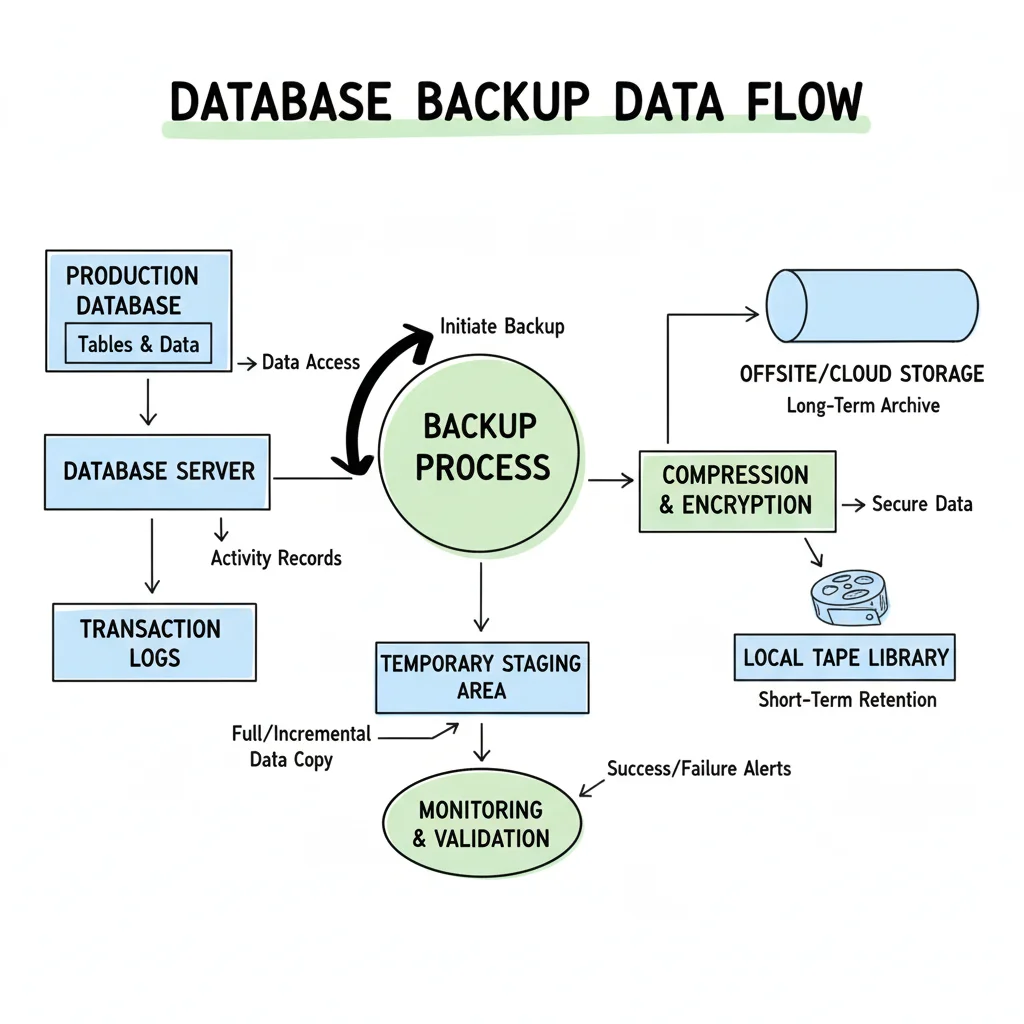
A comprehensive backup and recovery strategy is the absolute ultimate safety net for any database, critically ensuring data protection and business continuity. This isn't merely about copying data; it involves creating regular, reliable copies of database information and establishing rigorously tested procedures to restore operations swiftly after system failures, accidental deletions, security breaches, or catastrophic events. This practice embodies a holistic plan designed to minimize downtime and data loss, safeguarding an organization's most valuable digital assets.

A robust strategy includes implementing automated backup schedules, diligently testing the integrity and viability of those backups, and maintaining copies in multiple secure and geographically diverse locations. Effective database management best practices demand a proactive approach to backups, treating them as a critical, non-negotiable component of daily operations. For certifications such as the AWS Certified SysOps Administrator or the Azure Administrator Associate, a deep understanding of backup types (full, differential, transactional log) and recovery procedures is essential.
Real-World Application and Benefits
Financial institutions provide an excellent example, often employing real-time replication, continuous backup monitoring, and point-in-time recovery to ensure virtually no transaction data is ever lost. In the event of a primary server failure, they can swiftly failover to a replica with minimal disruption, often within seconds. Similarly, healthcare providers must adhere to stringent regulations like HIPAA, which mandates encrypted backups with specific long-term retention policies, ensuring patient data is both secure and recoverable for years. These scenarios underscore how a robust backup and recovery strategy not only prevents catastrophic data loss but also actively supports critical regulatory compliance and builds customer trust.
Actionable Implementation Tips
To build a truly resilient backup and recovery plan, integrate these strategies, which are frequently tested in certification exams:
- Adhere to the 3-2-1 Backup Rule: This industry-standard rule dictates maintaining at least three copies of your data, on two different storage media, with at least one copy located offsite. This drastically reduces the risk of a single point of failure and enhances disaster recovery capabilities.
- Define and Document RTO and RPO: Clearly establish your Recovery Time Objective (RTO), which specifies the maximum acceptable downtime, and your Recovery Point Objective (RPO), the maximum amount of data loss you can tolerate. These crucial metrics will guide the design and implementation of your entire backup and recovery strategy.
- Automate and Monitor Everything: Automate your backup schedules, verification processes, and monitoring alerts. Manual backups are highly prone to human error; automation ensures consistency, reliability, and provides immediate notification if a backup fails. You can learn more about robust backup and recovery strategies in AWS on MindMesh Academy.
- Test Recovery Procedures Regularly: A backup is utterly useless if it cannot be restored successfully. Conduct monthly or quarterly disaster recovery drills to simulate various failure scenarios and test your team's ability to restore the database within your defined RTO and RPO. This iterative testing is vital for identifying weaknesses and refining your plan.
Reflection Prompt: When was the last time your organization conducted a full recovery test? What challenges did you encounter?
3. Database Indexing Strategy: Accelerating Data Retrieval
A well-crafted database indexing strategy is paramount for optimizing query performance. It involves creating specialized lookup structures, or indexes, that the database search engine can efficiently use to locate data, much like using an index in a book to quickly find a specific topic without having to read every page. A well-designed index dramatically reduces the time it takes to retrieve data, making applications far more responsive. However, this comes with trade-offs: increased storage space for the indexes themselves and a slight overhead during write operations (INSERT, UPDATE, DELETE), as the indexes must also be updated.
Effective indexing requires a careful balance between the significant improvements in read-speed and the marginal increase in write-performance overhead. Understanding different index types (e.g., B-tree, hash, full-text, clustered vs. non-clustered) and their appropriate use, as popularized by systems like Microsoft SQL Server, Oracle, and PostgreSQL, has made this a cornerstone of modern database management best practices. A thoughtful indexing strategy ensures that the most frequent and critical queries are executed with maximum efficiency, directly impacting application responsiveness and user experience – a key area of focus for certifications like the Microsoft Certified: Azure Database Administrator Associate.
Real-World Application and Benefits
Consider a bustling social media platform where users constantly search for posts by a specific user or a trending hashtag. Without appropriate indexes, the database would be forced to perform a full table scan, meticulously checking every single post to find matches. For a table with billions of records, this would be an incredibly slow and resource-intensive operation, potentially taking minutes. By creating indexes on relevant columns such as user_id and hashtag, the database can instantly locate the relevant posts, improving search performance from minutes to mere milliseconds. This dramatically enhances the user experience and the overall scalability of the platform.
Actionable Implementation Tips
To develop a robust indexing strategy, which is often a critical skill assessed in performance-focused certifications, follow these key guidelines:
- Analyze Query Patterns Thoroughly: Identify columns that are frequently used in
WHEREclauses,JOINconditions,ORDER BYclauses, andGROUP BYclauses. These are the prime candidates for indexing, as fast lookups on these columns provide the most significant performance gains. - Monitor Execution Plans: Utilize database-specific tools like
EXPLAIN(PostgreSQL, MySQL),EXPLAIN PLAN(Oracle), or SQL Server's Query Store and Execution Plan features. These tools show you precisely how the database engine executes a query, helping you identify slow queries, pinpoint bottlenecks, and determine if existing indexes are being used effectively or if new ones are needed. - Avoid Over-Indexing: While indexes are beneficial, creating too many can degrade write performance and consume excessive storage. Regularly review and remove unused or duplicate indexes to keep your database lean, efficient, and prevent unnecessary overhead. Aim for quality over quantity.
- Utilize Covering Indexes: For queries that retrieve a specific, small set of columns, a covering index includes all the necessary columns within the index itself. This allows the database to answer the query solely from the index, avoiding a slower lookup to the main table and significantly speeding up retrieval for those specific queries.
Reflection Prompt: Think about a slow query you've encountered. How might an index have improved its performance, and what trade-offs would that introduce?
4. Database Security and Access Control: Shielding Your Most Valuable Asset
Database security encompasses a comprehensive set of measures meticulously designed to protect sensitive data from unauthorized access, corruption, and malicious attacks. It mandates a multi-layered approach that includes robust authentication mechanisms, granular access controls, data encryption (both in transit and at rest), and continuous monitoring and auditing. In an era of escalating cyber threats and stringent data privacy regulations, securing your database is not just a technical task but a critical business function that preserves data confidentiality, integrity, and availability.

Effective security is a cornerstone of modern database management best practices, ensuring that only authorized users or applications can perform appropriate actions on specific data sets. This is achieved through a combination of policies, technologies, and controls, reflecting best practices pioneered by industry leaders and foundational to security certifications like CompTIA Security+ or CISSP, as well as cloud-specific security certifications from AWS and Azure. Proper implementation safeguards intellectual property, protects customer information (including Personally Identifiable Information - PII), secures financial records (PCI DSS compliance), and helps organizations comply with critical regulations like GDPR and HIPAA.
Real-World Application and Benefits
Consider a healthcare system managing vast amounts of patient records. It must implement rigorous HIPAA-compliant access controls, ensuring that a doctor can only view the records of their own patients, while a billing administrator can only access financial data. This is typically achieved through Role-Based Access Control (RBAC), where permissions are logically tied to predefined job roles, not individual users. Similarly, financial institutions employ end-to-end encryption to protect transaction data both in transit (e.g., TLS/SSL) and at rest (e.g., TDE - Transparent Data Encryption), preventing interception or theft even if the underlying storage is compromised. These measures are not just protective; they are fundamental for maintaining legal compliance and customer trust.
Actionable Implementation Tips
To effectively implement robust database security, a critical skill for any IT professional, follow these key strategies:
- Implement the Principle of Least Privilege (PoLP): Grant users and applications the absolute minimum permissions necessary to perform their required job functions. No one, not even a DBA, should have default, unrestricted access to all data. Regularly review and revoke unnecessary privileges.
- Utilize Database Firewalls and Monitoring: Deploy a Web Application Firewall (WAF) or a Database Firewall to monitor and block unauthorized SQL queries or suspicious patterns of activity. Continuously audit database activity logs to detect and alert on suspicious behavior or access attempts in real-time.
- Keep Software and Patches Updated Religiously: Regularly update your Database Management System (DBMS) (e.g., SQL Server, Oracle, PostgreSQL, MySQL) and apply all security patches promptly. This protects against known vulnerabilities that attackers frequently exploit. Automate this process where possible.
- Conduct Periodic Security Audits and Penetration Testing: Engage in regular, independent security audits and penetration testing to identify and remediate weaknesses in your security posture before they can be exploited by malicious actors. This proactive approach is invaluable for hardening your defenses.
Reflection Prompt: How can you verify that the principle of least privilege is truly being followed for all users and applications accessing your critical databases?
5. Performance Monitoring and Query Optimization: Driving Peak Efficiency
Performance monitoring and query optimization is a continuous, iterative process of tracking database metrics, identifying performance bottlenecks, and refining SQL queries to ensure the system runs at peak efficiency. It involves using specialized tools and techniques to observe server health, analyze query execution plans, and proactively address issues before they impact end-users or business operations. This practice is crucial for maintaining a responsive and reliable application, especially as data volume, user load, and transactional complexity inevitably grow over time.
Effective performance tuning is a critical element of modern database management best practices, as it directly impacts user experience, operational costs, and the scalability of applications. By regularly reviewing and optimizing how the database handles requests, organizations can prevent costly slowdowns, reduce the need for expensive hardware upgrades, and ensure their applications remain competitive and meet service level agreements (SLAs). Proficiency in this area is a core competency for advanced certifications like the AWS Certified Database - Specialty or the Azure Data Engineer Associate.
Real-World Application and Benefits
Consider a vast platform like LinkedIn, which handles millions of simultaneous user requests for profile views, connection updates, and feed generation. Without continuous performance monitoring, slow queries could quickly cripple the user experience, leading to user churn and reputational damage. By continuously analyzing query execution logs, optimizing database indexes, and tuning SQL statements, LinkedIn ensures that data is retrieved in milliseconds, even for complex, highly concurrent operations. Similarly, Uber's ride-matching algorithm relies heavily on real-time database optimization to connect drivers and riders with minimal latency—a critical factor for its business model and customer satisfaction.
Actionable Implementation Tips
To effectively monitor database performance and optimize queries, adopt these essential strategies:
- Set Up Automated Alerts and Baselines: Utilize comprehensive monitoring tools (e.g., cloud-native monitoring like AWS CloudWatch, Azure Monitor; or third-party solutions like Datadog, New Relic). Establish baseline performance metrics (e.g., CPU usage, I/O operations, query latency, active connections). Configure automated alerts to notify your team when these metrics exceed predefined thresholds, enabling proactive intervention rather than reactive firefighting.
- Regularly Review and Analyze Slow Queries: Most database systems provide mechanisms to log slow-running queries. Schedule regular reviews of these logs to identify inefficient SQL statements. Analyze their execution plans to pinpoint bottlenecks such as missing indexes, inefficient join operations, or suboptimal data retrieval methods.
- Leverage Database-Specific Optimization Tools: Make full use of the optimization tools built into your DBMS. Examples include PostgreSQL's
EXPLAIN ANALYZE, SQL Server's Query Store and Database Engine Tuning Advisor, or Oracle's AWR/ASH reports. These advisors provide detailed insights into how the database engine executes a query and often offer specific, actionable recommendations for improvement. - Implement Strategic Query Caching: For frequently accessed data that changes infrequently (or is static), implement a caching layer using in-memory data stores like Redis or Memcached. Caching dramatically reduces direct database hits, lessening the load on the database server and significantly speeding up response times for common requests.
Reflection Prompt: If your application suddenly became slow, what three performance metrics would you check first, and why?
6. Data Lifecycle Management: Governing Data from Creation to Archival
Data Lifecycle Management (DLM) is a policy-based, systematic approach to managing information throughout its entire existence, from its initial creation or acquisition to its eventual archival or secure deletion. It provides a structured framework for handling data based on its evolving business value, which typically changes over time. Effective DLM ensures that data is stored on the most appropriate, cost-effective tier of storage, retained only as long as necessary for compliance and business needs, and securely disposed of when it is no longer required.
The data lifecycle typically encompasses phases such as data creation, storage, active usage, sharing, backup, archiving, and ultimately, destruction. By applying specific, automated policies to each phase, organizations can optimize performance (keeping active data on fast storage), manage storage costs (moving older data to cheaper tiers), and meet stringent regulatory requirements (GDPR, HIPAA, PCI DSS). Implementing a robust DLM strategy is a crucial part of modern database management best practices, as it expertly balances data accessibility, security, and cost-efficiency. This concept is fundamental in certifications like ITIL Foundation, which emphasizes structured service management, and in cloud architecture certifications that cover storage tiering (e.g., AWS S3 lifecycle policies, Azure Blob storage tiers).
Real-World Application and Benefits
In healthcare, a patient's medical records are actively accessed and frequently updated during their treatment period. After a certain period of inactivity (e.g., 2-5 years post-treatment) and to comply with long-term retention regulations like HIPAA, these records can be automatically moved from expensive, high-performance primary storage to a less expensive, archival storage tier (e.g., tape backups, cloud cold storage). Eventually, after the legally mandated retention period expires (which can be decades), the data can be securely and irrevocably destroyed. This tiered approach ensures fast access when needed, drastically reduces primary storage costs, and guarantees compliance, preventing potential legal and financial penalties associated with data mismanagement.
Actionable Implementation Tips
To effectively implement data lifecycle management, focus on integrating these strategies into your data governance framework:
- Develop Clear Data Retention and Classification Policies: Work with legal, compliance, and business stakeholders to classify your data based on its type, sensitivity, regulatory requirements, and business value. Define specific retention periods for each data class (e.g., financial transactions, customer PII, application logs) to guide its lifecycle.
- Implement Automated Workflows and Tiering: Leverage database features (e.g., partitioning, archival tables) or cloud-native services (e.g., AWS S3 lifecycle rules, Azure Storage tiers) to automate the seamless movement of data between storage tiers. For example, automatically archive transactional records older than two years to a cheaper, slower object storage system.
- Regularly Audit and Review DLM Practices: Periodically audit your data retention, archival, and disposal practices to ensure they are being followed correctly and remain compliant with evolving regulations. This helps identify and correct any gaps or inefficiencies in your DLM process.
- Utilize Storage Optimization Techniques for Archived Data: When data is moved to archival tiers, employ techniques like compression and deduplication to significantly reduce the physical storage footprint and associated costs. Ensure that the chosen archival format and storage method maintain data integrity and allow for eventual retrieval if required.
Reflection Prompt: How might your current data retention policies impact storage costs and query performance for historical data?
7. Database Change Management and Version Control: Taming the Evolution of Data Schemas
Database change management is the systematic process of tracking, controlling, and deploying modifications to a database schema, stored procedures, functions, and configurations. This critical discipline ensures that every alteration is thoroughly documented, rigorously tested, and formally approved before being rolled out to production environments. By treating database code and schema definitions with the same rigor and version control as application code, it prevents inconsistencies, maintains data integrity, and stabilizes system performance across different environments (development, staging, production).
This robust approach integrates the database seamlessly into modern CI/CD (Continuous Integration/Continuous Delivery) pipelines, making database deployments repeatable, reliable, and auditable. Without it, manual changes, often referred to as "schema drift," can lead to deployment failures, data corruption, or costly downtime. Implementing version control for your database, similar to Git for application code, is a crucial aspect of modern database management best practices, transforming what is often a chaotic and error-prone process into a predictable, automated workflow. This skill set is highly valued in DevOps and database administration certifications.
Real-World Application and Benefits
Consider how a large software company like Atlassian manages database updates for its popular products like Jira or Confluence. They utilize specialized tools such as Flyway or Liquibase to version-control schema changes. Every time a developer needs to alter the database (e.g., add a column, modify an index), they create a new, versioned SQL migration script. This script is committed to a Git repository alongside the application code. This robust process ensures that when the application is deployed, the database is automatically and consistently migrated to the correct version, eliminating manual errors, preventing deployment mismatches, and providing a clear audit trail of all schema evolution.
Actionable Implementation Tips
To effectively manage database changes and apply version control, follow these strategic guidelines, essential for modern IT operations:
- Adopt Database Migration Tools: Implement specialized database migration frameworks like Flyway, Liquibase, or other cloud-native migration services (e.g., AWS Database Migration Service). These tools automate the process of applying and tracking database schema changes, ensuring every environment is at the right version and providing rollback capabilities.
- Enforce Script-Based Changes (Database as Code): Prohibit direct, ad-hoc changes to the production database using GUI tools. Instead, all modifications (DDL and DML) should be captured in version-controlled SQL scripts. This "database as code" approach creates an auditable history of every change, facilitates peer review, and ensures consistency.
- Test Thoroughly in Staging Environments: Before deploying to production, all database migration scripts must be rigorously tested in a staging environment that meticulously mirrors production in terms of data volume and schema. This helps catch potential data integrity issues, performance regressions, or compatibility problems early. To learn more about how to set this up, check out this guide on automating operational tasks on MindMesh Academy.
- Maintain Versioning Branches Aligned with Application Code: Align your database schema versions with your application code branches (e.g., Git branches). This allows you to manage different database states for features in development, testing, and production, preventing conflicts and ensuring that the application and its database are always compatible.
Reflection Prompt: How might a "database as code" approach improve collaboration and reduce errors in your team's development workflow?
8. Database Documentation and Standards: The Foundation of Maintainability
Database documentation and adherence to established standards are the bedrock of a truly maintainable, scalable, and understandable data environment. This practice involves creating and enforcing a comprehensive set of rules and records that meticulously describe your database's structure, the underlying business logic, and essential operational procedures. It extends beyond simple schema diagrams to include rigorous naming conventions, detailed data dictionaries, clear data lineage, and comprehensive process documentation, ensuring that critical knowledge isn't confined to a single developer or DBA but is readily accessible and understandable to the entire team.
Effective documentation serves as a single source of truth, empowering developers, administrators, business analysts, and even auditors to quickly understand the data's context, lineage, purpose, and interdependencies. Adhering to clear standards significantly reduces ambiguity, streamlines the onboarding of new team members, and dramatically accelerates troubleshooting efforts. This discipline is a cornerstone of professional database management best practices, proactively preventing the creation of cryptic, unmanageable systems that inevitably accumulate technical debt and hinder innovation over time. It's also a key component of ITIL's knowledge management principles.
Real-World Application and Benefits
Consider a large financial institution operating under strict regulatory requirements that mandate precise data auditing and reporting. Comprehensive documentation details every table's purpose, precise column definitions (data types, constraints), and the exact business rules governing data transformations and calculations. When auditors request information on how a specific financial report is generated or how a compliance metric is derived, the team can quickly provide clear, precise documentation tracing the data from its source to the final output. This not only demonstrates compliance and transparency but also builds trust. Without these meticulous standards, such a request could trigger a frantic, time-consuming investigation, potentially leading to fines or reputational damage.
Actionable Implementation Tips
To implement robust documentation and standards, integrate these strategies into your daily workflow:
- Establish and Rigorously Enforce Naming Conventions: Create a consistent, logical, and unambiguous system for naming tables, columns, indexes, views, and stored procedures (e.g.,
tbl_Customers,pk_CustomerID,usp_GetOrderByID). Use automated linters or integrate code review processes to enforce these rules consistently across the organization. - Leverage Automated Documentation Tools: Utilize specialized tools like Dataedo, Redgate SQL Doc, or Doxygen (for stored procedures/functions) to automatically generate comprehensive documentation directly from your database schema. This saves immense manual effort and ensures that documentation remains synchronized with any schema changes.
- Maintain a Centralized and Living Data Dictionary: Create and continually update a data dictionary that explains each table and column, including data types, default values, constraints, and crucial business context. Platforms like Atlassian Confluence, SharePoint, or dedicated data catalog tools are excellent for hosting this dynamic, living documentation.
- Integrate Documentation into Your Change Management Process: Make documentation updates a mandatory and integral part of your database change management and deployment process. No schema change or new stored procedure should be approved or deployed unless its corresponding documentation is simultaneously updated, ensuring accuracy and currency.
Reflection Prompt: How much time could your team save if every database object had clear, up-to-date documentation?
9. Database Scalability Planning: Preparing for Growth and Peak Performance
Database scalability planning is the proactive process of designing a database architecture that can gracefully handle anticipated growth in data volume, user traffic, and transaction complexity without sacrificing performance. It involves anticipating future demands and implementing strategies that allow the system to expand its capacity (or shrink it, for cost optimization) efficiently. This is a crucial aspect of modern database management best practices, ensuring that your applications remain responsive, reliable, and cost-effective as your user base and data continue to grow.
The two primary approaches to scaling are vertical scaling (scaling up) and horizontal scaling (scaling out). Vertical scaling involves adding more power (e.g., CPU, RAM, faster storage) to an existing single server. Horizontal scaling, often preferred in cloud environments, distributes the load across multiple, smaller servers or instances. Effective scalability planning frequently involves a hybrid approach, strategically using techniques like sharding, clustering, replication, and load balancing to build a resilient and high-performing infrastructure. This foresight prevents costly, reactive overhauls and enables seamless growth when the system inevitably reaches its limits. These concepts are foundational for AWS and Azure architects and database specialists.
Real-World Application and Benefits
Consider a global streaming giant like Netflix, which serves billions of requests daily to a massive, diverse audience. Netflix employs a sophisticated polyglot persistence strategy, utilizing different database types specifically optimized for various tasks. For instance, it leverages highly scalable NoSQL databases like Apache Cassandra for its massive viewing history dataset and relational databases for transactional systems where strong consistency is paramount. This distributed, purpose-built architecture allows Netflix to handle immense loads by distributing data and processing across hundreds or thousands of servers (horizontal scaling). Cloud-native services, such as AWS Aurora with its read replicas and global databases, or Azure Cosmos DB's automatic partitioning, exemplify how planning for horizontal scaling from the outset enables immense growth, high availability, and disaster recovery capabilities.
Actionable Implementation Tips
To effectively plan for database scalability, integrate these strategies into your design process, a skill rigorously tested in cloud certification exams:
- Plan for Scale from Day One: Do not treat scalability as an afterthought. During the initial design phase, consider how your data might be partitioned, distributed, and replicated, even if you initially start with a single database instance. This "scalability-first" mindset saves significant refactoring effort later.
- Implement Read Replicas for Read-Heavy Workloads: For applications with a high read-to-write ratio (which is common), use read replicas. This technique offloads read queries to separate database instances, freeing up the primary database to handle write operations and significantly improving overall read performance and throughput. Cloud providers (AWS RDS, Azure SQL Database) offer managed read replica services.
- Leverage Caching Strategies Extensively: Implement a robust caching layer using in-memory data stores like Redis or Memcached. Caching frequently accessed data in memory dramatically reduces the number of direct queries hitting the database, lowering latency, decreasing the load on the database server, and improving user experience.
- Embrace Sharding for Horizontal Growth: When a single server, even a vertically scaled one, is no longer sufficient for your data volume or transaction rate, partition your data across multiple databases (shards). Each shard operates as an independent database, allowing your application to scale horizontally by adding more servers as needed, a strategy used by internet giants like Facebook to manage billions of users.
Reflection Prompt: If your application suddenly experiences a 10x increase in users, what scalability strategy would you implement first, and why?
10. Data Quality Management and Validation: Ensuring Trustworthy Information
Data quality management is a comprehensive discipline that involves establishing processes and utilizing tools to rigorously ensure data is accurate, complete, consistent, timely, and reliable. This practice extends beyond simple error checking; it's about fostering a culture of data excellence throughout the organization, where information can be trusted implicitly for every decision. By implementing robust validation rules, performing regular data cleansing routines, and establishing clear data governance policies, you can effectively prevent the "garbage in, garbage out" phenomenon that plagues many systems and undermines trust.
High-quality data is the foundational bedrock of reliable analytics, effective business operations, and informed, strategic decision-making. Conversely, poor data can lead to flawed insights, significant compliance risks, substantial financial losses, and eroded customer trust. Therefore, integrating proactive data quality into your database management best practices is not merely an IT task; it is a critical business function that safeguards the integrity of your most valuable asset: your information. This is a core concern for project managers (PMP certification emphasizes data quality for project success) and data professionals across all industries.
Real-World Application and Benefits
Consider a healthcare organization where accurate patient data is non-negotiable for proper treatment, correct billing, and stringent regulatory compliance (e.g., HIPAA). A robust data quality management program would ensure that patient records are complete with correct medical history, current contact information, and accurate insurance details. This proactive approach prevents dangerous medical errors (e.g., incorrect medication dosages), significantly reduces claim rejections and administrative overhead, and ensures seamless compliance with health information regulations. Similarly, in a retail environment, clean and consistent product catalog data ensures a smooth customer experience, accurate inventory management, and prevents costly shipping errors or customer dissatisfaction.
Actionable Implementation Tips
To effectively manage and validate your data quality, implement these strategic approaches:
- Implement Validation at the Point of Entry: The most effective way to maintain high data quality is to prevent bad data from entering your database in the first place. Utilize application-level checks, database constraints (e.g.,
NOT NULL,CHECKconstraints, foreign keys), and triggers to enforce rules for format, range, consistency, and completeness as data is initially created or updated. - Establish and Monitor Data Quality Metrics: You cannot improve what you do not measure. Define key performance indicators (KPIs) for data quality, such as completeness (percentage of filled fields), accuracy (rate of correct values against a known source), consistency (uniformity across systems), and timeliness (data freshness). Monitor these metrics regularly and create dashboards to visualize trends and identify areas needing improvement.
- Utilize Data Profiling Tools: Leverage specialized data profiling and quality tools (ee.g., Informatica Data Quality, Talend, or cloud-native data quality services) to scan your datasets. These tools can automatically identify anomalies, inconsistencies, missing values, and patterns, providing deep insights into the current state of your data and helping you prioritize cleansing efforts.
- Create Dedicated Data Stewardship Roles: Assign clear ownership of specific data domains to individuals or teams (data stewards). These stewards are responsible for defining data standards, resolving identified quality issues, overseeing data cleansing initiatives, and ensuring the data within their domain remains trustworthy and fit for its intended purpose. This formalizes accountability for data quality.
Reflection Prompt: How might inaccurate customer data impact your organization's sales, marketing efforts, or customer satisfaction?
Database Management Best Practices Comparison
| Aspect | Database Normalization | Regular Database Backups & Recovery Planning | Database Indexing Strategy | Database Security & Access Control | Performance Monitoring & Query Optimization | Data Lifecycle Management |
|---|---|---|---|---|---|---|
| Implementation Complexity 🔄 | Moderate to high; requires careful design expertise and adherence to multiple normal forms. | Moderate; involves setting automated schedules, configuring robust backups, and rigorous testing of recovery procedures. | Moderate; needs a deep understanding of index types, query patterns, and trade-offs. | High; involves implementing complex security policies, encryption, and granular access controls. | High; demands specialized knowledge, continuous tuning, and sophisticated tooling. | Moderate to high; requires careful planning of policies and managing data across multiple stages and tiers. |
| Resource Requirements ⚡ | Low storage savings, but potential increased CPU for complex joins due to more tables. | High storage for multiple backup copies; potential performance impact during backup processes. | Increased storage for indexes; ongoing maintenance overhead to keep indexes optimized. | Increased processing overhead due to encryption/decryption and stringent access controls. | Requires monitoring tools which can add some overhead to the database server. | Storage optimization via tiering; ongoing maintenance for policy enforcement and data movement. |
| Expected Outcomes 📊 | Reduced data redundancy, significantly improved data integrity, but potentially slower complex queries without proper indexing. | Reliable data recovery, minimal downtime, strong compliance adherence. | Dramatically faster query performance, highly efficient data retrieval. | Secured sensitive data, robust regulatory compliance, clear audit trails. | Proactive bottleneck resolution, consistently optimized query speeds, improved resource utilization. | Significant storage cost savings, enhanced compliance, improved database performance by offloading old data. |
| Ideal Use Cases 💡 | Systems requiring exceptionally high data integrity and a highly normalized schema (e.g., banking, healthcare, ERP systems). | Any critical system where data loss or prolonged downtime is unacceptable (e.g., financial transactions, patient records). | Systems with heavy read operations needing fast data access (e.g., e-commerce, content platforms, analytical dashboards). | Enterprises handling highly sensitive or regulated data (e.g., PII, financial, intellectual property). | Environments demanding consistently high performance and a responsive user experience (e.g., SaaS applications, real-time analytics). | Organizations managing very large data volumes with diverse retention and compliance needs (e.g., big data archives, long-term logs). |
| Key Advantages ⭐ | Eliminates data anomalies, maintains consistency, simplifies data updates. | Protects against data loss, ensures business continuity, provides peace of mind. | Dramatically improves query response times, enhances user experience. | Protects sensitive data, builds trust, ensures regulatory compliance. | Improves performance and resource utilization, extends hardware lifespan. | Optimizes storage costs, ensures regulatory compliance, improves data governance. |
| Tips 💡 | Start from 3NF; understand trade-offs for denormalization; document all design decisions. | Follow 3-2-1 backup rule; test recoveries regularly; automate monitoring and verification. | Index frequently used columns; monitor execution plans; remove unused/duplicate indexes. | Apply least privilege; use database firewalls; keep software patched; conduct audits. | Automate alerts; regularly review slow queries; use database-specific optimization tools. | Define clear retention policies; automate data workflows; audit practices regularly. |
Transforming Database Management from a Task to a Strategy
Navigating the complex landscape of modern data requires far more than just keeping servers online; it demands a strategic, disciplined approach that sees the database as a critical business enabler. The journey through these ten database management best practices reveals a powerful narrative: effective database management is not a collection of isolated tasks, but an integrated system of principles that collectively fortify your data infrastructure. It’s the profound difference between a fragile, reactive system constantly battling fires and a resilient, high-performance data engine that actively drives business value and innovation.
By internalizing and applying these concepts, IT professionals move beyond the role of a simple administrator to become a strategic architect of their organization's most critical digital asset. You are no longer just fixing problems as they arise. Instead, you are proactively engineering a data environment that is secure, efficient, scalable, and inherently prepared for future demands. This is the fundamental shift from tactical maintenance to strategic oversight, a mindset that defines true expertise in the field.
From Checklist to Culture: The Core Takeaways for IT Professionals
The practices detailed in this guide, from foundational normalization to proactive scalability planning, are profoundly interconnected. A robust backup strategy (Practice #2) is rendered less effective if poor query optimization (Practice #5) constantly brings the system to a crawl. Likewise, stringent access controls (Practice #4) are far more potent when supported by comprehensive documentation and standards (Practice #8) that clearly define who should have access and why.
The most critical takeaway for any IT professional is to view these principles not as a one-time setup checklist, but as a continuous, evolving discipline. Your approach to database management best practices must adapt alongside your technology stack, your ever-growing data volume, and your evolving organizational goals. This adaptive mindset is a hallmark of highly effective IT leaders.
Key strategic pillars to remember in your daily work:
- Proactive vs. Reactive: Cultivate a proactive mindset. Don't wait for a data breach, a server crash, or a performance bottleneck to occur. Implement robust security, comprehensive monitoring, and detailed recovery plans before you ever need them.
- Performance is a Feature: Understand that slow query responses and system bottlenecks directly impact user experience, operational efficiency, and ultimately, business outcomes. Strategic indexing and regular optimization are not optional luxuries; they are essential, non-negotiable features of a healthy, competitive database system.
- Data Has a Lifespan: Embrace Data Lifecycle Management. This ensures that your database remains lean, efficient, and compliant, actively preventing the performance degradation and cost inflation associated with indiscriminately hoarding irrelevant data.
- Consistency is Key: Implement strong change management, version control, and clear documentation. These practices create a predictable, stable, and auditable environment, dramatically reducing human error and simplifying collaboration, especially within growing and distributed teams.
Your Actionable Path Forward to Mastery
Mastering these concepts is a continuous journey, not a final destination. To translate this invaluable knowledge into tangible results and demonstrable skills, embark on a focused, incremental approach. Resist the temptation to overhaul your entire system overnight. Instead, identify the most critical area of improvement for your specific environment and begin there.
Here are your immediate next steps to elevate your database management expertise:
- Conduct a Comprehensive Health Audit: Begin by systematically assessing your current database environment against the ten practices discussed in this guide. Where are the most significant gaps? Is your backup and recovery plan truly tested? Is your documentation outdated or inconsistent? Use this audit to create a prioritized roadmap for improvement.
- Focus on a High-Impact Area: Select one or two practices to implement or significantly improve first. For many organizations, a great starting point is Performance Monitoring and Query Optimization (Practice #5), as its improvements often deliver immediate and noticeable benefits to end-users and stakeholders, building momentum for further changes.
- Champion a Culture of Documentation: Start today. For every new change, schema update, or stored procedure created, enforce the rule of documenting it meticulously (Practice #8). This seemingly small habit has a massive, compounding long-term impact on maintainability, team efficiency, and knowledge transfer.
- Invest in Continuous Learning: The world of data management is constantly evolving with new technologies, emerging security threats, and advanced optimization techniques. Dedicate regular time to ongoing education to ensure your skills remain as robust and reliable as the databases you manage. Adopting these database management best practices is the cornerstone of building a career that is not just successful, but indispensable in the modern IT landscape.
Ready to transform your theoretical knowledge into certified expertise? MindMesh Academy provides comprehensive, hands-on training and certification preparation for critical platforms like AWS and Azure, where these database management principles are applied every day. Elevate your skills and validate your proficiency by exploring our expert-led courses at MindMesh Academy: MindMesh Academy.
Ready to Get Certified?
Prepare with expert-curated study guides, practice exams, and spaced repetition flashcards at MindMesh Academy:

Written by
Alvin Varughese
Founder, MindMesh Academy
Alvin Varughese is the founder of MindMesh Academy and an enterprise architecture leader. An electrical engineer by training, he moved from factory automation in South Africa to cloud architecture at GE Appliances and Humana (Fortune 50), and holds 20 professional certifications including AWS Solutions Architect Professional, Azure DevOps Engineer Expert, and Microsoft Agentic AI Business Solutions Architect. He built MindMesh Academy after interviewing too many highly certified candidates who couldn't answer basic questions: the goal is prep that makes you better at the job, not just able to pass the exam.