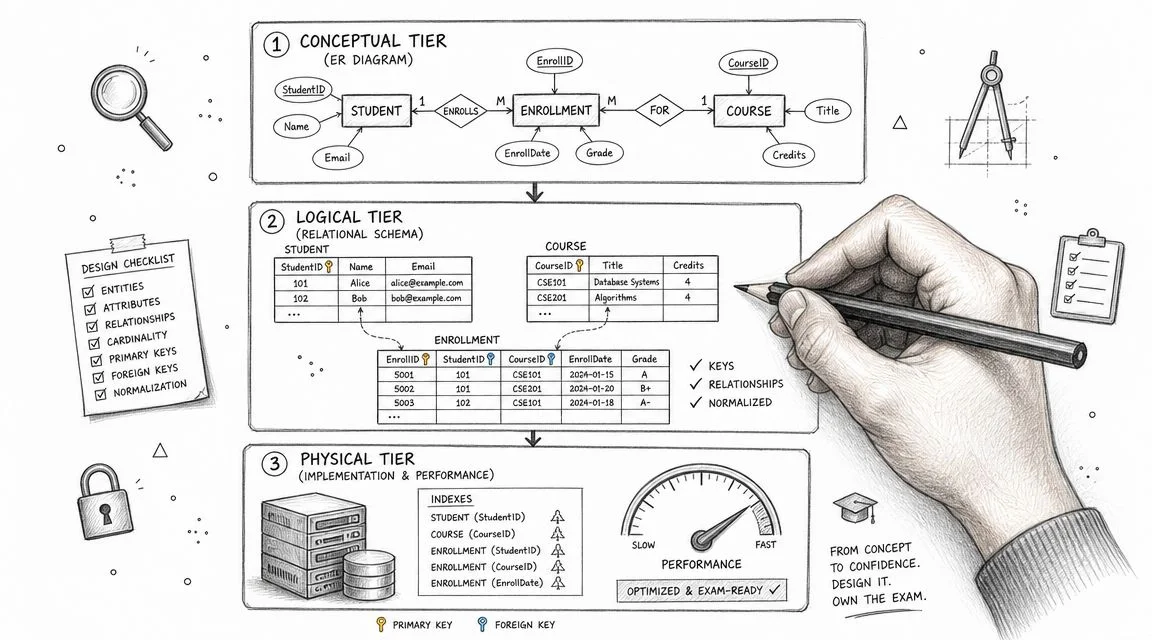
Database Design Fundamentals for Exam Success
Database Design Fundamentals for Exam Success
You're probably in one of two situations right now. You're either studying for a certification exam and hoping database design finally clicks, or you're building a real application and discovering that storing data is easy until the app starts behaving strangely.
At first, every database looks fine. A few tables, a few rows, a couple of queries that return what you expect. Then the cracks show. One customer's name appears differently in three places. A report runs slowly because one giant table does too much work. A simple feature request turns into a risky migration because nobody can explain the schema's structure.
That's why database design fundamentals matter. They aren't just trivia for an exam. They are the habits that keep an application reliable as the codebase grows, the team changes, and the workload gets more demanding.
Why Solid Database Design Is Your Application's Foundation
A weak schema doesn't usually fail all at once. It fails gradually.
A team might start with a spreadsheet mindset. They put customers, orders, payments, shipping details, and product data into a small number of tables because it feels faster. For a while, it works. Then one change triggers another. Updating a product description means touching historical order rows. Deleting a user accidentally removes information the business still needed. Queries get longer because the structure no longer matches the business.
That pain isn't random. It's the cost of skipping design.
Mainstream guidance for database design fundamentals outlines a four-stage process: requirements analysis, conceptual design, logical design, and physical design. Skipping these steps means schema errors become expensive to fix after deployment. Early design choices directly impact performance, consistency, and scalability for any system that stores persistent data and needs to support operations like SELECT, INSERT, UPDATE, and DELETE. GeeksforGeeks offers a good summary of these fundamentals.
What goes wrong when design is rushed
Here's the pattern I've seen again and again with junior developers building their first serious app:
- They model screens instead of data. A signup page becomes a
userstable, a checkout page becomes anorderstable, and anything that doesn't fit gets stuffed into text fields. - They duplicate data for convenience. Product names, prices, and customer addresses get copied into multiple places without clear rules.
- They postpone constraints. They assume the application layer will always validate everything correctly.
- They guess at performance later. They wait until slow queries appear, then start adding indexes without understanding access patterns.
Practical rule: If you can't explain why a table exists, what one row represents, and how it relates to other tables, the design isn't stable yet.
That's why professional teams treat schema design like architecture, not clerical work. If you're deciding on tools for a new product, a broader systems view can help too. A practical example is build your solo founder tech stack, which looks at how technical choices fit together before implementation starts.
The workflow that exams and real jobs both expect
Certification exams often test the same progression you'd use on an actual project.
You start by learning what the business needs. Then you model the important things the business cares about. After that, you translate those ideas into tables, columns, and keys. Only then do you think about storage details and performance tuning.
That order matters. If you start with SQL syntax, you'll build tables too early. If you jump straight to indexing, you may speed up a flawed design. Good database work is sequential. Each stage reduces ambiguity before the next one adds technical detail.
Consider building a house: You don't choose drawer handles before deciding how many rooms the house needs. In the same way, you don't create indexes before understanding the queries, and you don't define foreign keys before knowing the business relationships.
Capturing Requirements with Conceptual Modeling
Conceptual modeling is where database work becomes visible to non-developers. It's the stage where you stop thinking about SQL and start thinking about the business itself.
If you've ever felt unsure about the difference between a requirement and a table, this is usually the missing piece. A requirement answers, “What information does the business need to manage?” A table answers, “How will the database store that information?” Conceptual modeling sits in between.
Start with nouns, properties, and relationships
The easiest way to begin is to listen for business nouns.
In an online store, people say things like customer, product, order, payment, cart, review, and shipment. Those are strong candidates for entities. Then listen for the details attached to those nouns. A customer has a name and email. A product has a title and price. Those become attributes. Finally, notice the verbs. A customer places an order. An order contains products. A product receives reviews. Those become relationships.
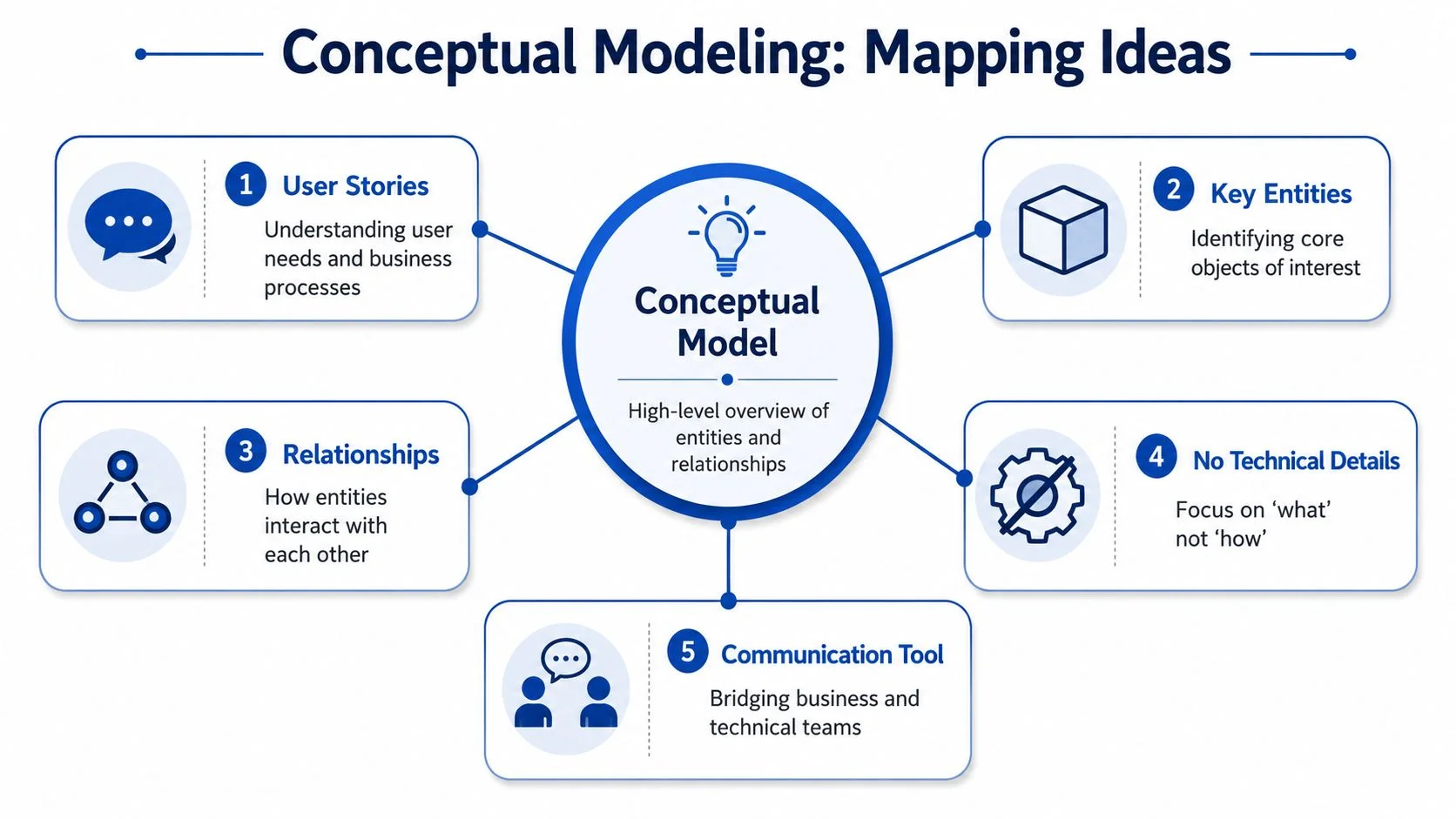
At this stage, don't worry about column types, indexes, or normalization. Stay high level. The model should help a product manager, analyst, and developer all point to the same diagram and agree that it reflects the business.
A simple online store example
Suppose the business says:
- Customers can place multiple orders.
- Each order can include multiple products.
- Products can belong to categories.
- Customers can write reviews for products.
A rough conceptual model might identify these entities:
- Customer
- Order
- Product
- Category
- Review
Then define the relationships in plain language:
- Customer places Order
- Order includes Product
- Product belongs to Category
- Customer writes Review for Product
That's enough to start useful conversations. You may discover business rules you would have missed in code. Can a guest place an order? Can a product belong to more than one category? Can a customer review the same product more than once?
Those questions are exactly why conceptual modeling matters.
A good conceptual model doesn't impress anyone with technical detail. It reduces misunderstandings before they harden into schema mistakes.
What beginners often mix up
New developers often confuse an entity with a screen or an API endpoint. Don't do that. A “checkout page” isn't usually an entity. It's a workflow. The data behind it might involve customer, order, payment, and shipping address.
A useful checkpoint is this:
| Item | Usually a conceptual entity | Usually not a conceptual entity |
|---|---|---|
| Customer | Yes | No |
| Product | Yes | No |
| Order | Yes | No |
| Checkout page | No | Yes |
| Search results screen | No | Yes |
If you want a broader view of how storage choices connect to modeling decisions, MindMesh Academy's data store insights are useful because they frame database decisions around workload and use case, not just syntax.
Keep the model readable
When you draft an ERD at the conceptual level, keep it spare.
- Name entities clearly. Use business language people already use.
- Avoid technical clutter. Don't add data types or index notes yet.
- Label relationships plainly. “Places,” “contains,” and “belongs to” are easier to discuss than abstract notation alone.
- Check with stakeholders. If the business owner says the model doesn't reflect how work happens, fix the model before you write SQL.
Conceptual modeling isn't busywork. It's where you catch hidden assumptions while they're still cheap to fix.
Building the Schema with Logical Design
Logical design is where the sketch becomes a blueprint a database can enforce. This is the point where abstract entities turn into structured tables.
If conceptual design answers “what exists,” logical design answers “how it is represented.” That shift matters on certification exams because many questions test whether you can translate business relationships into relational structures without losing meaning.
Turning entities into tables
Take the online store model and convert each entity into a table:
CustomerOrderProductCategoryReview
Now turn attributes into columns. A Customer table might have customer_id, first_name, last_name, and email. A Product table might have product_id, product_name, and price. You choose data types to fit the values being stored.
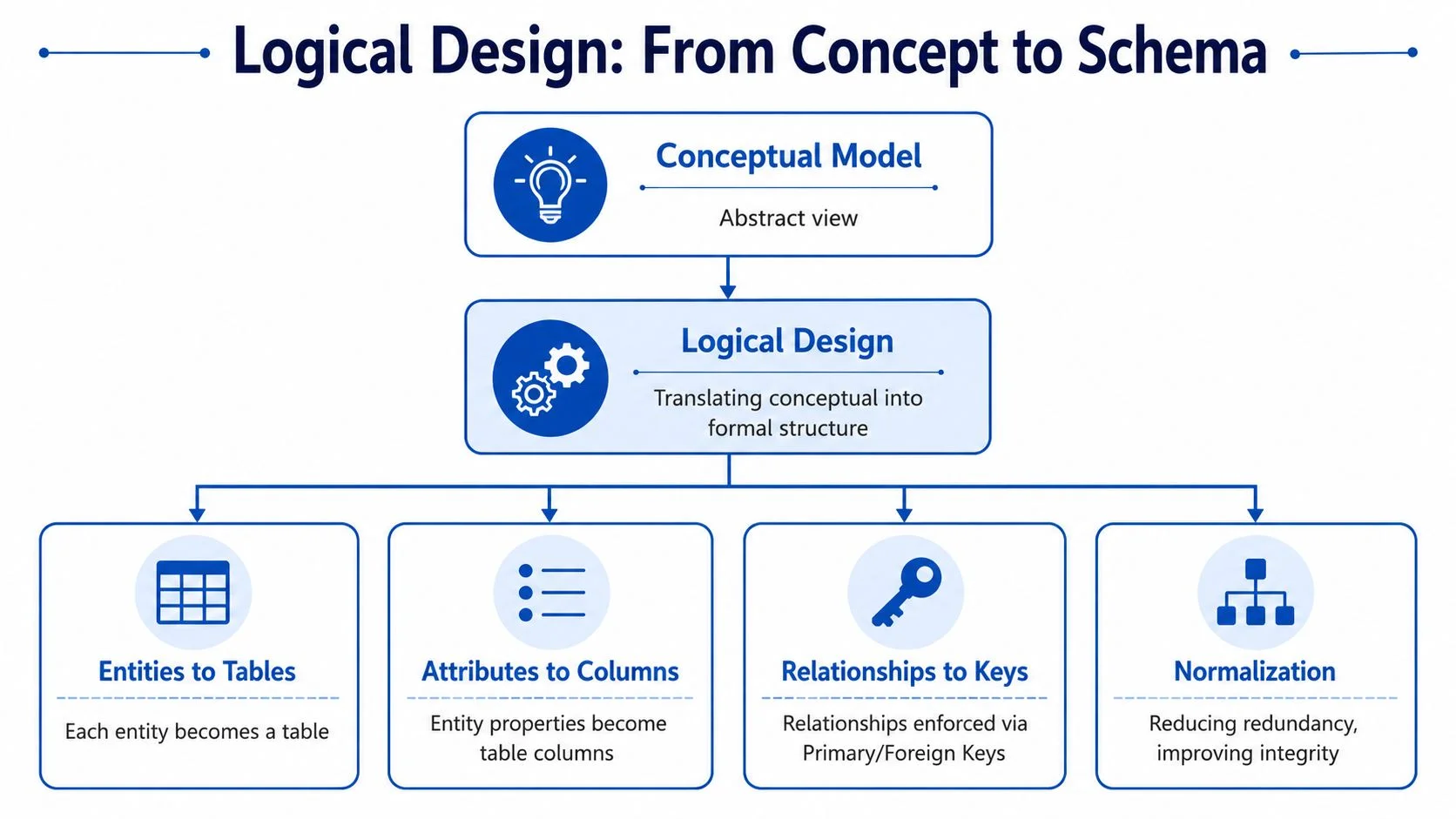
Don't overcomplicate the first draft. A junior developer often tries to solve every edge case immediately. A better approach is to define the core structure cleanly, then refine it.
Primary keys and foreign keys
Every table needs a way to identify each row uniquely. That's the job of a primary key.
For example:
customer_ididentifies one customerorder_ididentifies one orderproduct_ididentifies one product
Relationships from the conceptual model become foreign keys in the logical model. If one customer can place many orders, then the Order table should include customer_id as a foreign key pointing back to Customer.
That gives you a clean rule: every order belongs to one customer, and the database can enforce that relationship.
Here's a simple mapping:
| Conceptual idea | Logical design result |
|---|---|
| Customer places Order | Order.customer_id references Customer.customer_id |
| Product belongs to Category | Product.category_id references Category.category_id |
| Customer writes Review | Review.customer_id references Customer.customer_id |
| Review is for Product | Review.product_id references Product.product_id |
Handling many-to-many relationships
Many beginners stumble at this point.
An order can contain multiple products, and one product can appear in multiple orders. That's a many-to-many relationship. Relational databases don't model that directly in a single foreign key column. You solve it with a relationship table, often called a junction table.
So instead of forcing product columns into the Order table, create OrderItem with fields like:
order_idproduct_idquantity
That structure reflects the business more accurately. It also keeps the design flexible. An order can now contain one product or many products without changing the schema.
As noted in mainstream design guidance, many-to-many cases are handled with relationship tables, and subject-based tables with primary keys create a more stable schema. If you're studying cloud-specific variants of schema planning, MindMesh Academy's AWS data study gives useful context for how schema design changes across different storage systems.
A schema should express business rules
Good logical design is more than table creation. It expresses rules.
Exam mindset: When you see a business statement like “one customer can place many orders,” train yourself to ask which table gets the foreign key and why.
That habit pays off in both exams and production work.
A clean logical schema should let another developer infer important truths without reading application code. They should see that orders belong to customers, reviews tie customers to products, and order items connect orders to products. If they can't, the schema is hiding business logic instead of representing it.
Achieving Data Integrity Through Normalization
Normalization is where many learners start memorizing rules and stop understanding the purpose. That's backward.
The point of normalization isn't to win a vocabulary contest with terms like transitive dependency. The point is to stop your data from lying to you.
Database design saw a foundational milestone with Edgar F. Codd's 1970 relational model. This model became the basis for normalization rules like 1NF, 2NF, and 3NF. These rules help reduce data redundancy and prevent insertion, update, and deletion anomalies by splitting data into related tables. Modern explanations still define 1NF as atomic values, 2NF as removing partial dependencies, and 3NF as eliminating transitive dependencies, as Statology describes in its overview of database design fundamentals.
Start with a bad table on purpose
Suppose someone stores order data in one giant spreadsheet-like table:
| OrderID | CustomerName | CustomerEmail | Product1 | Product2 | ProductCategory | CategoryManager |
|---|---|---|---|---|---|---|
| 1001 | Ana Lee | ana@example.com | Keyboard | Mouse | Accessories | Sam |
| 1002 | Omar Khan | omar@example.com | Monitor | Displays | Priya |
This looks convenient at first. It is not.
Problems appear quickly:
- If Ana changes her email, you must update every row where she appears.
- If the business wants to add a third product to an order, the table structure breaks.
- If you delete the only order for a category, you may lose the only stored record of that category's manager.
- If you want to add a new product category before any order exists, there may be nowhere sensible to store it.
Those are classic anomalies. They're the practical reason normalization exists.
First Normal Form
1NF requires atomic values. Each field should hold one value, not a list or repeating group.
In the bad table, Product1 and Product2 are already warning signs. The table structure depends on how many products happen to be in an order. That means the schema is tracking layout convenience, not business reality.
A 1NF-friendly redesign separates repeating products into rows:
| OrderID | CustomerName | CustomerEmail | ProductName | ProductCategory | CategoryManager |
|---|---|---|---|---|---|
| 1001 | Ana Lee | ana@example.com | Keyboard | Accessories | Sam |
| 1001 | Ana Lee | ana@example.com | Mouse | Accessories | Sam |
| 1002 | Omar Khan | omar@example.com | Monitor | Displays | Priya |
Better, but still flawed.
Second Normal Form
2NF removes partial dependencies. This matters when a table's key is composite and some columns depend on only part of that key.
In the revised table, you might treat (OrderID, ProductName) as the combined key. But CustomerName and CustomerEmail depend only on OrderID, not on ProductName. They describe the order's customer, not the specific product row.
So split the data:
Orderstores order-level factsOrderItemstores product rows within each order
That removes duplication of customer details across every line item.
Third Normal Form
3NF removes transitive dependencies. In plain language, non-key columns shouldn't depend on other non-key columns.
If ProductCategory determines CategoryManager, then storing both in the same product-related table creates a problem. Category manager information belongs to the category, not to each product row.
So split again:
CustomerOrderOrderItemProductCategory
Now category manager data lives with the category, customer data lives with the customer, and order item data lives with the order item.
Summary of normalization forms
| Normal Form | Primary Requirement | Problem It Solves |
|---|---|---|
| 1NF | Atomic values, no repeating groups | Prevents multi-value fields and unstable table structure |
| 2NF | Remove partial dependencies | Prevents facts from being repeated when they depend on only part of a composite key |
| 3NF | Remove transitive dependencies | Prevents non-key facts from depending on other non-key facts |
Normalize to protect correctness first. If you ever denormalize later for performance, do it deliberately and document why.
What students often get wrong
A common mistake is treating normalization as a ritual. They decompose tables mechanically without checking whether the result still matches how the business works.
Another mistake is thinking normalization means “split everything forever.” It doesn't. It means each fact should live in the right place. If a customer email belongs to the customer, store it once in Customer. If category manager belongs to Category, keep it there.
When you practice for exams, don't just memorize definitions. Take a messy table and ask:
- Which values repeat?
- Which facts belong to the row's full key?
- Which columns are describing another column instead of the key?
If you can answer those three questions, normalization becomes far more intuitive.
Defining Rules with Keys and Constraints
A schema without constraints is polite fiction. It suggests how data should behave, but it doesn't enforce anything.
The database moves beyond being a passive container to act as a gatekeeper. Keys and constraints create the rules that keep bad data out even when application code has bugs, edge cases, or rushed patches.
Know the key types clearly
You already met primary and foreign keys earlier. Here's the fuller picture you should know for exams and real work.
- Primary key identifies each row uniquely in a table.
- Candidate key is any column, or combination of columns, that could uniquely identify a row.
- Composite key uses more than one column together as the unique identifier.
- Foreign key points to a primary key in another table to preserve relationships.
Take a User table. Both user_id and email might uniquely identify a row. That means both can be candidate keys, but you choose one as the primary key. In an OrderItem table, (order_id, product_id) might work as a composite key because the pair identifies one product entry within one order.
Constraints are the database's laws of physics
Constraints make promises enforceable.
If email must exist, use NOT NULL. If no two users should share the same email, use UNIQUE. If an order status should only contain approved values, use a CHECK constraint. If a new row should receive a standard value unless one is provided, use DEFAULT.
Here's the practical meaning of common constraints:
| Constraint | What it prevents |
|---|---|
| NOT NULL | Missing required values |
| UNIQUE | Duplicate values where uniqueness matters |
| CHECK | Invalid values outside a rule |
| DEFAULT | Empty fields when a sensible starting value exists |
A developer who relies only on front-end validation is trusting every future code path to behave perfectly. That's not realistic. APIs change. Background jobs get added. Imports bypass forms. Constraints catch problems at the storage layer, where they should be caught.
If a rule matters to the truth of the data, enforce it in the database, not just in the UI.
Practical examples that stick
Think about a Review table.
You probably want:
ratingto be requiredratingto stay within allowed valuescreated_atto get a default timestampcustomer_idandproduct_idto reference valid rows
That combination protects the record from several classes of errors. The review can't exist without a customer or product. The rating can't be empty. It also can't wander into nonsense values that the business never intended.
A User table is similar. If the business rule says every account must have an email and no two accounts can share one, then NOT NULL and UNIQUE are not optional conveniences. They are part of the system's integrity.
Where beginners slip
New developers often overestimate application validation and underestimate schema enforcement.
They'll say, “The form already checks that.” Fine. But what about an import script? A mobile client on an old version? A manual update from an admin tool? A migration written under pressure?
Constraints aren't there because developers are careless. They're there because systems have multiple entry points, and data lives longer than any one code path.
For exam prep, train yourself to translate business rules into enforcement mechanisms. If the rule is about identity, think keys. If it's about required presence, think NOT NULL. If it's about allowed values, think CHECK. If it's about relationship validity, think foreign key.
Improving Performance with Strategic Indexing
A well-designed schema can still feel slow if the database has to search too much data the hard way.
That's where indexing comes in. The simplest analogy is a book index. Without it, you flip page by page looking for a topic. With it, you jump close to the answer immediately. A database index serves the same purpose for lookups, joins, and filters.
Indexing strategy is a key part of physical design. Primary keys should be indexed, foreign keys should be indexed in child tables, and additional indexes should be driven by real query patterns. Indexes reduce the search space for lookups, but indexes on low-cardinality columns often offer little benefit while adding maintenance overhead, as explained in Redgate's discussion of database design principles.
What an index helps with
Suppose you have an Order table with many rows and users often search by customer_id. Without an index, the database may scan row after row to find matching orders. With an index on customer_id, it can narrow the search much faster.
Indexes often help when queries do things like:
- Filter rows with
WHERE - Join tables on key columns
- Sort data for common access patterns
That's why primary keys and foreign keys are common index candidates. They show up constantly in relationships and joins.
The trade-off students forget
Indexes speed up reads, but they add work to writes.
Every time you INSERT, UPDATE, or DELETE, the database may also need to update one or more indexes. That means indexing isn't free. If you add indexes casually, writes become heavier and storage usage grows.
Junior developers often make a classic mistake. They notice one slow query and start indexing everything that looks important. That can create a database that reads well in one place and writes poorly everywhere else.
Practical trade-off: An index is a performance tool, not a decoration. Add it because a real query needs it.
What to index and what to leave alone
A strong starting point looks like this:
- Index primary keys. They identify rows and are central to lookups.
- Index foreign keys in child tables. Joins depend on them.
- Index columns used often in filters or joins. Let workload drive the choice.
- Be skeptical of low-cardinality columns. If a column has very few distinct values, it may not narrow searches enough to help.
For example, a status column with only a few possible values may not be a great standalone index candidate. The database still has to touch a large share of rows.
If you're studying optimization in a broader SQL context, data transformation techniques can help connect indexing with query behavior and execution choices.
A short video can help make the idea more visual:
Think workload, not theory alone
The right indexing strategy depends on how the application behaves.
A reporting system may benefit from indexes very different from those of a write-heavy transaction system. That's why experienced DBAs don't ask only, “What columns exist?” They ask, “What queries run most often, and what pain are users feeling?”
For certification exams, remember the rule of thumb. Indexing belongs to physical design, and physical design should support actual workload patterns, not guesses.
Your Study Plan for Mastering Database Design
Database questions are not commonly failed because the concepts themselves are impossible. Instead, failures often occur because the topics blur together. Requirements, ERDs, keys, normalization, and indexing all feel related, but they aren't the same skill.
The fix is practice in sequence. Treat database design fundamentals like a project workflow, not a list of definitions. If you train in the same order professionals use on the job, exam questions become easier to decode because you recognize where in the process the question lives.
Use one scenario and run the full workflow
Pick a simple business case and reuse it for several practice sessions. A library system works well. So does a project tracker, clinic scheduler, or online store.
For each scenario, do the following:
- Write a few business rules. Example: a member can borrow multiple books, a book can have multiple authors, and a loan has a due date.
- Draw a conceptual ERD. Focus on entities, attributes, and relationships.
- Convert it to a logical schema. Create tables, choose keys, and resolve many-to-many relationships.
- Normalize the tables. Check whether every fact is stored in the right place.
- Add constraints. Enforce required values, uniqueness, and relationship integrity.
- Choose likely indexes. Base them on realistic queries, not instinct alone.
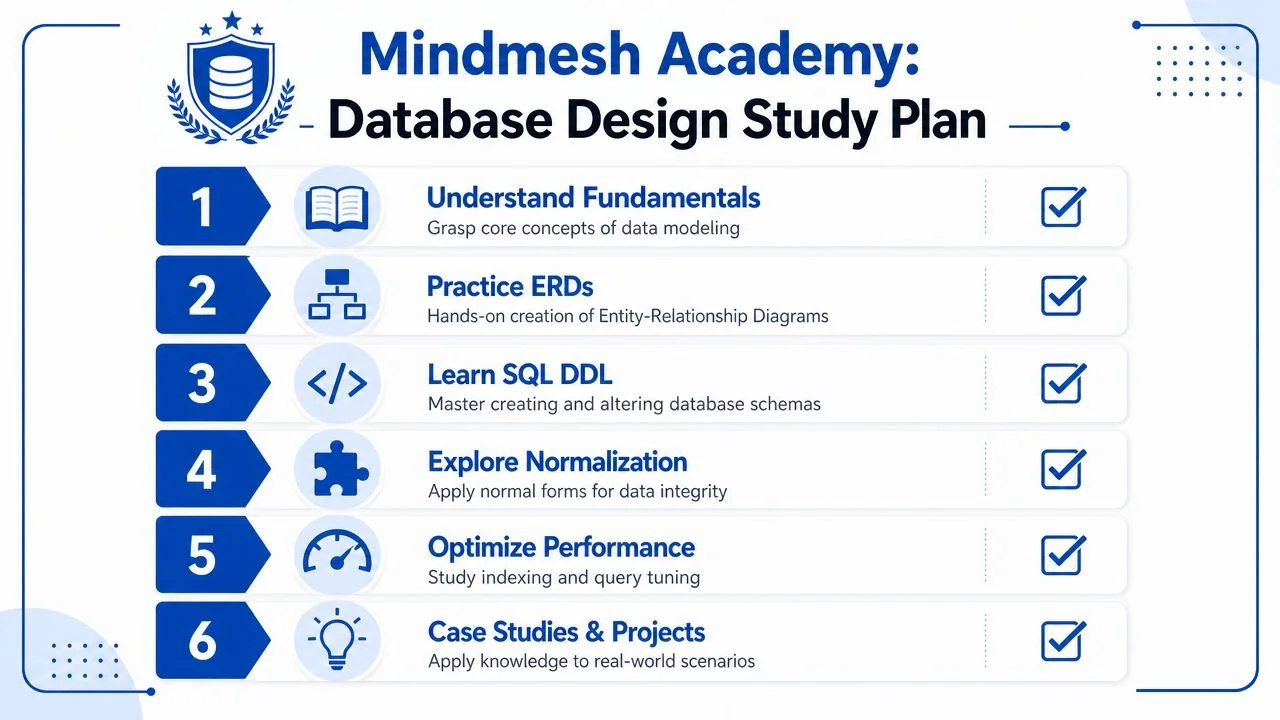
That repetition matters. By the third or fourth scenario, you'll stop seeing database design as disconnected terminology and start seeing it as a flow.
A practical weekly routine
You don't need exotic tools for this. You need consistency.
Try a rhythm like this:
- One day for concepts. Review entities, relationships, keys, and normal forms from your notes.
- One day for drawing. Build ERDs by hand or in a diagram tool.
- One day for SQL DDL. Write
CREATE TABLEstatements from your diagrams. - One day for review. Look for duplicated facts, missing constraints, and weak key choices.
- One day for performance thinking. Ask which queries would need support from indexes.
This style of repetition is where a structured learning platform can help. MindMesh Academy offers certification study materials with progress tracking and learning methods such as spaced repetition, which fits well when you're trying to retain design patterns instead of just cramming definitions. For more deliberate SQL practice, Codeling's hands-on SQL curriculum is also a useful complement because it gives you a place to apply relational ideas directly in code.
What to study after the core design topics
Once the design workflow feels natural, expand carefully.
Focus next on topics that usually sit close to schema design in certification exams:
- Transactions so you understand how grouped operations succeed or fail together
- ACID properties so you can reason about consistency and reliability
- SQL DDL and DML so schema design connects to actual statements
- Query execution basics so indexing decisions make practical sense
You don't need to master every advanced optimization topic immediately. But you do need a stable foundation. A student who can model the business clearly, build a clean schema, normalize it sensibly, and explain indexing trade-offs is already thinking like a competent junior database professional.
Study the design process the way a builder studies construction. Don't just memorize the names of the tools. Learn when each one is used and what problem it solves.
The exam strategy that works
When you see a certification question, identify its layer first.
Ask yourself:
- Is this about requirements?
- Is it about entities and relationships?
- Is it about tables and keys?
- Is it about normalization?
- Is it about constraints?
- Is it about physical performance choices?
That habit reduces panic because you stop treating every question like a mystery. You classify it, then solve it using the right mental model.
Mastery comes from doing the workflow repeatedly until the stages feel obvious. Once that happens, both exam questions and real database work start to look much more manageable.
If you want a structured place to practice certification concepts, review weak areas, and build confidence with methods designed for retention, consider starting with the MindMesh Academy AWS Data Engineer Associate practice exam.

Written by
Alvin Varughese
Founder, MindMesh Academy
Alvin Varughese is the founder of MindMesh Academy and an enterprise architecture leader. An electrical engineer by training, he moved from factory automation in South Africa to cloud architecture at GE Appliances and Humana (Fortune 50), and holds 20 professional certifications including AWS Solutions Architect Professional, Azure DevOps Engineer Expert, and Microsoft Agentic AI Business Solutions Architect. He built MindMesh Academy after interviewing too many highly certified candidates who couldn't answer basic questions: the goal is prep that makes you better at the job, not just able to pass the exam.