A Guide to the Change Management IT Process
A formal change management IT process isn't just a set of rules; it's a structured roadmap for navigating any technology transition, whether you're upgrading a server or rolling out new software across the company. Think of it as a critical business function designed to minimize disruption, slash risk, and make sure that IT changes actually deliver on their promises—without causing total operational chaos.
Why Your Business Needs a Change Management IT Process
Imagine trying to swap out a car's engine while it's barreling down the highway. That’s exactly what it feels like to implement a major IT update without a plan. It's chaotic, risky, and almost certainly doomed.
A structured change management process isn't about adding bureaucratic overhead. It's the guardrail that keeps your business stable and secure when technology shifts beneath your feet.
Without a formal process, every single update becomes a gamble. Unmanaged changes can set off a chain reaction of failures, from system outages that grind productivity to a halt to security breaches that expose your most sensitive data. Teams get frustrated, resources are wasted putting out preventable fires, and the whole point of the change gets lost in the confusion.
The High Cost of Unmanaged Change
The hard truth is that navigating IT transitions is incredibly difficult. A staggering 70% of change initiatives fail, not because the ideas were bad, but because the execution was flawed. This statistic highlights a massive gap where well-intentioned projects fall apart without proper guidance and support. You can explore more insights on these change management statistics and see for yourself why a structured approach is so vital.
This failure rate isn't just a number on a slide; it translates to real-world costs. Every failed initiative piles on more problems:
- Lost Productivity: When systems are down or employees are fighting with new software, work simply stops.
- Increased Security Risks: Rushed changes create vulnerabilities that cybercriminals are more than happy to exploit.
- Damaged Morale: Constant, chaotic changes lead to employee burnout and a deep-seated resistance to any future initiatives.
A well-defined change management IT process transforms reactive firefighting into proactive strategy. It gives you the visibility, accountability, and control needed to ensure technology serves the business, not disrupts it.
Managed vs Unmanaged IT Change Outcomes
The difference between a structured approach and an "anything goes" one is night and day. A formal process brings predictability and control, while an unmanaged free-for-all invites instability and risk. The table below really drives this point home.
| Area of Impact | With Formal Change Management | Without Formal Change Management |
|---|---|---|
| Service Stability | Minimal downtime and predictable service levels are maintained. | Frequent, unexpected service outages and disruptions occur. |
| Risk Exposure | Risks are identified, assessed, and mitigated before implementation. | Security vulnerabilities and operational risks are often overlooked. |
| Resource Allocation | Resources are used efficiently for planned, approved activities. | Significant time is wasted on fixing avoidable errors. |
| Business Alignment | Changes are directly linked to business goals and priorities. | Changes are often disconnected from strategic objectives. |
As you can see, one path leads to control and reliability, while the other leads to firefighting and frustration. The choice of which path to take is pretty clear.
Navigating the 5 Core Stages of IT Change Management
A solid IT change doesn't just happen on its own. It follows a structured path from a rough idea to a fully integrated solution, much like building a house. You wouldn't just show up and start laying bricks, would you? Of course not. You start with an idea, draw up a blueprint, get the right permits, build with care, and finally, inspect the finished work.
That’s what a good change management IT process provides: a clear journey. It ensures every change, from a quick software patch to a massive infrastructure overhaul, is handled with precision. The goal is always to minimize risk and squeeze out the maximum business value.
Let’s walk through the five core stages that make this happen.
Stage 1: Change Submission
Every change starts with a spark—a need, an idea, a problem begging for a solution. This first step, often called Change Submission or a Request for Change (RFC), is where things get official. It’s the moment someone in the organization spots a chance for improvement and actually writes it down.
Imagine the sales team is struggling with a clunky, slow Customer Relationship Management (CRM) tool. It just can't keep up. A sales manager would draft a formal RFC, laying out the problem and proposing a move to a modern platform. This isn't just a hallway complaint; it's a documented request that kicks the whole process into gear.
This simple flow shows how a request moves from submission and analysis toward that all-important approval gate.
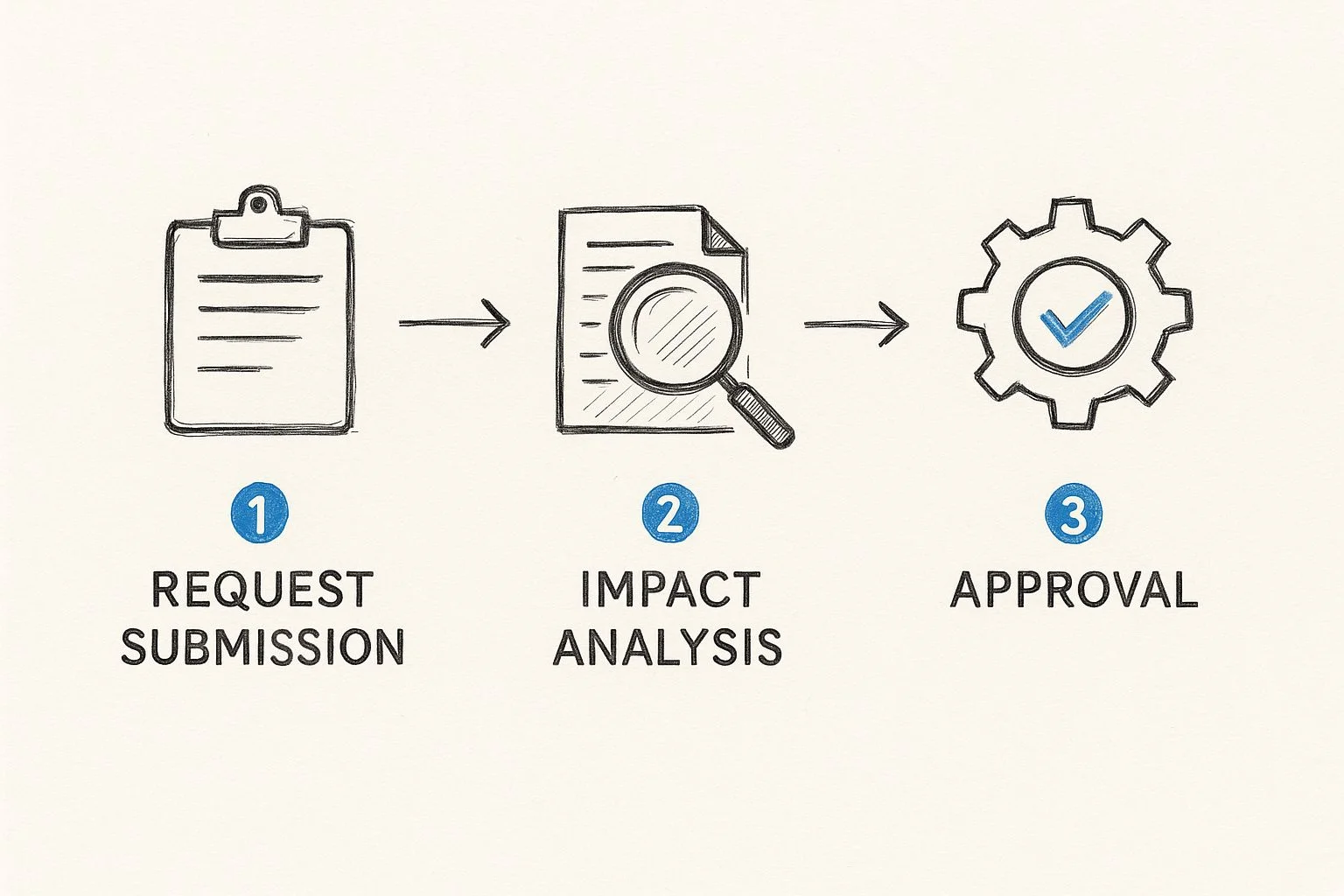
As you can see, each stage acts as a checkpoint for the next. This structure prevents people from jumping the gun and ensures every change is properly vetted before it gets the green light.
Stage 2: Strategic Assessment
Once the RFC is in, it’s time for Strategic Assessment. This is the blueprinting phase. Here, we dig in and examine the idea from every angle to understand its real-world implications. We’re looking at potential impact, risks, benefits, and the resources it'll take to pull it off.
Key activities during this stage usually include:
- Impact Analysis: Who and what will this touch? We’re talking systems, departments, workflows, and the people using them.
- Risk Assessment: What’s the worst that could happen? This is where we identify potential security holes, operational hiccups, or budget blowouts.
- Resource Planning: What do we need to make this happen? This covers the people, the money, and the tech required.
Going back to our CRM example, the assessment would map out which departments depend on the old system, calculate the risk of data loss during the migration, and nail down a realistic budget and timeline.
Stage 3: Planning and Approval
With a solid assessment in hand, the change is ready for the Planning and Approval stage. This is where a detailed implementation plan is hammered out and presented to the Change Advisory Board (CAB) or a similar group for an official thumbs-up.
This plan is the playbook. It outlines everything needed for a smooth rollout.
It should have a detailed timeline, a communication strategy for keeping everyone in the loop, a rollback plan if things go sideways, and clear success metrics to know if we actually won. It's the last strategic gut-check before a single line of code is written.
Getting the CAB's approval is a critical checkpoint. They scrutinize the assessment and the plan to make sure the change actually supports business goals and that the risks are worth taking. In modern DevOps shops, this is often automated for routine changes. You can see how this works with change management processes for IaC platforms that speed up these approvals.
Stage 4: Building and Testing
Once approval is secured, we get to the fun part: Building and Testing. This is where the implementation team rolls up their sleeves and gets to work. They build, configure, and code the change according to the approved plan. For our CRM project, this means setting up the new platform, customizing it, and migrating the data over.
But building is only half the battle. Testing is just as crucial. The change is put through its paces in a controlled, non-production environment to hunt down bugs, performance lags, and usability issues. This step ensures that when the change goes live, it actually works without causing chaos.
Stage 5: Post-Implementation Review
The final stage is the Post-Implementation Review (PIR). Just because the change is live doesn't mean we're done. The PIR is a look back to figure out if the change was truly a success and to capture lessons for next time.
The team gathers to answer a few key questions:
- Did the change do what we wanted it to do?
- Did we stick to the budget and timeline?
- What part of the process went really well?
- What tripped us up, and how do we avoid it in the future?
This review closes the loop on the current change and feeds valuable insights back into the entire change management IT process. It turns every project—whether it was a home run or a messy single—into a learning opportunity.
Understanding Key Roles and Responsibilities
A great change management IT process isn’t just about flowcharts. It's powered by people who know exactly what they’re supposed to do.
Think of it like a film crew. You have a director, a producer, and actors, and the movie only works if everyone nails their specific role. The same is true for managing IT changes. When roles get fuzzy, accountability vanishes. Deadlines slip, tasks get dropped, and the whole process grinds to a halt.
By clearly defining who does what, you turn potential chaos into a smooth, predictable workflow. This is more critical than ever, especially when you consider that only about 34% of major change initiatives actually achieve their goals. The data on change management success rates makes it clear: defined roles are a massive advantage.
Let's break down the key players.
The Change Requester: The Visionary
Every change starts with a person who sees a problem or an opportunity. This is the Change Requester. They aren’t just filling out a form; they're the one who sparks the entire process.
Their main job is to articulate the "why" behind the change. That means clearly documenting the issue, the proposed fix, and the expected business benefits in a formal Request for Change (RFC). A great requester is usually a subject matter expert in their own world—sales, finance, operations—who can translate their needs into a compelling case for IT.
The Change Manager: The Orchestra Conductor
If the Change Requester writes the music, the Change Manager is the orchestra conductor. This person doesn't play an instrument but makes sure everyone plays their part in harmony and on time. They are the central hub for all communication and coordination.
The Change Manager is responsible for:
- Guiding the RFC through every single stage, from submission to final review.
- Keeping the lines of communication open between the requester, the technical teams, and business stakeholders.
- Making sure every process step is followed, documentation is complete, and all risks are properly assessed.
This role demands a unique mix of organizational skill, clear communication, and a deep understanding of the change management IT process. They are the guardians of the procedure, ensuring nothing falls through the cracks.
The Change Advisory Board: The Strategic Gatekeepers
The Change Advisory Board (CAB) acts as the strategic gatekeeper. This is a cross-functional group—often including leaders from IT, security, finance, and key business units—that reviews and either approves or rejects high-impact changes.
The CAB’s job isn’t to be a roadblock; it’s to provide a 360-degree view of a proposed change. They evaluate its strategic alignment, assess its risk to the wider organization, and ensure that resources are being allocated to the most valuable initiatives.
Their approval is a critical checkpoint. It confirms a change isn’t just technically sound but is also good for the business as a whole. They are the collective wisdom that stops a well-intentioned change in one department from causing a disaster in another.
The Implementation Team: The Skilled Builders
Finally, we have the Implementation Team. These are the hands-on technical experts—the developers, system administrators, and engineers—who actually build, test, and deploy the change. Once the CAB gives the green light, this team turns the approved plan into reality.
Their responsibilities are all about execution. They follow the technical specs, perform rigorous testing in a safe environment, and carry out the deployment during the scheduled window. Crucially, they are also responsible for hitting the "undo" button and executing the rollback plan if anything goes wrong. Their skill and attention to detail are what ultimately determine if the change succeeds.
To bring it all together, here’s a quick summary of how these roles fit into the process.
Table: Key Roles in the IT Change Management Process
| Role | Primary Responsibility | Key Interaction |
|---|---|---|
| Change Requester | Submits the initial Request for Change (RFC) with a clear business case. | Works with the Change Manager to refine the RFC and provide necessary details. |
| Change Manager | Manages the change lifecycle, ensures process compliance, and facilitates communication. | Coordinates with the Requester, Implementation Team, and CAB. |
| Change Advisory Board (CAB) | Assesses, prioritizes, and authorizes high-impact changes based on risk and business value. | Reviews RFCs presented by the Change Manager and provides approval or rejection. |
| Implementation Team | Builds, tests, deploys, and (if necessary) rolls back the change. | Receives the approved change plan from the Change Manager and executes it. |
With these roles clearly defined, everyone understands their part, leading to a much more effective and predictable change process.
Applying Frameworks Like ITIL for Better Results
You don’t have to invent your change management IT process from scratch. Why reinvent the wheel when proven industry frameworks can give you a rock-solid foundation? The most respected of these is ITIL (Information Technology Infrastructure Library).
Think of ITIL less like a rigid rulebook and more like a toolkit packed with best practices. It offers a structured, globally recognized approach that brings consistency and predictability to IT operations. By adopting its principles, you’re aligning your process with a methodology designed to balance speed with stability.
This isn’t about adding bureaucracy. It’s about creating a common language and a standardized approach so everyone understands the game plan, ensuring every change gets the right level of care.
The Role of Change Enablement in ITIL 4
The latest version, ITIL 4, makes a crucial shift in language: it talks about "Change Enablement," not "change control." This is more than just semantics—it's a fundamental change in philosophy. "Control" sounds like a gatekeeper slowing things down. "Enablement" is about safely guiding change through the system.
The core purpose of the Change Enablement practice is to maximize the number of successful service and product changes by ensuring that risks have been properly assessed, authorizing changes to proceed, and managing the change schedule.
This modern perspective gets it right. The goal isn't to prevent change; it's to facilitate it efficiently and without causing chaos. It’s a pragmatic mindset that supports agility without sacrificing governance. To go deeper, check out our guide on ITIL 4 Change Enablement for a detailed look.
Understanding the Three Types of IT Changes
ITIL brings order to the chaos by sorting changes into categories based on their risk and impact. This simple act of classification is incredibly powerful. It allows you to fast-track low-risk requests while giving high-stakes changes the intense scrutiny they deserve.
There are three main types of changes:
- Standard Changes
- Normal Changes
- Emergency Changes
Let's break down what makes each one different.
Standard Changes: Low Risk and Pre-Approved
Standard Changes are your bread and butter. These are the routine, low-risk, well-understood tasks that happen all the time. Since the process is documented and the outcome is predictable, they are pre-authorized. No need to call a meeting with the Change Advisory Board (CAB) every time one comes up.
Think of tasks like:
- Resetting a user’s password. It’s a defined process with almost zero risk.
- Installing approved software on a new laptop. You follow a standard checklist you’ve used a hundred times.
- Replacing a broken mouse. A simple hardware swap with no effect on the wider system.
Pre-approving these changes cuts out the red tape, freeing up your team to handle common requests without delay.
Normal Changes: Requiring Formal Review
Normal Changes are the ones that need a closer look. These are non-emergency modifications that carry a moderate to high level of risk, so they must go through the full review process with the CAB. Nothing gets skipped—from submission and risk assessment to planning and final approval.
Examples include:
- Upgrading a critical production server. This requires downtime scheduling, careful planning, and a bulletproof rollback plan.
- Migrating the company’s email to a new cloud provider. This impacts everyone and has major technical and user-facing implications.
- Deploying a new feature for a customer-facing app. This could introduce bugs or frustrate users, so it needs rigorous testing.
The formal review for Normal Changes ensures all potential impacts are considered before anyone touches a thing. It’s about being deliberate, not reckless.
Emergency Changes: Urgent and Unplanned
Finally, we have Emergency Changes. These are the "all hands on deck" situations that must be implemented right now to fix a critical outage or patch a major security hole. They are always a response to an unexpected incident.
Given the urgency, the standard approval process is thrown out the window. Approval is typically granted by an Emergency Change Advisory Board (ECAB)—a smaller, more agile group that can make a decision in minutes, not days.
Classic examples are:
- Patching a zero-day vulnerability that’s being actively exploited.
- Restoring a critical database from a backup after a server dies.
- Pushing an urgent fix for a system outage that's costing the business money every minute.
While absolutely necessary, these changes are risky by nature. A post-implementation review is always required to confirm the fix worked and to document what happened for next time.
Proven Best Practices for a Smooth Implementation
Knowing the theory behind a change management IT process is one thing. Executing it under pressure is something else entirely. Moving from a clean plan on a whiteboard to a real-world implementation is where most initiatives get messy.
Success isn’t just about following the stages—it’s about adopting battle-tested habits that sidestep common disasters and build real momentum. These aren’t just suggestions; they’re the hard-won lessons from teams that have navigated complex IT changes and lived to tell the tale.
Prioritize Crystal Clear Communication
Good communication is the single most critical factor in change management. Period. When people are left in the dark, they assume the worst. That’s when you get resistance, confusion, and good old-fashioned fear.
A proactive communication plan ensures everyone understands the what, why, when, and how of the change. Imagine your team is planning a weekend server migration that will cause a temporary outage. Without clear communication, your customer support folks are walking into a firestorm of angry calls on Monday morning.
But if you communicate the plan, the timeline, and the expected impact ahead of time, the support team is armed and ready. They can handle inquiries with confidence, turning a potential crisis into a managed event.
Develop a Comprehensive Rollback Plan
Hope for the best, but always, always plan for the worst. A rollback plan is your safety net—a detailed, step-by-step procedure to rewind everything back to its previous state if the change goes sideways. This isn't pessimism; it's professional preparedness.
Your rollback plan should be tested as rigorously as the change itself. It needs to define clear triggers for when to pull the plug and outline the exact technical steps and communication protocols to get things back to normal.
A solid rollback plan turns a potential disaster into a manageable incident. It gives the implementation team the confidence to act decisively, knowing they have a clear path to restore stability if something goes wrong.
Failing to have one is like flying a plane without a parachute. You might not need it, but you'll be in a world of hurt if you do.
Implement Phased Rollouts to Contain Risk
The "big bang" approach—deploying a change to everyone at once—is just asking for trouble. A much smarter strategy is a phased rollout, where the change is introduced to small, controlled groups over time. Think of it as an early warning system.
This lets you identify and fix issues with a limited audience before they can impact the entire organization. There are a few ways to slice it:
- Pilot Group: Start with a small, tech-savvy team that can give you solid, detailed feedback.
- By Department: Roll it out to one department at a time. Maybe start with Finance before moving on to Marketing.
- By Geography: Implement the change in a single office or region before going global.
This approach minimizes the blast radius of any surprise problems. They become easier to contain, manage, and fix without causing a company-wide meltdown.
Invest Heavily in User Training and Support
A technically flawless change can still crash and burn if users don't know how to use the new system or feel like they’ve been abandoned. Training isn't an afterthought—it's essential for getting people on board and making sure the change actually sticks.
Good training is tailored. The sales team rolling out a new CRM needs to learn about lead management, while the support team needs to master the new ticketing features. It has to connect to their daily work.
And it doesn't end there. After launch, you need easily accessible support channels—a dedicated helpdesk, clear FAQs, maybe some short video tutorials. This ongoing support builds user confidence and helps new habits take root long after the official training is over.
How AI Is Shaping the Future of IT Change
The old change management IT process—built on manual checklists and gut-feel decisions—is on its way out. The next evolution is already here, and it’s being driven by Artificial Intelligence (AI).
AI is flipping the script on change management, shifting it from a reactive practice to a proactive—and even predictive—one.
Think of AI as an intelligent co-pilot for your Change Manager. Instead of relying solely on past experience, managers now have tools that can sift through years of historical change data. This gives them the power to forecast the risk of a new change before it’s even submitted.
From Reactive to Predictive
AI's real power is its ability to spot patterns humans would never see. By analyzing thousands of past changes, it can learn what factors consistently lead to success and which ones almost always end in failure. This is a complete game-changer for risk assessment.
Imagine this: an AI tool flags a proposed server patch because it shares subtle characteristics with a change that caused a three-hour outage six months ago. That kind of data-driven insight lets teams rethink their plan and sidestep a major incident.
As detailed in these change management trends for 2025, integrating AI isn't just a minor tweak; it’s fundamentally changing how organizations navigate transitions, boosting adoption and minimizing disruption.
Automation and Sharper Decision Making
Beyond just flagging risks, AI is also here to clean up the workflow. It automates the tedious, administrative tasks that bog down skilled professionals, freeing them up to focus on actual strategy.
Here’s where AI is already making a difference:
- Automated Scheduling: Instead of guessing, AI analyzes company-wide calendars and system usage data to pinpoint the perfect, least disruptive time to roll out a change.
- Sentiment Analysis: AI can scan communications in tools like Slack or Teams to gauge how employees really feel about an upcoming change, giving leaders a real-time pulse on buy-in.
- Intelligent Notifications: It can automatically draft and send tailored messages to every group affected by a change, ensuring the right people get the right information without manual effort.
AI isn’t replacing the Change Manager. It’s augmenting them. It delivers the deep, data-backed insights needed to pilot complex changes with more confidence and a much higher chance of success.
Getting a handle on these trends is crucial for keeping your change management IT process from becoming obsolete. For anyone curious about the tech that makes this possible, diving into concepts like MLOps pipelines and automation offers a fascinating look at how these intelligent systems are built and managed.
Frequently Asked Questions
Even with a solid plan, you're bound to run into questions when the rubber meets the road. Here are a few common ones I hear all the time, with straightforward answers to help you put these ideas into practice.
What’s the Difference Between Change Management and Change Control?
It helps to think of it like planning a big road trip.
Change management is the entire effort. It’s about convincing everyone the destination is worth the drive, planning the route, and making sure all the passengers are ready for the journey. It's about the people.
Change control, on the other hand, is like following the traffic laws. It’s the specific, technical process of stopping at red lights and using your turn signals to make sure you get there safely. It’s how you review, approve, and deploy updates without causing a pile-up.
How Can a Small Business Implement This Process?
A small business can and should adopt a "right-sized" version of this. The goal is to embrace the principles, not drown in bureaucracy that was built for a massive enterprise.
You don't need a formal Change Advisory Board (CAB) when a single manager or team lead can handle approvals. Just focus on the core actions:
- Document every request, even if it’s just in a simple spreadsheet or a lightweight helpdesk tool.
- Assess the risk. A quick checklist is often all you need.
- Talk to people. Let everyone know what’s happening and why.
- Always, always have a rollback plan, no matter how tiny the change seems.
The point isn't to replicate a corporate workflow. It’s to add just enough structure to make your changes predictable and safe.
What Is the Single Most Critical Factor for Success?
The single most critical factor for success in any change management IT process is effective communication. A technically perfect deployment can still fail miserably if people don't understand why a change is happening, feel unprepared, or resist the new way of working.
Technical execution is table stakes. But time and again, I’ve seen that communication is what makes or breaks a change.
When you communicate clearly, consistently, and with a bit of empathy, you build trust. It’s the glue that holds the human side of the change together, ensuring it’s just as solid as the technical one.
Ready to master the concepts behind IT certifications like ITIL and AWS? MindMesh Academy provides expert-led study guides and evidence-based learning tools to help you pass your exams and accelerate your career. Explore our courses today.

Written by
Alvin Varughese
Founder, MindMesh Academy
Alvin Varughese is the founder of MindMesh Academy and an enterprise architecture leader. An electrical engineer by training, he moved from factory automation in South Africa to cloud architecture at GE Appliances and Humana (Fortune 50), and holds 20 professional certifications including AWS Solutions Architect Professional, Azure DevOps Engineer Expert, and Microsoft Agentic AI Business Solutions Architect. He built MindMesh Academy after interviewing too many highly certified candidates who couldn't answer basic questions: the goal is prep that makes you better at the job, not just able to pass the exam.