Unlocking Secure AWS Access with a Bastion Host Strategy
Unlocking Secure AWS Access with a Bastion Host Strategy
Cloud security requires precise control over how users reach private infrastructure. A bastion host in AWS serves as a gatekeeper, providing one hardened entry point for administrators to access resources inside a Virtual Private Cloud (VPC). You avoid exposing sensitive servers directly to the internet by routing administrative traffic through this specific server, also known as a jump box.
This component remains the only instance in your network with a public presence. Once connected to this intermediary, IT staff reach internal assets like databases, application servers, or private EC2 instances that lack public IP addresses. Restricting entry to a single, monitored point shrinks the attack surface. This design choice strengthens your overall security posture and simplifies the auditing process for remote access requests. By centralizing management, you ensure that every administrative session follows established protocols before touching your most critical cloud-based workloads.
The Core Function of a Bastion Host
Think of your AWS private network as a high-security facility housing your most sensitive digital assets—core application servers, private databases, and internal services. You would not leave the front doors open to the public. Instead, you would design a single, strong, and monitored entry point with strict protocols for access. This analogy describes the role of a bastion host within your cloud architecture.
Its main function addresses a practical problem for cloud architects and operations teams: how to obtain controlled, auditable administrative access to resources that are intentionally isolated from the internet. These resources live in private subnets, meaning they have no public IP addresses and cannot be reached directly from the outside. The bastion host sits in a public subnet and acts as the secure proxy that administrators must connect to first.
A bastion host acts as the chokepoint for all administrative traffic entering your private network. It transforms a broad surface of potential targets into a single, defensible, and manageable gateway. This deliberate concentration of access is the foundation of its security effectiveness, enabling a stronger defense against unauthorized intrusion.
To understand this better, look at the specific characteristics of the bastion host concept.
AWS Bastion Host at a Glance
| Concept | Description | Educational Insight |
|---|---|---|
| Core Purpose | To provide a single, secure, and monitored point of entry for administrators to access private resources within an AWS VPC. | Necessary for enforcing the principle of least privilege at the network perimeter. |
| Key Benefits | Reduces the network attack surface, centralizes access control and logging, and allows for enhanced security on a single machine. | Vital for meeting compliance standards and simplifying security audits. |
| Typical Use Cases | Securely connecting via SSH or RDP to EC2 instances, databases (RDS), or other services located in private subnets. | A primary pattern for operational management in many AWS certification scenarios. |
This table shows the focused role of a bastion host. It is a specialized tool used to solve a very specific security and operational challenge in modern cloud environments.
Why Is This So Important for IT Professionals?
Without a bastion host, you face a difficult choice. You could expose your private instances directly to the internet—which is a major security risk—or you could lose the ability to manage them remotely. Understanding the inherent cloud computing security risks helps explain why a bastion is a necessary part of a strong cloud security strategy. It allows you to enforce the principle of least privilege at the network level, a concept that appears often in AWS certification exams like the Solutions Architect Associate (SAA-C03) and Security Specialty (SCS-C03).
Using this secure access model provides several immediate advantages:
- Reduced Attack Surface: By exposing only one, tightly controlled server to the internet, you minimize the number of potential entry points for an attacker. This is a primary goal in any security design.
- Centralized Monitoring and Auditing: All administrative traffic flows through one point. This makes it easier to implement logging, real-time monitoring, and auditing of every administrative session. This provides data if an incident occurs.
- Simplified Access Management: Instead of managing SSH keys, security group rules, and user access across many individual servers, you only need to manage these controls for this one entry point.
- Enhanced Security Controls: You can add extra security layers to this single host, such as Multi-Factor Authentication (MFA), host-based firewalls, and intrusion detection systems (IDS), without making your entire infrastructure more complex.
The widespread use of these gateways shows their value. The global bastion host market is projected to reach $2.5 billion by 2025 (verify latest projections via industry reports), which shows how common this security pattern has become as cyber threats increase. For any IT professional preparing for an AWS certification, mastering the bastion host and its modern alternatives is required. It is a fundamental part of AWS security best practices and a common topic in exam scenarios. You can read more about this growth in reports on bastion host market trends.
Reflection Prompt: Consider your current or a past project. How might exposing critical internal resources directly to the internet have impacted its security and compliance? What specific benefits would a bastion host strategy offer in that scenario?
Designing Your Secure Bastion Host Architecture
Building a secure bastion host in AWS requires more than spinning up a standard EC2 instance. It requires a deliberate strategy to construct a protected network environment. Your primary goal is to create a single, monitored entry point that isolates your internal resources from the public internet. The success of this approach depends on how you design and configure your Virtual Private Cloud (VPC).
The standard bastion architecture uses a simple but effective logic. You place one hardened EC2 instance, the bastion, in a public subnet. This subnet connects to an Internet Gateway (IGW), allowing the bastion to receive traffic from the outside world. At the same time, you place your databases, internal application servers, and backend services in private subnets. These private subnets have no direct route to the Internet Gateway, which prevents them from being reached by anyone on the public web.
This separation creates a clear security boundary. If an administrator needs to manage a server in a private subnet, they must first connect to the bastion host. Once authenticated and connected to the bastion, they can then initiate a second connection to the internal server. This "jump" ensures that internal resources remain hidden and protected. This model is a central part of cloud security and appears frequently in the curriculum for the AWS Certified Solutions Architect Associate and Advanced Networking Specialty exams.
This concept map illustrates the flow of traffic. It shows a controlled path starting from the administrator’s machine, passing through the bastion host, and ending at the protected internal resources.
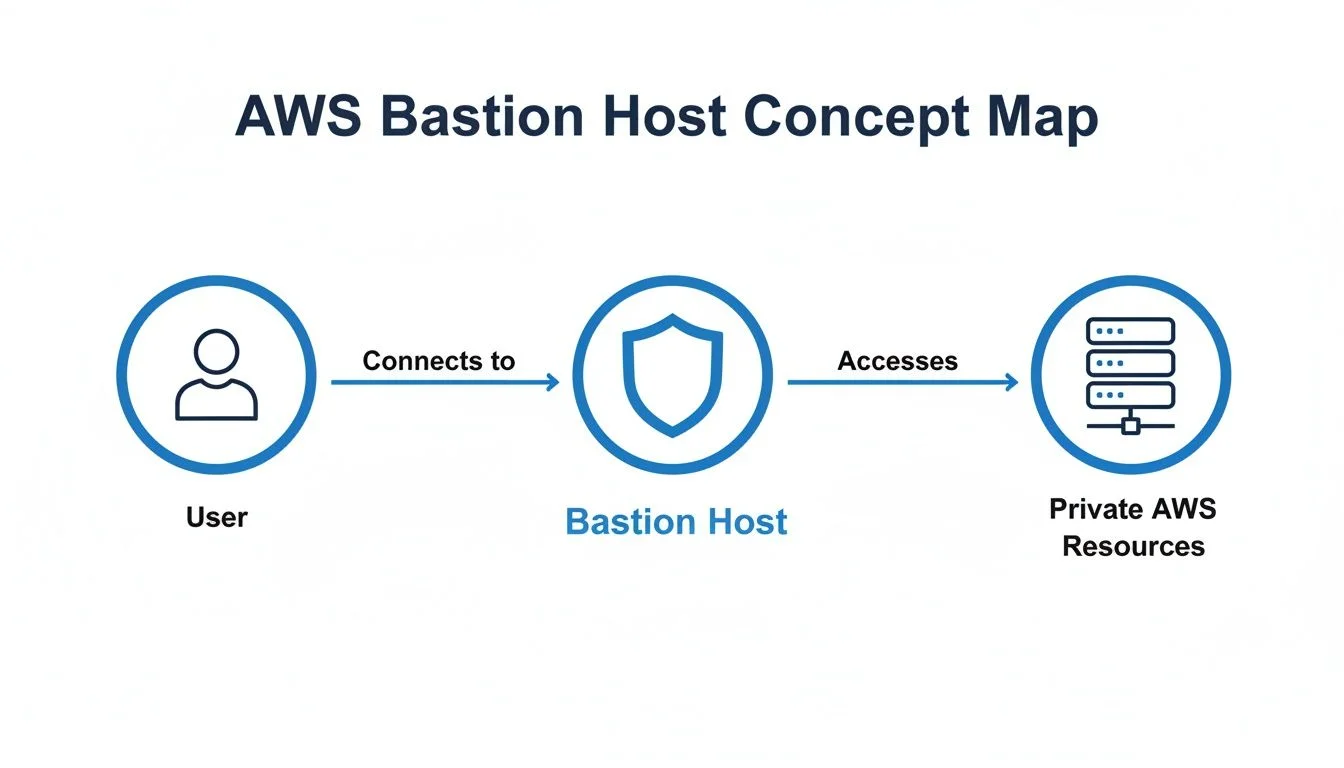 Caption: A visual representation of administrative access flowing through a bastion host to private AWS resources, illustrating the critical security choke point.
The diagram highlights the bastion as a mandatory checkpoint. It blocks any direct contact between the public internet and your private cloud infrastructure. This physical and logical separation is the core of the bastion host model. By controlling the routing, you ensure that your private instances remain invisible to the public internet.
The Key Architectural Components
To implement this architecture, you must coordinate several AWS networking features. Understanding how these components work together is necessary for building and maintaining a secure environment.
- Virtual Private Cloud (VPC): This is your private, isolated network space in AWS. It serves as the digital perimeter for your cloud resources. You define the IP address range for the VPC using CIDR blocks, which provides the foundation for all your subnets and networking rules.
- Public Subnet: This is a segment of your VPC that includes a route to an Internet Gateway. For a bastion host to be reachable from your local machine over the internet, it must live in a public subnet and have a public IP address or an Elastic IP assigned to it.
- Private Subnet: This is where you house your sensitive data and core applications. These subnets are not assigned a route to the Internet Gateway. Because they lack this route, they cannot be reached directly from the internet, which significantly reduces the attack surface of your architecture.
- Internet Gateway (IGW): This is a redundant, highly available VPC component that allows communication between your VPC and the internet. It performs network address translation (NAT) for your instances that have public IP addresses, enabling two-way traffic flow for the public subnet.
- Route Tables: These function as the traffic directors for your network. Each subnet in your VPC must be associated with a route table. The public subnet uses a route table with a default route (0.0.0.0/0) pointing to the Internet Gateway. In contrast, the private subnet’s route table does not have this entry, ensuring those resources remain isolated.
Controlling Traffic with Security Groups
Subnets and route tables define the general network paths, but Security Groups act as the specific firewalls that guard your instances. These are stateful firewalls, meaning that if an inbound request is allowed, the outbound response is automatically permitted. They operate at the elastic network interface (ENI) level rather than the subnet level. You should use Security Groups to enforce the principle of least privilege, ensuring only the minimum required traffic can pass through.
A frequent error in cloud security is the use of broad, permissive rules. The effectiveness of your bastion host depends on how strictly you configure these rules. Even a single open port that is not needed can provide an opening for an attacker to exploit your network.
A secure bastion setup typically uses two different Security Groups to manage access:
- Bastion Security Group: You attach this group to the bastion EC2 instance. The inbound rules should be restricted to allow only SSH traffic on TCP port 22 (for Linux) or RDP traffic on TCP port 3389 (for Windows). Furthermore, you should restrict the source of this traffic to specific, trusted IP addresses, such as your office network or a specific administrative VPN. You should never leave these ports open to the entire internet (0.0.0.0/0).
- Private Resource Security Group: You attach this group to your internal servers, such as databases or web servers. The most important inbound rule here allows SSH or RDP traffic, but only if the source is the Bastion Security Group itself. By using the Security Group ID of the bastion as the source, rather than a specific IP address, you ensure that only traffic coming from your bastion can reach your private instances.
This two-tier configuration creates a one-way path for administrative tasks. It forces all traffic through the hardened bastion host. Even if a user knows the private IP address of a server in your private subnet, they cannot connect to it because the Private Resource Security Group will reject any traffic that does not originate from the bastion.
Mastering these networking details is helpful for professional certification and day-to-day security operations. You can find more specific technical details in our guide for the AWS Certified Advanced Networking Specialty.
Hardening Your Bastion Host for Maximum Security
Your bastion host in AWS is a high-value target. Because it acts as the primary entry point to your private network, it will be scanned and attacked by automated scripts constantly. Simply launching a standard EC2 instance and assuming it is safe is a mistake. You must harden the system to transform it from a potential vulnerability into a resilient gateway.
Hardening starts before the instance is even launched. You must choose an appropriate Amazon Machine Image (AMI). Avoid general-purpose AMIs that include desktop environments, compilers, or unnecessary background services. Every extra package or open port is a potential way for an attacker to gain access. Instead, select a minimal AMI. Amazon Linux 2 or Amazon Linux 2023 are good options because they are maintained by AWS and designed for high performance. You can also find hardened images from third-party vendors on the AWS Marketplace. These images often follow industry security benchmarks, such as those from the Center for Internet Security (CIS), and have a much smaller attack surface by default.
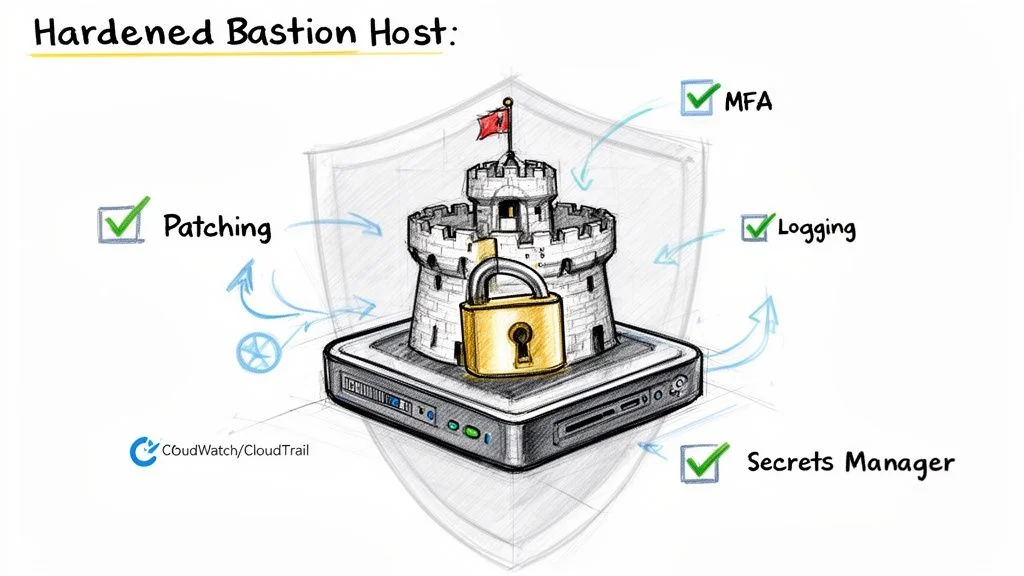 Caption: Essential security layers for a hardened bastion host, including regular patching, Multi-Factor Authentication (MFA), detailed logging, and secure secrets management.
Consider a physical analogy. You would not protect a bank vault with a door made of plywood. You would use reinforced steel and multiple complex locks. Using a minimal, hardened AMI is like starting with that steel door. It provides a strong, resilient foundation that is difficult to compromise from the moment it is online.
Implementing Essential Hardening Techniques
After choosing the right image, you must focus on locking down access. Relying on simple passwords or a single SSH key is not enough to stop modern attackers. Criminal groups use automated tools to find misconfigured instances. You need multi-layered authentication to protect your environment.
Integrating Multi-Factor Authentication (MFA) is a key step. MFA requires a second form of identity verification. Even if an attacker steals a user's SSH private key, they cannot log in without the second factor. This is usually a one-time code generated by an app on a mobile device. This simple addition blocks the majority of automated credential-based attacks.
You must also apply these security configurations to the bastion's operating system:
- Disable Password and Root Login: You should modify the SSH daemon configuration file located at
/etc/ssh/sshd_config. Change thePasswordAuthenticationsetting to "no" andPermitRootLoginto "no". This ensures that attackers cannot attempt to guess passwords. It also prevents anyone from logging in directly as the root user. All administrators should use their own individual accounts and authenticate using SSH key pairs, preferably using modern algorithms like ED25519. This creates better accountability for every action taken on the system. - Install Intrusion Prevention Tools: Tools like
fail2banprovide an automated defense against brute-force attempts. This software monitors system logs, such as/var/log/secure, looking for repeated login failures from the same source. When it detects a pattern that looks like an attack, it automatically updates the system's firewall rules to block that specific IP address for a set period. This prevents automated scripts from trying thousands of different keys or passwords against your bastion. - Automate Security Patching: New security flaws are discovered every day. You cannot wait for manual updates to keep your bastion safe. You should use tools like
yum-cronon Amazon Linux orunattended-upgradeson Ubuntu to handle updates automatically. Configure these tools to download and install security-related patches as soon as they are released by the OS vendor. Automated patching ensures your bastion is protected against the latest known threats without requiring a human to log in and run commands manually.
Establishing a Detailed Audit Trail
If a security event occurs, your ability to respond effectively depends on your logs. You need to know exactly who logged in, when they logged in, and every command they executed. Allowing users to connect to a bastion without tracking their actions is dangerous. It makes it nearly impossible to figure out what happened during a breach or how to prevent it from happening again.
Logging is a fundamental security requirement. Without a record of every session and every command, you are essentially blind to the activity inside your network. If your network is compromised, detailed logs are the only way to see how the attacker gained entry and what data they accessed. This visibility is often the deciding factor between a minor incident and a total data breach.
To create a reliable record, you should link your bastion host to AWS native monitoring services. This keeps the logs in a separate, secure location where an attacker cannot easily delete or modify them.
A detailed logging strategy should include these three layers:
- AWS CloudTrail: This service tracks every API call made in your AWS account. It records when the bastion instance was launched, who changed its security group settings, and who attached network interfaces. While CloudTrail does not see what happens inside the Linux operating system, it is vital for tracking changes to the infrastructure surrounding the bastion host.
- Amazon CloudWatch Logs: You should install the CloudWatch Agent on the bastion instance. Configure it to stream important system files to the AWS CloudWatch service. You should track
/var/log/secureor/var/log/auth.logto monitor login activity. You can also stream the shell history of every user. Centralizing these logs makes it easier to search through them and set up automated alerts for suspicious events, such as a high volume of failed logins. - Command-Level Auditing: For high-security environments, you may need to record every single keystroke. You can use the Linux Audit Framework (
auditd) to track specific system calls, file changes, and executed programs. Another option is using a session manager that records the entire terminal session. This provides an absolute record of every action taken on the machine, which is often necessary for regulatory compliance and internal security reviews.
By using these techniques, you create a clear and verifiable record of everything that happens on your bastion. This information is vital for security audits and is a core requirement for the AWS Certified Security - Specialty (SCS-C03) exam. When you properly harden your bastion, you turn the most exposed part of your network into one of its strongest defenses.
Step-by-Step Deployment: Your First Secure AWS Bastion Host
Theory provides the framework, but implementing a practical solution is what confirms your knowledge. Moving from high-level diagrams to a functional setup is the best way to understand how cloud security works in practice. This walkthrough covers the configuration of a secure EC2 bastion host in AWS. Following these steps will help you build the technical skills required to manage access to private cloud environments. Each phase focuses on a specific security layer to ensure that your internal resources remain protected while staying reachable for authorized administrative tasks.
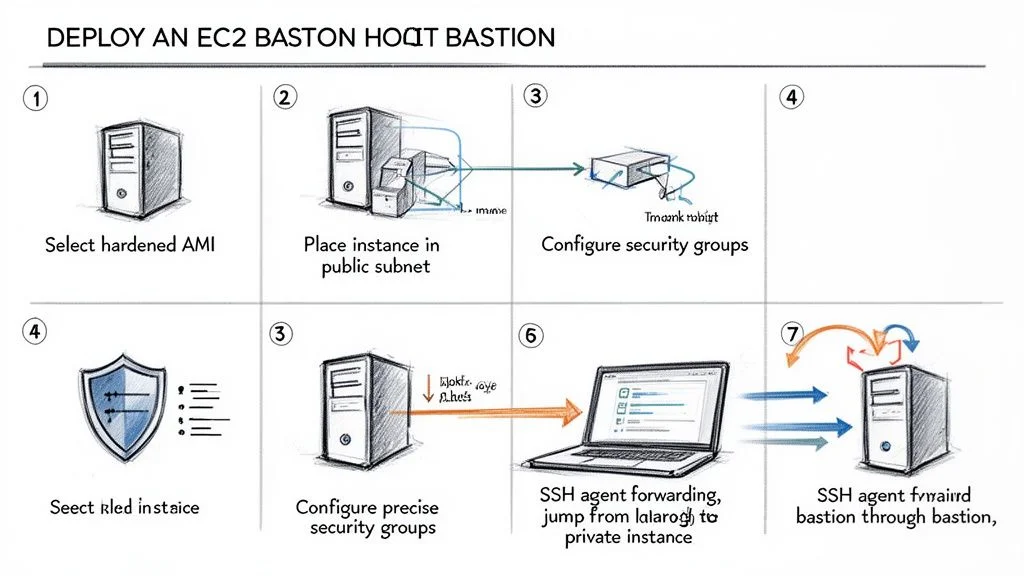 Caption: A streamlined, seven-step deployment process for establishing a secure EC2 bastion host in AWS.
Step 1: Select a Hardened Amazon Machine Image (AMI)
The choice of an Amazon Machine Image (AMI) is the first decision in the deployment process and it directly affects your security profile. Avoid using a general-purpose image that comes loaded with unnecessary software. Instead, use a hardened, minimal image to reduce the attack surface. Amazon Linux 2023 is a strong candidate because it is designed to be lightweight and includes modern security features like SELinux (Security-Enhanced Linux) set to permissive or enforcing mode by default.
By choosing a lean image, you minimize the number of installed packages that require patching. Fewer packages mean fewer vulnerabilities for attackers to exploit. You can also find specialized AMIs in the AWS Marketplace that are pre-hardened to meet specific compliance standards like CIS Benchmarks or STIG requirements. Starting with a minimal footprint is a proactive way to secure the host from the beginning. These minimal distributions also boot faster and use fewer resources, which provides a performance benefit during administrative tasks.
Step 2: Configure the Instance and Network Placement
A bastion host must be placed correctly within your Virtual Private Cloud (VPC) to function as a gateway. It needs to reside in a public subnet. For a subnet to be defined as "public" in AWS, its routing table must have an entry that points traffic destined for the internet to an Internet Gateway (IGW). To ensure you can always find your bastion, assign an Elastic IP address. This static public IP address remains consistent even if you stop and restart the instance. Without a static IP, the public IP would change upon every reboot, forcing you to update your local SSH configuration and firewall rules frequently.
For the instance type, the bastion does not need high-performance hardware. Its only job is to manage terminal sessions and proxy traffic. A t3.micro or a t4g.micro instance is usually sufficient for most teams (check current regional instance availability). The t4g.micro uses AWS Graviton processors, which provide better price-to-performance for utility tasks like this. Using these small instance types keeps your monthly AWS bill low while providing a dedicated path for administrative traffic. Most administrative tasks involve text-based protocols like SSH, which consume very little CPU and memory.
Step 3: Create Precise Security Groups
Security Groups act as your primary firewall at the instance level. You will configure two specific groups to enforce the principle of least privilege. This dual-group configuration ensures that access is tightly controlled and that your internal resources are never exposed directly to the internet.
- Bastion Security Group: This group attaches to the bastion host. Create an inbound rule that allows SSH traffic on port 22 (for Linux) or RDP traffic on port 3389 (for Windows). You must restrict the source of this traffic to a specific IP address. This might be your home office IP or the exit IP of your company’s VPN. By whitelisting a single IP or a small CIDR range, you block the rest of the internet from even attempting to connect to the host.
- Private Resource Security Group: This group attaches to your internal servers, such as your databases or web servers located in private subnets. Create an inbound rule for SSH or RDP, but set the source as the Security Group ID of your Bastion Security Group. This creates a logical link between the groups. The internal servers will only accept traffic that originates from instances associated with the bastion's group.
Avoid a common security error: do not set the inbound rule source to 0.0.0.0/0. This configuration allows every person and bot on the internet to attempt a connection. Publicly accessible administrative ports are targets for constant automated brute-force attacks. Keeping your source IPs restricted is a fundamental requirement for passing the AWS Certified Solutions Architect Associate exam and for running safe production environments.
Step 4: Securely Manage and Use SSH Keys
Security in the cloud relies on strong identity management. For bastion hosts, use SSH key pairs instead of traditional passwords. Passwords are vulnerable to many types of attacks, whereas keys offer much higher protection. You keep your private key on your local machine and place the public key on the bastion host in the ~/.ssh/authorized_keys file.
One major risk is the temptation to copy your private key onto the bastion host so you can use it to connect to the next server. This practice is dangerous. If an attacker gains access to the bastion, any keys stored on its disk are also compromised. The secure way to handle this is through SSH Agent Forwarding. This feature allows the bastion to use the keys on your local computer to authenticate you to the private servers. Your private key never leaves your local machine, which keeps it safe from exposure on the intermediary server. Ensure your local key has the correct permissions, typically set with chmod 400, to prevent other users on your machine from reading it.
Step 5: Establish the Secure Connection
Connecting through a bastion requires a two-step process that utilizes the agent forwarding mentioned above. Once your local SSH agent is running and your key is added using ssh-add, you can start the session.
- First Hop (Local Machine to Bastion): Connect to the bastion using the
-Aflag. For example:ssh -A ec2-user@your-bastion-elastic-ip. The-Aflag enables the forwarding of your authentication credentials for the next leg of the connection. - Second Hop (Bastion to Private Instance): Once you are logged into the bastion's command-line interface, you can connect directly to a private instance using its internal IP address:
ssh ec2-user@10.0.1.50.
The bastion host passes the authentication request back to your local agent, which signs the request and sends it back through the bastion. This allows you to reach your private servers in a single terminal flow while maintaining a high level of security. Cloud professionals must master these techniques. AWS now powers more than 30% of the world's cloud-based infrastructure (verify current market share reports), making these patterns a standard for IT operations. These methods support a zero-trust approach by ensuring that every connection point is authenticated and that no resource is exposed to the public web unnecessarily. Following this deployment process builds a functional, secure access point that protects both your data and your infrastructure.
Comparing Bastion Hosts with Modern AWS Alternatives
*Caption: A video discussing alternatives to traditional bastion hosts for secure access in AWS.*Traditional bastion hosts have functioned as a standard security pattern for many years. This approach is well-understood, but it introduces operational tasks that can slow down a cloud engineering team. AWS provides managed services that meet these same requirements while reducing the maintenance burden and shrinking the attack surface. If your team still depends solely on jump boxes, now is the time to evaluate alternatives like AWS Systems Manager (SSM) Session Manager and AWS Client VPN. These tools approach access differently, and understanding those differences is vital for building a secure network.
Managing a fleet of EC2 instances requires a clear strategy for remote access. While the bastion host method involves placing a hardened server in a public subnet, newer services abstract the underlying infrastructure. This shift allows administrators to focus on identity and permissions rather than patching and securing a gateway server. Each service has specific use cases, and the choice between them depends on whether you need individual instance access or broad network connectivity.
AWS Systems Manager (SSM) Session Manager
For administrative access to specific instances, SSM Session Manager is an effective choice. It removes the need for public-facing EC2 instances. You do not have to open inbound SSH (port 22) or RDP (port 3389) in your security groups. Session Manager provides a secure shell through the AWS Management Console or the AWS CLI. Because it uses an agent-based model, the instance initiates a connection to the Systems Manager service. This means no inbound traffic is required at the network level, which limits exposure to port scanning and brute-force attacks.
The security benefits provided by Session Manager are significant:
- No Open Inbound Ports: You can close port 22 and port 3389 in your security groups entirely. The SSM Agent communicates with the Systems Manager service over port 443 (HTTPS), which is typically allowed for outbound traffic.
- No SSH Keys Required: Access relies on IAM policies rather than static SSH keys. This eliminates the burden of rotating keys or worrying about stolen credentials. You can grant access to specific users for specific instances using IAM tags and conditions.
- No Dedicated Bastion Instance: You no longer need to provision or pay for a separate server that only acts as a jump box. This removes the cost of the instance and the time required to keep its operating system patched and hardened.
This model changes how engineers interact with private resources. Because access is governed by IAM, you gain fine-grained control over who can access which instances. Every command executed during a session can be logged directly to CloudWatch or S3. These logs provide a clear audit trail for compliance. This is a significant improvement over traditional SSH, where logging often requires complex third-party tools or manual configuration on the bastion itself.
AWS Client VPN
AWS Client VPN handles secure access from a network perspective rather than an instance perspective. It is a managed VPN service that allows users to create an encrypted tunnel from their workstations into an AWS VPC. This service is useful when teams need access to various internal resources like databases, private web applications, or file shares. Instead of connecting to a single server to run commands, users join the cloud network as if they were in the office.
When you use Client VPN, you define a client IP address pool that does not overlap with your VPC range. You then associate the VPN endpoint with specific subnets. This allows the VPN service to place network interfaces in those subnets to route traffic from the remote user into your private environment. You can also configure split-tunneling. This ensures that only traffic destined for the VPC goes through the VPN, while general internet traffic uses the user's local connection. This preserves bandwidth and reduces latency for the end user.
Authorization in Client VPN is handled through network-level rules. You can define which user groups have access to specific CIDR ranges within your network. It integrates with identity providers through Active Directory or SAML 2.0. This makes it a strong choice for organizations that already use a central identity store. If a developer needs to use a local database IDE to connect to an RDS instance in a private subnet, Client VPN provides that network path without needing to tunnel through a bastion host.
A Head-to-Head Comparison
Choosing the right tool depends on your security goals, budget, and the technical needs of your users. Traditional bastions are familiar, but they require constant attention. SSM Session Manager offers the highest level of security for shell access, while Client VPN provides the most flexibility for diverse network traffic.
The following table breaks down how these three options compare across several important categories. Each solution has a different impact on your operational workflow and your monthly AWS bill.
Bastion Host vs. SSM Session Manager vs. Client VPN
| Feature | EC2 Bastion Host | SSM Session Manager | AWS Client VPN |
|---|---|---|---|
| Security Posture | Relies on a hardened instance and open inbound ports (22/3389). High management burden for security. | Strong. No open inbound ports or SSH keys required. Access controlled via IAM policies. | Strong. Uses an encrypted tunnel to the VPC. Access controlled by security groups and IAM. |
| Operational Overhead | High. Requires patching, hardening, monitoring, and key management for the bastion instance. | Low. Fully managed service. No servers to provision or maintain, reducing operational burden. | Medium. Requires configuration of VPN endpoint, client profiles, and certificate management. |
| Auditing | Good. Can be configured to log commands and sessions to CloudWatch, but requires manual setup. | Excellent. Natively logs all session activity, including commands, to CloudWatch Logs or S3 for easy auditing. | Limited. Logs connection events, but not granular in-VPC activity. Relies on VPC Flow Logs for network traffic. |
| Cost | Cost of running the EC2 instance (e.g., t3.micro) plus associated data transfer and Elastic IP. | Free for core EC2 instance management, making it extremely cost-effective for most use cases. | Priced per endpoint hour and per connection hour (verify current pricing on the vendor site). |
Using these modern alternatives helps organizations satisfy compliance requirements for SOC 2 and HIPAA. It creates a central, auditable record of every action taken on an instance or every connection made to the network. This level of visibility is difficult to achieve with traditional SSH logging on a self-managed jump box. By removing the need for a public gateway, you can focus your security efforts on identity management and data encryption.
In production environments, moving away from public-facing bastions can reduce the external attack surface by 50-70%. This is a vital defense when considering that the average cost of a data breach is projected to reach $4.45 million by 2026 (verify current figures on the source site). Protecting your private subnets with managed services reduces the likelihood of an accidental misconfiguration leading to a compromise. To learn more about how these services fit into a broader cloud strategy, explore these insights on the latest trends in AWS services and their financial impact.
Common Questions About AWS Bastion Hosts
Even after understanding the basic architecture and deployment, certain questions usually surface when you start implementing bastion hosts. These queries touch on uptime, traffic flow, and budget. Addressing them helps clarify how these instances function in a production environment and prepares you for both certification exams and practical system administration.
Can a Bastion Host Be Made Highly Available?
Yes. For any production environment where uptime is a priority, making your bastion host highly available is necessary. A single bastion instance is a classic single point of failure. If that one instance goes offline due to a hardware issue or a software crash, you lose your secure administrative path to every resource in your private subnets.
The standard solution involves pairing an Auto Scaling Group (ASG) with a Network Load Balancer (NLB). This setup ensures your gateway architecture is resilient across multiple Availability Zones. Because SSH and RDP traffic use the TCP protocol, a Network Load Balancer is the correct tool for the job. It operates at Layer 4 of the OSI model, providing the high speed and low latency required for interactive terminal sessions.
Here is how this setup functions to protect your access:
- Auto Scaling Group: The ASG is configured to maintain a specific number of healthy bastion instances. Usually, you would set this to one instance per Availability Zone. The ASG monitors the health of these instances constantly. If an instance stops responding to health checks or the underlying hardware fails, the ASG terminates the faulty unit and launches a new one automatically. It uses a Launch Template to ensure the new instance has the correct Amazon Machine Image (AMI), security groups, and SSH keys.
- Network Load Balancer: The NLB provides a stable entry point for your administrators. It offers a static IP address or a fixed DNS name that does not change, even if the underlying bastion instances are replaced by the ASG. When an administrator initiates a connection, the NLB evaluates the health of the available bastions and routes the traffic to a functional instance. This distribution happens in the background, so the user experience remains consistent.
This method offers two major benefits:
- Continuous Access: You eliminate the single point of failure. You will always have a reliable way to reach your private resources, even if an entire Availability Zone experiences an outage or an individual instance fails.
- Scalability: Most bastion setups do not require massive scaling because administrative traffic is usually light. However, if you have a very large team of engineers all connecting simultaneously, the ASG can add more instances to handle the increased load. For most companies, maintaining one instance per Availability Zone is the standard for high availability.
Is a Bastion Host the Same as a NAT Gateway?
This is a frequent point of confusion for those new to VPC design. While both a bastion host and a NAT Gateway sit in a public subnet and talk to private subnets, they serve different purposes. Their primary distinction lies in the direction the traffic travels.
A bastion host acts as a secure front door for humans. Its purpose is to let administrators initiate connections into your private network. You use it for interactive tasks, such as running commands on a database server or managing a web server via RDP. It is built for inbound, administrative access.
A NAT (Network Address Translation) Gateway is a managed service that lets your private instances initiate connections to the internet. This is essential for instances that need to download security patches, update their operating systems, or reach external APIs. The NAT Gateway allows this outbound traffic while blocking any connection attempts initiated from the internet. This preserves the isolation of your private servers.
To keep them straight, remember that the bastion host is for people coming in, while the NAT Gateway is for servers going out. A bastion is an EC2 instance you manage and patch yourself. A NAT Gateway is a managed service where AWS handles the underlying infrastructure and scaling for you.
What Are the Main Costs of a Bastion Host?
Running a bastion host on an EC2 instance is usually inexpensive. However, you should track three specific areas to manage your budget effectively.
- EC2 Instance Cost: This is the primary expense. Because a bastion host is just a "jump box" and does not run heavy applications, you can use very small instance types. Options like
t3.microort4g.microare sufficient. These instances are often included in the AWS Free Tier, which provides 750 hours of usage per month for the first 12 months of a new account. This often makes the compute cost zero for smaller operations. - Elastic IP Address: An Elastic IP (EIP) is a static public IPv4 address. AWS does not charge for an EIP if it is attached to a running instance. However, they do apply a small hourly charge for any EIP that is allocated to your account but not currently in use. This policy ensures that public IPv4 addresses, which are a limited resource, are not wasted.
- Data Transfer: AWS charges for data moving across the internet. You will pay for data flowing from the internet into your bastion and for data sent from the bastion back to your local machine. Traffic between the bastion and other instances in the same Availability Zone is typically free. If your bastion communicates with instances in a different Availability Zone, you will see small regional data transfer charges.
For most teams, the total monthly cost for a single t3.micro bastion is just a few dollars (verify current pricing on the vendor site). This is a low price for the security it provides. Using a bastion host is a smart way to protect your infrastructure without blowing your budget.
Ready to master AWS and accelerate your career? MindMesh Academy offers expert-led study guides and evidence-based learning tools to help you pass your certification exams with confidence and gain the practical skills you need to succeed in the cloud. Start your process with MindMesh Academy today!

Written by
Alvin Varughese
Founder, MindMesh Academy
Alvin Varughese is the founder of MindMesh Academy and holds 20 professional certifications including Microsoft Agentic AI Business Solutions Architect, AWS Solutions Architect Professional, and Azure DevOps Engineer Expert. He's held senior engineering and architecture roles at Humana (Fortune 50) and GE Appliances. He built MindMesh Academy to share the study methods and first-principles approach that helped him pass each exam.