3.1.1. Summarize various security measures and their purposes. (Obj. 2.1)
💡 First Principle: A comprehensive security strategy protects assets through layers of both physical controls (what you can touch) and logical controls (what you can access).
Effective security isn't about a single magical tool; it's about creating multiple layers of defense, a concept known as defense-in-depth.
Figure: Defense in Depth - Multiple security layers protect core data
If one layer fails, another is there to stop an attacker. These layers fall into two broad categories: physical and logical. Physical security is the first line of defense and involves protecting the physical IT infrastructure from unauthorized access, theft, or damage. This includes tangible measures like locked doors on server rooms, security guards, surveillance cameras, and swipe-card/biometric access readers. If an attacker can't physically get to a server, it's much harder for them to compromise it.
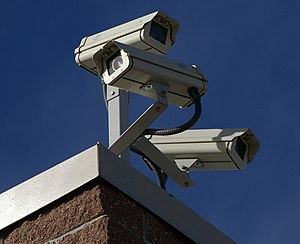 Figure: Surveillance cameras are a key physical security control for monitoring and deterring unauthorized access
Logical security controls the access to data and systems using software and policies. This is where a technician spends most of their time. A core tenet is the Principle of Least Privilege, which states that a user or system should only have the absolute minimum level of access and permissions required to perform their job function, and no more. This drastically limits the damage that can be done if an account is compromised. This is enforced by Authentication (proving who you are, e.g., with a password), which is made significantly stronger by Multifactor Authentication (MFA). MFA requires a user to provide two or more types of proof: something they know (password), something they have (a phone app code or security key), and/or something they are (a fingerprint). Other logical controls include Directory Services like Active Directory for centralizing user identity and policy enforcement, and Data Loss Prevention (DLP) software, which acts like a security guard for data, inspecting network traffic and endpoints to block sensitive information (like credit card numbers) from leaving the company network.
 Figure: A YubiKey hardware security key - a physical "something you have" factor for multifactor authentication
Physical controls you should be able to tell apart:
- Access control vestibule (mantrap): two interlocking doors; the first must close and lock before the second opens, so only one person passes at a time. This is the control that defeats tailgating. A badge reader alone does not, because the door stays open behind the authorized person.
- Bollards and fences: bollards are posts that stop vehicles; fences mark and enforce a perimeter. Neither controls who walks through a doorway.
- Badge readers, key fobs, smart cards, door and equipment locks: grant entry on something you have. Biometric locks (fingerprint, palm, retina) grant entry on something you are.
- Video surveillance, alarm systems, motion sensors, lighting and magnetometers: deter, detect and record. Cameras and sensors do not physically stop anyone; security guards can, by challenging people in person.
More logical controls and authentication concepts:
- Authentication factors: something you know (password, PIN, security question), something you have (phone, hardware token, smart card), something you are (biometrics) and somewhere you are (location). MFA requires factors from different categories, so a password plus a security question is still single-factor.
- MFA methods: authenticator apps (time-based one-time codes or an "Approve" push), hardware tokens/security keys, SMS, voice call and email codes. Authenticator-app codes and hardware tokens work without any signal. SMS and voice calls need cell coverage, email codes need a data connection (and an email account that may itself be compromised), so all three are the weaker choices. Enrollment usually runs: enable MFA in the account or directory policy, register the authenticator app (scan the QR code), confirm with a test code, then save backup codes.
- Single Sign-On (SSO): one sign-in grants access to many applications. With federated SSO using SAML, the cloud app redirects the user to the organization's identity provider to sign in and then back, already authenticated. SSO reduces how many times you sign in; it is not MFA.
- Zero Trust: no request is trusted because of where it comes from (such as inside the network); every user, device and request is verified.
- Access Control List (ACL): a list of allow/deny rules attached to a resource such as a folder, router or firewall.
- Identity and Access Management (IAM): the processes and tools for creating, changing and removing identities. Connecting IAM to the HR system automates provisioning and deprovisioning, so access is removed as soon as HR records a termination instead of waiting on a manual request.
- Privileged Access Management (PAM) / Just-in-Time (JIT) access: administrative rights are granted temporarily when needed and revoked afterwards, rather than held permanently.
Technician's Action Plan: Scenario: A company is setting up a new office. As the IT technician, you are asked for input on the security plan.
- Address Physical Security First: Recommend that the room designated for network equipment and servers be equipped with a key card access lock. Only IT personnel should have their badges programmed to open this door. Suggest the installation of a security camera covering the entrance to the server room.
- Implement Logical Access Controls: For the new user accounts, recommend a policy based on the Principle of Least Privilege. Propose creating security groups in Active Directory (e.g., "Sales", "Accounting", "HR") and assigning permissions to network folders based on these groups, rather than to individual users. An employee in Sales should not have access to the Accounting folder.
- Mandate Strong Authentication: Strongly advocate for enabling MFA for all users, especially for access to email (Microsoft 365) and any VPN services. Explain that this single measure is one of the most effective ways to prevent account takeovers, even if a user's password is stolen.
- Incorporate DLP: For the Accounting and HR departments who handle sensitive data, recommend exploring a DLP solution to prevent accidental or malicious exfiltration of employee PII or financial data via email or USB drives.
Reflection Question: How does the "Principle of Least Privilege" directly reduce the potential damage caused by a compromised user account?