Rapid Elasticity in Cloud Computing: A Practical Scaling Guide
Rapid Elasticity in Cloud Computing: A Practical Scaling Guide for IT Professionals
Predicting every sudden peak or drop in user traffic is nearly impossible for modern IT teams. Rapid elasticity addresses this challenge by providing a core capability for any modern application. It allows your infrastructure to automatically acquire specific resources the moment they are needed and release them as soon as demand subsides. This ensures your application maintains high performance levels without overspending on unused capacity. By adjusting server capacity, storage, and network bandwidth in real-time, your system stays responsive under heavy loads.
Traditional infrastructure typically requires lengthy manual procurement and setup processes that can take weeks or months. Rapid elasticity changes this by enabling the cloud environment to react autonomously in near real-time. This capability makes cloud resources function like a utility. Much like electricity or water, you consume only what is necessary and pay exclusively for that usage. For IT professionals preparing for the AWS Certified Solutions Architect or Azure Administrator certifications, understanding how to implement these scaling mechanisms is essential. This guide provides the technical foundation needed to build systems that scale effectively while maintaining cost efficiency across various cloud providers.
What Is Rapid Elasticity in Cloud Computing?
 Caption: Rapid elasticity visualized as an accordion, demonstrating the smooth expansion and contraction of cloud resources.
The National Institute of Standards and Technology (NIST) defines rapid elasticity as one of the five essential characteristics of cloud computing. This principle provides the agility, cost-efficiency, and resilience that organizations prioritize when moving away from physical data centers. When a system is truly elastic, it can adjust its resource levels almost instantly to match changing demands.
Consider an online retail store. For most of the year, website visitor numbers remain steady and predictable. However, during major sales events like Black Friday or Cyber Monday, traffic can increase by a massive margin.
Without elastic resources, a company faces a difficult choice. They would have to buy and maintain a large fleet of on-premises servers to handle that brief peak. For the other 364 days of the year, those expensive machines sit idle. They occupy rack space, consume power for cooling, and require maintenance while burning through the company budget. An elastic cloud setup fixes this problem. The infrastructure expands to handle the rush of shoppers and then contracts once the sale ends. This prevents performance bottlenecks and keeps the site functional during high-pressure periods.
The Strategic Power of Scaling Down
Expanding to meet a spike is useful, but the real financial benefit is the ability to scale down. This is where companies find the most significant savings. Traditional infrastructure forces a guessing game. IT managers must predict peak demand and buy enough hardware to cover it. This leads to over-provisioning. You pay for capacity that sits unused most of the time, which remains a constant drain on the IT budget.
Rapid elasticity changes how you pay for technology. You stop spending capital on potential needs and move to an operational expense model. You pay for the specific resources you use at any given moment. This reduces waste and makes the budget much easier to manage. Instead of owning hardware that depreciates in value, you rent exactly what you need.
A clear example of this occurred during the global shift to remote work in 2020. The platform Zoom saw a 30-fold increase in usage almost overnight. If they relied on physical hardware, they could not have added servers fast enough to keep up with millions of new users. Because their cloud infrastructure was elastic, Zoom grew its capacity to support the surge without crashing. As demand stabilized or shifted across time zones, they could adjust those resources back down.
This flexibility explains why global cloud spending reached $600 billion in 2023 (verify current industry spending trends via Gartner or IDC reports). Many firms report that they have cut their infrastructure costs by 20-40% by adopting these methods. For IT staff, learning to manage these resources is a vital skill for controlling costs.
Reflection Prompt: Consider an application you've worked with. How would rapid elasticity have benefited its operational costs or performance during unexpected demand spikes or lulls?
Contrasting Elasticity with Traditional Scaling
To understand why rapid elasticity matters, you must compare it with conventional infrastructure. Understanding these differences is vital for IT professionals. This is especially true when preparing for cloud certification exams, where questions often focus on the distinction between cloud hosting vs. dedicated servers.
The table below shows the key contrasts. It illustrates why cloud elasticity is a better fit for the fluctuating workloads of modern digital businesses.
Rapid Elasticity vs. Traditional On-Premises Scaling
| Attribute | Rapid Elasticity (Cloud) | Traditional Scaling (On-Premises) |
|---|---|---|
| Resource Provisioning | Automated and on-demand, often within minutes | Manual process requiring weeks or months for acquisition and setup |
| Scaling Direction | Scales both up (out) and down (in) dynamically | Primarily scales up; scaling down is typically difficult and wasteful |
| Cost Model | Pay-as-you-go (Operational Expense, OpEx) | High upfront investment (Capital Expense, CapEx) |
| Capacity Planning | Reactive to real-time demand and metrics | Based on long-term forecasting and peak capacity estimates |
| Efficiency | High; resources precisely match active needs | Low; often leads to significant over-provisioning and idle resources |
The cloud's elastic model removes the heavy financial burden and the guesswork associated with capacity planning. IT teams no longer have to spend months waiting for hardware to arrive and be racked in a data center. This allows them to focus on application development and innovation rather than the limitations of the underlying hardware. Since resources scale automatically based on real-time metrics, the system stays efficient without constant human intervention.
How Cloud Elasticity Actually Works
What orchestrates this automated scaling behind the scenes in a cloud environment? While it may look like magic, it results from the precise coordination of monitoring and automated logic. For IT professionals preparing for certifications such as the AWS Certified DevOps Engineer or Azure Solutions Architect, understanding these mechanics is required to build reliable systems.
The entire system operates on a straightforward feedback loop: monitor, evaluate, and act. Your cloud platform continuously observes the performance and health of your applications. When system metrics hit predefined thresholds, automated rules—often configured through infrastructure as code—trigger actions to add or remove resources. This ensures your infrastructure stays aligned with the actual workload.
Autoscaling: The Intelligent Thermostat for Your Infrastructure
Autoscaling functions like a thermostat for your cloud environment. Just as a home thermostat maintains a set temperature by activating heating or cooling, autoscaling preserves application performance by adding or removing server instances.
As an IT professional, you define the parameters for these adjustments. These are known as "scaling policies" and rely on specific operational metrics. CPU utilization is the most common example. You might configure a policy with these specific rules:
- Rule 1 (Scale-Out): "If the average CPU utilization across all my servers climbs above 70% for five consecutive minutes, automatically add a new server instance to the pool." This rule prepares the system for a growing workload.
- Rule 2 (Scale-In): "If the average CPU utilization drops below 20% for ten minutes, terminate an instance." This rule handles cost optimization during periods of low demand.
This configuration ensures that when a sudden traffic spike occurs, new servers are provisioned to handle the load. When demand subsides, those extra servers are terminated. This prevents you from paying for unused capacity. This dynamic adjustment is the core engine of rapid elasticity. To learn more about capacity management strategies, explore our guide on horizontal vs. vertical scaling, a common topic in certification exams.
Key Takeaway for Certifications: Autoscaling is the foundational component enabling elasticity. It uses user-defined rules and real-time metrics to adjust compute resources automatically. This guarantees consistent performance without manual intervention, a concept frequently tested in cloud operations exams.
Load Balancing: The Expert Traffic Director
Autoscaling provides the raw server capacity, but load balancing makes that capacity usable. A load balancer distributes incoming application traffic across your available servers.
Think of a busy airport during peak travel season. As more gates open, you need air traffic control to direct planes to avoid congestion. A load balancer performs this role for your application traffic. It prevents any single server from becoming overwhelmed while others sit idle.
Without a load balancer, new instances launched by an autoscaling group would stay underutilized. Most user traffic would continue to hit the original servers. The load balancer acts as the gateway for all requests, routing them to the healthiest, least-busy server available in the pool.
These two components work in an efficient tandem:
- A user initiates a request to your application's public endpoint.
- The load balancer intercepts the request and directs it to the server with the lightest load.
- If traffic surges and servers become busy (e.g., average CPU exceeds 70%), the autoscaling policy triggers a new server.
- The load balancer detects this new, healthy server and begins distributing traffic to it immediately.
This partnership creates a resilient system that delivers a reliable user experience even when traffic patterns are unpredictable.
Serverless: The Ultimate Hands-Off Elasticity
Serverless computing, often called Function-as-a-Service (FaaS), represents the next step in elasticity. In a serverless model, traditional server management vanishes. You do not configure autoscaling groups or manage the underlying infrastructure. You simply write application code as discrete functions—such as AWS Lambda, Azure Functions, or Google Cloud Functions—and deploy them.
The cloud provider then assumes responsibility for the rest.
When a request requires your function to run, the platform provisions the exact amount of compute power needed. Once the function finishes, those resources are de-provisioned. This scaling capability ranges from zero to millions of requests on a per-request basis. No manual intervention is needed.
This shift has changed how organizations approach growth. The move toward elastic, cloud-native architectures is a major reason the cloud computing market is projected to hit $1.6 trillion by 2030. Organizations embrace this model to reduce operational overhead and cut compute costs. Some reports indicate that 84% of companies realize savings with elastic pay-per-use models. This hands-off approach allows developers to focus on building features rather than managing hardware.
How AWS, Azure, and GCP Handle Real-World Elasticity
It is one thing to discuss rapid elasticity in theory; its true power shows up in practical use. The three major cloud providers—Amazon Web Services (AWS), Microsoft Azure, and Google Cloud Platform (GCP)—provide specific services built to implement elasticity. While their service names differ, their fundamental objective remains consistent: to provide automatic, on-demand scaling that matches resource supply with actual traffic.
We will examine common scenarios across each platform to see how these tools resolve business challenges. These solutions keep performance high while maintaining precise control over costs—knowledge that is essential for anyone pursuing a cloud certification. Understanding these implementations helps clarify the difference between simply having resources and having resources that adapt to the environment.
AWS: Surviving a Black Friday Sales Rush
Imagine a high-volume e-commerce site running on AWS. Its traffic usually stays stable throughout the year, but on Black Friday, it faces a massive 100x traffic explosion for several hours. Manually attempting to provision and de-provision servers to handle such a rapid surge would be a failure. Humans cannot react fast enough to click through consoles and launch instances as thousands of customers hit the "Add to Cart" button simultaneously. On the flip side, paying for that peak-level capacity for the entire year would lead to extreme financial waste.
This scenario fits the EC2 Auto Scaling Group, a core concept tested in the AWS Certified Cloud Practitioner (CLF-C02) and Solutions Architect exams. The setup works through a combination of several integrated services:
- Application Load Balancer (ALB): This serves as the entry point for all incoming customer requests. It uses health checks to ensure it only sends traffic to instances that are running and ready to respond.
- EC2 Auto Scaling Group: This manages a collection of EC2 instances. You define a minimum number of instances to keep costs low and a maximum number to ensure you do not run out of capacity.
- Amazon CloudWatch Alarms: These monitor performance metrics in real time. For e-commerce, the most common metrics are CPU utilization, memory usage, or the number of requests per target.
When the Black Friday sale begins and shoppers flood the site, CPU utilization on the existing servers might quickly pass a threshold like 70%. This triggers the CloudWatch alarm. The Auto Scaling Group immediately starts launching new EC2 instances based on a pre-configured Launch Template. The ALB detects these new instances as soon as they pass their health checks and starts routing traffic to them. This ensures the customer experience stays fast and responsive even during the peak of the surge.
Later, as the sale winds down and traffic drops, CPU usage falls below the scale-in threshold, perhaps 20%. The Auto Scaling Group then terminates the extra instances. This process is efficient and keeps operational costs low. The business only pays for the massive compute power for the specific hours it was actually used. For more information on the technical mechanics, our guide covers configuring auto scaling solutions on AWS in greater detail, which is a key topic for DevOps and Solutions Architect certifications.
Azure: Broadcasting a Live Sporting Event
Next, consider a media company using Microsoft Azure to stream a major live sports event. Millions of viewers tune in at the exact same time, but only for the duration of the game. This is a massive yet short-lived workload that requires a high level of elasticity to avoid a platform crash.
In this situation, Virtual Machine (VM) Scale Sets provide the solution. Similar to the AWS version, a VM Scale Set lets you manage a pool of identical Azure VMs. The number of active VMs can expand or contract based on real-time demand or a set schedule.
For major live events, a hybrid scaling approach is often the most effective choice. You can use schedule-based scaling to "pre-warm" the system. This involves provisioning a large amount of capacity 30 minutes before kickoff. After the game starts, you can use metric-based autoscaling to handle unforeseen spikes in viewership, such as a close overtime finish. This strategy prevents the latency issues that occur when thousands of VMs try to boot up at the exact same moment.
An Azure Load Balancer distributes all incoming streaming requests to the VMs in the scale set. As more fans connect, Azure Monitor tracks the escalating metrics and tells the scale set to add more VMs. To maintain stability, Azure uses "cool-down" periods to prevent the system from adding or removing VMs too quickly in response to small fluctuations. When the game ends and viewers log off, the scale set shrinks back to its minimum size. The media company only pays for that massive compute power while the game was active, which demonstrates great cost efficiency.
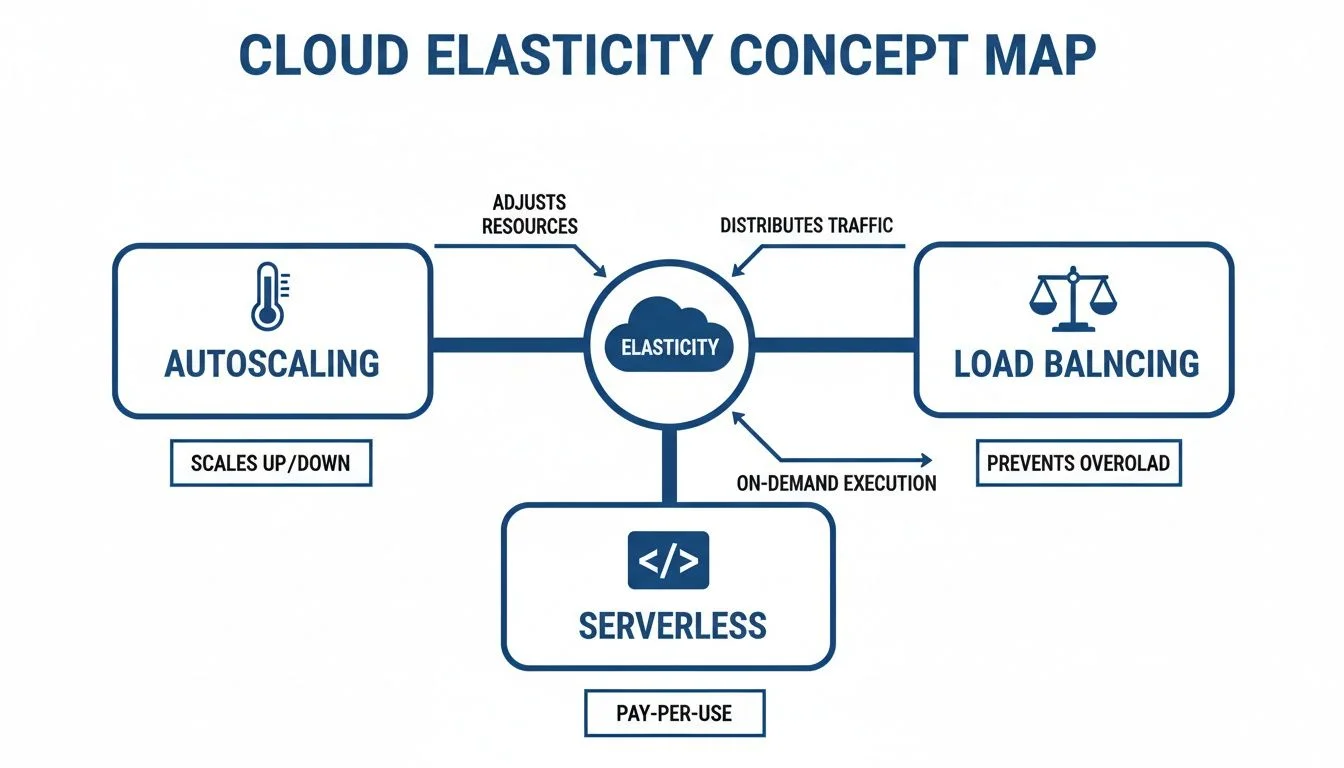
The following concept map shows how autoscaling, load balancing, and serverless technologies work together to make this elasticity possible.
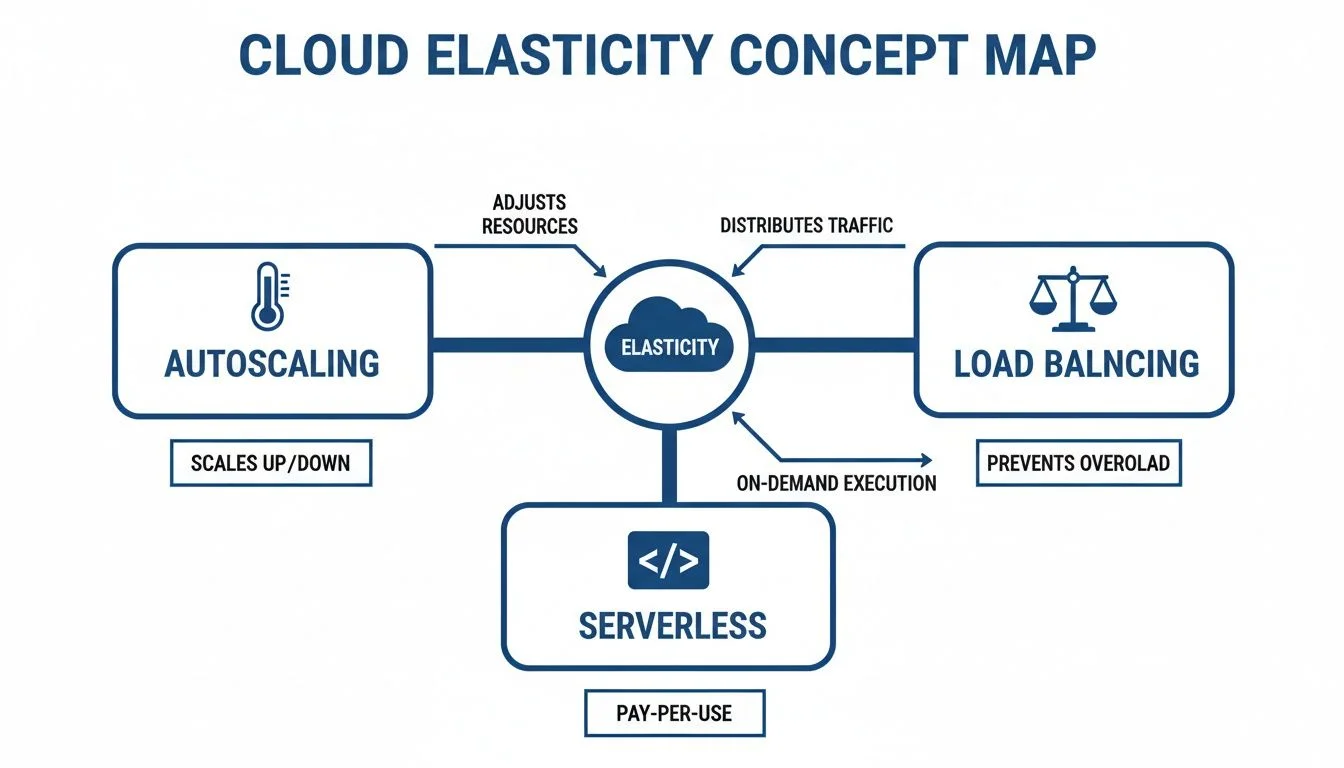 Caption: A conceptual diagram illustrating the interconnected roles of autoscaling, load balancing, and serverless in enabling cloud elasticity.
As the diagram illustrates, elasticity is not one single tool. It is a combination of traffic management (load balancing) and automated resource scaling (autoscaling). These often integrate with serverless functions to handle small, background tasks without needing any dedicated VMs at all.
GCP: Powering a Viral Mobile Game
Finally, imagine a mobile game hosted on Google Cloud Platform. Game popularity is often unpredictable. A single mention from a popular streamer can cause player counts to jump from a few thousand to millions in minutes. This requires an infrastructure that can keep up with volatile shifts in demand.
Google Cloud uses Managed Instance Groups (MIGs) to solve this. A MIG lets you treat a group of identical VM instances as a single unit. You can configure a MIG to autoscale based on CPU load, network traffic, or custom metrics like the number of active game sessions.
For a successful mobile game, the operational flow demonstrates elasticity in action:
- Cloud Load Balancing: This directs all incoming player connections to the game servers in the MIG. GCP uses a global load balancer, meaning players from around the world are sent to the nearest available server to reduce lag.
- Autoscaling Configuration: The MIG autoscaler is set to keep average CPU usage at 60%. This provides enough "headroom" to handle sudden bursts of players while the new instances are still booting.
- Automatic Expansion: When the streamer's audience logs in, the CPU load across instances spikes. The autoscaler sees this and starts creating new VMs immediately.
- Self-Healing: If a game server instance crashes due to a software bug, the MIG automatically recreates it to maintain the desired capacity.
The ability to react in near real-time is the core of rapid elasticity in cloud computing. By automating the management and provisioning of resources, all three major cloud providers give IT professionals the tools to build applications that are resilient and aligned with budget limits. This prevents the "over-provisioning" problem where companies spend thousands of dollars on servers that sit idle for 90% of the day.
Elasticity Services Across Major Cloud Platforms
The principles of elasticity are universal, but each cloud provider uses different names for their services. This table works as a quick reference guide for anyone studying for multi-cloud certifications or working in an environment that uses more than one provider.
| Functionality | AWS Service | Azure Service | Google Cloud Service |
|---|---|---|---|
| Automated VM Scaling | EC2 Auto Scaling Groups | Virtual Machine Scale Sets | Managed Instance Groups (MIGs) |
| Traffic Distribution | Elastic Load Balancing (ELB) | Azure Load Balancer | Cloud Load Balancing |
| Performance Monitoring | Amazon CloudWatch | Azure Monitor | Cloud Monitoring |
| Serverless Compute | AWS Lambda | Azure Functions | Google Cloud Functions |
Learning these equivalencies is helpful if you work in a multi-cloud environment or are preparing for a certification exam that covers different platforms. For example, if you are moving from an AWS-focused role to an Azure role, knowing that a VM Scale Set performs the same task as an Auto Scaling Group allows you to apply your existing architectural knowledge to the new platform immediately. This cross-platform understanding is vital as more organizations adopt multi-cloud strategies to avoid vendor lock-in and improve disaster recovery options.
Managing Your Costs in an Elastic Environment
 Caption: Effective cloud cost management involves real-time monitoring, proactive alerts, and strategic budgeting.
Rapid elasticity provides the capacity for an on-demand resource pool that feels infinite to the end user. While this dynamic scaling keeps applications responsive during sudden traffic peaks, it frequently causes massive cloud bills when left unmanaged. Without proper oversight, the automation that saves your service during a viral marketing event might also generate expenses that exceed your quarterly budget in a single weekend.
Consider your home electricity meter. You pay for what you use, but leaving high-wattage appliances running 24/7 leads to an expensive monthly bill. This reality makes FinOps—the practice of managing cloud costs—a required skill for any IT professional. FinOps integrates financial accountability into the world of variable, on-demand IT spending. It ensures that engineers and finance teams collaborate when assessing the value and performance of elastic infrastructure.
Setting Up Your Financial Guardrails
Visibility is the foundation of cloud cost control. You cannot manage what you do not measure. Every major cloud provider offers feature-rich tools to monitor spending in real time. These tools ensure you see the financial impact of your scaling decisions before the final bill arrives in your inbox.
IT professionals should prioritize these monitoring practices to stay within budget:
- Budget Alerts: AWS Budgets, Azure Cost Management, and GCP Billing enable you to set specific spending limits. You can configure these to trigger when your actual costs or your projected costs hit a certain percentage of your budget. For example, if a testing environment starts consuming resources faster than expected, an automated alert gives you time to investigate. This allows you to stop the spend before it becomes a financial disaster.
- Real-Time Anomaly Detection: Modern cloud providers include tools to spot unusual spending patterns using machine learning. If a bug causes a serverless function to enter an infinite loop, it might trigger millions of unnecessary invocations. Anomaly detection flags this sudden cost spike immediately. This is far more effective than waiting for a human to check a billing dashboard once a week.
Setting up these guardrails builds a defense against runaway costs. Your billing dashboard should be a data-driven tool for optimizing operations, not a source of monthly stress. When these alerts are active, you can scale with more confidence. You know the system will notify you if a configuration error leads to a spike in resource consumption.
Certification Tip: Cost management in an elastic environment depends on automation. Your financial oversight should be as automated as your infrastructure scaling. This principle is a key part of cloud economics and is often tested in domains related to operations, governance, and FinOps.
Implementing Proactive Cost Controls
Monitoring identifies when you are overspending, but proactive controls prevent the overspending from starting. You must build financial constraints into your scaling policies from the beginning. This prevents automation from behaving in ways that your business cannot afford.
Setting strict upper limits on autoscaling groups is a fundamental strategy for cost control. You want your system to handle more users, but you rarely need it to scale to 500 servers for a standard application. A misconfiguration or a malicious DDoS attack could trigger massive scaling that serves no business purpose. Defining a maximum number of instances creates a safety net that protects your budget from these unforeseen edge cases.
Resource tagging is another tool for precision management. You should apply descriptive tags to every resource you launch. Use tags like project:marketing-campaign, team:data-science, or environment:dev. When the bill arrives, these tags allow you to see exactly which department or project is responsible for the spend. This level of detail makes it easier to decide where to cut costs or where to invest more resources. It also supports "showback" models where departments see exactly how much their cloud usage costs the company.
Effective expense management in a scaling environment also requires looking at the bigger picture. Factors like app maintenance costs are often heavily influenced by how you set up your elastic infrastructure. For those focused on AWS, our guide offers specific compute cost optimization tactics. It covers right-sizing, reserved instances, savings plans, and spot instances. These topics are central to passing professional-level certifications and managing real-world production environments.
Mastering elasticity is not just a technical challenge. It is about building a financially sustainable system. By using real-time alerts, sensible scaling limits, and consistent resource tagging, you can use the power of the cloud without the risk of unmanaged debt.
Balancing Elasticity with Security and Performance
*Caption: A detailed explanation of rapid elasticity in cloud computing.*Rapid elasticity allows applications to adapt to changing demand, but the speed of scaling creates specific pressure on security and performance. A scalable system is only useful if it remains protected and responsive during a massive surge. If an organization focuses solely on adding resources without considering how those resources are hardened or how quickly they become available, the benefits of the cloud disappear.
From a security perspective, dynamic scaling acts as a useful defense. When an instance shows signs of compromise or technical failure, the system can terminate it immediately. Your autoscaling rules then provision a clean replacement from a verified, trusted image. This approach, known as immutable infrastructure, limits the time an attacker has to move laterally through a network or establish persistence. By treating servers as short-lived assets, you reduce the overall attack surface.
However, the speed of scaling can also spread risks. If a base image contains a misconfiguration or a critical software vulnerability, the scaling engine will replicate that flaw across the entire fleet during a traffic spike. A single oversight in the template becomes a widespread incident in minutes as the provider launches dozens or hundreds of flawed instances. Security must keep pace with the automation that drives elasticity to prevent this type of rapid exposure.
Protecting Your Dynamic Infrastructure
In an environment where infrastructure is constantly appearing and disappearing, manual security checks are impossible to maintain. Security must be part of the system design and automated from the start. This approach is a major requirement for professionals pursuing certifications like the AWS Certified Security - Specialty.
Several strategies help secure these elastic environments:
- Golden Images: Use tools like EC2 Image Builder or HashiCorp Packer to create "golden images." These are pre-approved, hardened, and fully patched server or container templates, such as Amazon Machine Images (AMIs). Launching every new instance from this secure baseline ensures that every resource meets your organization's security standards from the first second of its lifecycle.
- Automated Scanning: Place security scanners inside your Continuous Integration/Continuous Delivery (CI/CD) pipeline. These tools scan container images and virtual machine templates for known vulnerabilities before they reach production. Catching a flaw in the template phase prevents the scaling engine from deploying that vulnerability thousands of times.
- Identity and Access Management (IAM): Apply the principle of least privilege to every elastic component. New instances and functions should only have the minimum permissions needed to complete their work. Use service-linked roles and temporary credentials to ensure that if one instance is compromised, the attacker cannot use its credentials to access other parts of the cloud environment.
Key Takeaway for Certifications: A well-architected elastic system treats servers as ephemeral, disposable commodities. By automating the creation of secure, pre-configured instances, you build a self-healing infrastructure that is more resilient to attacks than traditional, static environments. This concept is foundational for cloud security and DevOps certifications.
Navigating Performance Hurdles
Elasticity is meant to improve performance, but it can create bottlenecks if the system does not scale fast enough. Provisioning resources is not always an instant process. The time it takes for a resource to become "ready" can lead to dropped connections or slow response times for users.
A common example is the "cold start" found in serverless functions like AWS Lambda. When a function has not been used for a while, the cloud provider must allocate a new execution environment and download the code before it can run. While this often takes less than a second, it is enough to cause latency in applications that require immediate responses. Similar delays occur with virtual machines, which may take several minutes to boot, run initialization scripts (user data), and pass health checks before they can accept traffic from a load balancer.
To handle these performance gaps, engineers use specific tactics to stay ahead of the demand curve. Predictive scaling uses machine learning to analyze historical traffic patterns. If the system knows that traffic always spikes at 9:00 AM on Mondays, it can begin adding capacity at 8:45 AM. This ensures that the resources are fully booted and ready before the users arrive.
Another effective method is using "warm pools" or instance pre-warming. This involves keeping a group of pre-initialized instances in a stopped state. When the autoscaling group needs to expand, it pulls from this pool rather than starting a fresh boot process from scratch. This significantly reduces the time it takes for new capacity to become operational. By addressing these timing issues, you can provide a smooth user experience even during the most aggressive scaling events.
Common Elasticity Mistakes and How to Avoid Them
Deploying rapid elasticity effectively provides a major advantage for any organization. However, a few frequent errors can quickly turn the goal of cost savings and high availability into a financial liability or a performance bottleneck. These mistakes are avoidable. Learning from the operational history of other teams is much cheaper than experiencing these failures during a production incident.
Most engineering teams face trouble not because elasticity itself is a flawed concept. Instead, problems arise when the implementation does not align with the specific architecture of the application or the actual patterns of business traffic.
Picking the Wrong Scaling Triggers
Choosing incorrect or insufficient scaling triggers is a frequent error. Many teams configure an e-commerce site to scale out based only on CPU utilization. While this metric is a standard starting point for many workloads, it often fails to tell the whole story.
During a high-traffic event like a flash sale, the CPU might remain under the threshold while other components fail. The real bottleneck could be memory exhaustion caused by thousands of concurrent user sessions. It could be a database connection pool reaching its limit or a message queue filling up with unprocessed orders. Monitoring and scaling based on CPU while memory is at its limit is like adding more lanes to a highway when the real blockage is a single broken toll booth. You are solving a problem that does not exist while the actual failure point continues to degrade. This leads to dropped connections, lost revenue, and poor user experiences.
Getting Caught in Scaling "Thrashing"
A second common issue is "thrashing." This happens when autoscaling rules are too sensitive or lack sufficient cooldown periods. The system ends up in a cycle where it constantly spins up new instances only to terminate them moments later. Picture a brief traffic spike that lasts sixty seconds. This spike triggers a new server to boot up. By the time that server is online and ready to accept traffic, the spike has passed. The system sees the drop in demand and starts a scale-in event. Five minutes later, another minor traffic bump repeats the entire cycle.
This continuous churn is wasteful. You pay for the compute time used during the boot-up and shutdown processes, yet these instances never actually handle a meaningful workload. To fix this, you must use cooldown periods.
A cooldown period is a set amount of time after a scaling action—either adding or removing resources—during which the system ignores further scaling requests of that type. It serves as a buffer. This pause prevents the infrastructure from overreacting to every minor change in network traffic. Setting these parameters is a standard requirement for managing autoscaling groups in AWS, Microsoft Azure, or Google Cloud Platform (GCP).
Ignoring What Your Application is Telling You
Many teams restrict their monitoring to basic infrastructure metrics. They look at CPU usage, network I/O, or disk space and assume they have the full picture. However, the most effective elasticity strategies rely on data from the application layer.
IT professionals can avoid these pitfalls by focusing on three specific areas:
- Look Beyond Infrastructure Basics: Use Application Performance Monitoring (APM) tools such as Datadog, New Relic, or Dynatrace. These tools provide visibility into the internal functions of your software. An APM reveals if the true bottleneck is a specific service’s memory usage or the length of a processing queue, such as an Amazon SQS queue or an Azure Service Bus queue. You should set your scaling triggers based on these specific application metrics rather than just hardware signals.
- Set Smart Cooldowns: Stop system thrashing by tuning your cooldown settings. A scale-out cooldown of several minutes ensures that a spike is sustained before you commit to new resources. For scaling in, use a longer cooldown period. This prevents the system from removing servers that might be needed again in a few minutes if traffic is volatile.
- Establish Hard Limits: You must always set a maximum instance count for every autoscaling group. There are no exceptions to this rule. This limit acts as a financial safety net. It protects your budget from runaway bugs, configuration errors, or even a denial-of-service attack that might otherwise trigger the provisioning of hundreds of expensive, unnecessary virtual machines.
Precision matters in enterprise IT environments. As organizations adopt hybrid cloud models—with 88% of cloud buyers currently running them—managing scalability is a high priority. Data shows heavy cloud utilization increased from 53% in 2020 to 63% in 2022. This shift demonstrates that businesses rely heavily on the flexibility of elastic provisioning. Leadership teams recognize the value, with 41.4% of organizations increasing their cloud budget to drive growth, despite broader economic shifts. You can review more specific data in these cloud computing trends and statistics.
By identifying and avoiding these common errors, technical teams ensure their approach to rapid elasticity in cloud computing remains powerful and cost-effective.
Got Questions About Rapid Elasticity?
As you move forward with cloud training, specifically when preparing for exams like the AWS Certified Cloud Practitioner (CLF-C02) or CompTIA Network+ (N10-009), questions about rapid elasticity often come up. It is necessary to clarify these distinctions and concepts. Understanding how this characteristic works ensures you can apply it to actual technical environments rather than just memorizing definitions.
What’s the Real Difference Between Scalability and Elasticity?
It is common to confuse these two terms, but they solve different problems regarding system growth and adaptation. This distinction is a frequent topic on certification exams.
Scalability is the long-term ability of a system to handle more work by adding resources. It refers to the built-in capacity for growth. A scalable system functions like a building designed with a foundation strong enough to support additional floors in the future. You are building in the capacity for anticipated growth. This happens in two ways: vertical scaling, where you add more CPU or RAM to an existing server, and horizontal scaling, where you add more servers to a group. Scalability is often a manual or planned process aimed at meeting steady, predictable increases in demand over weeks or months.
Elasticity is the ability to automatically and quickly scale resources out or in based on immediate needs. While scalability provides the infrastructure to grow, elasticity provides the automation to do it in real-time. For example, a retail website experiences a massive traffic spike during a flash sale. Elasticity allows the system to detect the increase in demand and provision dozens of new instances in minutes. When the sale ends and traffic drops, the system terminates those instances to avoid unnecessary costs.
For any certification exam, remember that elasticity is about the dynamic, automated, and bidirectional nature of resource management. It is not just about growing; it is about shrinking when demand disappears.
Key Takeaway for Certifications: Scalability represents the capacity for growth, while elasticity is the automated reaction to changing demand in real-time, both up and down.
Does Rapid Elasticity Actually Save You Money?
Yes, it does. The primary financial benefit comes from the ability to scale down. In a traditional on-premises data center, you had to purchase hardware based on your highest projected peak traffic. Even if that peak only happened for two hours on a Monday, you still paid for the hardware to sit in a rack 24/7. This resulted in significant waste, as you paid for electricity, cooling, and maintenance for idle machines.
Rapid elasticity changes this by moving the budget from a fixed capital investment (CapEx) to a variable operational expense (OpEx). Under this model, you only pay for the resources you use while they are active. When the system detects lower traffic and shuts down extra instances, the billing for those resources stops immediately. This pay-as-you-go approach ensures that your costs stay aligned with your actual usage, reducing the total cost of ownership for your infrastructure.
How Do You Properly Test an Elasticity Setup?
Never assume that your auto-scaling rules will function correctly without validation. You must perform load testing in a staging or pre-production environment that matches your production setup. This is the only way to confirm that your triggers are set at the right levels. During these tests, you should simulate a sudden surge in users and monitor several specific performance areas.
- Did the new instances start up and become ready fast enough to handle the traffic? You need to check if the time between the trigger and the server being ready is short enough to prevent a bottleneck.
- Did the load balancer recognize the new resources and begin sending traffic to them without delay? Verify that the distribution of requests happens as soon as the instances pass their health checks.
- Did the application stay responsive and maintain performance metrics like latency? Monitor error rates and response times to ensure the user experience did not degrade while the system was scaling.
- Did the system scale back down and release resources once the test ended? Verifying that resources are released is just as important as verifying that they are created to prevent budget overruns.
Testing allows you to find the correct balance for scaling triggers and cooldown periods. It gives you the certainty that your infrastructure can handle a viral event or a seasonal surge without failing or exceeding your budget.
Ready to strengthen your knowledge of cloud concepts and pass your exams? MindMesh Academy provides study guides and learning tools for IT professionals. Start preparing today at AWS Cloud Practitioner Practice Exams.
Ready to Get Certified?
Prepare for exams using study guides, practice exams, and spaced repetition flashcards at MindMesh Academy. These resources cover current certifications:

Written by
Alvin Varughese
Founder, MindMesh Academy
Alvin Varughese is the founder of MindMesh Academy and an enterprise architecture leader. An electrical engineer by training, he moved from factory automation in South Africa to cloud architecture at GE Appliances and Humana (Fortune 50), and holds 20 professional certifications including AWS Solutions Architect Professional, Azure DevOps Engineer Expert, and Microsoft Agentic AI Business Solutions Architect. He built MindMesh Academy after interviewing too many highly certified candidates who couldn't answer basic questions: the goal is prep that makes you better at the job, not just able to pass the exam.