10 CCNA Examination Questions to Master Before the Exam
Mastering the CCNA: 10 Essential Examination Questions Success
Passing the Cisco CCNA 200-301 exam demands more than surface-level memorization; it requires a strategic, in-depth understanding of core networking concepts. Many aspiring IT professionals fall into the trap of endlessly drilling practice questions without truly dissecting the 'why' behind each correct answer. This passive approach often leads to frustration and failure because the exam evaluates your ability to apply knowledge, not just recall facts.
This guide is engineered to break that cycle. We'll deconstruct 10 crucial types of CCNA examination questions, providing not just the solutions, but the strategic thinking, common pitfalls, and real-world applications necessary to achieve true mastery. By dissecting each question type and offering actionable takeaways, we aim to build your proficiency across key domains like IP addressing, routing protocols, and network security. By the end, you won't just know the answers; you'll understand the underlying principles – a skill critical for both certification success and a thriving career.
This educational methodology, mirroring the evidence-based learning techniques embraced at MindMesh Academy, transforms your study sessions from passive review into active, strategic learning. It ensures you're fully prepared for the diverse challenges the CCNA exam presents. To further diversify your study approach and test your knowledge, consider strategies for creating your own practice quizzes online, which can help reinforce these complex topics. This comprehensive article will equip you with the practical skills and deep insights necessary to confidently face the CCNA exam and beyond.
1. OSI Model and Network Layer Identification
A deep understanding of the OSI (Open Systems Interconnection) model is non-negotiable for success on the CCNA exam. Foundational CCNA examination questions frequently test your ability to map networking devices, protocols, and functions to their correct OSI layer. This isn't just about memorization; it's about building a mental framework for how data traverses a network, which is critical for both robust network design and effective troubleshooting.
Why It's a Core Concept
The OSI model breaks down the complex process of network communication into seven manageable layers, from the Physical (Layer 1) to the Application (Layer 7). The CCNA exam expects you to know precisely where devices like switches (Layer 2) and routers (Layer 3) operate and why. Understanding this distinction is key to grasping how data is encapsulated and de-encapsulated as it moves from one host to another, forming the basis of architectural thinking in networking.
Example Question and Analysis
Question: At which layer of the OSI model does a standard network switch primarily operate to forward traffic based on hardware addresses?
- A) Layer 1 (Physical)
- B) Layer 2 (Data Link)
- C) Layer 3 (Network)
- D) Layer 4 (Transport)
Correct Answer: B) Layer 2 (Data Link)
Breakdown:
- Layer 1 (Physical): This layer deals with the raw physical transmission of bits, encompassing components like cables, connectors, and hubs. A switch performs more intelligent operations than a hub.
- Layer 2 (Data Link): This layer is responsible for framing data and using MAC (Media Access Control) addresses – which are hardware-burned addresses – to make forwarding decisions within a local network segment (LAN). This perfectly aligns with a standard switch's primary function.
- Layer 3 (Network): This layer focuses on logical addressing (IP addresses) and routing data packets between different networks. This is the primary function of a router.
- Layer 4 (Transport): This layer manages end-to-end communication, connection establishment, and data segmentation, using protocols like TCP and UDP.
Actionable Study Tips
To master this topic for your CCNA exam, focus on associating devices and protocols with their respective layers, and envision their practical application rather than just rote learning.
- Create a Mnemonic: A classic aid is "Please Do Not Throw Sausage Pizza Away" (Physical, Data Link, Network, Transport, Session, Presentation, Application). Many variations exist; find one that resonates.
- Build a Protocol/Device Chart: Systematically create a table with columns for the OSI layer, layer name, key networking devices (e.g., Switch, Router, Hub, Firewall), and common protocols (e.g., Ethernet, IP, TCP, UDP, HTTP, FTP).
- Visualize Data Flow: Practice tracing a packet's journey: from a user typing a URL in a web browser (Application Layer 7) down through the layers on the source machine, across the network, and back up the layers on the destination server. This visualization solidifies understanding.
Reflection Prompt: Before moving on, take a moment. Can you name a common protocol for each of the top three OSI layers (Application, Presentation, Session) and briefly explain its role in network communication? How might this knowledge help you diagnose a problem with a web application?
For a more structured exploration of this fundamental topic, you can delve into this detailed guide on the OSI model and layered network design. Learn more about the layered network design and the OSI model on mindmeshacademy.com.
2. IP Addressing and Subnetting Calculations
Mastery of IP addressing and subnetting is arguably the most critical hands-on skill tested on the CCNA exam. You will encounter numerous CCNA examination questions that require you to quickly and accurately calculate network addresses, broadcast addresses, valid host ranges, and subnet masks. This is not merely a theoretical exercise; it's a fundamental requirement for designing, implementing, and troubleshooting any IP-based network.
Why It's a Core Concept
Subnetting allows network administrators to divide a large network into smaller, more manageable, and efficient segments. This improves security by isolating traffic, optimizes performance by reducing broadcast domains, and simplifies troubleshooting by segmenting issues. The CCNA exam rigorously tests this skill because it directly translates to real-world network configuration tasks on Cisco devices, where incorrect IP allocation can cause major connectivity failures and security vulnerabilities. This is a foundational concept in all network infrastructure design, from on-premises data centers to cloud environments like AWS and Azure.
Example Question and Analysis
Question: An administrator needs to configure a new network segment using the IP address 192.168.10.19/28. What is the valid host range for this subnet?
- A) 192.168.10.1 - 192.168.10.14
- B) 192.168.10.16 - 192.168.10.31
- C) 192.168.10.17 - 192.168.10.30
- D) 192.168.10.18 - 192.168.10.29
Correct Answer: C) 192.168.10.17 - 192.168.10.30
Breakdown:
- Identify the Block Size: A /28 mask means 28 bits are used for the network portion, leaving 32 - 28 = 4 bits for hosts. The block size (or increment) for the subnets is 2^4 = 16.
- Find the Network Address: The subnets will be multiples of 16 in the fourth octet: 0, 16, 32, 48, etc. The given IP address 192.168.10.19 falls into the subnet that starts at 192.168.10.16. This is the network address for this subnet.
- Find the Broadcast Address: The next subnet in the sequence starts at 192.168.10.32. Therefore, the broadcast address for the 192.168.10.16 network is one less than the next network address, which is 192.168.10.31.
- Determine the Host Range: The valid host addresses are all the IPs between the network address and the broadcast address. This gives us the range from 192.168.10.17 to 192.168.10.30.
Actionable Study Tips
Speed and accuracy are essential for subnetting questions on the CCNA exam. Consistent practice is the only way to build proficiency.
- Learn the "Magic Number" Method: For quick calculations, particularly in the interesting octet, use the formula 256 minus the decimal value of the subnet mask in that octet. For /28, the subnet mask is 255.255.255.240. The magic number for the last octet is 256 - 240 = 16, which is your block size.
- Practice Daily: Dedicate 15-20 minutes every day to solving random subnetting problems. Start with Class C scenarios, then progress to the more complex Class B and A scenarios. Focus on rapidly identifying the network address, broadcast address, and valid host range.
- Write It Down: During the exam, if allowed a whiteboard or scratchpad, immediately write out the powers of 2 (128, 64, 32, 16, 8, 4, 2, 1) and their corresponding subnet masks. This quick reference can significantly assist with binary conversions and calculations under pressure.
Reflection Prompt: Consider a scenario where you're given a /27 network. How many usable hosts can it support, what would be the block size, and why is knowing this immediately beneficial when planning an AWS VPC subnet?
3. Routing Protocols Comparison (RIP, OSPF, EIGRP)
A significant portion of CCNA examination questions focuses on your ability to differentiate between the major Interior Gateway Protocols (IGPs): RIP, EIGRP, and OSPF. The exam moves beyond simple definitions, requiring you to compare their metrics, convergence speed, scalability, and administrative distance. Understanding these trade-offs is crucial for designing and troubleshooting efficient, modern networks.
Why It's a Core Concept
Choosing the right routing protocol is a fundamental network design decision. The CCNA exam validates that you understand the operational differences between distance-vector (RIP), advanced distance-vector/hybrid (EIGRP), and link-state (OSPF) protocols. This knowledge directly determines how routers share information, calculate the best paths, and react to network changes, directly impacting network performance, stability, and resource utilization. In an enterprise environment, selecting the appropriate routing protocol can be the difference between a resilient network and one prone to outages.
Example Question and Analysis
Question: A network administrator is configuring a router that has learned the same route to a destination network via both OSPF and EIGRP. Assuming default configurations, which routing protocol's path will be installed in the routing table?
- A) OSPF, because it is an open standard.
- B) EIGRP, because it has a lower default administrative distance.
- C) Both routes will be installed and used for load balancing.
- D) The router will prompt the administrator to choose one.
Correct Answer: B) EIGRP, because it has a lower default administrative distance.
Breakdown:
- Administrative Distance (AD): This is the core concept being tested. AD is an integer value from 0 to 255 that Cisco routers use to determine the trustworthiness of a routing information source. A lower AD value indicates a more trustworthy source and is always preferred.
- EIGRP's AD: The default administrative distance for internal EIGRP routes is 90.
- OSPF's AD: The default administrative distance for OSPF routes is 110.
- Conclusion: Since 90 is lower than 110, the router will trust the EIGRP-learned route more and install it in the routing table, discarding the OSPF route for that same destination (unless specific policy routing or redistribution is configured).
Actionable Study Tips
To master routing protocol comparisons, focus on their key differentiators and memorize critical values like administrative distances.
- Create a Comparison Chart: Build a detailed table comparing RIP, EIGRP, and OSPF. Include columns for Protocol Type (Distance-Vector, Link-State, Hybrid), Default AD, Metric (Hop Count, Bandwidth/Delay/Reliability, Cost), Algorithm (Bellman-Ford, DUAL, SPF), Scalability, Convergence Speed, and Resource Usage.
- Memorize Administrative Distances: Create flashcards specifically for AD values. You must know the defaults for directly connected networks (0), static routes (1), EIGRP (90), OSPF (110), RIP (120), and external EIGRP (170) without hesitation.
- Understand the "Why": Don't just learn that OSPF scales better than RIP. Understand why its link-state nature, which gives each router a full topological map of the network, inherently avoids the routing loops and slow convergence (like RIP's 15-hop limit) inherent to RIP's distance-vector approach. This deeper understanding is key for the CCNA exam.
Reflection Prompt: If you had to choose between OSPF and EIGRP for a large enterprise network with diverse vendor equipment (not just Cisco), which would you lean towards and why? What are the key considerations for such a decision in a multi-vendor environment, similar to what you might encounter in a large Azure deployment?
4. VLAN Configuration and Inter-VLAN Routing
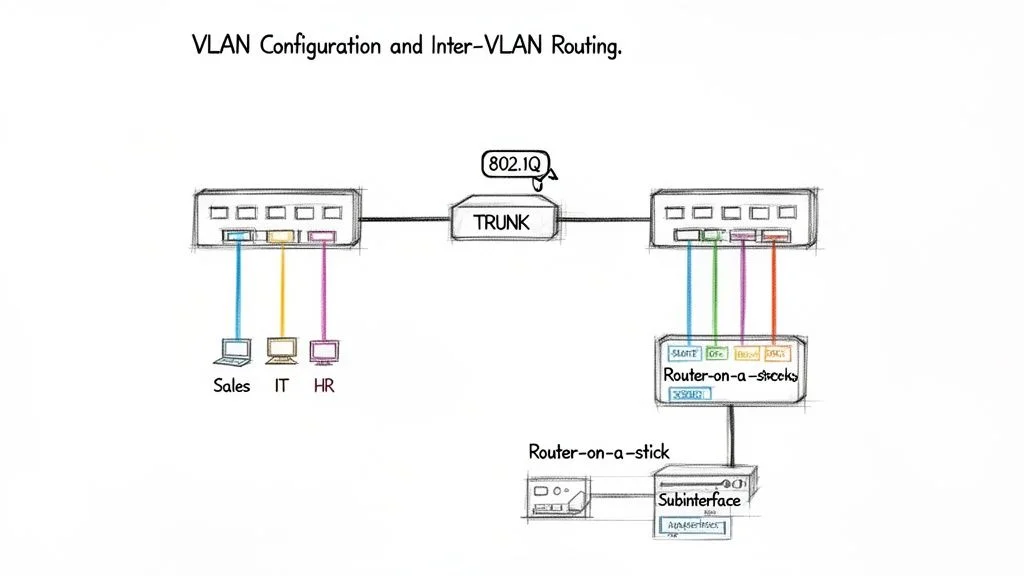
Virtual Local Area Networks (VLANs) are a foundational technology for network segmentation, and CCNA examination questions will rigorously test your practical knowledge of their configuration and operation. These questions move beyond theory, requiring you to understand specific command syntax for creating VLANs, assigning ports, configuring trunk links, and enabling communication between different VLANs. Mastery of this topic is critical for designing secure, efficient, and manageable modern networks.
Why It's a Core Concept
VLANs allow network administrators to group devices together logically, regardless of their physical location. This enhances security by isolating traffic, improves performance by reducing broadcast domains, and simplifies network management. The CCNA exam ensures you can implement this segmentation by testing your ability to configure access ports for end devices and trunk ports to carry traffic for multiple VLANs between switches, a process known as VLAN tagging (using the IEEE 802.1Q standard). This knowledge is crucial for any network professional, from small office setups to complex data center designs.
Example Question and Analysis
Question: A network administrator needs to configure interface GigabitEthernet0/1 on a switch to carry traffic for VLAN 10, VLAN 20, and VLAN 30 between two switches. Which command sequence correctly achieves this?
- A)
interface gi0/1,switchport mode access,switchport access vlan 10,20,30 - B)
interface gi0/1,switchport mode trunk - C)
interface gi0/1,switchport mode trunk,switchport trunk allowed vlan 10,20,30 - D)
interface gi0/1,vlan 10,vlan 20,vlan 30
Correct Answer: C) switchport mode trunk, switchport trunk allowed vlan 10,20,30
Breakdown:
- A)
switchport mode access: This command configures the port for a single VLAN, specifically used for connecting end devices like PCs, printers, or servers that belong to one VLAN. It cannot carry multiple VLANs. - B)
switchport mode trunk: This command correctly sets the port as a trunk. By default, a trunk port allows all VLANs to traverse it. While this might achieve the goal of carrying the specified VLANs, it's less precise and potentially less secure than explicitly defining allowed VLANs. - C)
switchport mode trunk,switchport trunk allowed vlan...: This sequence first sets the port to trunk mode and then explicitly specifies which VLANs (10, 20, and 30) are permitted to cross the link. This is the most precise, secure, and recommended method to meet the requirement. - D)
vlan 10...: These commands are used to create VLANs in the global configuration mode, not to configure an interface to participate in or carry VLAN traffic.
Actionable Study Tips
To master VLANs, you must move from theoretical concepts to practical command implementation. Hands-on practice is essential for success on the CCNA exam.
- Differentiate Port Modes: Clearly understand the fundamental difference between an access port (carries traffic for one VLAN, typically for an end device) and a trunk port (carries traffic for multiple VLANs, typically between switches or between a switch and a router).
- Practice Inter-VLAN Routing: Set up a "Router-on-a-Stick" (ROAS) in a lab environment (e.g., Cisco Packet Tracer or GNS3). This involves creating subinterfaces on a router, one for each VLAN, to enable communication between them. This is a very common CCNA exam scenario.
- Learn the Native VLAN: Understand the concept of the native VLAN on a trunk link (the one VLAN that traverses the trunk untagged) and its security implications (e.g., VLAN hopping attacks). Be prepared for questions about this.
- Use Command Drills: Repeatedly practice the command syntax for creating VLANs (
vlan 10,name Sales), assigning access ports (switchport access vlan 10), and configuring trunks (switchport mode trunk,switchport trunk allowed vlan add 10,20,30).
Reflection Prompt: Imagine a small office with three departments (Sales, Marketing, IT), each needing its own logical network. How would VLANs benefit this setup in terms of security and broadcast domain reduction? What's one critical security risk if trunk ports are not properly configured?
5. Access Control Lists (ACL) Configuration and Filtering
The ability to configure and troubleshoot Access Control Lists (ACLs) is a fundamental skill tested heavily in CCNA examination questions. These questions assess your understanding of how to filter network traffic based on specific criteria, such as source or destination IP addresses and port numbers. Mastery of ACLs is essential for network security and traffic management, making it a critical component of the CCNA curriculum and a vital skill for any network professional.

Why It's a Core Concept
ACLs are the primary mechanism on Cisco routers and switches for implementing packet filtering, a basic but powerful form of network security. They provide granular control over what traffic is allowed to enter or exit an interface. The CCNA exam requires you to know the difference between standard and extended ACLs, understand rule processing logic (top-down, first match), and correctly apply them to interfaces to achieve specific security objectives. Understanding ACLs is a cornerstone of a defense-in-depth security strategy, similar to how Security Groups and Network ACLs function in cloud environments like AWS.
Example Question and Analysis
Question: A network administrator needs to prevent all hosts from the 192.168.10.0/24 network from accessing a specific server at 10.1.1.5. The administrator applies an ACL to the router interface connected to the 192.168.10.0/24 network. Which command is most appropriate to achieve this goal?
- A)
access-list 1 deny 192.168.10.0 255.255.255.0 - B)
access-list 101 deny ip 192.168.10.0 0.0.0.255 host 10.1.1.5 - C)
access-list 101 permit ip 192.168.10.0 0.0.0.255 host 10.1.1.5 - D)
access-list 1 deny host 10.1.1.5
Correct Answer: B) access-list 101 deny ip 192.168.10.0 0.0.0.255 host 10.1.1.5
Breakdown:
- A) Incorrect: This uses a standard ACL (numbered 1-99 or 1300-1999). Standard ACLs can only filter based on the source IP address and cannot specify a destination. Additionally,
255.255.255.0is a subnet mask, not the required wildcard mask for an ACL. - B) Correct: This uses an extended ACL (numbered 100-199 or 2000-2699) which can filter based on source IP, destination IP, protocol, and port numbers. It correctly specifies the source network (192.168.10.0 with wildcard mask 0.0.0.255) and the destination host (10.1.1.5), along with the
deny ipaction, perfectly matching the requirement. - C) Incorrect: This command would permit the specified traffic, which is the opposite of the requirement to prevent access.
- D) Incorrect: This is a standard ACL that would deny all traffic from the server at 10.1.1.5, not traffic to it from a specific source network.
Actionable Study Tips
To master ACLs for your CCNA exam, focus on the logic behind the rules and their practical application.
- Memorize ACL Ranges: Know the numerical ranges for standard ACLs (1-99, 1300-1999) and extended ACLs (100-199, 2000-2699). This dictates what criteria you can filter on.
- Master Wildcard Masks: Practice calculating wildcard masks quickly. Remember the simple trick:
255.255.255.255 - Subnet Mask = Wildcard Mask. For example, a /24 (255.255.255.0) subnet mask has a wildcard mask of 0.0.0.255. - Visualize the Logic: Always remember that ACLs are processed sequentially, from top to bottom. The first rule that matches a packet's criteria is applied, and no further rules are checked. Also, be acutely mindful of the implicit
deny anythat exists at the end of every ACL, which can unintentionally block all traffic if not carefully planned.
Reflection Prompt: Think about the
implicit deny anyat the end of every ACL. Why is this a crucial, often overlooked, aspect of ACL configuration, especially when troubleshooting connectivity issues? How does this compare to the default behavior of a Security Group in AWS, which is implicitly deny all until explicitly allowed?
For a deeper understanding of network filtering principles, you can review this guide to AWS security groups and network ACLs. You can learn more about network security and ACL principles on mindmeshacademy.com.
6. Network Address Translation (NAT) Implementation
A core competency tested in CCNA examination questions is your ability to configure and troubleshoot Network Address Translation (NAT). This technology is fundamental for conserving public IPv4 addresses and securing internal networks by masking their private IP structure. CCNA exam questions will test your knowledge of its different types (Static, Dynamic, and PAT) and your ability to apply the correct one to a given network scenario.
Why It's a Core Concept
NAT enables private, non-routable IP addresses on an internal network to communicate with external networks, most commonly the internet. The CCNA exam requires you to understand the entire translation process, including the key terminology: inside local, inside global, outside local, and outside global addresses. Mastering NAT is crucial for implementing basic network perimeter security and efficiently managing IPv4 address allocation in any real-world network, especially as public IPv4 addresses become increasingly scarce.
Example Question and Analysis
Question: A network administrator needs to allow multiple internal hosts using private IP addresses from the 192.168.10.0/24 range to access the internet using a single public IP address assigned to the router's external interface. Which command is essential for this configuration?
- A)
ip nat inside source static 192.168.10.5 203.0.113.50 - B)
ip nat pool PUBLIC_IPS 203.0.113.10 203.0.113.20 netmask 255.255.255.0 - C)
ip nat inside source list 1 interface GigabitEthernet0/1 overload - D)
ip nat outside
Correct Answer: C) ip nat inside source list 1 interface GigabitEthernet0/1 overload
Breakdown:
- A) Static NAT: This command creates a one-to-one, permanent mapping between a single private IP and a single public IP. It does not meet the requirement of serving multiple internal hosts with a single public IP.
- B) Dynamic NAT Pool: This command defines a pool of public IP addresses available for dynamic translation. While it allows multiple internal hosts to share public IPs, it requires a pool of multiple public IPs, not just a single public IP as the question specifies for many-to-one translation.
- C) PAT (Port Address Translation): The
overloadkeyword is the critical element here. It enables Port Address Translation (PAT), often referred to as NAT overload. PAT allows many internal hosts to share a single public IP address by tracking connections using unique source port numbers. This perfectly matches the scenario described, maximizing IP conservation. Thelist 1refers to a standard ACL defining which internal private IPs are allowed to be translated. - D) Interface Command: This command (
ip nat outside) is used on the public-facing interface to mark it as being on the "outside" of the NAT boundary. It's a necessary part of the NAT configuration but is not the command that actually enables the translation itself.
Actionable Study Tips
To confidently answer NAT-related questions on the CCNA exam, focus on the specific use case for each type and the precise syntax of its configuration.
- Memorize the "Why": Understand when to use each NAT type:
- Static NAT: For internal servers that need a fixed, publicly accessible IP address (e.g., a web server).
- Dynamic NAT: For a group of internal users who need internet access, where not everyone needs access simultaneously, and you have a small pool of public IPs.
- PAT (overload): For maximum IP conservation, allowing a large number of internal hosts to share a single public IP address.
- Draw the Flow: For practice scenarios, draw a simple diagram showing a packet's source and destination IP addresses as they change when crossing the NAT router. Label the inside local, inside global, outside local, and outside global addresses to solidify the translation process.
- Lab the Commands: Use a simulator like Cisco Packet Tracer or a virtual lab environment to configure all three types of NAT. Pay close attention to defining inside/outside interfaces and creating the necessary access lists for dynamic NAT and PAT to ensure practical understanding.
Reflection Prompt: If you needed to host a web server (e.g., a customer portal) on your internal network that must be accessible from the internet, which type of NAT would you configure and why? How would this scenario differ from giving all internal employees outbound internet access?
To deepen your understanding of how address translation works in various network environments, you can explore this guide on NAT. Learn more about the implementation of NAT gateways on mindmeshacademy.com.
7. Spanning Tree Protocol (STP) and RSTP
Spanning Tree Protocol (STP) is a fundamental Layer 2 protocol designed to prevent broadcast storms and logical loops in a switched network with redundant links. Given its critical role in ensuring network stability and high availability, CCNA examination questions extensively test your knowledge of its operation, including root bridge election, port roles, and convergence states. This knowledge is essential for building and troubleshooting resilient local area networks.
Why It's a Core Concept
In a redundant switched topology, having multiple paths between devices creates broadcast storms and MAC address table instability (loops). STP logically blocks certain redundant paths to create a single, loop-free logical topology while still allowing physical redundancy for fault tolerance. The CCNA exam requires a deep understanding of how this process works, from the exchange of Bridge Protocol Data Units (BPDUs) to the election of a root bridge. You must also understand the evolution to Rapid STP (RSTP) and its significant improvements in convergence time, which is vital for modern network performance and uptime.
Example Question and Analysis
Question: In a network of three switches, Switch A has a priority of 32768, Switch B has a priority of 24576, and Switch C has a priority of 36864. Assuming all switches are in the same VLAN and have default settings otherwise, which switch becomes the root bridge?
- A) Switch A
- B) Switch B
- C) Switch C
- D) The switch with the highest MAC address
Correct Answer: B) Switch B
Breakdown:
- Root Bridge Election: The primary criterion for selecting the root bridge in STP is the lowest bridge ID. The bridge ID is composed of two parts: the bridge priority (a configurable value) and the MAC address of the switch (a unique, hard-coded value). A lower numerical value for the bridge priority means a higher preference for becoming the root bridge.
- Switch A (Priority 32768): This is the default priority value for Cisco switches, making it a potential candidate, but not necessarily the most preferred.
- Switch B (Priority 24576): This priority value is numerically lower than both Switch A (32768) and Switch C (36864), making it the most preferred candidate based on the primary criterion.
- Switch C (Priority 36864): This is a higher numerical value, giving it the lowest priority of the three.
- MAC Address Tiebreaker: The MAC address is only used as a tiebreaker if two or more switches share the same lowest priority. Since Switch B's priority (24576) is uniquely the lowest in this scenario, the MAC address is not considered for the root bridge election.
Actionable Study Tips
To excel at STP questions on the CCNA exam, you need to understand the election process and port states inside and out.
- Master the Election Process: Remember the two-step rule for root bridge election:
- The switch with the lowest Bridge Priority wins.
- If priorities are tied, the switch with the lowest MAC address wins.
- Learn Port States and Roles: Memorize the classic STP port states (Blocking, Listening, Learning, Forwarding) and RSTP states (Discarding, Learning, Forwarding). Understand the purpose and function of Root ports, Designated ports, and Blocked/Alternate ports.
- Use Labs for Visualization: There is no substitute for hands-on practice. Use Cisco Packet Tracer or a virtual lab environment to build a small switched network with redundant links. Change priorities and observe how the topology changes, how ports transition through states, and which ports become blocked to solidify your understanding.
Reflection Prompt: Without STP, what common network issue would immediately arise in a switched network with redundant links, and how would it severely impact network performance and potentially cause outages?
For hands-on experience, explore MindMesh Academy's interactive labs focused on STP topology changes and network convergence scenarios.
8. DHCP Server Configuration and Operation
Automating IP address assignment is fundamental to modern networking, and the Dynamic Host Configuration Protocol (DHCP) is the engine that drives it. For this reason, CCNA examination questions will rigorously test your ability to configure, verify, and troubleshoot DHCP on Cisco IOS routers. This skill is not just about memorizing commands; it is about understanding the entire lifecycle of an IP address lease.
Why It's a Core Concept
Manual IP address configuration is impractical, time-consuming, and error-prone in any network of significant size. DHCP automates this process, providing clients with IP addresses, subnet masks, default gateways, and DNS server information, reducing operational overhead and improving network scalability. The CCNA exam requires you to know how to set up a router to act as a DHCP server, reserve addresses for static devices, and understand the four-step DORA (Discover, Offer, Request, Acknowledge) process that underpins all DHCP communication. This is a critical service in virtually all IT environments, from small businesses to large enterprises.
Example Question and Analysis
Question: A network administrator needs to configure a DHCP pool on a router for the 10.10.20.0/24 network. The first 15 usable IP addresses within this subnet must be reserved for static assignment to servers. Which command correctly excludes these addresses from being leased by DHCP?
- A)
ip dhcp excluded-address 10.10.20.0 10.10.20.15 - B)
ip dhcp excluded-address 10.10.20.1 10.10.20.15 - C)
ip dhcp pool exclude 10.10.20.1-10.10.20.15 - D)
no ip dhcp pool 10.10.20.1 10.10.20.15
Correct Answer: B) ip dhcp excluded-address 10.10.20.1 10.10.20.15
Breakdown:
- The Goal: The task is to prevent the DHCP server from leasing out the addresses from 10.10.20.1 to 10.10.20.15 so they can be manually assigned to servers.
- Command Structure: The correct global configuration command is
ip dhcp excluded-address [start-ip] [end-ip]. This command is applied globally, before or outside the DHCP pool definition. - Address Range: In a /24 network (e.g., 10.10.20.0/24), the network address is 10.10.20.0, and the broadcast address is 10.10.20.255. The usable host addresses range from 10.10.20.1 to 10.10.20.254. Therefore, the "first 15 usable" addresses are indeed 10.10.20.1 through 10.10.20.15. Option A incorrectly includes the network address (10.10.20.0), which is never a usable host address.
- Incorrect Syntax: Options C and D use invalid command syntax for excluding addresses.
Actionable Study Tips
To master DHCP for the CCNA exam, move beyond basic configuration and focus on operational details and troubleshooting scenarios.
- Practice the Full Sequence: In a lab environment, configure a DHCP pool from scratch. Include all essential commands:
ip dhcp pool [name],network [network-address] [subnet-mask],default-router [gateway-ip],dns-server [dns-ip], andip dhcp excluded-address [range]. - Memorize DORA: Understand what happens at each stage of the Discover, Offer, Request, and Acknowledge process. Know which messages are broadcast and which are unicast, and why this is important for troubleshooting.
- Understand DHCP Relay: Study how a "helper-address" command (e.g.,
ip helper-address [dhcp-server-ip]) on a router interface allows DHCP requests to cross broadcast domains (subnets). This is a very common real-world and CCNA exam scenario because DHCP servers typically reside on a different subnet than their clients.
Reflection Prompt: What's the primary benefit of configuring DHCP relay (IP helper-address) on a router, and in what specific network scenario would it be absolutely essential for client connectivity?
9. Basic Switch and Router Configuration (IOS Commands)
A significant portion of the CCNA exam, especially in performance-based labs, will test your hands-on ability to navigate the Cisco Internetwork Operating System (IOS) and perform essential device setup. These CCNA examination questions require you to know the fundamental command-line interface (CLI) syntax for configuring switches and routers. This goes beyond theory; it's about demonstrating practical, real-world competence.
Why It's a Core Concept
Mastering basic IOS commands is the equivalent of learning the alphabet before you can write a novel. Every advanced configuration, from routing protocols and VLANs to security policies, is built upon a foundation of navigating configuration modes, assigning IP addresses, configuring passwords, and securing device access. The CCNA exam validates that you possess these foundational skills to manage Cisco hardware effectively, making it the bedrock of all networking tasks you'll perform.
Example Question and Analysis
Question: A network administrator needs to configure a new router. After connecting via the console port, which sequence of commands correctly sets the hostname to "R1" and assigns the IP address 10.10.1.1/24 to the GigabitEthernet0/0 interface, while also activating it?
- A)
enable->hostname R1->interface gi0/0->ip address 10.10.1.1 255.255.255.0 - B)
configure terminal->hostname R1->interface gigabitethernet0/0->ip address 10.10.1.1 255.255.255.0->shutdown - C)
enable->configure terminal->hostname R1->interface gigabitethernet0/0->ip address 10.10.1.1 255.255.255.0->no shutdown - D)
config t->interface gi0/0->ip address 10.10.1.1 255.255.255.0->no shutdown->hostname R1
Correct Answer: C) enable -> configure terminal -> hostname R1 -> interface gigabitethernet0/0 -> ip address 10.10.1.1 255.255.255.0 -> no shutdown
Breakdown:
enable: This command is essential to move from user EXEC mode (Router>) to privileged EXEC mode (Router#), where configuration changes can be initiated.configure terminal(orconfig t): This command enters global configuration mode (Router(config)#), which is required before making any device-wide changes like setting a hostname or entering an interface.hostname R1: This command correctly sets the device's hostname.interface gigabitethernet0/0(orint gi0/0): This command enters the specific interface configuration mode (Router(config-if)#).ip address 10.10.1.1 255.255.255.0: This command assigns the IP address and subnet mask to the interface.no shutdown: Crucially, this command activates the interface. By default, router interfaces are administratively down (shutdown) for security and to prevent accidental loops during initial configuration.
Actionable Study Tips
To build the muscle memory required for the CCNA exam, you need consistent hands-on practice.
- Learn Mode Hierarchy: Understand and internalize the flow between different configuration modes: User EXEC (
>) -> Privileged EXEC (#) -> Global Configuration ((config)#) -> Specific configuration modes like Interface, Line, or Router ((config-if)#,(config-line)#,(config-router)#). Knowing where you are and what commands are available in each mode is fundamental. - Embrace Command Abbreviation: Practice using shortcuts like
conf tforconfigure terminal,int gi0/0forinterface gigabitethernet0/0, andwrforwrite memory(to save configuration). This saves valuable time during the exam and in real-world scenarios. - Use the
?Command: The context-sensitive help (?) is your best friend in the Cisco CLI. If you are unsure of the next command, available parameters, or exact syntax, use?to see available options without leaving your current mode. - Practice in a Lab Environment: Use simulators like Cisco Packet Tracer or a virtual lab environment (e.g., GNS3, EVE-NG) to repeatedly practice configuring devices from scratch, setting passwords, assigning IP addresses, and saving the configuration with
copy running-config startup-config. This practical repetition is invaluable for the CCNA.
Reflection Prompt: Why is saving your configuration (e.g.,
copy running-config startup-config) absolutely critical after making changes to a production device? What are the potential consequences if you forget this step?
10. Troubleshooting Network Connectivity Issues
The ability to troubleshoot systematically is a cornerstone of network engineering, and advanced CCNA examination questions will test this skill rigorously. These questions move beyond simple configuration and require you to interpret command outputs, diagnose failures across multiple OSI layers, and identify the root cause of a connectivity problem. Mastering a structured troubleshooting methodology is essential for both the CCNA exam and real-world network administration, making it a critical career skill.
Why It's a Core Concept
Networks fail, and it's an undeniable reality in IT. The CCNA certification validates that you have the skills to figure out why, quickly and efficiently. Exam scenarios often present a broken network topology and expect you to use diagnostic tools like ping, tracert (or traceroute), and various show commands to isolate the fault. This tests your practical understanding of how Layer 1 (Physical), Layer 2 (Data Link), and Layer 3 (Network) interact and depend on one another, and how issues at one layer can manifest as problems at another. A methodical troubleshooting approach, similar to those used in ITIL problem management, is key.
Example Question and Analysis
Question: A user on PC1 (192.168.1.10) cannot ping the server at 192.168.2.10. A traceroute command from PC1 successfully reaches the default gateway router, R1 (192.168.1.1), but then stops responding. The output of show ip route on R1 does not show an entry for the 192.168.2.0/24 network. What is the most likely cause of the issue?
- A) A faulty cable is connecting PC1 to the switch.
- B) An access control list (ACL) on R1 is blocking ICMP traffic.
- C) The server at 192.168.2.10 is powered off.
- D) R1 is missing a route to the destination network.
Correct Answer: D) R1 is missing a route to the destination network.
Breakdown:
- A) Faulty cable (Layer 1): If the cable connecting PC1 to the switch were faulty, PC1 likely wouldn't even be able to reach its default gateway R1. The
tracerouteoutput indicates success up to R1, ruling out this Layer 1 issue. - B) ACL blocking ICMP: An ACL explicitly blocking ICMP traffic on R1 would typically cause the
tracerouteto show responses like "!" (host unreachable) or "U" (administratively prohibited) from R1, not simply stop responding after R1. The core clue here is the missing route, which is a more fundamental problem. - C) Server powered off: If the server at 192.168.2.10 were off, the
traceroutewould likely complete its path to the router responsible for the 192.168.2.0/24 subnet, and then time out when trying to reach the server itself. The problem here occurs earlier: R1 doesn't know where to send the packet. - D) Missing route (Layer 3): The
show ip routecommand output explicitly stating no entry for the 192.168.2.0/24 network is the definitive evidence. If R1 has no route for the destination network, it has no idea how to forward the packet beyond itself and will drop it, perfectly aligning with thetraceroutestopping at R1. This is a classic Layer 3 routing problem.
Actionable Study Tips
To excel at troubleshooting questions on the CCNA exam, adopt a methodical approach that mirrors real-world best practices.
- Follow the OSI Model (Bottom-Up): Always start troubleshooting from the physical layer and work your way up. Check Layer 1 (Is the interface
up/up? Are cables plugged in?) before moving to Layer 2 (VLANs, MAC addresses) and Layer 3 (IP addressing, routing). This systematic approach helps prevent overlooking simple issues. - Master Key
showCommands: Commit the primary purpose of these essential commands to memory: show interfaces(for Layer 1/2 status, errors, duplex, speed).show ip interface brief(quick overview of interface IP status).show ip route(for Layer 3 forwarding logic and learned routes).show cdp neighbors(for discovering directly connected Cisco devices at Layer 2).show access-lists(for security policy verification).- Use a Process of Elimination: Based on the symptoms provided, methodically rule out what is working correctly. If you can ping your gateway, you know Layers 1, 2, and 3 are likely working correctly on your local segment, allowing you to focus on upstream issues.
- Practice in a Lab: There is no substitute for hands-on experience. Use network simulators or the MindMesh Academy's simulation environment to intentionally break and fix network configurations repeatedly. This builds intuition and problem-solving skills under pressure.
Reflection Prompt: Describe a common troubleshooting scenario where starting at Layer 1 (Physical) first would save significant time compared to immediately looking at Layer 3 (Network) issues. For example, what would be the first thing you check if a brand-new PC can't get an IP address via DHCP?
CCNA Examination Questions — 10-Topic Comparison
| Topic | Implementation Complexity | Resource Requirements | Expected Outcomes | Ideal Use Cases | Key Advantages |
|---|---|---|---|---|---|
| OSI Model and Network Layer Identification | Low — conceptual learning | Minimal — documentation and diagrams | Clear conceptual understanding of layer responsibilities | Foundations, theory review, interview prep, problem isolation | Simplifies troubleshooting, communication, and architectural thinking |
| IP Addressing and Subnetting Calculations | Medium — requires practice & accuracy | Tools/calculators, practice labs | Accurate IP plans, correct host ranges and masks | IP planning, VLAN sizing, exam simulations, network segmentation | Enables efficient address allocation, network design, and problem prevention |
| Routing Protocols Comparison (RIP, OSPF, EIGRP) | Medium–High — protocol behaviors & tuning | Lab environments or simulators, protocol docs | Informed protocol selection and optimized routing | Multi-site routing design, protocol migration decisions, scaling networks | Guides choice of protocol for scale, convergence, vendor fit, and efficiency |
| VLAN Configuration and Inter-VLAN Routing | Medium — multi-device config | Switches/routers or simulators, VLAN planning | Segmented networks and routed inter-VLAN traffic | Network segmentation, security zones, departmental isolation, broadcast reduction | Improves security, performance, and management by isolating traffic |
| Access Control Lists (ACL) Configuration & Filtering | Medium — rule logic sensitive | Packet examples, simulators, ACL templates | Controlled traffic flow and enforced policies | Perimeter filtering, subnet protection, access restrictions, basic security | Fine-grained traffic control, policy enforcement, and enhanced network security |
| Network Address Translation (NAT) Implementation | Medium — varied modes (static/dynamic/PAT) | Public IPs, NAT-capable devices, diagrams | Private-to-public connectivity and address conservation | Internet access for private networks, server publishing, IPv4 conservation | Conserves IPv4 space, hides internal addressing, and adds basic perimeter security |
| Spanning Tree Protocol (STP) and RSTP | Medium — topology-dependent | Multiple switches, topology diagrams, simulators | Loop-free Layer 2 topology with redundancy | Redundant switch networks, data center and campus switching, high availability | Prevents loops while allowing redundancy; RSTP significantly speeds convergence |
| DHCP Server Configuration and Operation | Low–Medium — straightforward configs | DHCP server, network segments, relay agents | Automated IP assignments and lease management | Dynamic host environments, multi-VLAN deployments, network scalability | Reduces manual IP errors, eases device provisioning, and improves network management |
| Basic Switch and Router Configuration (IOS Commands) | Low — CLI familiarity needed | Device access or emulators, command references | Functional device configs and saved setups | Initial device bring-up, lab practice, exam tasks, foundational operations | Essential hands-on skillset; prerequisite for all advanced configurations and troubleshooting |
| Troubleshooting Network Connectivity Issues | High — broad, integrative skill | Diagnostic tools, access to devices, scenario practice | Root-cause identification and remediation steps | Production incident resolution, support roles, network monitoring | Critical real-world skill; improves uptime, reliability, and career progression |
Your Strategic Path to CCNA Certification
You have now journeyed through a comprehensive collection of CCNA examination questions, dissecting everything from the foundational OSI model and intricate subnetting calculations to the practical application of ACLs and NAT. We've explored not just the what but the why behind each answer, providing the strategic context needed to transform rote memorization into true networking fluency. This guide was designed to be more than a simple Q&A; it's a blueprint for deconstructing the exam's logic and building a robust understanding.
The core takeaway is this: success on the CCNA exam hinges on your ability to integrate disparate concepts into a cohesive whole. It’s not enough to know the commands for configuring a VLAN; you must also understand how that VLAN interacts with routing protocols, ACLs, and DHCP to solve a real-world business problem. The exam questions are designed to test this very capability – your ability to connect the dots across network domains.
Synthesizing Knowledge into Exam Readiness
Your preparation from this point forward must be intentional and strategic. Merely reading through more CCNA examination questions will yield diminishing returns without active engagement. The true path to certification involves a structured, strategic approach to practice and review.
Here are the key principles to carry forward:
- Identify Your Gaps: Revisit the topics covered in this article, from IP addressing to troubleshooting methodologies. Which areas felt the most challenging? Be honest with yourself and prioritize these domains for focused, in-depth study. A single weak link in your knowledge can unravel your confidence on exam day.
- Embrace Active Recall: Don't just re-read the answers and explanations. Cover them up and force yourself to reconstruct the solution from memory, explaining the logic step-by-step. This active recall process strengthens neural pathways far more effectively than passive review, making knowledge more accessible under pressure.
- Contextualize Every Command: For every Cisco IOS command you learn, ask yourself three questions: What problem does this solve? What are the common misconfigurations or pitfalls? How does it fit into the larger network architecture and design? This deepens your understanding beyond simple syntax and prepares you for scenario-based questions.
The Power of Strategic Practice
Mastering the CCNA is a marathon, not a sprint. The sheer volume of information can be overwhelming, and knowledge decay is a real threat. This is where a methodical practice strategy becomes your most valuable asset.
A powerful, evidence-based technique for long-term retention is Spaced Repetition. This learning method involves reviewing information at increasing intervals, right at the moment you are about to forget it. Instead of cramming, which leads to temporary recall, you build durable, accessible knowledge that stands the test of time and pressure.
Strategic Insight: The CCNA exam doesn't just test what you know; it tests how quickly and accurately you can apply it under pressure. Spaced repetition builds the kind of instant recall and confidence needed to navigate complex scenarios without second-guessing your fundamental skills. This method is highly effective for certifications like the PMP or ITIL, where broad knowledge recall is critical.
By combining the deep analysis from this guide with a structured, adaptive practice regimen, you build the muscle memory required to not only pass the CCNA exam but to excel in a professional networking role. You shift from being a student who can answer CCNA examination questions to a practitioner who can confidently solve complex network challenges.
Ready to transform your study process from random practice to a targeted, efficient path to certification? MindMesh Academy leverages the power of spaced repetition with adaptive quizzes that focus on your weak areas, ensuring every minute you spend studying is as effective as possible. Explore our comprehensive CCNA prep course and start your personalized journey to success today at MindMesh Academy.
Ready to Pass the CCNA?
Prepare with expert-curated study guides, practice exams, and spaced repetition flashcards at MindMesh Academy:
- CCNA Study Guide – Comprehensive prep for the Cisco CCNA certification
Free CCNA Practice Questions (With Answers)
5 real questions from the CCNA bank, with the full explanation for each answer. No sign-up needed to read them.
- Question 1IP Services [DHCP/DNS]
A helpdesk technician is troubleshooting a workstation that can't obtain an IP address. To diagnose where the DHCP process fails, the technician needs to understand the correct message sequence. What is the correct order of DHCP messages?
- A.Discover, Request, Offer, Acknowledge
- B.Offer, Discover, Request, Acknowledge
- C.Request, Discover, Offer, Acknowledge
- D.Discover, Offer, Request, Acknowledge
Show answer and explanation
Correct answer: D
Correct. DORA: Discover (client broadcasts 'I need an IP'), Offer (server proposes an address), Request (client accepts the offer), Acknowledge (server confirms the lease). Understanding this sequence is key to troubleshooting — if you see Discovers but no Offers, the server isn't reachable; if you see Offers but no Requests, the client may be rejecting the configuration.
Why the other options are wrong
A. Incorrect. The server must Offer before the client can Request. The Offer contains the proposed IP, subnet mask, gateway, and lease duration — the client needs this information before it can make a Request.
B. Incorrect. The client must initiate by broadcasting a Discover first — it doesn't know any DHCP servers exist yet. A server can't Offer an address until it receives a Discover requesting one.
C. Incorrect. A client can't Request a specific address until a server has Offered one. The Request step formally accepts a particular Offer, which is important when multiple DHCP servers respond.
- Question 2Security Fundamentals [Concepts]
What is the difference between a vulnerability and an exploit?
- A.A vulnerability is a weakness; an exploit is code that takes advantage of it
- B.Vulnerabilities only affect software; exploits affect hardware
- C.They are the same thing — both refer to a software flaw
- D.An exploit is a weakness; a vulnerability is code that takes advantage of it
Show answer and explanation
Correct answer: A
Correct. Vulnerabilities are flaws; exploits are the methods used to attack those flaws.
Why the other options are wrong
B. Incorrect. This option relies on the misconception that physical hardware is immune to vulnerabilities. In truth, both hardware (like CPU microcode) and software can have vulnerabilities, and exploits can target either medium.
C. Incorrect. It is common to conflate these terms because they are closely related. However, a vulnerability is the passive security flaw itself, whereas an exploit is the active tool or code used to take advantage of that flaw.
D. Incorrect. This option reverses the actual definitions of the two terms. A vulnerability is the underlying weakness or gap in security, while an exploit is the specific vehicle, script, or technology used to target that weakness.
- Question 3Automation and Programmability [Controller-Based Networking]
An enterprise IT director is evaluating Cisco Catalyst Center (formerly DNA Center) for a campus network with both wired and wireless infrastructure. Which description best fits Catalyst Center?
- A.A firewall appliance to inspect and block traffic
- B.A routing protocol to exchange topology information
- C.A wireless access point
- D.A network management and automation platform
Show answer and explanation
Correct answer: D
Correct. Cisco Catalyst Center (formerly Cisco DNA Center) is an intent-based networking platform that serves as the centralized management, automation, and assurance system for enterprise networks. It provides: automated device provisioning (zero-touch deployment), AI/ML-driven analytics for proactive troubleshooting, policy-based network segmentation (Software-Defined Access), and a single pane of glass for managing campus, branch, and WAN infrastructure. It communicates with network devices through NETCONF/YANG southbound.
Why the other options are wrong
A. Incorrect. Catalyst Center is a management and automation platform, not a security appliance. While it can define and enforce security policies through network segmentation, the actual traffic filtering happens on the managed network devices.
B. Incorrect. Catalyst Center is not a protocol — it's a comprehensive network management platform. Protocols (like OSPF or OpenFlow) handle specific communication tasks; Catalyst Center orchestrates the entire network management lifecycle.
C. Incorrect. Catalyst Center manages wireless access points (through integration with Cisco WLC), but it's not an access point itself. It's the management layer that sits above the entire network infrastructure.
- Question 4Security Fundamentals [ACL - Show Command Output]
What does this tell you about traffic filtering?
show ip interface Gi0/0
Router# show ip interface Gi0/0
GigabitEthernet0/0 is up, line protocol is up
  Inbound access list is 101
  Outgoing access list is not set
- A.ACL 101 filters outbound traffic leaving the router on interface Gi0/0 to secure the network
- B.All traffic is blocked on Gi0/0 by the ACL
- C.ACL 101 filters traffic entering the router on Gi0/0; outbound is not filtered
- D.No filtering is applied; the ACL is defined but not active
Show answer and explanation
Correct answer: C
Correct. Inbound ACL filters ingress traffic; no outbound ACL means egress is unrestricted.
Why the other options are wrong
A. Incorrect. This option confuses the direction of the applied filter. The output shows that ACL 101 is explicitly bound as an inbound access list, meaning it only inspects traffic entering the router through this interface.
B. Incorrect. This option assumes an overly restrictive behavior. Only traffic entering the interface is subject to the rules of ACL 101, while outbound traffic remains completely unfiltered because no outgoing access list is configured.
D. Incorrect. This option assumes the ACL is dormant. However, the output explicitly lists ACL 101 under the inbound access list field, confirming that the filter is active and actively processing incoming packets on this interface.
- Question 5Network Fundamentals [ARP - Show Command Output]
What does 'Incomplete' for 192.168.1.30 indicate?
show ip arp
Router# show ip arp
Protocol  Address          Age (min)  Hardware Addr   Type   Interface
Internet  192.168.1.1             -   0001.0001.0001  ARPA   Gi0/0
Internet  192.168.1.10           5   0011.2233.4455  ARPA   Gi0/0
Internet  192.168.1.20          15   0022.3344.5566  ARPA   Gi0/0
Internet  192.168.1.30           -   Incomplete      ARPA   Gi0/0
- A.The entry is a static ARP configured by an administrator
- B.The MAC address is being learned
- C.The entry is being deleted
- D.ARP request was sent but no reply received
Show answer and explanation
Correct answer: D
Correct. Incomplete means the router sent ARP but the host hasn't responded (may be offline).
Why the other options are wrong
A. Incorrect. This option confuses unresolved dynamic entries with static configurations. A static ARP entry is manually defined with a valid MAC address and would display that hardware address rather than showing as incomplete.
B. Incorrect. This option assumes active learning is in progress. While the router is waiting for a response, the term 'Incomplete' means the resolution process has not succeeded, rather than indicating a normal learning state.
C. Incorrect. This option mistakes a pending resolution for an aging-out process. An entry being deleted would simply be removed from the table, whereas 'Incomplete' indicates an active, unanswered ARP request.
Those are 5 of the 40 questions in the free sample exam. Sign up to take the remaining 35 under exam conditions, get scored, and see which topics are holding you back.

Written by
Alvin Varughese
Founder, MindMesh Academy
Alvin Varughese is the founder of MindMesh Academy and an enterprise architecture leader. An electrical engineer by training, he moved from factory automation in South Africa to cloud architecture at GE Appliances and Humana (Fortune 50), and holds 20 professional certifications including AWS Solutions Architect Professional, Azure DevOps Engineer Expert, and Microsoft Agentic AI Business Solutions Architect. He built MindMesh Academy after interviewing too many highly certified candidates who couldn't answer basic questions: the goal is prep that makes you better at the job, not just able to pass the exam.