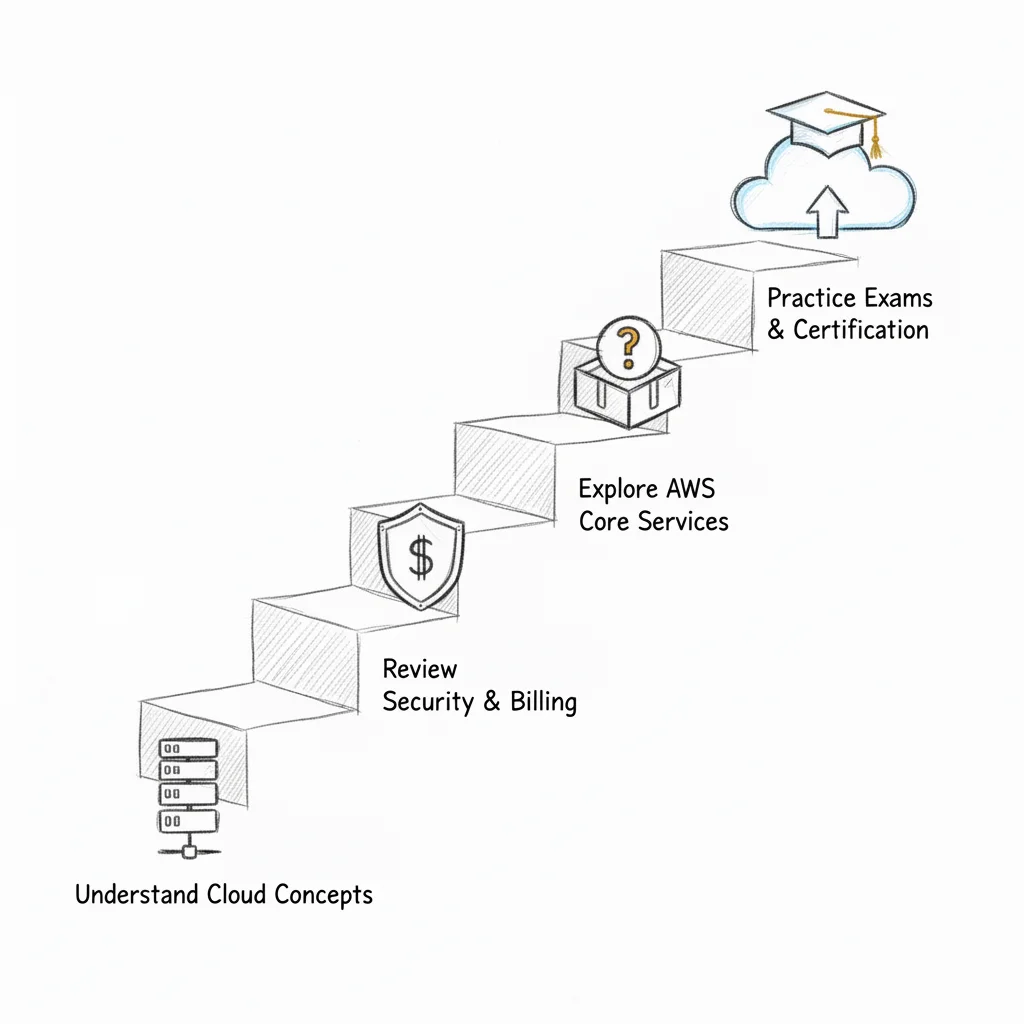
Your AWS Cloud Practitioner Study Guide
Your Definitive AWS Cloud Practitioner Study Guide
Starting in the cloud requires a strong foundation. This AWS Cloud Practitioner study guide provides a clear roadmap to pass the current CLF-C02 exam with confidence. We built this guide to explain complex technical jargon using simple, digestible concepts. Our objective is to provide a precise, actionable study plan so you are well-prepared for the test. Use these resources to review key topics and practice your skills before your exam day finally arrives.
Why Start with the AWS Cloud Practitioner Certification
 Kickstart your cloud career with the AWS Cloud Practitioner certification, a vital first step for IT professionals.
Learning Amazon Web Services (AWS) often feels like exploring a vast, unfamiliar territory. The sheer volume of available services and technical architectural patterns can easily overwhelm a newcomer. This difficulty makes the AWS Certified Cloud Practitioner (CLF-C02) an ideal entry point for anyone working with cloud technology or collaborating on technical projects.
This certification serves as the grammar of the cloud. It functions much like learning core networking protocols for a CompTIA Network+ exam or understanding the process groups for a PMP credential. The exam provides the necessary vocabulary and framework to discuss technology effectively. This path serves more than just aspiring engineers. Professionals in sales, finance, marketing, and project management gain the ability to communicate with technical staff, understand cloud strategy, and participate in modern IT planning. You will be able to bridge communication gaps and contribute to technology discussions more effectively.
A Foundation for Any Career Path
Passing the Cloud Practitioner exam proves you understand how the AWS Cloud functions, which services matter most, and how they provide business value. You will not build high-level, multi-region architectures yet. Those advanced skills are reserved for certifications like the AWS Solutions Architect Associate. Instead, you will gain enough knowledge to discuss infrastructure, security best practices, and cost management with confidence.
This credential represents more than a line on a resume. It shows cloud fluency. Cloud knowledge has moved from being a specialized advantage to a standard requirement in most technical and business roles. It proves you understand the environment where modern businesses operate and can contribute to informed decision-making.
The demand for professionals holding the AWS Certified Cloud Practitioner certification has seen an extraordinary surge, with job listings referencing it increasing by 84% between October 2021 and September 2022. This growth shows that cloud literacy is now a core requirement across many sectors, much like how project management methodologies became standard for PMP-certified staff.
Reflection Prompt: Think about your current role. How would a foundational understanding of cloud concepts enhance your daily contributions or your team's efficiency?
What This Guide Will Do For You
This guide acts as a map to help you reach the AWS Cloud Practitioner goal. We have organized a large amount of information into a clear and manageable learning path.
MindMesh Academy supports your preparation through:
- Clear Concepts: We explain cloud principles and AWS services using direct analogies and real-world scenarios that make technical details easier to grasp.
- Strategic Focus: Our review of each exam domain helps you study the specific topics that appear on the current test, which improves your efficiency and reduces wasted effort.
- Structured Pathway: You can follow a step-by-step plan that builds your knowledge logically, helping you pass with confidence on exam day.
This certification provides a strong starting point for moving into cloud technology or advancing in your current field. To see how this fits into the broader picture, check out our guide on how to get AWS certification.
Breaking Down the Exam Blueprint
Passing the AWS Cloud Practitioner exam requires a clear plan rather than just broad effort. You should start by studying the official exam blueprint. This document is your authoritative syllabus. It lists every topic AWS considers essential for the current CLF-C02 exam. It also explains how much each domain counts toward your final grade.
Studying without this blueprint is like starting a large software project without a list of requirements. You might spend hours on a minor service while ignoring a topic that appears in dozens of questions. The blueprint tells you exactly where to spend your energy. It shows that you should focus most of your time on Cloud Concepts, Security, and Technology.
The official blueprint provides a direct view of the exam structure. As you read it, you will see that the majority of your points come from these three heavy-hitting areas. This allows you to prioritize your schedule and focus on the services that provide the most value for your score.
Domain 1: Cloud Concepts (24%)
This first domain covers the fundamental reasoning behind cloud computing. You are not just memorizing a list of individual AWS services here. Instead, you are learning why the cloud has changed the way IT works. Your goal is to explain the value of moving data and applications to AWS. You should be able to discuss these concepts with both technical teams and business leaders.
Key areas to master include:
- The Six Advantages of Cloud: You must understand the shift from capital expenditures (CapEx) to operational expenditures (OpEx). In the past, companies paid for hardware upfront. In the cloud, you use a pay-as-you-go model. You also benefit from massive scale. Because AWS has millions of customers, they can lower prices for everyone. You also stop guessing capacity. Instead of buying too many servers, you scale as your traffic grows. This allows you to increase speed and agility while going global in minutes.
- Cloud Architecture Principles: Learn the core design rules. One major rule is designing for failure. You should assume that every component will eventually break and build systems that stay online despite these issues. You should also understand loose coupling. This keeps different parts of your application independent so that a change in one does not break the others. Elasticity is another vital concept. It allows your resources to grow when demand is high and shrink when demand is low to save money.
- The AWS Global Footprint: You need to know the difference between Regions and Availability Zones. A Region is a physical location in the world that contains multiple Availability Zones. An Availability Zone (AZ) is one or more data centers with redundant power and networking. These zones are isolated from each other to prevent a single disaster from taking down an entire Region. You should also know about Edge Locations. These sites cache content closer to users to reduce latency.
This domain is your foundation. It gives you the language you need to talk about the cloud as a business strategy rather than just a technical tool.
Domain 2: Security and Compliance (30%)
Security accounts for 30% of your exam. This shows how much AWS prioritizes safety. The most important topic here is the AWS Shared Responsibility Model. You must know exactly where the responsibility of AWS ends and where your responsibility begins. AWS handles the security of the cloud. This means they protect the physical buildings, the hardware, and the software that runs the services. You are responsible for security in the cloud. This includes protecting your data, managing your passwords, and updating the software on your virtual servers. This model applies to all major cloud providers.
Beyond this model, you should learn about these essential security tools:
- AWS Identity and Access Management (IAM): This is the service used to control access to your resources. You create users for people and roles for applications. You use groups to manage many users at once. You also apply policies to these identities to set specific permissions. Always follow the Principle of Least Privilege. This means you only give a user the minimum access they need to do their job.
- Core Security Tools: You need to know what AWS Shield and AWS WAF do. AWS Shield provides protection against Distributed Denial of Service (DDoS) attacks that try to crash your site. AWS WAF is a web application firewall. It blocks common web attacks like SQL injection.
- Meeting Compliance Needs: Many industries have strict rules like HIPAA for healthcare or PCI DSS for credit cards. AWS provides the tools and documentation you need to meet these standards. You should know that while AWS helps you stay compliant, you are still responsible for the security of the data you put in the cloud.
Domain 3: Cloud Technology and Services (34%)
This is the largest domain on the exam. It counts for 34% of your total score. You will learn about the building blocks of the AWS ecosystem. For the Cloud Practitioner level, you do not need to be a technical expert who can configure every setting. You only need to know what each service does and when you should use it. For a more detailed look at the exam categories, see our guide on understanding the AWS CLF-C02 exam.
Expect questions on these service groups:
- Compute: You must know the difference between Amazon EC2 and AWS Lambda. EC2 provides virtual servers that you manage. Lambda is a serverless service that runs your code only when it is triggered by an event. EC2 is better for long-running tasks, while Lambda is perfect for short tasks that only run when needed.
- Storage: Understand the different storage types. Amazon S3 is for object storage, which is used for files like photos, videos, and backups. Amazon EBS provides block storage that acts like a hard drive for your EC2 servers. Amazon EFS is a file system that can be shared by many EC2 servers at the same time.
- Databases: Learn when to use a relational database versus a NoSQL database. Amazon RDS is for relational data that uses SQL. Amazon DynamoDB is a fast NoSQL database that can handle massive amounts of traffic with very low latency.
- Networking: Know the basics of an Amazon VPC. This is your private network in the cloud. You also need to know Route 53, which is the AWS DNS service. Finally, understand CloudFront. This is a Content Delivery Network (CDN) that speeds up your website by delivering content from locations near your users.
Domain 4: Billing, Pricing, and Support (12%)
The final domain covers the business side of AWS. It is worth 12% of the exam. This section teaches you how AWS charges for its services and how to get help when you need it. Even if you are a technical person, you need to understand these costs to help your company save money.
The core pricing idea at AWS is pay-as-you-go. This means you only pay for the specific resources you use for the exact time you use them. You should know the three main pricing models. On-Demand pricing is flexible and has no commitment. Reserved Instances allow you to save money by committing to a 1-year or 3-year term. Spot Instances are the cheapest, as they allow you to use spare capacity, though AWS can take them back if they need them. You should also know about the AWS Pricing Calculator for estimating costs and AWS Budgets for setting spending alerts. AWS also offers different support plans: Basic, Developer, Business, and Enterprise. Each plan provides different levels of technical help and response times.
AWS Cloud Practitioner Exam Domain Breakdown
The table below summarizes the four domains. It shows their weightings and the most important concepts to study for each.
| Exam Domain | Weighting | Key Concepts to Master |
|---|---|---|
| Cloud Concepts | 24% | Value proposition, six advantages of cloud, architecture rules, Regions, and Availability Zones. |
| Security and Compliance | 30% | Shared Responsibility Model, IAM (users and roles), Shield, WAF, and compliance standards like HIPAA. |
| Technology and Services | 34% | Compute (EC2, Lambda), Storage (S3, EBS, EFS), Databases (RDS, DynamoDB), and Networking (VPC, CloudFront). |
| Billing, Pricing, & Support | 12% | Pay-as-you-go, Reserved vs Spot instances, Pricing Calculator, and tiered support plans (Basic to Enterprise). |
Use this table to check your progress. It acts as a guide to help you manage your study time efficiently. Focus your energy on the domains with the highest percentages.
The AWS Certified Cloud Practitioner exam is a 90-minute test (verify current duration on the AWS site). It contains 65 questions. You need a score of 700 out of 1000 to pass (verify passing scores on the AWS site). There is no penalty for guessing, so you should answer every question on the test.
Reflection Prompt: Look at the weightings for the four domains. Which area seems the most difficult to you? Which area are you already familiar with? You should plan to spend more time on your weakest domain to ensure you are ready for exam day.
Making Sense of Core AWS Services with Simple Analogies
The current AWS Cloud Practitioner exam, known as the CLF-C02, introduces you to a vast array of services. Attempting to memorize every technical definition in isolation frequently leads to cognitive overload. A more effective strategy involves building a practical, intuitive understanding of the purpose and functionality behind each tool. When you understand why a service exists, the technical details become much easier to retain.
Rather than reading a dry list of features, you can use clear, relatable real-world analogies to ground these concepts. This approach transforms abstract AWS services into memorable tools, much like using mnemonics for complicated networking layers or ITIL processes. By comparing cloud infrastructure to physical objects you already understand, you create mental hooks that make recall during the exam much faster.
We will categorize the most essential services into four fundamental groups: Compute, Storage, Databases, and Networking. These represent the primary building blocks for almost any application built in the cloud. Most questions in the technology domain of the exam will focus on how these four categories interact to provide a functional environment for users.
As the exam blueprint highlights:
 AWS Cloud Practitioner Exam Domain Breakdown: Technology & Services (34%), Security (30%), Cloud Concepts (24%).
With 34% of the exam dedicated to Technology and Services, a strong grasp of each service's role is essential—it is a requirement for anyone aiming to pass with confidence. This specific domain often represents the most significant area for focused study because it requires you to distinguish between services that may seem similar at first glance.
Compute: The Brains of Your Operation
Compute services are the engines that drive your cloud applications. They provide the processing power necessary to run code, handle user requests, and process data. In a traditional on-premises environment, you would have to purchase, rack, and maintain physical servers. AWS changes this model by allowing you to provision and pay for only the compute resources you need at any given moment.
-
Amazon EC2 (Elastic Compute Cloud): This service is the foundation of the compute category in AWS. You can visualize EC2 as renting a customizable virtual server in the cloud. You have the authority to select the specific hardware traits of the instance, including the CPU, memory, storage capacity, and networking speed. This is very similar to how you would configure a new physical workstation or laptop. Consider a scenario where a retail company faces a massive surge in traffic during a peak event like Black Friday. They can instantly provision dozens of powerful EC2 instances to handle the load. When the event ends and traffic drops, they can terminate those instances and stop paying for them. This ability to expand and contract resources based on demand is the definition of elasticity.
-
AWS Lambda: Sometimes you do not need a full server running 24/7. You might only need a specific piece of code to run for a few seconds to handle a single task, such as resizing an uploaded image or sending a confirmation email. While an EC2 instance could do this, you would have to pay for the server even when it is sitting idle. AWS Lambda provides a different model: visualize it as an on-demand specialist called in to perform one specific job. This specialist (your code) only appears when triggered by an event, performs the task, and then leaves. You are billed only for the exact amount of time the code was running, often measured in milliseconds. This represents serverless computing, a model where AWS handles all underlying server management, leaving you to focus entirely on your code logic.
Storage: Your Digital Filing Cabinet
AWS storage services are built to keep your data secure, organized, and available. Just as you would choose a specific physical storage method—such as a safe for jewelry, a folder for paper documents, or a shipping container for bulk items—AWS offers different storage types based on how often you need to access data and how durable that data needs to be.
-
Amazon S3 (Simple Storage Service): Visualize S3 as an infinitely scalable and highly durable digital warehouse for files. You can store almost any type of data here, including images, video archives, system backups, or the files that make up a static website. In S3, data is stored as "objects." This means each file is a distinct unit containing the data itself and descriptive metadata. S3 is known for its extreme durability, designed to provide 99.999999999% (eleven nines) of durability for objects over a year. This makes it an ideal choice for data that you cannot afford to lose.
-
Amazon EBS (Elastic Block Store): If an EC2 instance is your virtual computer, then EBS is its high-performance virtual hard drive. EBS provides block-level storage that connects directly to a single EC2 instance. It is the place where you install the operating system and the applications that the server runs. Because it is directly attached, it offers the low-latency performance required for active databases and boot volumes, functioning much like an SSD or a physical hard disk inside a desktop computer.
-
Amazon EFS (Elastic File System): Compare EFS to a managed, scalable network folder that many different computers can access at the same time. This is different from EBS, which usually connects to only one instance. EFS is used in scenarios where a cluster of web servers or a group of developers all need to see and edit the same set of files simultaneously. It grows and shrinks automatically as you add or remove files, so you never have to worry about running out of space.
Key Takeaway for the Exam: The differences between these three services appear often on the test. Remember: S3 is for object storage (files like photos or backups), EBS is a dedicated drive for one EC2 instance (like a C: drive), and EFS is a shared file system for multiple EC2 instances (like a shared office drive).
Reflection Prompt: Look at an app on your phone. Where would the user's profile picture be stored? Where would the app's actual database live? Which service would handle a sudden spike in users at noon? Mapping these to S3, EBS, and EC2 helps solidify your knowledge.
Databases: Organizing Your Information
Databases are systems designed to store and retrieve data with high speed and reliability. They keep your information organized so that applications can find exactly what they need in an instant. They are the digital ledgers of the cloud, acting as the primary source of truth for user accounts, inventory levels, and financial transactions.
-
Amazon RDS (Relational Database Service): RDS makes it easier to set up and run popular relational databases like MySQL, PostgreSQL, MariaDB, Oracle, and SQL Server. You can compare RDS to hiring a team of experts to handle the difficult parts of database management. AWS takes care of the technical chores, such as installing security patches, performing daily backups, and setting up replication to ensure the database stays online if something fails. This allows your developers to focus on the structure of the data rather than the maintenance of the server. Relational databases are the best choice for data that fits into structured tables with clear relationships.
-
Amazon DynamoDB: This is a fully managed, serverless NoSQL database. It is designed for applications that need to retrieve data in just a few milliseconds, regardless of how many users are active. Unlike RDS, DynamoDB does not use rigid tables and rows. Visualize it as a massive, incredibly fast list of items stored with unique keys. It is the preferred choice for high-speed use cases like tracking high scores in a mobile game, managing real-time retail inventory, or storing items in a digital shopping cart. It offers the flexibility to change the data structure on the fly, which traditional relational databases cannot do as easily.
Networking: Your Private Corner of the Internet
Networking services provide the connections that allow your AWS resources to talk to each other and to users on the internet. They act as the roads, signs, and security gates of your cloud environment.
-
Amazon VPC (Virtual Private Cloud): This is the most basic networking service in AWS. A VPC is like building your own private, isolated data center inside the AWS cloud. You have complete control over the environment. You decide the IP address ranges, create subnets for different types of traffic, and set up gateways to the internet. This isolation ensures that your resources, such as EC2 instances or RDS databases, are separated from other customers and protected from unauthorized access.
-
Amazon Route 53: This is the DNS (Domain Name System) service for AWS. Its job is to translate names that people can remember, like
www.mindmeshacademy.com, into the numeric IP addresses that computers use to find each other. Compare Route 53 to the global phone book of the internet. When someone types your website address into a browser, Route 53 tells that browser exactly which AWS resource should handle the request. It also monitors the health of your resources to make sure it doesn't send traffic to a server that is down. -
Amazon CloudFront: CloudFront is a Content Delivery Network (CDN) that speeds up the delivery of your content to users around the world. If your main server is in Virginia but your user is in London, the physical distance can cause a delay. CloudFront solves this by storing copies of your files at Edge Locations located in cities across the globe. When a user requests a file, CloudFront serves it from the location closest to them. This reduces the time it takes for a page to load, providing a much better experience for the user. It functions similarly to a local branch of a library that keeps copies of the most popular books so you don't have to wait for them to be shipped from a central warehouse.
Navigating Security and the Shared Responsibility Model
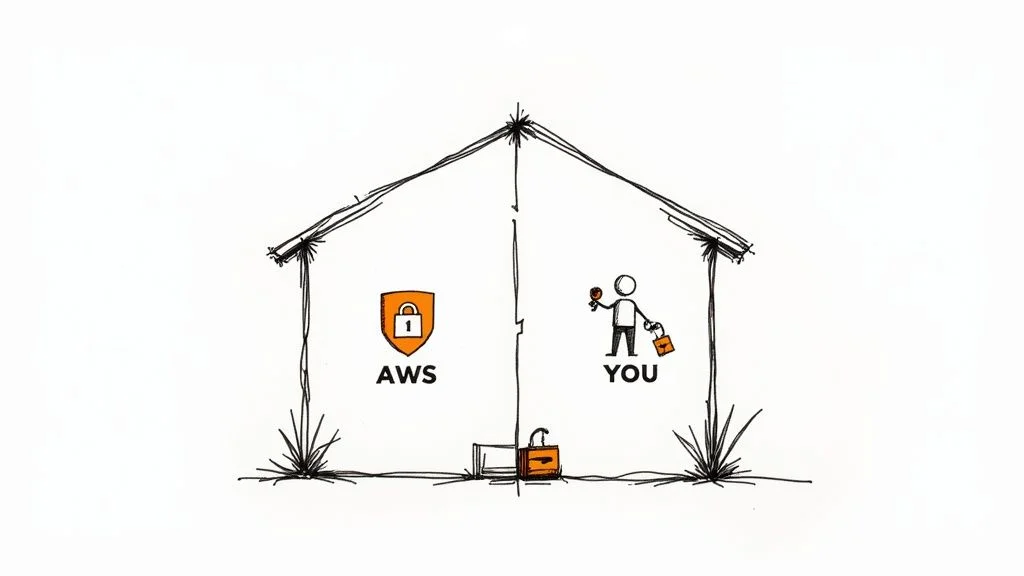
 The AWS Shared Responsibility Model: AWS secures the cloud, customers secure their assets in the cloud.
Security is the most heavily weighted domain on the current AWS Certified Cloud Practitioner (CLF-C02) exam. It contributes a significant 30% to your total score. While this percentage might seem high, success in this section comes down to understanding one core idea: the AWS Shared Responsibility Model.
This model defines which security tasks belong to AWS and which tasks belong to you. To understand it, use the analogy of a tenant in a managed apartment building. In this scenario, AWS acts as the landlord. They are responsible for the security of the cloud. This means they protect the physical buildings where the servers live. They manage the physical security guards, the perimeter fences, and the biometric scanners that prevent unauthorized entry to data centers. AWS also maintains the hardware, the storage disks, and the cables that link the network. They manage the virtualization layer that separates different customers. If a hard drive fails or a power supply burns out, AWS replaces it without you ever knowing.
You are the tenant. You have responsibility for security in the cloud. You control everything inside your virtual apartment. You decide who has the keys to your data. You choose whether to lock your virtual doors by configuring firewalls and access controls. You are responsible for the data you upload and the applications you run. If you launch a virtual server, you must manage the operating system. This includes installing security patches and updates. You also manage how your data is encrypted and how your users are identified.
This division of labor is the most vital security concept for the exam. It ensures that both the provider and the customer know exactly what they need to protect. Whether you use AWS, Azure, or Google Cloud, this model remains the standard for cloud governance.
Your Responsibilities in the Cloud
Securing your cloud environment requires specific tools to manage access and protect digital assets. The most important service for this is AWS Identity and Access Management (IAM).
IAM acts as the main security gate for your entire account. Instead of sharing one set of master credentials, you create separate identities for every person and application. This starts with the root user. The root user is the identity you created when you first opened the account. It has complete power over every resource. Best practices dictate that you should not use the root user for daily work. Instead, create IAM users with limited permissions.
IAM relies on the Principle of Least Privilege. This security rule states that you should give users only the access they need to perform their jobs. If a person only needs to read files from a storage bucket, they should not have permission to delete a database. Limiting access this way reduces the risk of accidental changes or security breaches.
IAM consists of four main components that you will see on the exam:
- Users: These represent individual people or specific applications that need to interact with AWS resources.
- Groups: These are collections of users. You can apply permissions to a group to manage many users at once. For example, you can create a 'Developers' group and give everyone in that group access to your coding tools.
- Roles: Roles provide temporary access to resources. They do not have permanent passwords. They are used when an AWS service needs to talk to another service. For example, a virtual server might assume a role to write data into a storage bucket.
- Policies: These are JSON documents that list what actions are allowed or denied. You attach these policies to users, groups, or roles to define their permissions.
Critical Exam Tip: You will likely see questions about the most secure way for services to interact. If an EC2 instance needs to access an S3 bucket, never hard-code access keys into the application. The correct answer is always to use an IAM Role. This provides temporary credentials that expire, which is much safer than permanent keys.
Key Security Services to Know
AWS provides a wide range of services to defend your applications. For the Cloud Practitioner exam, you need to understand what these tools do rather than how to configure every setting. You should be able to identify which tool solves a specific security problem.
Protecting Your Infrastructure
Your first line of defense involves protecting your network and applications from external threats.
- AWS Shield: This service protects your applications against Distributed Denial of Service (DDoS) attacks. These attacks try to crash your website by flooding it with massive amounts of fake traffic. Shield Standard is active for every AWS customer at no extra cost. it handles the most common network-level attacks automatically. For businesses that need more protection, Shield Advanced offers higher-level detection and 24/7 access to a response team.
- AWS WAF (Web Application Firewall): While Shield focuses on the network, AWS WAF looks at the application layer. It acts as a filter for web traffic. You can create rules to block specific threats like SQL injection or cross-site scripting (XSS). WAF can also block traffic from specific countries or IP addresses that you do not trust. It sits in front of services like the Application Load Balancer or Amazon CloudFront to stop malicious requests before they reach your servers.
Encrypting Your Data
Encryption is a way to scramble your data so that only authorized people can read it. It is a core control for keeping sensitive information private. You must protect data both at rest (stored on a disk) and in transit (moving across the network).
- AWS Key Management Service (KMS): This service manages the keys used to encrypt and decrypt your data. It works like a secure digital vault. KMS is integrated with many other AWS services, such as Amazon S3 for storage and Amazon EBS for disk volumes. This makes it easy to turn on encryption with a few clicks. KMS also keeps a detailed log of every time a key is used. This is helpful for audits and proving that your data is handled correctly.
When you take the exam, apply the Shared Responsibility Model to every security question. Ask yourself: "Is this something AWS handles to keep the cloud running, or is it something I must configure myself?" This simple question will help you find the right answer. AWS handles the physical infrastructure and the virtualization layers. You handle the data, the user permissions, and the firewall rules.
Reflection Prompt: Imagine a data breach scenario. How would knowing the Shared Responsibility Model help you identify whose fault it was and what actions should have been taken by both AWS and the customer?
Making Sense of AWS Pricing and Support
AWS technology is impressive, but you also need to grasp the business side of cloud operations. This includes understanding pricing models and the various support options available to customers. This domain accounts for 12% of the AWS Certified Cloud Practitioner CLF-C02 exam score (verify current exam weighting on the AWS website). It focuses on how organizations use cloud services to achieve financial goals. You must be able to explain how to use resources efficiently to keep costs low. It is about making smart financial decisions rather than simply turning on servers.
The main rule for AWS pricing is simple: you pay only for what you use. This method changes how companies handle their budgets. It removes the need to spend large amounts of cash upfront on servers and physical data centers. It is similar to paying for water or electricity from a utility provider. You pay based on your actual consumption each month. This system allows companies to lower their Capital Expenditure (CapEx) and move to an Operational Expenditure (OpEx) model instead. Businesses can then adjust their spending as their needs change.
Decoding AWS EC2 Pricing Models
The pay-as-you-go model is visible in several pricing options for Amazon EC2 instances. The exam tests your ability to pick the best pricing plan for different situations. Each model tries to find a balance between saving money and keeping the flexibility you need.
Here are two primary EC2 pricing models explained:
| Pricing Model | Best For | The Analogy |
|---|---|---|
| Reserved Instances | Applications with steady state (predictable) workloads that can commit to usage for a period. | This is like leasing a car for 1 or 3 years. You get a significant discount for that commitment compared to daily rentals, but you are bound by the lease terms. These are ideal for applications that run consistently, like a production enterprise resource planning (ERP) system. |
| Spot Instances | Workloads that are fault-tolerant and can handle interruptions, such as big data processing or rendering. | This is akin to bidding on a standby airline ticket. You can secure substantial discounts—often up to 90% off On-Demand prices (verify current pricing on the AWS website)—by using unused AWS capacity. However, be aware that AWS can reclaim these instances with short notice if the capacity is needed, making them suitable only for flexible, interruptible tasks. |
The goal is to match your application's behavior with the most cost-effective plan.
Taking Advantage of the AWS Free Tier
To help people explore their services, AWS provides a Free Tier. This is a highly useful resource for new users to test ideas and build projects without paying a bill immediately. However, you must track the specific limits and when the offers end to avoid charges you did not expect.
The Free Tier usually includes three different categories:
- Always Free: These offers are available to every AWS customer regardless of how long they have had an account. They do not expire. One example is the 1 million free requests allowed every month for AWS Lambda.
- 12 Months Free: When you start a new AWS account, you can use certain services for free for one year. This includes 750 hours of Amazon EC2 t2.micro or t3.micro instances every month (verify current instance types on the AWS website).
- Trials: These are short-term trials for specific services. They begin the first time you use that specific service and last for a limited period of time.
Pro Tip for Cost Management: Even if you only use the Free Tier, you should set up AWS Budgets and billing alarms. This proactive step helps you avoid surprise bills if you accidentally use a resource that is not free or exceeds your limits. It is a basic financial habit for cloud professionals, similar to the financial management processes used in ITIL frameworks.
Choosing the Right AWS Support Plan
Technical issues will happen in any IT environment. You need to know how to get help when things go wrong. AWS has several Support Plans to choose from. The exam will ask you to pick the right plan based on what a business needs or how serious a problem is.
Here is a breakdown of the support tiers:
- Basic Support: This is included with every AWS account at no extra cost. You can use documentation, whitepapers, and support forums. You can also contact customer service for help with your bill or account settings, but you do not get technical support for your specific architecture.
- Developer Support: This plan is for people testing and building applications. It allows you to open technical support cases via email during standard business hours. The expected response time for general technical guidance is between 12 and 24 hours.
- Business Support: This tier is for companies running production workloads. You get 24/7 access to Cloud Support Engineers by phone, email, and chat. Response times are faster, such as a 1-hour window for production systems that are not working correctly. You also get access to AWS Trusted Advisor to help improve security and reduce costs.
- Enterprise Support: This top tier is for large organizations with mission-critical applications. In addition to 24/7 support, you get a dedicated Technical Account Manager (TAM) who knows your environment. They provide architectural reviews and guidance on best practices. For critical systems that are completely down, AWS targets a response time of 15 minutes.
Learning these pricing and support concepts is more than an exam requirement. It is a professional skill that affects business strategy and how efficiently a company runs. From a financial view, earning the AWS Certified Cloud Practitioner credential can increase your earning potential. In the United States, an entry-level professional can earn about $96,260 per year (verify current salary data on industry sites). Research indicates that 73% of professionals received a raise after getting certified. This shows a clear link between the certification and career progress. You can discover more about AWS Cloud Practitioner salaries and career growth online.
Your Actionable 4-Week Study Plan
Theory provides a start, but a clear, structured plan helps you cross the finish line. This four-week schedule serves as your AWS Cloud Practitioner study guide, organized to build your knowledge step by step. Following a set timeline helps you avoid the stress of last-minute cramming by breaking the exam material into smaller, manageable weekly goals.
Consistency matters more than total hours spent in a single day. Trying to learn everything in a few long, exhausting sessions rarely helps you remember the facts long-term. Instead, aim for 60-90 minutes of active study every day, about five days a week. This method of spaced repetition allows ideas to settle in your mind, creating a solid base of knowledge well before you sit for the exam.
To track your progress and keep your thoughts organized, use one of the best note-taking apps. Digital notes are easy to search and reorganize. They also provide a way to review key concepts quickly whenever you have a few free minutes in your day.
Week 1: Laying the Foundation
Your first week focuses on the fundamentals. The goal is not to memorize every single service name. Instead, you should try to understand why companies move to the cloud and how the basic tools in the AWS environment function.
Primary Focus:
- Cloud Concepts: Study the six main advantages of cloud computing and the concept of economies of scale. You should also learn the basic architectural principles that guide cloud design. These ideas are the foundation for every other service you will study.
- Core Services: Focus on why people use specific services like Amazon EC2, Amazon S3, Amazon VPC, and Amazon RDS. Look for real-world examples of when a company would choose one over another. Use the analogies mentioned earlier to help make these technical tools feel more familiar.
Week 2: Security and Networking
Once you understand the basics, week two shifts to security. This is arguably the most important area for anyone working in a cloud environment. Your goal is to learn the AWS Shared Responsibility Model and identify the services that keep data and systems safe.
Primary Focus:
- Shared Responsibility Model: You need a clear understanding of what AWS manages and what you, the customer, must manage. This topic appears frequently on the current exam and is vital for anyone using the platform.
- IAM: Learn the parts of Identity and Access Management, including users, groups, roles, and policies. Focus on the Principle of Least Privilege, which ensures users only have the access they actually need for their jobs.
- Networking Basics: Review the basics of Virtual Private Clouds (VPCs). Learn how services like Route 53 handle DNS and how CloudFront works as a content delivery network to speed up access for users around the world.
Security works in layers. Use this week to learn how to build perimeter defenses with a VPC, set up access controls with IAM, and use tools like AWS Shield or WAF to detect and stop threats to your applications.
Week 3: Pricing and Management
This week covers the financial and administrative side of AWS. You will learn how AWS charges for its services, how to monitor your spending, and what types of help you can get from AWS support staff. These business topics are a major part of the exam and are essential for managing cloud costs.
Primary Focus:
- Pricing Models: Learn to distinguish between On-Demand, Reserved, and Spot instances. Each has different costs and use cases. Knowing when to use each one is a vital skill for saving money in the cloud.
- Cost Management: Learn how to use tools like AWS Budgets and the AWS Pricing Calculator. These help you predict how much a project will cost and alert you if you go over your intended budget.
- Support Plans: Learn the differences between the Basic, Developer, Business, and Enterprise support tiers. You should know which level of support a small startup might need compared to a large global corporation.
Week 4: Final Review and Practice Exams
The final week is for review and testing. Stop trying to learn new concepts and spend your time reviewing your detailed notes. Use practice exams to simulate the actual testing environment. This helps you find areas where you are still confused and improves your ability to manage your time during the test.
Take as many practice exams as you can find. When you miss a question, don't just move on; find out why the correct answer is right and why yours was wrong. This process builds the confidence needed to pass with confidence on your scheduled exam day.
Frequently Asked Questions About the Exam
Finalizing your study plan often brings up practical questions about how the test day actually works. Knowing these logistics beforehand lets you enter the testing center or log on from home with a clear mind. This preparation helps you ignore administrative distractions so you can focus entirely on the technical questions.
Here are the most common questions candidates ask before sitting for the AWS Cloud Practitioner exam.
What Is the Exam Format Like?
The AWS Certified Cloud Practitioner exam (CLF-C02) gives you 90 minutes to finish 65 questions. Most items use a standard multiple-choice format where you pick one correct answer. You will also see multiple-response questions that require you to choose two or more correct options from a list of five or more.
AWS does not penalize you for incorrect answers. Because there is no negative marking, you should provide an answer for every question, even if you have to make an educated guess. Your final score will be reported on a scale between 100 and 1,000. You need a minimum score of 700 to pass and earn the certification.
How Do I Book My Exam?
Scheduling your exam is a simple process managed through the AWS Training and Certification portal. When you register, you can select one of two testing methods:
- Pearson VUE testing centers: You travel to a physical facility to take the proctored exam in a controlled setting. This is a reliable choice if you prefer a traditional testing atmosphere or lack a private space at home.
- Online proctoring: This option allows you to take the exam from your home or office using your own computer. A remote proctor monitors you through your webcam and microphone throughout the session to ensure integrity.
Both methods use the same exam content and follow identical security protocols. Pick the environment that helps you stay most focused and fits your personal schedule.
Online Proctoring Tip: If you choose the remote option, verify that you have a stable internet connection and a private room where no one will interrupt you. Background noises or other people entering your space can cause the proctor to stop the test and invalidate your exam session immediately.
What Happens If I Don't Pass?
It is common for professionals to miss the passing mark on their first attempt. Failing is a minor delay rather than a permanent failure of your career goals. AWS requires you to wait 14 days before you are eligible to register for another attempt.
Use those two weeks to review your score report. This document provides a breakdown of your performance across the different exam domains. It shows exactly which technical areas require more study time before you try again. You must pay the exam fee for every attempt (verify current pricing on the vendor site), but there is no limit on how many times you can retake the test.
Does the Certification Expire?
Yes. The AWS Certified Cloud Practitioner credential is valid for three years from the date you pass. AWS requires recertification because the cloud platform changes quickly. New services appear every year, and existing tools receive updates that change how you might use them in a real-world scenario.
To keep your status active, you have two pathways. You can retake the current version of the Cloud Practitioner exam before the three-year window closes. Alternatively, you can pass a more advanced AWS certification, such as an Associate or Professional-level exam. Passing a higher-level test automatically renews your Cloud Practitioner status for another three years.
Ready to transform your preparation into a passing score? MindMesh Academy provides the tools, practice exams, and content to help you cross the finish line with confidence. Review our materials and prepare to pass your exam by visiting AWS Cloud Practitioner Practice Exams.

Written by
Alvin Varughese
Founder, MindMesh Academy
Alvin Varughese is the founder of MindMesh Academy and an enterprise architecture leader. An electrical engineer by training, he moved from factory automation in South Africa to cloud architecture at GE Appliances and Humana (Fortune 50), and holds 20 professional certifications including AWS Solutions Architect Professional, Azure DevOps Engineer Expert, and Microsoft Agentic AI Business Solutions Architect. He built MindMesh Academy after interviewing too many highly certified candidates who couldn't answer basic questions: the goal is prep that makes you better at the job, not just able to pass the exam.